CarGurus: Used & New Cars
- 11.64K
- 4.8
- Installs
- 10.00M
- Price
- Free

Screenshots
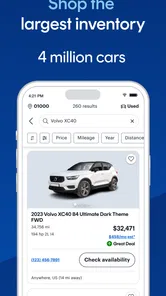
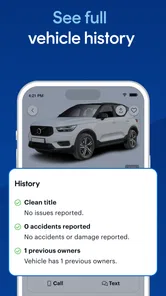
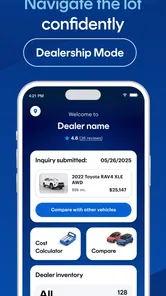
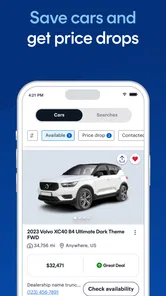
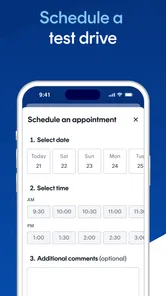
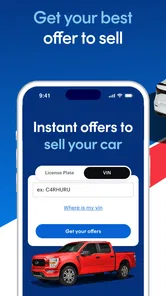

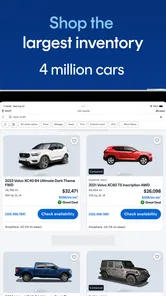
Analysis by Reviewed
I treat CarGurus as a place to organize a car search, not as a substitute for checking a vehicle in person. I would open it when I am still weighing different makes, prices, or types of car and need a clearer shortlist. Because it brings shopping, financing, and selling into one app, it can be useful at several points in that process. The real test is whether it helps me spend less time on unsuitable options and more time asking the right questions about the ones that remain.
What to expect from browsing speed
Car shopping is usually a stop-and-start activity: I check a few listings, get distracted, then return later with a clearer budget or a different shortlist. An app is most useful in that routine when it makes browsing and revisiting options feel manageable. The interface is organized around searches and vehicle listings, so I can narrow a broad hunt instead of treating every result as equally relevant. Still, a large choice of cars can take time to assess; quick scrolling is not the same as quickly knowing whether a car is right for me.
I would use it early, while deciding what is realistic, rather than waiting until I am ready to buy that day. The app has a 4.8 average from around 204,000 ratings, and more than five million installs. Those figures suggest a widely used service, but I would judge my own experience by whether the listings fit my needs and whether I can verify important details before contacting a seller.
Finding Your Perfect Ride
Imagine scrolling through an endless catalog of cars that you can filter down to the very last detail; that’s exactly what CarGurus: Used & New Cars offers. Whether you’re looking for a used car that fits your budget or a brand-new model that’s just hit the market, this app has got you covered. You can search by make, model, price range, and even color. I was particularly impressed by the app’s ability to provide a fair market value for each car, ensuring you get the best deal possible.
User-Friendly Interface
The app is super intuitive. I didn’t have to spend hours figuring out how to navigate it. Everything is laid out clearly, from the search filters to the detailed car listings. Each listing comes with high-quality images, comprehensive vehicle history reports, and dealer contact information right at your fingertips. It’s like having a car showroom in your pocket.
Stay Informed with Price Alerts
One of my favorite features is the price alert system. You can set alerts for specific cars and receive notifications if there are any changes in price. This means you’ll never miss out on a great deal again. Plus, the app offers insights into price trends, helping you decide the best time to buy.
Another nifty feature is the ability to save your favorite searches and cars. This is especially useful if you’re not ready to make a purchase immediately but want to keep an eye on certain vehicles.
More From Our News Desk

Weather by Xiaomi Review: Clear at a Glance, Less Clear Up Close

X Under Pressure: Can It Recover When Posting Goes Wrong?

Clash of Clans Is Won Between the Battles

Android Auto Makes the Case for Quieter Car Software

MobiOffice: Transforming Mobile Productivity with Seamless Integration

EA SPORTS FC™ Mobile Soccer: Redefining Mobile Sports Gaming
Putting a shortlist to work
A practical way to use those saved searches is to keep separate shortlists for different needs: a dependable daily commute, a larger family vehicle, or a model you are considering only if its price becomes more appealing. That makes comparisons more useful than repeatedly searching from scratch. When an alert arrives, I would check the listing again rather than treating a price change as proof that the car is a bargain. Compare the asking price with the vehicle’s condition, mileage, history, and your likely costs after purchase.
For example, if I have a few minutes during lunch to check a saved search, I can note which cars are worth a closer look and save the detailed inspection for later. Before arranging a visit, I would use the listing and history information to prepare specific questions for the seller, then confirm the answers directly. Photos and reports can help screen options, but they cannot replace seeing the vehicle or having it inspected.
From browsing to a useful visit
A shortlist becomes more valuable when I decide in advance what would make a car worth travelling to see. I would write down the questions that matter for my situation: whether the seller can confirm the details shown in the listing, whether the car is still available, and what I should examine during a visit. That simple step keeps a polished listing from setting the whole agenda. It also helps me compare two candidates fairly instead of remembering one car’s appealing photos and forgetting the other’s practical advantages.
If I am shopping with someone else, I would agree on the non-negotiables before browsing together. One person may care most about running costs or space, while the other focuses on a particular model. Separate saved searches can keep those priorities visible without turning every session into a debate about whichever listing appeared most recently. The trade-off is that a wider search can produce more candidates than I can sensibly inspect, so I would tighten the criteria once I have a manageable group.
Community and Expert Reviews
What sets CarGurus apart from the competition is its community and expert reviews. You can read honest opinions from other users and car experts, which I found incredibly helpful in making an informed decision. The app also offers a platform to ask questions and get answers from fellow car enthusiasts and professionals alike.
For those concerned about safety and reliability, CarGurus provides detailed vehicle history reports, including accident history and service records. This transparency is crucial, especially when purchasing a used vehicle.
Reading listing information with care
I would treat a history report as a useful screening tool rather than a complete biography of a car. If something in a report, listing, or review affects my decision, I would ask the seller to clarify it and check the vehicle independently. A clean-looking summary does not establish how a car feels on the road, whether a feature works as expected, or whether its present condition matches its description. Reports are most helpful when they lead to sharper questions, not when they end the investigation.
The same goes for ratings and comments from other shoppers. They can reveal concerns worth exploring, but another buyer’s priorities may not match mine. A review about comfort or space is most useful when I connect it to my own commute, passengers, and regular cargo. I would use shared opinions to create a checklist for a test drive, then make the decision based on the actual car and my needs.
How it fits among other car-search options
Compared with checking a single dealer’s inventory, browsing across listings can make it easier to see alternatives and avoid anchoring on the first car that looks promising. A general classifieds site may offer a different mix of sellers, while visiting dealerships directly can be more useful when I already know the exact model and want to see it in person. I would use CarGurus to build and compare a shortlist, then contact the seller and verify the details through direct questions and an inspection. It is a discovery and comparison aid, not a substitute for due diligence.
The right alternative depends on where I am in the decision. If I have already chosen a model and want to understand its features, a dedicated review or manufacturer source may answer questions that a marketplace listing cannot. If I want to assess a particular vehicle’s condition, a qualified independent inspection is more relevant than more time spent scrolling. For a buyer who has not settled on a model, though, comparing listings in one place is a practical way to see what fits the budget and what compromises each option involves.
The app can also suit someone who is exploring financing or thinking about selling, since those activities are part of its scope. I would still compare financing terms carefully and consider the full cost of ownership rather than focusing only on the vehicle’s asking price. If I am not ready to make calls or arrange visits, saved cars and searches let me research at my own pace. If I want a guaranteed diagnosis, negotiation, or purchase decision, I need help beyond an app.
When financing or selling enters the picture
It is handy to have buying, financing, and selling within the same broader experience when I am replacing one car with another. Even so, I would keep the decisions separate on paper: what I can spend on the next vehicle, what financing would cost over its full term, and what I expect from selling or trading my current one. Bundling those questions mentally can make a monthly payment feel more important than the total amount I will pay. I would use the app to explore the process, then compare the actual terms and offers before committing.
This is also a point where CarGurus may not be the right tool by itself. Someone who needs personalized financial advice, a firm trade-in assessment, or a mechanic’s diagnosis should seek that directly. The app can help me get oriented and prepare, but it cannot take responsibility for the details of a contract or the mechanical condition of a car.
Reliability and device expectations
CarGurus is rated for Everyone, and its current version is 5.15, with Android support starting at version 7.0. It has been available since February 11, 2014, and has accumulated around 10,000 written reviews. These details give a sense of an established app, but they do not guarantee that every listing is current or that every browsing session will be equally smooth. As with any marketplace search, I would recheck a vehicle’s availability and details with the seller before making plans.
For performance, I would keep expectations practical: browsing listings and comparing saved options is lighter work than editing video or playing a demanding game, but the experience still depends on the phone, connection, and the amount of listing information being loaded. If a page seems slow, I would first check my connection and try again before assuming the app has lost the search. Keeping searches focused also makes the results easier to review, especially on a smaller screen. There is no reason to expect a faster device to make a car-buying decision itself faster.
Making a slow session less frustrating
When I browse in short breaks or while moving between places, I would avoid trying to assess every detail on a small screen. I can use that time to identify a few candidates, then return when I can compare their descriptions carefully. If content takes a while to appear, it is more sensible to check the connection and reopen the relevant search than to keep tapping through several screens and lose track of what I meant to review. Saved searches and cars are useful here because they give me a way back to the same research rather than relying on memory.
I also would not judge reliability solely by whether one listing refreshes quickly. A marketplace depends on current information from sellers, so an app that opens smoothly can still show a car whose status has changed. Before driving anywhere, I would confirm availability, location, and key details directly. That small check matters more than shaving a few seconds off browsing, particularly when a visit takes planning.
Who will get the most from it
I think this is a good fit for buyers who want to compare used and new vehicles over several days, track a few candidates, and arrive at a dealer conversation with better questions. It is less compelling for someone who has already chosen a specific local car and simply needs to arrange a test drive, or for anyone who expects an online listing to replace an independent inspection. The app is free, which makes it easy to try during research, but time spent comparing still pays off only when I check the real condition and terms of each candidate.
It should also suit a first-time buyer who needs to learn what a given budget can realistically buy, provided they are comfortable doing some of the verification themselves. I would not recommend relying on it alone to someone who wants a single authoritative verdict on a car or who dislikes comparing details across several listings. A focused buyer may get more value from one direct dealer conversation and an inspection; an undecided buyer is more likely to benefit from the broader search and saved shortlist.
My performance verdict
For everyday use, I see CarGurus as a practical research companion rather than a performance-heavy app. Its value is in helping me keep a changing search organized, revisit possibilities, and prepare for conversations with sellers. I would not expect it to eliminate the slow parts of buying a car: checking documents, arranging a visit, testing the vehicle, and weighing costs still take time. Nor would I assume every session will feel identical across phones and connections. The useful measure is whether I can return to relevant listings and make a more informed next move.
CarGurus is free to try, and its broad vehicle-search focus gives it a clear role when I am comparing options rather than simply trying to locate one car I have already chosen. I would keep my search criteria realistic, use alerts as prompts to reassess rather than automatic deal signals, and verify each promising listing directly. With that approach, it can reduce the confusion of a large search without pretending to remove the judgement and checks that a purchase deserves.
In conclusion, CarGurus: Used & New Cars is a useful app for anyone in the market for a new or used car. With its clear browsing tools, listings, and price-related information, it can make the research stage more manageable. Whether you’re a first-time buyer or a seasoned car hunter, it has something to offer if you want to compare candidates before speaking with sellers. I would give it a try when I need a structured starting point, then rely on direct checks and an inspection before making a decision.
CarGurus: Used & New Cars Frequently Asked Questions
Can I browse cars without creating an account?
You can use CarGurus to explore car listings and vehicle details as part of your shopping research. Browsing helps you compare options and decide which vehicles are worth a closer look. If you find a car you are interested in, contact the seller directly to confirm its details and availability before making plans.
Is CarGurus available for my phone, and what should I know before installing it?
CarGurus is an Auto & Vehicles app from CarGurus, Inc. It is free to download, rated for Everyone, and supports devices running Android 7.0 or later. The app has a 4.8 average from around 204 thousand ratings, and more than 5 million installs. If your device meets the minimum OS requirement, you can install it and explore its car-shopping and selling tools.
What is CarGurus and how does it work?
CarGurus is a comprehensive platform for buying and selling new and used cars. It uses advanced algorithms to rank listings based on instant market value, helping users to find the best deals. The app provides detailed information on car listings, including price history, dealer reviews, and vehicle conditions, making it easier for users to make informed decisions.
Is CarGurus free to use?
Yes, CarGurus is free to download and use for browsing car listings. Users can search for cars, read reviews, and view vehicle details without any cost. However, there may be fees associated with certain features, such as premium listings or advertising your vehicle for sale, which are optional services for sellers.
How accurate are the car listings on CarGurus?
CarGurus aims to provide accurate and up-to-date listings by aggregating data from dealers across the country and using proprietary technology to verify information. However, users should always contact the seller directly to confirm details and availability before making a purchase, as listings can change frequently and may not reflect real-time updates.
Pros
- Extensive car listings available.
- User-friendly interface and design.
- Accurate car valuation tools.
- Comprehensive car reviews.
- Easy comparison of car prices.
Cons
- Limited features in free version.
- Occasional app crashes reported.
- Limited private seller options.
- Ads can be intrusive.
- Some outdated listings.











