BLW Meals: Starting Solids
- 64.00
- 3.4
- Installs
- 100.00K
- Price
- Free

Screenshots
Analysis by Reviewed
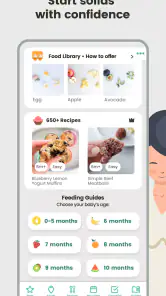
Starting solids can feel like a small daily task that somehow creates a long list of questions. What should I offer today? How do I introduce allergens? Is the texture suitable? Have I remembered what my baby already tried? BLW Meals: Starting Solids is designed to make that routine more manageable for parents following baby-led weaning, with recipes, meal planning, allergen guidance, and a tracker gathered in one parenting app.
I found its main value in reducing the amount of mental juggling involved. It is not trying to replace a pediatrician, and it does not turn feeding into a rigid program. Instead, it works best as a practical reference that I can open before shopping, while preparing a meal, or when I need to remember how a previous introduction went. The app is free to download, although optional in-app purchases range from $4.99 to $34.99 per item, so the experience may change depending on which parts I choose to unlock.
How the everyday BLW Meals routine works
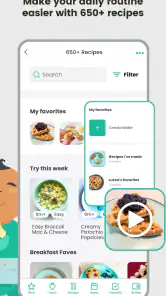
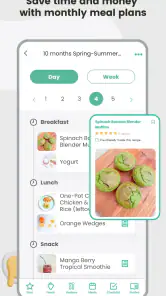
The most useful way to approach the app is not to browse randomly through recipes. I get more from it when I begin with a simple weekly question: what foods can fit our family meals, and how can I serve them in a baby-friendly way? The meal-plan area gives that process a clearer starting point than searching the internet every day for isolated ideas.
For example, I might look through meal suggestions at the beginning of the week, choose a few options that match what I already intend to cook, and then use the recipes as preparation reminders. This avoids one of the common problems with baby-led weaning: collecting attractive recipes that require completely separate shopping and cooking. The app is more practical when it helps adapt a normal household routine rather than creating another menu that only works on paper.
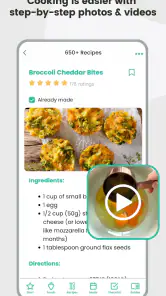
The recipe section is especially helpful during the transition from “what can my baby eat?” to “how can I serve this food safely and simply?” I use it as a prompt for combinations and preparation ideas, not as a command to follow every instruction exactly. Families have different schedules, equipment, budgets, and cultural foods, so the best result comes from treating the recipes as building blocks.
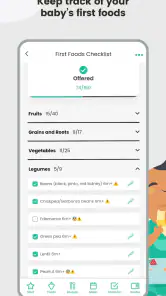
The tracker adds another layer of usefulness. A parent can use it to keep a running record of foods introduced, which is much easier than relying on memory after several busy days. That record becomes more valuable when a baby is trying many ingredients close together. It can help me remember what was offered and when, while also making conversations with a healthcare professional more organized if a concern appears.
One routine that works well is to update the tracker immediately after a meal instead of postponing it until bedtime. The difference sounds minor, but tired parents are more likely to forget details later. I would also keep the entry brief and consistent: note the food, whether it was accepted, and anything unusual. The app is most useful as a dependable habit, not as a diary that demands lengthy notes.
Using the allergen guidance without treating it as medical advice
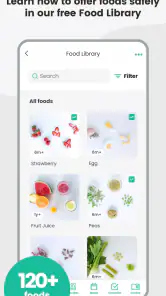
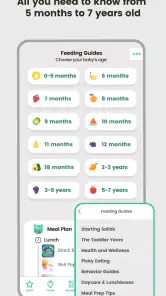
The allergen tips are one of the reasons this app can feel more reassuring than a basic recipe collection. They encourage me to think about introductions deliberately rather than adding new ingredients without a plan. That is useful for organizing meals and recognizing which foods deserve closer attention.
Still, I would not use an app as the final authority for allergy decisions. A baby with an existing allergy, eczema, a previous reaction, swallowing concerns, or other medical considerations may need individualized advice. In those situations, professional guidance should shape the plan, while the tracker can serve as a record of what happened. That distinction matters: the app can support preparation and organization, but it cannot assess a reaction or diagnose a problem.
A sensible workflow is to avoid turning every new food into a complicated experiment. I would choose a calm day, offer the food in an age-appropriate form, and record the introduction while the details are fresh. If there is a reaction or anything that worries me, I would stop relying on the app for interpretation and contact a qualified healthcare professional. This is an important boundary for anyone attracted to the convenience of an all-in-one feeding tool.
Settings and choices worth checking first
Before building a routine around the app, I would spend a few minutes exploring how the meal planning, recipe browsing, allergen information, and tracking areas are arranged. The goal is not to customize every possible detail; it is to learn where the tools are located so that a tired parent is not searching during a rushed meal.
I would also check which content is available without payment and which items are connected to an in-app purchase. Because the app is free to start but includes paid items, it is worth understanding the boundary before planning an entire week around a particular set of recipes or guidance. This is not necessarily a problem, but it can be frustrating if I assume every part of the catalog is included and only discover the difference when I am ready to use it.
The app is rated for Everyone, which makes it approachable as a general parenting resource, but that age label should not be confused with clinical suitability for every baby. Feeding readiness, texture, posture, supervision, and health history still require parental judgment and, where appropriate, professional advice. I would use the rating as an accessibility signal, not as a safety certification for individual meals.
Another useful check is whether the current app version behaves comfortably on the device. BLW Meals: Starting Solids currently appears as version 1.0.174 and requires iOS 11 or later. That makes it suitable for many older supported Apple devices, but anyone using an older system should check compatibility before investing time in setting up a tracker. A feeding record is only useful if it remains available on the device used every day.
Faster patterns for busy parents
The fastest approach is to separate planning from cooking. I would browse meal ideas when I have a quiet moment, save the few that fit the coming days in my own notes or shopping routine, and return to the recipe only when preparing food. Constantly opening the app to decide every meal can make it feel like another task; using it once to create a short list is more efficient.
A second shortcut is to plan around ingredients that adults will also eat. If the family is having vegetables, grains, eggs, beans, or soft fruit, the app can help inspire a baby-friendly presentation without requiring an entirely separate menu. This is where the recipes are more useful than a simple list of permitted foods: they can help translate familiar ingredients into a more structured meal idea.
I also prefer repeating successful formats. If a baby accepts a particular texture or serving style, I can use that format with a different ingredient rather than reinventing the meal. The tracker then becomes a reference for what has already been tried. This creates a repeatable pattern: choose a familiar base, introduce one planned change, observe, and record. It is less exciting than making a new recipe every day, but it is easier to sustain.
For shopping, I would use the meal-plan material as a prompt rather than a fixed order. A recipe may suggest an ingredient that is unavailable or unsuitable for the family’s budget. Swapping it for a similar food can keep the weekly plan practical. The important thing is to preserve the intended texture and preparation approach, not to follow a recipe so rigidly that the app creates extra expense.
One less obvious benefit of this method is that it helps separate acceptance from exposure. A baby refusing a food once does not necessarily mean the food should disappear forever. I can record the attempt, return to familiar foods, and try again later in a different combination or texture. The app cannot make that decision for me, but its tracker makes it easier to remember that the food was offered and prevents accidental repetition of the same uncertainty.
Where the app is genuinely useful
BLW Meals: Starting Solids is a strong fit for a parent who wants one place to combine ideas, planning, allergen reminders, and a basic food record. It is particularly helpful at the beginning, when the number of decisions feels larger than the amount of cooking involved. The app gives structure without requiring me to build a spreadsheet or keep several browser tabs open.
It can also help when more than one caregiver is involved. Even if only one person maintains the tracker, having a shared routine around checking what was introduced can reduce duplicated foods and forgotten details. A grandparent or partner may not need to study every recipe; they can simply understand that the meal plan and tracker are the reference points for the current stage.
The app is less compelling for an experienced parent who already has a trusted feeding system, a large personal recipe collection, and a reliable way to record introductions. In that case, the extra value may not justify learning another interface, especially if the most appealing content sits behind purchases. A general recipe app may also be better for families who want broad household cooking ideas rather than a baby-led-weaning focus.
I would also look elsewhere if I wanted detailed nutrition analysis, individualized medical recommendations, or a fully collaborative family database. The app’s strengths are organization and inspiration. Those are useful strengths, but they are narrower than the promises people sometimes expect from parenting technology.
Limits that become clearer with regular use
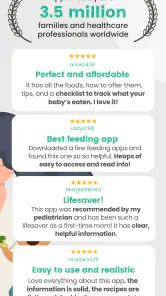
The average rating is 3.4 from around 417 ratings, with roughly 64 written reviews, and that mixed reception is worth keeping in mind. It suggests that the app will not feel equally polished or useful to everyone. A parent may appreciate the concept but still find navigation, content access, or the level of detail less satisfying than expected.
The scale of the app is also reflected in its audience: it has passed 100K installs, so it is established enough to have reached many families, but it is not a universal standard that every parent or healthcare professional will already know. I would judge it by whether its workflow fits my household rather than assuming popularity guarantees a perfect experience.
The biggest practical limitation is that organization can become another chore. If I forget to update the tracker, the record quickly loses accuracy. If I spend too long browsing recipes, planning becomes procrastination. The app works best when I decide in advance how much detail I need and keep the routine lightweight.
There is also a risk of false confidence. A neatly recorded food history can look authoritative even though it depends entirely on what I enter and how I interpret the guidance. I would never let a completed tracker replace supervision at mealtimes or professional advice about choking, allergies, readiness, or medical conditions. The app supports decisions; it does not make them safe by itself.
My verdict after building a repeatable routine
I see BLW Meals: Starting Solids as a useful companion for parents who want to organize the early feeding stage without designing a system from scratch. Its combination of recipes, meal planning, allergen tips, and tracking gives it more day-to-day value than a static list of baby foods. The strongest experience comes from using it deliberately: plan a small group of meals, check the relevant guidance, prepare food that fits the family table, and update the tracker straight away.
The free starting point makes it easy to test that workflow, while the in-app purchases mean I would explore the available content before deciding whether it deserves a larger role in my routine. I would recommend it to a new baby-led-weaning parent who wants practical structure and is comfortable applying personal judgment. I would be more cautious about recommending it as the only resource for a baby with medical or allergy concerns, or to a parent who already has a reliable system.
My final view is positive but measured. This is not a substitute for a pediatric professional, and it is not a magic meal generator. It is a planning and memory aid that becomes genuinely helpful when paired with consistent habits. Use it to reduce everyday decision fatigue, not to outsource responsibility. For the right family, that is enough to make starting solids feel calmer, more organized, and easier to repeat.
Pros
- Clear meal ideas tailored to baby-led weaning stages.
- Helpful guidance on safe shapes
- textures
- and serving sizes.
- Includes a variety of nutritious recipes for family meals.
- Useful planning tools can simplify weekly meal preparation.
- Clean layout makes recipes quick to browse while cooking.
Cons
- Some recipes may require ingredients that are not widely available.
- Portion guidance may not suit every baby’s appetite or development.
- The free version may limit access to certain recipes or features.
- It should complement
- not replace
- advice from a pediatrician or dietitian.
- Parents may need extra time to adapt recipes for allergies or preferences.

- Category
- Parenting
- Version
- 1.0.174











