BJ's Wholesale Club
- 44.44K
- 4.7
- Installs
- 5.00M
- Price
- Free

Screenshots

Analysis by Reviewed
On a first visit, the BJ’s Wholesale Club app makes a convincing case for keeping your warehouse-club errands organized on your phone. I can browse before leaving home, clip digital coupons, and check membership details without juggling paper slips. That convenience is most noticeable when I already shop at BJ’s; the app is less compelling as a reason on its own to join a wholesale club.
Why the first week feels useful
The early appeal is straightforward: search for an item, look through categories, and build a shopping list in the same place. I’d use that list before a planned stock-up, when it is easy to forget a household staple among larger purchases. Digital coupons add a practical step: I can review available offers while planning rather than hope I remember them at checkout.
For a realistic example, imagine preparing for a weekend gathering. I could make a list at home, check the app for relevant offers, then decide which items are worth buying in club quantities. That last decision matters: a deal is only useful if I can use the amount before it goes to waste. The app helps with preparation, but it cannot make an oversized purchase sensible by itself.
It is a free shopping app from BJ’s Wholesale Club, and its current version is 13.18.0, with Android support starting at version 8.0. Its Everyone age rating makes it suitable for a broad audience. Those basics are easy to overlook, but they help set expectations: this is a companion for shopping at one retailer, not a general-purpose grocery comparison tool.
Making it part of a regular shopping routine
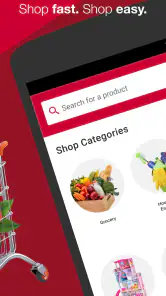
The first thing you’ll notice when you open the BJ’s Wholesale Club app is its clean and intuitive interface. It’s like having the entire store in your pocket! The app allows you to browse through a vast selection of products, from groceries and electronics to home goods and more, all without stepping foot outside your house. You can easily search for items using the search bar or explore different categories to find what you need.
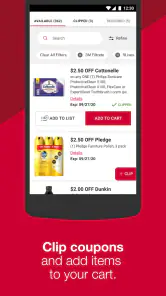
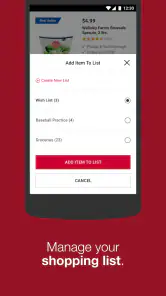
What’s really cool is the ability to create shopping lists directly in the app. This feature is a game-changer for those of us who tend to forget what we need to buy. Plus, it syncs across devices, so you can start your list on your phone and continue it on your tablet. And if you’re a coupon lover, you’re in for a treat! The app provides access to digital coupons that you can clip with a simple tap, helping you save even more on your purchases.
Membership details and in-store decisions
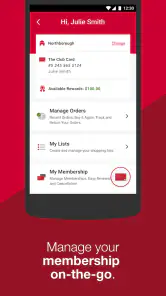
If you’re a member of BJ’s, the app takes your shopping experience to the next level. It allows you to manage your membership details, track your rewards, and even renew your membership directly from your phone. Talk about convenience! The app also offers exclusive deals and promotions that are only available to members, so you’ll want to keep an eye on those to make the most out of your membership.
More From Our News Desk

Weather by Xiaomi Review: Clear at a Glance, Less Clear Up Close

X Under Pressure: Can It Recover When Posting Goes Wrong?

Clash of Clans Is Won Between the Battles

Android Auto Makes the Case for Quieter Car Software

MobiOffice: Transforming Mobile Productivity with Seamless Integration

EA SPORTS FC™ Mobile Soccer: Redefining Mobile Sports Gaming
For recurring use, I’d treat the list and offers as a small planning routine: check them before the trip, remove things I no longer need, and avoid clipping every coupon just because it appears. That keeps the app useful rather than turning it into another stream of promotions to monitor. Membership tools are most valuable when I already intend to shop at BJ’s; they are less persuasive if I rarely visit or do not use the benefits.
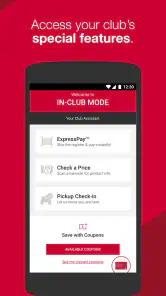
Another handy feature is the in-app barcode scanner. Ever found yourself in the store wondering if you’re getting the best deal? Just scan the product’s barcode with the app, and it’ll show you the price and availability. It’s like having your own personal shopping assistant!
That scanner is best treated as a quick check, not a complete price-comparison service. I’d use it when I’m holding an item and want to confirm its BJ’s price or availability, then compare the purchase with the amount I actually need and the alternatives I normally buy. If the question is whether another retailer has a better overall deal, I still need to check that retailer separately.
Pickup, delivery, and the trade-offs
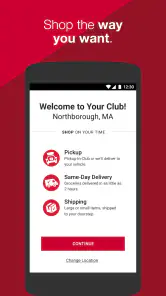
For those days when you just don’t have the time to wander the aisles, the BJ’s Wholesale Club app offers a convenient order and pickup option. You can place an order through the app and choose to pick it up at your nearest club location. It’s super easy and saves you a ton of time. Plus, you can track your order status in real-time, so you’ll know exactly when it’s ready for pickup.
Pickup makes the most sense when I know what I need and would rather spend less time inside the club. It is not necessarily the best choice for a trip where browsing is the point or where I want to inspect unfamiliar products before deciding. I’d also check the order details before setting out, so the pickup trip is based on what the app says is ready rather than on an assumption that every item will suit me.
And let’s not forget about the delivery options. For a small fee, you can have your items delivered straight to your doorstep. It’s perfect for those bulky items that are just too cumbersome to carry on your own.
Delivery can be a welcome alternative for heavy or awkward purchases, but the fee changes the value calculation. I’d reserve it for a load that would be inconvenient to transport, then weigh that convenience against collecting the order myself. Anyone who mainly buys a few lightweight items may find that a normal in-store trip or another shopping option fits better.
Making the app useful beyond a single trip
A practical way to decide whether this app belongs in my routine is to connect it to a real shopping cycle rather than opening it whenever I have a spare moment. Before a planned club visit, I can add household staples as I notice they are running low, then review the list when I am ready to shop. That simple separation—capture items as they come up, edit the list before leaving—helps prevent the app from becoming a hurried checklist made in the parking lot.
I would also use the list to think in terms of quantities, not just product names. If I am buying something in a larger pack, I can ask whether it will fit in the cupboard, freezer, or household budget before adding it. This is a small but important trade-off with wholesale shopping: convenience per unit can be appealing, yet the total purchase and storage needs matter more than a coupon alone. The app supports planning, but the best savings often come from deciding what not to buy.
For a household where more than one person handles errands, a shared planning habit can reduce duplicate purchases. Since the list can be continued across devices, I would make one person responsible for keeping it tidy and remove an item as soon as it is no longer needed. The feature is most helpful when everyone follows the same list; if several people add items without checking what is already there, it can become cluttered rather than coordinated.
Who benefits most, and who may prefer another option
I see the strongest fit for a current BJ’s member who makes planned stock-up trips, uses digital offers, or wants to handle membership tasks without searching through separate paperwork. It can also suit someone who is trying pickup for a known basket, especially when the main goal is to spend less time walking through the club. In those cases, the app links useful parts of the shopping routine instead of asking the user to adopt a new habit for its own sake.
It is a weaker fit for someone who shops at BJ’s only occasionally, buys small amounts at a time, or prefers to compare prices across several stores before choosing where to go. A conventional grocery app may be more convenient for a quick list of fresh essentials, while a broad marketplace is better for comparing sellers and product options across retailers. This app is deliberately tied to BJ’s, so its focused tools are an advantage only when that is where I expect to shop.
There is another reasonable exception: if I enjoy browsing in person and often change my mind after seeing products on the shelf, an app-led order may feel restrictive. I would still use the app for checking offers or keeping a list, but I would not force every purchase through pickup. The better workflow depends on the errand: use the phone to prepare a predictable shop, and leave room for in-store judgment when selection or inspection matters.
Will it earn a place on your phone?
The app’s long-term value comes from repeating a few useful habits: keeping a focused list, checking offers before a planned shop, and using membership tools when they save an extra step. It is not an app I would open daily just to browse. Its value rises with regular BJ’s trips and falls if my shopping is split among several stores or if club-sized quantities do not suit my household.
There is also a difference between the app’s convenience and the broader warehouse-club decision. A conventional grocery retailer may be a better fit for smaller quantities or quick top-up trips, while a general shopping app may be more useful if I want to compare many sellers in one place. BJ’s app is strongest when I have already chosen BJ’s and want its shopping, membership, and fulfillment options together.
It has a 4.7 average from around 153,000 ratings, and more than five million installs. Those figures suggest it has found a substantial audience, but my recommendation depends more on shopping habits than popularity: frequent BJ’s members have a clear reason to keep it, while occasional visitors may not need it taking up space.
For someone still weighing whether to download it, I would start by asking a few everyday questions. Do I make enough BJ’s trips to justify keeping a store-specific list? Will I actually check offers before shopping, rather than remember them only at checkout? Would pickup save me time on a basket I already know, or do I prefer to choose everything in person? If the answers point toward regular visits and planned purchases, the app has a clear role. If not, it may add little beyond a shortcut to a store I rarely use.
One source of fatigue is the temptation to treat every promotion as a reason to shop. I would set a narrow purpose for each visit—replenish specific staples, prepare for an event, or collect a known order—and use the app to support that purpose. Keeping the list focused makes it easier to notice when a coupon fits something I already need, rather than letting an offer expand the basket. That distinction is what turns digital deals into useful planning instead of extra noise.
Overall, the BJ’s Wholesale Club app is a must-have for anyone who frequently shops at BJ’s. It’s packed with features that make shopping a breeze, from digital coupons and membership management to order and pickup services. The app is designed with the user in mind, offering a seamless experience that makes saving money and time easier than ever. So, if you’re a BJ’s member or considering becoming one, download the app and take your shopping to the next level!
BJ's Wholesale Club Frequently Asked Questions
Is the BJ's Wholesale Club app available in my country?
BJ’s Wholesale Club is a shopping app focused on using the retailer’s membership and shopping tools. Before downloading, consider whether BJ’s stores and services are available where you shop, since the app is most useful when you can use those offerings. You can install it for free on a compatible Android or iOS device and explore the available options.
Can I browse the BJ's Wholesale Club app before creating an account?
You can download the app and explore its shopping interface, but account access is important for membership-focused features. The app is designed to help members get more from their membership, so signing in or starting registration is the practical next step if you want to use account tools, savings options, or member-oriented shopping features.
Is the BJ's Wholesale Club app free, and what devices can I use it on?
The app is free to download and is designed for shopping on Android and iOS devices. Before installing, check that your device meets the minimum operating-system requirement: version 8.0. The app is for Everyone, so its content rating is suitable for a general audience. You can use it to explore BJ’s mobile shopping tools and membership-related features.
Do I need a BJ's Wholesale Club membership to use the app?
The app is built around getting more from a BJ’s membership, so membership is central to using its shopping and savings features. You can start the membership sign-up process in the app, then use your account to access member-oriented tools. If you are already a member, signing in lets you manage your account and use the app for shopping.
What is BJ's Wholesale Club app and what features does it offer?
BJ's Wholesale Club app is a mobile application designed to enhance your shopping experience at BJ's Wholesale Club. It offers features such as easy online shopping, digital coupons, and the ability to scan products for prices and availability. Additionally, members can manage their accounts, track their savings, and access exclusive deals directly from the app.
Pros
- User-friendly interface enhances shopping experience.
- Exclusive member-only discounts available.
- Efficient delivery and pick-up options.
- Wide range of products under one roof.
- Reliable customer service support.
Cons
- Membership required to access deals.
- Limited international shipping options.
- Occasional app performance issues.
- In-app ads can be intrusive.
- Some items may be out of stock.
- Category
- Shopping
- Version
- 13.18.0











