

Best Hunting Times
- 70.00
- 2.4
- Installs
- 10.00K
- Price
- $2.99
Screenshots
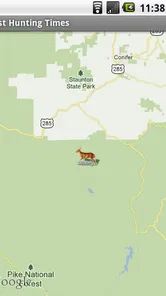
Analysis by Reviewed
For a hunter choosing a planning tool, the key question is whether a forecast can help organize a day without becoming a promise about what wildlife will do. Best Hunting Times focuses on timing: it is a paid weather app from K Solution, aimed at finding favorable hunting periods for a chosen date and place. I would treat its guidance as one input alongside local conditions, experience, and a sensible plan—not as a guarantee of a sighting.
A repeatable way to plan a trip
My baseline workflow would be to choose the location and date before deciding when to leave, then use the suggested periods to shape the day. That order matters: a favorable time is useful only if it fits the drive, daylight, access, and the length of the outing. When I am planning several days ahead, I would check more than one date rather than build the whole trip around a single promising window.
A practical example is a weekend trip with a fixed arrival time. I would compare the app’s timing for the intended location and date, then decide whether an early start is worthwhile or whether another day better fits the schedule. I would still check ordinary local weather information before setting out. A timing forecast and a weather forecast answer different questions, and confusing the two can lead to poor planning.
Settings and habits that make the guidance useful
The most valuable detail to get right is the location. If I am hunting away from home, I would check that the selected place reflects the actual area rather than assuming the phone’s current position is appropriate. For a trip near a boundary between towns or regions, I would compare the nearby choices if available and avoid reading too much into small differences in a prediction.
I would also make a simple habit of checking the date again whenever plans change. A saved plan for one day is not a substitute for looking up a newly chosen day. Keeping a short personal note after each trip—what the conditions were and whether the timing felt useful—can help me judge how much weight to give the app over time, without treating any single result as proof.
That is the trade-off with a specialized timing tool: it can narrow the planning question, but it cannot account for every detail of a particular outing. Access, terrain, wind, regulations, and safe travel remain the hunter’s responsibility. I would use the app to support decisions, not to replace field judgment or local knowledge.
Who will get the most from it?
This is most appealing to hunters who already plan around particular dates and locations and want a quick timing reference as part of that routine. Someone who enjoys comparing forecasts with their own observations may find it useful as a lightweight planning companion. It is less suitable for a person looking for a broad, general-purpose weather service, detailed mapping, or a complete trip-management system; those needs call for tools designed specifically for them.
More From Our News Desk

 Gmail
GmailGmail in a Busy Inbox: Who Benefits Most?
From first account to crowded workday, Gmail earns its place through dependable search and flexible sorting—but its best fit depends on how much inbox maintenance you can tolerate.

 Prime Video
Switching to Prime Video: What Changes in Your Viewing Routine
Prime Video can make a compelling second home for streaming, but switching means learning a different catalog, rental layer, and route from browsing to playback.

 Universal TV Remote Control
Universal TV Remote Control Works Best as a Reliable Backup
A phone remote earns its place through quick setup and reliable habits. Here is how to get more from Universal TV Remote Control—and where its limits show.

 Weather - By Xiaomi
Weather by Xiaomi Review: Clear at a Glance, Less Clear Up Close
Xiaomi’s weather app makes everyday forecasts quick to scan, but its calm surface can leave useful details and recovery paths harder to find than they should be.

 X
XX Under Pressure: Can It Recover When Posting Goes Wrong?
A resilience-focused review of X, examining setup, mistaken posts, interruptions, weak connections, and the gaps that matter when recovery needs to be dependable.

 Clash of Clans
Clash of Clans Is Won Between the Battles
Its raids are quick; its community is a long-term project of coordination, teaching, rivalry, and shared responsibility—with all the friction that entails.
Latest News



The usual alternative is to rely on a standard weather app, a calendar, and personal experience. Those can cover conditions and scheduling, but they do not serve the same focused timing purpose. Conversely, a favorable hunting period does not tell me whether the weather is safe or comfortable. I would keep the two checks separate rather than expect one app to do both jobs.
There is also a cost decision. At $2.99, this is not a free tool to try casually, so I would consider how often I hunt and whether timing predictions are already part of my planning. Its 2.5 average from around 120 ratings is a reason to keep expectations measured, not a verdict on how it will work for every person. With over 10,000 installs, it has found an audience, but I would still judge it by whether its focused purpose suits my own routine.
Make the timing fit the outing
A useful way to avoid letting a favorable period dictate the whole day is to set the practical constraints first. I would decide how far I am willing to travel, how much time I have, and what access arrangements are realistic, then see whether the suggested timing fits. If it does not, I would not force an unsafe or exhausting schedule just to chase a prediction. The app is most helpful when it informs a plan that already makes sense on the ground.
For a multi-day visit, I would use the date selection as a comparison aid rather than a scorecard. I might look across the available days, identify the one that best matches my schedule, and keep a second option in mind in case travel or local conditions change. This is a small but practical distinction: choosing among workable plans is more useful than treating one highlighted period as an instruction.
Because the app’s purpose is narrow, I would also keep the decision process simple. I would note the date, intended area, and timing I considered, then check current conditions separately before departure. That makes it easier to learn whether the timing guidance seems relevant to my own outings without confusing it with changes in weather, access, or how much time I spent afield.
Where it fits beside ordinary weather tools
Many weather apps are better for checking rain, temperature, wind, and near-term changes; those are the details I need when deciding what to wear or whether travel looks sensible. A calendar is better for keeping a commitment visible, while a map or local resource is better for understanding access and terrain. Best Hunting Times earns its place only when I specifically want a hunting-oriented timing reference alongside those tools.
That division of labor is important for anyone asking whether this can replace a regular forecast. I would not use it that way. A favorable hunting period does not settle whether a storm is approaching, whether roads are suitable, or whether conditions match my comfort and safety needs. Keeping the app as a specialist rather than a one-stop source makes its role clearer and prevents an appealing prediction from crowding out more immediate checks.
It is also not the right purchase for someone who hunts rarely and already feels well served by a general forecast and personal routine. In that case, the added timing reference may not change the decision enough to justify paying for another tool. Regular hunters who enjoy planning around specific dates are more likely to notice the benefit, especially if they use the same process consistently instead of opening the app only when a trip is already underway.
What I would check before relying on a plan
Before building a trip around a result, I would verify the chosen location and date once more, especially after changing plans or traveling beyond my usual area. I would then compare the timing with the real logistics: travel time, legal access, daylight, and a safe route home. These checks are not extra features of the app; they are the steps that keep a timing suggestion from being mistaken for a complete plan.
One reasonable question is whether a hunter needs to use the app every day. I would say no. Its value is greatest when there is an actual date and place to plan, so opening it without a trip in mind may not add much. Another is whether it can tell someone where wildlife will be. I would not interpret a timing tool as a location guarantee; local knowledge, habitat, and responsible fieldcraft still matter.
For a first-time user, I would avoid changing several assumptions at once. Start with the intended area and date, see what timing the app presents, and compare that with your normal planning routine. Over time, brief notes about conditions and outcomes can make your own judgment more informed. That is more useful than deciding after one trip that a prediction either worked perfectly or failed completely.
Ever found yourself out on a hunting trip, only to realize that the game seems to be hiding better than a squirrel with a stash of acorns? Well, I’ve been there too! That’s why I was thrilled to stumble upon the Best Hunting Times app. Let me walk you through my experience with this handy digital hunting companion.
What’s the Buzz About?
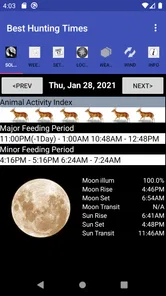
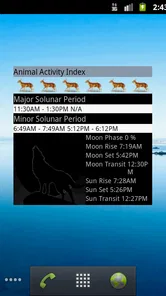
The Best Hunting Times app is like having a seasoned hunter whispering into your ear, telling you not just when to hunt, but also where. The app uses the latest in solunar theory, which is based on the position and phases of the moon, to predict the best times for hunting. It's like getting a cheat sheet for nature, and let's face it, who wouldn't want that?
Easy Setup and User Interface
When I first downloaded the app, I was impressed by how user-friendly it was. No need for a user manual that feels like it's written in hieroglyphics. The setup was a breeze, and the interface is clean and intuitive, making it easy to navigate even for those of us who might be a bit tech-challenged.
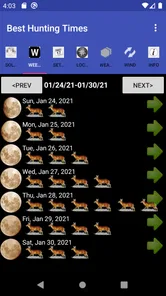
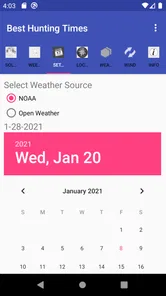
The app quickly syncs with your location and provides a calendar view of the best hunting times. There's something quite satisfying about planning your weekend hunting trip with data-backed predictions right at your fingertips.
Features That Stand Out
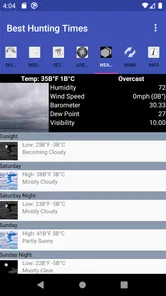
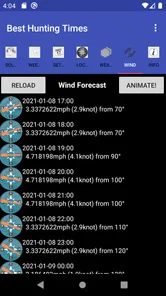
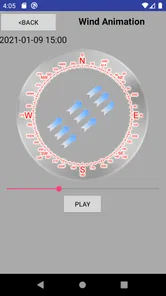
One of the coolest features is the weather forecast integration. This is crucial when planning a hunting trip, as nobody wants to be caught in an unexpected downpour. The app provides a detailed weather forecast, allowing you to plan your hunting trips with confidence.
Another highlight is the ability to customize your hunting calendar. You can mark your successful hunting days, jot down notes, and even set reminders for essential hunting gear. It’s like having a personal hunting assistant.
Is It Worth It?
So, here’s the million-dollar question: Is the Best Hunting Times app worth downloading? In my opinion, absolutely. Whether you’re a seasoned hunter or a newbie, this app provides valuable insights that can enhance your hunting experience. The combination of solunar predictions, weather integration, and a user-friendly interface makes it a must-have tool in any hunter’s digital arsenal.
In conclusion, if you’re looking to up your hunting game, give the Best Hunting Times app a shot. It’s like having a trusty guide in your pocket, ready to help make your hunting trips more fruitful and enjoyable. So, what are you waiting for? It’s time to gear up and hit the great outdoors with a little extra confidence!
Version, access, and a grounded verdict
The app is rated for Everyone, runs on Android 5.0 or later, and its current version is 3.6. It was released on December 16, 2011, and has 68 written reviews. I would check that my device meets the minimum requirement before paying, particularly if I use an older phone. These details make it a straightforward option for compatible Android users, though the paid price means I would want a clear reason to add it to my routine.
One point deserves care: the original experience described here includes a calendar, weather integration, notes, and reminders, but I would not assume every hunter needs each of those elements. The practical value is in using the planning view consistently, then comparing its suggestions with real conditions and personal observations. If I simply want current rain or temperature information, my regular weather app is the more direct choice; if I want a focused hunting-time reference, this app has a clearer role.
Overall, I would consider it a niche companion rather than an all-in-one field guide. It can help me organize when to go and make planning feel more deliberate, while its predictions remain just that—predictions. For an occasional hunter, the price and modest average rating may make a free weather app and a personal calendar enough. For someone who regularly plans around dates and locations, the focused approach may be worth trying, provided they keep safety, local rules, and real-world conditions ahead of any forecast.
Best Hunting Times Frequently Asked Questions
Does Best Hunting Times work on older Android devices?
Best Hunting Times is compatible with Android devices running version 5.0 or later. If your phone or tablet meets that minimum requirement, you can consider installing the app and using it to determine best hunting times for a selected date and location. Check your device’s operating system version before downloading so you can tell whether it meets the compatibility requirement.
What is Best Hunting Times?
Best Hunting Times is a mobile application designed for hunters and wildlife enthusiasts. It provides users with detailed information on the optimal times to hunt various species. By analyzing weather conditions, moon phases, and wildlife activity patterns, the app helps users plan successful hunting trips. It's available for both Android and iOS devices.
How does Best Hunting Times determine the optimal hunting times?
The app uses a sophisticated algorithm that takes into account various environmental factors such as weather conditions, lunar phases, and historical wildlife activity patterns. By analyzing these elements, Best Hunting Times calculates the best times to hunt specific game in your chosen location, increasing your chances of a successful outing.
Is Best Hunting Times user-friendly for beginners?
Yes, Best Hunting Times is designed with simplicity and ease of use in mind. The user interface is intuitive, allowing even novice hunters to navigate the app effortlessly. It provides clear, step-by-step instructions and tips on how to make the most of the app’s features, ensuring a smooth user experience for all skill levels.
Does Best Hunting Times require an internet connection to work?
No, Best Hunting Times is capable of functioning offline once the essential data is downloaded. This feature is particularly useful for hunters who venture into remote areas without reliable internet access. Users can download the necessary information beforehand and use the app in offline mode during their hunting trips.
Pros
- Accurate hunting time predictions
- User-friendly interface
- Customizable alerts
- Weather integration
- Offline access
Cons
- Limited free features
- Battery drain issues
- Occasional GPS inaccuracies
- Ads in free version
- No social sharing options











