Best Buy: Shop tech deals
- 78.46K
- 4.7
- Installs
- 10.00M
- Price
- Free

Screenshots


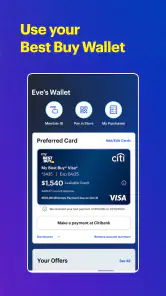
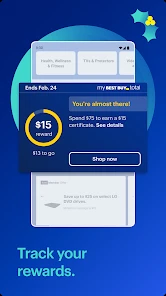
Analysis by Reviewed
I tend to judge a shopping app by a practical question: can I find the item I need without turning a quick check into a long browsing session? Best Buy’s app is built around that kind of tech shopping, with product discovery, deal browsing, and store-related tasks in one place. I’d find it most useful when I already have a device or accessory in mind and want to compare options before deciding whether to buy online or visit a store.
Quick checks versus deep browsing
For a focused search, a retail app can be more convenient than opening several general shopping sites: it keeps the product hunt within one retailer’s catalog and makes it easier to move from an item page to related shopping tasks. That convenience has a boundary, though. If I’m comparing the entire market or looking for the lowest price across many sellers, a price-comparison site or another retailer may give me a wider view. I’d use this app to narrow down a Best Buy purchase, then check elsewhere when the final price matters more than staying in one store’s ecosystem.
A useful habit is to search by the exact model number when I have one, rather than relying on broad terms such as “wireless headphones.” For tech products, small differences in model names can mean different generations or configurations. I’d also check the item details carefully before adding it to a basket, especially when choosing between similar accessories. That extra pause is worthwhile: quick discovery is helpful only if it leads to the right version.
Browsing Made Easy
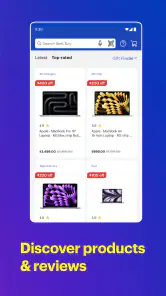
First off, let's talk about the user interface. If you’re anything like me, a cluttered app can really put a damper on your shopping experience. Thankfully, Best Buy: Shop tech deals nails it with a sleek and intuitive layout. Browsing through categories feels like flipping through the pages of your favorite tech magazine. Whether you're looking for a new smartphone, a smart TV, or just some cool accessories, everything is neatly organized and easy to find. Plus, the search function is impressively fast, making it a breeze to locate specific products.
Deals, Deals, and More Deals
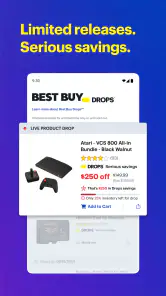
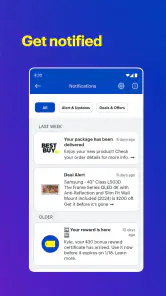
Now, onto the part we all love – the deals! Who doesn't love snagging a great deal on the latest tech gadgets? The app keeps you updated with daily deals, flash sales, and exclusive offers that you won’t want to miss. I was particularly impressed with the personalized deal notifications. Just set your preferences, and voila! You'll get alerts on the products you care about the most.
Notifications are most useful when I’m already considering a particular purchase; otherwise, frequent deal prompts can become noise. I’d keep alerts focused on products I genuinely plan to buy and treat a discount as a reason to recheck the details, not as proof that an item is the right choice. For a planned upgrade, that small bit of restraint helps separate a useful saving from an impulse purchase. If I’m only browsing casually, I’d rather search when I need something than let sale reminders set my shopping agenda.
One of the features that I found particularly handy is the price comparison tool. It’s super useful if you’re trying to ensure you’re getting the best bang for your buck. The app will show you how current deals stack up against previous prices, so you can make informed decisions without any hassle.
You May Like

Clash of Clans Is Won Between the Battles

Android Auto Makes the Case for Quieter Car Software

MobiOffice: Transforming Mobile Productivity with Seamless Integration

EA SPORTS FC™ Mobile Soccer: Redefining Mobile Sports Gaming

How Microsoft OneDrive Became a Mobile Productivity Giant

How Google Translate Breaks Language Barriers Effortlessly
Your Personal Shopping Assistant
If you're someone who enjoys a personalized shopping experience, this app has got you covered. From creating wishlists to tracking your orders, Best Buy has made sure that every step of the shopping journey is tailored to your needs. The app even provides recommendations based on your browsing history. It’s like having your own personal shopping assistant who knows exactly what you like.
A wishlist can also work as a low-pressure shortlist rather than a promise to buy. I’d save a few alternatives while researching, then compare their specifications and revisit the list when I’m ready. That is especially handy for a household purchase: I can keep candidate models together, discuss the choice, and avoid trying to remember which product page looked promising. Recommendations can help surface related options, but I’d still use my own requirements—such as size, compatibility, or intended use—to make the final call.
Another nifty feature is the in-store mode. If you’re at a Best Buy store, just switch on this mode, and you can easily navigate the aisles, check product availability, or even scan barcodes for quick information. It’s a tech lover's dream come true!
When I’d use it in person
Imagine I’m replacing a charger and can stop at a nearby store on the way home. I can check the item and availability before making the trip, then use the in-store tools to locate or identify a product while I’m there. That’s a more useful workflow than wandering the aisles hoping the right accessory is stocked. I’d still confirm that the product matches my device before leaving, since a barcode or product name is only helpful if I’ve checked compatibility.
A slightly more involved use case is shopping for a shared household purchase, such as a television or computer. I’d collect a small set of contenders in the wishlist, then review the differences with the other person before deciding which one deserves a closer look. This avoids sending a string of product pages back and forth or relying on memory after a long browse. The app is most helpful here as a place to organize candidates; for a final decision, I’d still compare the specifications that matter to us rather than treating recommendations as a ranking of what we should buy.
For a quick accessory run, I’d make the search more specific before leaving home: confirm the model name, check whether the item appears available at the store I plan to visit, and keep the product page ready to refer to in person. That sequence can reduce wasted browsing, but it doesn’t remove the need to check the packaging and compatibility at the shelf. A phone case, cable, or charger that looks close to the right one can still be the wrong fit.
Choosing between a retailer app and a marketplace
The main alternative is not another feature inside the app; it is deciding where to do the research. A broad marketplace can expose me to more sellers and a wider range of listings, while a price-comparison service is better when I want a quick market-wide check. Best Buy’s app is more focused: it suits someone who is already considering that retailer and wants to keep product research, deal browsing, and store errands together. I would not use it as my only reference for an expensive purchase if I had not yet decided where to buy.
There is also a useful distinction between browsing for inspiration and shopping with a requirement. When I know the exact product family or model, the retailer’s focused catalog can make the hunt feel direct. When I only know that I need “a laptop for school” or “a TV for a bright room,” I’d first write down the requirements that will rule options in or out. Otherwise, recommendations and deal prompts can pull attention toward whatever is prominent rather than what suits the room, budget, or workload.
Reliability during longer shopping sessions
For a shopping app, perceived speed matters most during simple tasks: searching a model, opening its details, and moving between options. The experience described here makes those actions feel approachable, but I wouldn’t assume every session will be equally smooth on every phone or network. Product browsing can also become heavier when I’m switching between many listings, saving candidates, checking deals, and then using store tools in the same outing. Keeping the search focused and closing out of tasks I no longer need is a sensible way to make a longer session easier to manage.
If a page takes time to load or a shopping task is interrupted, I’d return to the product search or wishlist rather than repeatedly tapping buttons and risking confusion about what I selected. Before completing a purchase, I’d review the item and order details again. That’s a useful recovery habit for any mobile retailer, particularly when comparing near-identical electronics. The app is free, so trying it for a specific shopping task is low commitment; whether it earns a place on my home screen depends on how often I buy from this store.
For anyone concerned about stability, I’d separate what the app is meant to help with from what depends on the situation. Searching a catalog and opening a shortlist are relatively straightforward tasks, while a busy store visit can involve several switches between product information and location-oriented tools. I’d keep the product details I need easy to find and avoid leaving a purchase decision to the last moment in a crowded aisle. If a session is interrupted, returning to a saved candidate is a calmer recovery route than repeating the same search from scratch.
As for resource demands, I wouldn’t assume that every phone will feel identical simply because the app is designed for mobile shopping. A newer device and a dependable connection may make image-heavy browsing feel more comfortable than an older phone or a weak signal, but that is a general constraint of shopping on a phone, not a reason to expect a particular performance result. If I were planning a longer comparison, I’d do the detailed research when I have time and a stable connection, then use the app in store for the shorter checks it handles well.
Who it suits, and what to keep in mind
Best Buy Co., Inc developed this shopping app, which has a 4.7 average from around 395,000 ratings and more than 10 million installs. It is rated for Everyone, costs nothing to download, and its current version is 25.11.10, with Android 7.0 or later required. Those details make it accessible to a broad range of shoppers, though the actual experience still depends on the device and connection. I’d especially recommend it to someone planning a TV, computer, phone, or accessory purchase who wants to research and manage the shopping process from one retailer’s app.
One trade-off is that a retailer’s recommendations and offers naturally keep attention on that retailer’s products. That can save time when I already intend to shop there, but it is not the same as an independent market-wide recommendation. For an expensive purchase, I’d use the app to inspect suitable options and track my shortlist, then make a separate comparison if I’m unsure about value. For a small replacement item, that extra research may be unnecessary; for a major upgrade, it can prevent a rushed decision.
I’d also consider how often I buy electronics before making it a regular part of my phone routine. Someone who replaces accessories occasionally can still use it when a specific need comes up, but may not get much from keeping notifications on or browsing deals every day. A frequent tech shopper, on the other hand, may appreciate having product pages, saved possibilities, and order-related activity in one retailer’s app. The sensible setup is the one that supports an actual purchase plan rather than creating one.
My take after weighing the workflow
In conclusion, the Best Buy: Shop tech deals app is a must-have for anyone who loves tech and hates missing out on a good deal. It’s user-friendly, packed with features, and genuinely enhances the shopping experience by making it more accessible and personalized. Whether you’re a tech newbie or a seasoned gadget guru, this app has something for everyone. So, if you haven’t already, give it a go and let the tech shopping spree begin!
My recommendation is a little narrower: I’d keep it handy if Best Buy is part of how you shop for electronics, especially when you want to research before a store visit or keep a few options in one place. I wouldn’t rely on deal alerts alone to decide what to buy, and I’d look elsewhere when comparing sellers is the priority. For the right shopper, its value is less about browsing endlessly and more about making a specific tech purchase easier to plan.
One practical question is whether I’d use it for every purchase. No: for a routine item I already know by exact model, the app can be a convenient direct route, but for a product I’m still learning about, I’d combine it with independent research. The retailer’s focused shopping path is a strength when I have a clear destination and a limitation when I need a neutral overview of the market.
Another question is whether deal notifications are worth enabling. I’d say yes only if I have a short list of products I genuinely expect to buy; otherwise, I’d leave the alerts alone and check when I’m ready. A promotion is a prompt to revisit the price and product details, not a reason by itself to change my plans. That approach keeps the app useful without letting shopping reminders create urgency that I didn’t have before.
For someone deciding whether to install it, the clearest test is a real task: look up a product you already need, save a couple of plausible choices, and see whether the retailer-centered workflow makes the decision easier. If it does, the free app may be worth keeping for future electronics shopping. If your usual method depends on comparing many sellers or you rarely buy tech, a browser and a broad comparison tool may be enough.
Overall, I see this as a practical companion for focused Best Buy shopping, rather than a universal shopping destination. It brings together useful steps for researching, watching offers, and preparing for a store visit, while leaving the shopper responsible for compatibility checks and wider price comparisons. Used with that distinction in mind, it can save effort without asking me to treat every deal or recommendation as the right choice.
Best Buy: Shop tech deals Frequently Asked Questions
Does Best Buy: Shop tech deals include products beyond electronics?
The app focuses on tech deals and products, making it useful for browsing items such as computers, phones, and other gadgets. Its shopping experience is centered on Best Buy’s product selection, and the store summary also highlights gifts and more. If you have a particular item in mind, search or browse within the app to see whether it is currently offered.
Can I browse deals before deciding to buy anything?
Yes, the app is designed for browsing Best Buy products and deals, so you can look through available items before making a purchase. You can explore its shopping selection on your phone and decide whether something suits your needs. Installing it does not mean you have to place an order immediately; you can use the app to discover products and offers first.
Is the Best Buy app free, and what devices can run it?
Best Buy: Shop tech deals is free to download and is intended for shoppers who want to browse Best Buy products on a mobile device. The listed minimum operating-system requirement is Android 7.0, so it is worth checking your device settings before installing. The app is developed by Best Buy Co., Inc. and is also available for iOS, giving shoppers on either platform a way to explore the retailer’s tech offers.
What is Best Buy: Shop tech deals app?
Best Buy: Shop tech deals is a mobile application designed to provide users with easy access to the latest tech deals and products available at Best Buy. The app allows users to browse through a wide range of electronics, compare prices, check availability, and even make purchases directly from their smartphones. Whether you're looking for a new laptop, smartphone, or any other gadget, this app aims to simplify your shopping experience by offering exclusive deals and promotions.
How do I make a purchase using the Best Buy app?
Making a purchase using the Best Buy app is straightforward. After browsing and selecting your desired product, you can add it to your cart. The app provides a secure checkout process where you can review your order, enter payment information, and choose delivery options. You can also opt for in-store pickup if available. The app supports various payment methods, including credit/debit cards and digital wallets, ensuring a seamless transaction process.
Pros
- Wide variety of tech products available.
- User-friendly interface for easy navigation.
- Frequent sales and discounts on items.
- Reliable customer service support.
- Convenient mobile app notifications.
Cons
- Occasional app crashes reported by users.
- Some items may have limited stock.
- Shipping can sometimes be delayed.
- App requires frequent updates.
- In-app ads can be intrusive.

- Category
- Shopping
- Version
- 25.11.10