Bed Bath & Beyond
- 11.65K
- 4.5
- Installs
- 5.00M
- Price
- Free

Screenshots




Analysis by Reviewed
Hey there! I recently took a closer look at the Bed Bath & Beyond app, and found it most useful when I had a specific home purchase in mind but wanted to browse before committing. It brings the retailer’s shopping experience to a phone, which is handy for comparing household items without making a store trip first. I wouldn’t treat it as a general-purpose marketplace, though: its appeal is strongest when you’re shopping for things for the home and want to check the retailer’s current selection and offers.
When a focused home-shopping app makes sense
I can see this fitting people planning a room refresh, replacing a worn-out kitchen essential, or keeping track of a few possible purchases while they decide. It’s less compelling if your priority is finding the absolute lowest price across every retailer; a dedicated comparison search may be a better second stop. For someone already considering Bed Bath & Beyond, having browsing, deal discovery, and purchase details together is a practical convenience.
It’s also a useful option if you prefer to make home purchases in stages. You might be choosing towels now, waiting to replace cookware until payday, and still collecting ideas for a bedroom update. Keeping those separate decisions in one retailer’s app can be tidier than leaving a trail of open browser tabs, though it won’t give you a complete view of what other shops carry.
A realistic way to use it for a household decision
Imagine you’re refreshing a guest room but haven’t settled on bedding. I’d use the app to browse a few styles, narrow candidates by the details that matter, and save the strongest options while checking room measurements and what’s already in the linen closet. Later, I’d compare the saved choices and look at the total basket before deciding. That slower workflow makes the app more useful than treating it as a stream of promotions or buying the first appealing result.
Exploring the Interface
The first thing I noticed about the Bed Bath & Beyond app is its clean and user-friendly interface. Everything is laid out in a way that makes navigation a breeze. As soon as you open the app, you're greeted with a homepage that showcases the latest deals, trending products, and some personalized recommendations. It's like the app knows exactly what you're looking for!
Shopping Made Easy
One of the standout features of this app is how it simplifies the shopping experience. With a few taps, you can browse through a wide array of categories ranging from bedding and bath essentials to kitchen gadgets and home decor. The search function is quite robust, allowing you to filter results by price, brand, and even customer ratings.
For a more deliberate search, I’d start with a broad category and narrow the results by the factor that matters most to me, such as price or customer ratings. That makes it easier to compare like with like instead of jumping between unrelated recommendations. If you’re shopping for a room, save candidates as you go and review them together later; it’s a simple way to avoid buying the first attractive option you see.
More From Our News Desk

Clash of Clans Is Won Between the Battles

Android Auto Makes the Case for Quieter Car Software

MobiOffice: Transforming Mobile Productivity with Seamless Integration

EA SPORTS FC™ Mobile Soccer: Redefining Mobile Sports Gaming

How Microsoft OneDrive Became a Mobile Productivity Giant

How Google Translate Breaks Language Barriers Effortlessly
One small but useful habit is to decide on your must-haves before opening a long results list. For bedding, that might mean the right size or material; for a kitchen purchase, it could be a particular brand or a price ceiling. Applying a relevant filter early can cut down on browsing that looks productive but doesn’t move you closer to a decision. I’d still read the full product details before checkout, since a filtered result is only a starting point for comparing items.
Another thing I loved is the app's barcode scanner feature. If you're in a physical store and want to check if you're getting the best deal, just scan the product's barcode with your phone, and voila! You get instant access to prices, reviews, and even similar items available online.
Useful in-store, with a sensible caveat
The scanner is particularly useful when you’re already holding an item and want to compare it with other choices before paying. I’d use it as a quick reference rather than assume that the first result settles the decision: compare the product details and customer feedback, and check that the online option is genuinely comparable to the item in front of you. This workflow is less useful if you’re not near a physical product, or if you’re simply looking for the widest selection from many retailers.
For a better comparison, I’d check the exact product identity rather than relying on a similar-looking image. Small differences in size, finish, or included pieces can make two household items seem like a bargain match when they are not. A scan can help you get to relevant information quickly, but it doesn’t replace reading the listing carefully or deciding whether the price difference is worth changing your plan.
Deals and Discounts Galore
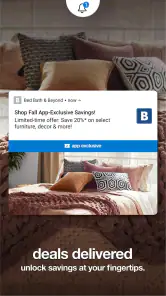
If you're a bargain hunter like me, you're going to love the deals section. The app regularly updates its offers, and you can find some incredible discounts on a wide range of products. Plus, there's the option to use coupons directly from your phone, which is super convenient. No more fumbling through your wallet at the checkout counter!
I’d still check the final basket before placing an order. A discount is only useful if the item suits your needs, and comparing the offer with another retailer can help you judge whether it is actually the right buy. For a planned purchase, browsing the deals section first and then searching for the specific item is a more grounded approach than letting a promotion decide what you shop for.
That distinction matters most for replacements you need soon. If your old pan has failed, a tempting deal on a different style may not be the right substitute for the size or use you need. I’d treat promotions as a chance to improve a purchase already on my list, not as a reason to add something that wasn’t part of the plan. This keeps the app’s deal browsing helpful without letting it set the household budget.
Wishlist and Order Tracking
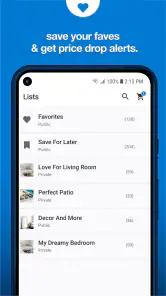
For those of us who love to window shop, the wishlist feature is a godsend. You can save items that catch your eye and come back to them later. It's perfect for planning future purchases or simply dreaming about redecorating your home.
A realistic use is to save a few options while measuring a space or checking what you already own, then revisit the list when you’re ready to choose. That small pause can prevent an impulse purchase, though a wishlist is only useful if you remember to review it and remove items that no longer fit your plans.
I’d use saved items as a short decision list rather than a permanent scrapbook. When you return, check whether each option still matches the room, budget, or replacement need you had in mind. That quick review helps keep a shortlist useful and makes it easier to spot when you’ve saved several versions of essentially the same thing.
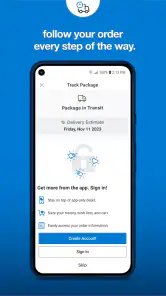
Once you've made a purchase, tracking your order is a piece of cake. The app provides real-time updates on your order status, so you'll always know when to expect your new goodies. It's all about keeping you in the loop!
For an everyday order, that status view can make it easier to plan around a delivery instead of repeatedly searching through messages. If timing is important, I’d still check the order details and keep an eye on updates rather than making arrangements based on an assumption. Tracking is helpful for staying informed, but it is not the same as a guarantee that a package will arrive at a particular moment.
How it fits beside other shopping options
Compared with a broad online marketplace, this app has a narrower point of view: it is centered on Bed Bath & Beyond’s home-shopping experience rather than on gathering offers from unrelated sellers. That focus can make browsing feel more relevant when you already know the retailer is one of your options. A retailer-neutral search is the better tool when you want to scan the wider market first, while this app is more convenient for exploring one catalogue, saving choices, and handling a purchase there.
It also serves a different purpose from visiting a store without a plan. Browsing on your phone gives you room to compare possible purchases at your own pace, but seeing an item in person can be more useful when its feel, scale, or finish is central to the decision. I’d use the app to narrow down what I want and an in-person visit when actually handling the product could resolve a doubt.
What the app’s current version tells me
Bed Bath & Beyond is a free shopping app from Beyond, Inc. (App), rated for Everyone. It first appeared on February 16, 2010, and its current version is 2025.11.0, with support for devices running OS 8.1 or later. That long-running presence alongside a recent version number suggests ongoing maintenance, but a version number alone doesn’t tell me exactly which screens or functions changed. I’d expect existing users to find the familiar shopping tasks central; anyone returning after a break should allow a moment to get reacquainted rather than assume the layout has stayed identical.
The practical takeaway is to approach it as a currently maintained shopping companion, not as a promise that every part of the interface is unchanged. If you already use it, your familiar habits around searching, saving, or checking an order should remain a sensible place to start, while a returning user can take a moment to look around before relying on an old routine. I’d watch for changes that affect how easily I can compare product details or revisit saved items, since those matter more to my day-to-day use than a version label on its own.
The app has a 4.5 average from around 98,000 ratings, and has been installed over 5 million times. Those figures suggest a substantial audience, but they can’t tell you whether a particular product, offer, or order experience will suit your needs. I’d judge it by the practical tasks you need it for: browsing home goods, weighing a deal, saving choices, or checking an order.
Where I’d be cautious
The main trade-off is that a retailer-focused app naturally centers its own catalogue and promotions. That’s convenient when you already want to shop there, but it’s not a substitute for comparing selection and prices across the wider market. Personal recommendations can help surface ideas, yet I’d treat them as suggestions rather than a complete view of what’s available. And while order tracking is useful after checkout, it doesn’t remove the need to check the order details and updates yourself if timing matters.
I’d also avoid assuming that a convenient mobile path automatically answers every practical question about a purchase. For anything where dimensions, compatibility, or exact product details affect whether it will work at home, take the time to verify those details before ordering. The app can help bring options together, but the final decision still benefits from a careful read rather than a quick tap on a promising image or offer.
If you’re shopping for a time-sensitive household need, I’d compare the app’s options with local availability or another retailer before relying on a single route. If you’re furnishing a home gradually, on the other hand, the combination of search, saved items, offers, and order updates makes it easier to keep decisions in one place. The best choice depends on whether convenience or broad cross-store comparison matters more to you.
As a result, I’d skip it as my main tool if I wanted a retailer-independent price survey, or if a purchase depended on confirming immediate local availability before setting out. It makes more sense for a planned browse, a shortlist, or an order I’ve already decided to place through this retailer. That’s a narrower role than a universal shopping app, but it is also the reason its focused tools can be convenient.
Overall, I must say, my experience with the Bed Bath & Beyond app was quite enjoyable. It's not just an app for shopping; it's a tool that enhances your shopping experience, making it more personalized and efficient. Whether you're looking to spruce up your living space or just snag a great deal, this app's got you covered. Happy shopping!
My recommendation
I’d recommend giving it a try if Bed Bath & Beyond is already on your shortlist and you want a convenient way to browse, keep track of possibilities, and follow an order. I’d skip it as your only shopping tool if you want a retailer-neutral overview or need to confirm a product’s availability before making plans. For me, it works best as a focused companion to a considered purchase: useful for narrowing choices, but still worth pairing with your own checks before checkout.
My simplest advice is to start with a real household need, use search and filters to build a manageable comparison, and leave the deal section until you know what would actually solve it. Save only the options you may genuinely buy, then revisit them when you can check the details without rushing. Used that way, the app is a practical place to organize a Bed Bath & Beyond purchase; if your goal is to discover the whole market, I’d begin elsewhere and return here only when this retailer is part of the decision.
Bed Bath & Beyond Frequently Asked Questions
Who develops the Bed Bath & Beyond app?
The Bed Bath & Beyond app is developed by Beyond, Inc. It is a shopping app for people who want to browse the brand’s offerings and shop from a mobile device. If you are comparing apps before installing, checking the developer name in the app store can help you select the intended app rather than a similarly named result.
How popular is the Bed Bath & Beyond app?
The app has over five million installs and an average rating of 4.5 from around 98,000 ratings. Those figures suggest it has reached a broad audience, though individual experiences can vary depending on what someone wants to buy and how they prefer to shop. Reading recent user reviews can help you decide whether its shopping tools fit your needs.
What is the Bed Bath & Beyond app’s current version, and when was it released?
The current version is 2025.11.0, and the app was released on February 16, 2010. It has been available for many years, while its version number reflects a more recent update in the app’s ongoing development. Before installing, you can check the store page on your device to see whether an update is available for your platform.
Is the Bed Bath & Beyond app free to download?
Yes, the Bed Bath & Beyond app is free to download. It is a shopping app from Beyond, Inc., designed to help users browse and shop for Bed Bath & Beyond products. You can install it without paying for the app itself, then explore its shopping features and available deals. Any purchase made through the app is separate from the cost of downloading it.
What Android version do I need to install the Bed Bath & Beyond app?
The Bed Bath & Beyond app supports Android devices running Android 8.1 or later. Before downloading, check your phone’s Android version in its settings to make sure it meets that requirement. Keeping your device’s software up to date can also help apps run smoothly. The app is available for iOS devices as well, so shoppers can use a compatible phone or tablet on either platform.
Pros
- Wide range of products available.
- User-friendly interface.
- Convenient one-stop shopping.
- Frequent sales and promotions.
- Easy online ordering process.
Cons
- App can be slow at times.
- Limited international shipping.
- Occasional login issues.
- Some items out of stock.
- Customer service can be slow.

- Category
- Shopping
- Version
- 2025.11.0











