

BeautyTheme: Icons & Widgets
- 150.00
- 3.8
- Installs
- 5.00M
- Price
- Free
Screenshots
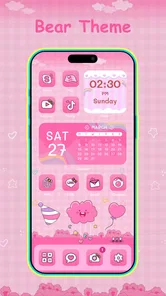
Analysis by Reviewed
In a home where a phone gets passed between people, personalization can be more than decoration: a familiar color scheme can make a shared screen easier to recognize, while a calmer layout can feel less cluttered. I’d treat BeautyTheme as a way to change the look of a device, not as a tool for managing separate household users. Its appeal is strongest when the person setting it up wants a more personal home screen and is happy to spend a little time choosing a visual style.
One phone, several people, one visual choice
A realistic use case is a family member borrowing a phone to check the time or use a visible app. A distinctive icon arrangement or widget style may make the screen feel more welcoming to its owner, but it won’t establish individual profiles or create boundaries between people. I would not use a theme as a substitute for device-level account settings, screen locks, or other controls. Those choices belong in the phone’s operating system, especially if several people regularly use the same device.
That distinction matters because changing icons and widgets affects presentation, not who can open apps or see information. If the phone is shared, I’d first agree on a design that works for its primary user and won’t make everyday tasks confusing for anyone borrowing it. A highly decorative screen may be fun for one person and harder to navigate for another. When quick access matters more than appearance, keeping the main screen simple is the better trade-off.
Set it up around the person who uses the phone most
Before applying a new look, I’d take a moment to notice which apps the owner reaches for without thinking. Those familiar shortcuts are part of the phone’s routine, and a visual refresh should not make them harder to find. Start with a small change—perhaps a coordinated set of icons or a single widget—then live with it for a day. This is a more useful test than changing everything at once, because it reveals whether the new design is attractive and practical after the novelty wears off.
For a shared household device, I’d also make the setup decision with the person who will use it most, rather than treating the home screen as a group project that needs to satisfy everyone. One person may prefer bright colors, while another values clear labels and familiar placement. BeautyTheme is best approached as an individual customization choice; the household can coordinate around it, but the app should not be mistaken for a shared calendar, family dashboard, or account-switching system.
Coordination without adding more clutter
There is a useful middle ground between a completely untouched home screen and an elaborate redesign. A consistent icon palette can give the device a more intentional feel while leaving the arrangement familiar. If you are helping someone else set up their phone, ask which visual changes they actually want and let them make the final choice. That small step avoids the common problem of a well-meant makeover that looks good to the helper but frustrates the person who uses the device every day.
Widgets deserve the same practical check. A widget can make information visible at a glance, but a screen crowded with decorative elements may be less convenient than the original layout. I’d choose only the items that fit a real routine, then judge them by whether they help the owner rather than whether they match every icon. If a widget is mainly there for appearance, that may still be a perfectly good reason to keep it—just be honest about the space it takes up.
More From Our News Desk

 Instagram
Instagram’s Power Comes From Its Place in Your Phone
A close look at how Instagram turns Meta’s reach, recommendation systems and everyday camera habits into durable platform power—and what that costs users.

 Gmail
GmailGmail in a Busy Inbox: Who Benefits Most?
From first account to crowded workday, Gmail earns its place through dependable search and flexible sorting—but its best fit depends on how much inbox maintenance you can tolerate.

 Prime Video
Switching to Prime Video: What Changes in Your Viewing Routine
Prime Video can make a compelling second home for streaming, but switching means learning a different catalog, rental layer, and route from browsing to playback.

 Universal TV Remote Control
Universal TV Remote Control Works Best as a Reliable Backup
A phone remote earns its place through quick setup and reliable habits. Here is how to get more from Universal TV Remote Control—and where its limits show.

 Weather - By Xiaomi
Weather by Xiaomi Review: Clear at a Glance, Less Clear Up Close
Xiaomi’s weather app makes everyday forecasts quick to scan, but its calm surface can leave useful details and recovery paths harder to find than they should be.

 X
XX Under Pressure: Can It Recover When Posting Goes Wrong?
A resilience-focused review of X, examining setup, mistaken posts, interruptions, weak connections, and the gaps that matter when recovery needs to be dependable.
Latest News



BeautyTheme is an Android personalization app from Wow Themes & Fulll HD Themes. It is free to download, with optional in-app purchases priced from under a dollar to around thirty dollars per item. I’d browse and decide what I actually want before spending, rather than assuming that every style or customization choice is included at no cost. That makes the experience easier to evaluate on its own merits and avoids treating a paid option as necessary for a basic visual refresh.
Age, trust, and sensible expectations
The app is rated for Everyone, which makes its general audience broad, but that label does not mean every household should hand over a device without supervision. A child choosing colors or icons can be a harmless personalization activity, while purchase decisions and access to the phone itself still need to follow the family’s usual rules. I would keep any spending decisions with the adult responsible for the device, particularly because optional purchases are available.
It is also worth keeping expectations grounded. A theme can change how the phone looks, but it does not make the device safer, create private spaces, or provide household coordination features. If those are the main reasons you are looking for an app, the phone’s built-in user and privacy settings are the more relevant place to start. BeautyTheme makes sense when the goal is visual expression, not when the goal is managing people or permissions.
What the customization feels like in everyday use
Hey there, app enthusiasts! Today, I’m diving into the world of smartphone personalization with the BeautyTheme: Icons & Widgets app. If you’re someone who loves to tweak and customize every inch of your mobile device, then you’re in for a treat. Let’s get into the nitty-gritty of this app and see what makes it tick.
Unleashing Your Creativity with Custom Icons
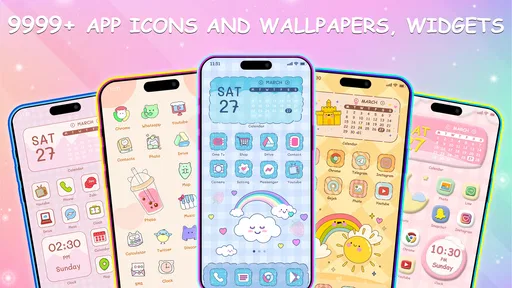
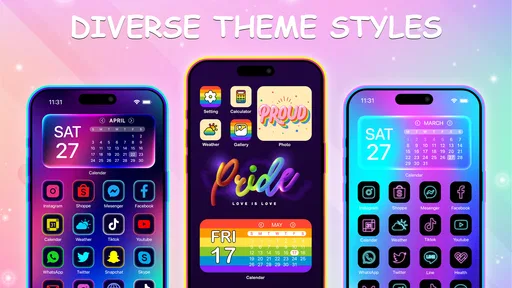
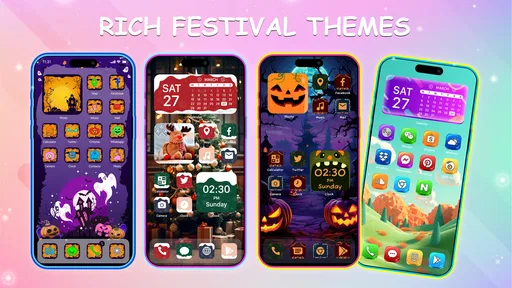
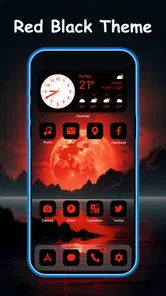
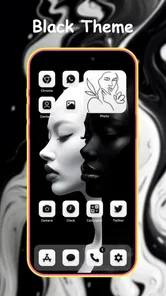
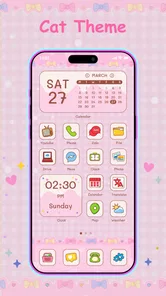
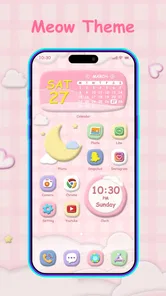
One of the standout features of BeautyTheme: Icons & Widgets is its vast library of custom icons. We all know that the default icons can get a bit monotonous, right? Well, this app lets you swap them out for something that better suits your vibe. Whether you're into minimalistic designs or something more vibrant and eye-catching, BeautyTheme has got you covered. I found myself spending a solid hour just browsing through the options and trying to decide which set to go with. Spoiler alert: I went with a retro theme, and it looks fantastic!
Widgets That Wow
Now, let’s talk widgets. These little guys are not just for decoration; they’re functional too! BeautyTheme offers a wide array of widgets that can display everything from the weather to your daily step count. The ability to customize the look and feel of these widgets adds a personal touch to your device. I particularly loved the clock widget, which comes with several styles to match whatever aesthetic you’re going for.
Another cool feature is the ease of use. Even if you’re not tech-savvy, the app guides you through the process of setting up your widgets and icons with simple, clear instructions. So, no need to worry about getting lost in a sea of settings.
Performance and User Experience
When it comes to performance, BeautyTheme doesn’t disappoint. The app runs smoothly without any noticeable lag, which is crucial when you’re switching between apps and customizing your home screen. The user interface is intuitive and user-friendly, making the whole personalization experience a breeze.
The app offers a free version with plenty of features to get you started, but if you’re looking to unlock the full potential, there’s a premium version available. Honestly, considering the amount of content and customization it offers, it’s worth every penny.
Overall, if you’re looking to give your smartphone a fresh new look, BeautyTheme: Icons & Widgets is definitely worth checking out. It’s like giving your phone a makeover without the hefty price tag. So go ahead, unleash your creativity and have fun with it!
Choosing it over the phone’s built-in options
The most useful comparison is not with another theme app in the abstract, but with the customization already available on your phone. Built-in options are usually the sensible choice if you only want to change wallpaper, adjust colors, or keep every shortcut exactly as it is. BeautyTheme is more appealing when you want icon and widget styling to work together and enjoy browsing for a look rather than making one quick system-level adjustment.
Compared with manually arranging shortcuts or relying on a launcher, an icon-and-widget app can be a more approachable starting point for someone who wants a coordinated appearance without first learning a different home-screen tool. The trade-off is that a dedicated customization app introduces another layer to the process. If you already like your launcher and have a carefully organized screen, changing icons may mean extra setup that offers little practical benefit. I’d choose the route that preserves the routines you already rely on.
Small workflow choices that make a difference
One easy mistake is picking a theme by its preview alone. A polished sample screen may show a handful of icons, while your everyday phone contains many more. Before committing to a style, think about whether the overall look will still feel coherent once you return to your normal mix of apps. I’d favor a set that leaves the important shortcuts recognizable over one that looks striking in a screenshot but makes familiar apps harder to identify.
Another useful approach is to separate experimentation from the final setup. Try a visual direction when you have a little time, then check the screen later during a routine task—when you are looking for a message, checking the time, or opening a frequently used app. That second look is a better test of usability than the first burst of excitement. If you find yourself searching for shortcuts, simplify the arrangement rather than adding more decorative elements to compensate.
Widgets also work best when they answer a specific need. A clock is an obvious fit for a home screen because it can be both decorative and useful. For any other widget, I’d ask whether seeing that information there saves a step in the day. If not, it may still be worth keeping for its design, but it should earn its space. This is especially helpful on a shared phone, where screen space has to serve the owner’s habits rather than everyone’s hypothetical preferences.
Who will enjoy it—and who may prefer something else
I can see BeautyTheme suiting someone who enjoys seasonal refreshes, likes coordinating colors, or wants a phone screen that feels less like the default setup. It is also a reasonable choice for a person who wants to explore visual options without beginning with a complicated home-screen redesign. The strongest fit is someone who sees customization as part of using the phone and does not mind taking time to choose a look.
I would skip it if you want a strictly functional screen, are already satisfied with your current icons, or need a tool for shared accounts, privacy, parental controls, or household scheduling. Those are different problems, and a visual personalization app should not be expected to solve them. Someone who dislikes browsing choices may also be happier with a quick wallpaper change through the phone’s own settings. There is no need to add another app if a simpler change gives you the result you want.
The audience is broad: the app has an Everyone age rating, and it has been available since spring 2023. It currently carries an average rating of 3.8 from around ten thousand ratings, with roughly 150 written reviews, and has passed five million installs. Those figures suggest that many people have tried it, but they do not tell me whether a particular style will suit your device or whether you will enjoy the setup process. I’d use them as context, not as a substitute for deciding what you want from a home screen.
What to check before settling on a design
If you are choosing a look for someone else, let that person test the screen rather than judging only by appearance. Ask them to find their usual shortcuts and tell you whether the icons feel clear. For a child, keep the activity focused on design choices and leave purchases and device access under the household’s normal supervision. That is a more practical boundary than assuming the age rating itself answers every question about how the app should be used.
For your own phone, I’d make one change at a time and keep track of what you actually like. A new icon set may be the part that makes the device feel fresh, while a widget could turn out to be visual clutter. That is not a failure; it is useful feedback. Customization should fit the way you use the phone, and there is no benefit in keeping a feature just because it was part of the original design idea.
The app’s current version is 20251120, and it supports Android 7.0 and later. That makes the minimum Android requirement worth checking before you plan a redesign on an older device. If you use an iPhone, do not assume that this Android app is available there simply because icon and widget customization is also possible on iOS through other methods. Choose a solution designed for your operating system and follow that platform’s own setup process.
A balanced household verdict
For a household, I’d think of BeautyTheme as a personal styling option that can be shared as an idea, not as a shared-use system. It may be enjoyable to compare a few looks together, especially when someone wants help making a phone feel more like their own. But the final layout should remain practical for the person who uses that device most, and household boundaries should be handled through the phone’s existing settings rather than inferred from the theme.
My recommendation is simple: try it if choosing icons and widgets sounds enjoyable and you want a visible refresh. Start small, check that everyday shortcuts remain easy to find, and consider the optional purchases before deciding what you want to unlock. If your priority is privacy, account separation, or a no-fuss screen, use the operating system’s tools or keep your current layout instead. BeautyTheme is at its best when the goal is a more personal-looking phone, and it is a less convincing fit when you need anything beyond that.
BeautyTheme: Icons & Widgets Frequently Asked Questions
Does BeautyTheme: Icons & Widgets cost anything to download?
BeautyTheme: Icons & Widgets is free to download, so you can explore the app without paying upfront. It also offers in-app purchases, with prices ranging from $0.99 to $29.99 per item. If you prefer to keep your spending under control, check any purchase options before confirming them and enjoy the free content that suits your style.
What is BeautyTheme: Icons & Widgets and what does it offer?
BeautyTheme: Icons & Widgets is a personalization app designed to enhance the visual appeal of your smartphone interface. It offers a wide range of icon packs, themes, and widgets that allow users to customize their home screen appearance. With a user-friendly interface, it provides an easy way to express personal style and creativity through your device's display.
Is BeautyTheme: Icons & Widgets compatible with all Android and iOS devices?
BeautyTheme: Icons & Widgets is designed to be compatible with most Android and iOS devices. However, some features may vary depending on the operating system version and device specifications. It's recommended to check the app's compatibility details on the respective app store before downloading to ensure it works smoothly on your device.
Are there any in-app purchases or subscription fees in BeautyTheme: Icons & Widgets?
Yes, BeautyTheme: Icons & Widgets offers both free and premium content. While the app provides a selection of free icons and themes, users can access additional features and exclusive content through in-app purchases or subscription plans. These premium options enhance the customization experience, offering a wider variety of design choices.
How user-friendly is the customization process in BeautyTheme: Icons & Widgets?
The customization process in BeautyTheme: Icons & Widgets is highly user-friendly, designed with simplicity in mind. The app features an intuitive interface that allows users to easily browse and apply themes, icons, and widgets. Whether you are a tech-savvy individual or a beginner, the app provides step-by-step guidance to ensure a seamless customization experience.
Pros
- User-friendly interface
- easy to navigate.
- Wide variety of icon and widget designs.
- Regular updates with new themes.
- Customizable options for personalization.
- Supports both Android and iOS devices.
Cons
- Some features require in-app purchases.
- Occasional bugs in the widget display.
- Limited free options available.
- Requires frequent updates for new content.
- May consume more battery life on older devices.












