

ThemeMax: Widgets & Wallpapers
- 38.00
- 3.7
- Installs
- 1.00M
- Price
- Free

Screenshots
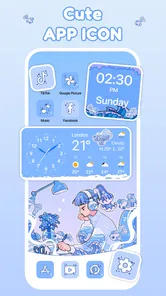
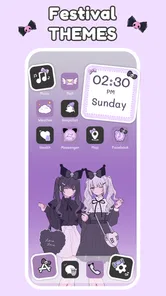
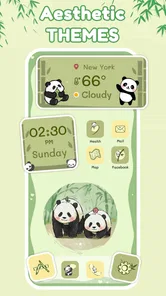
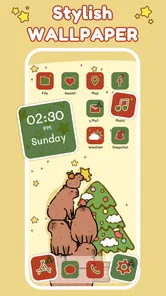
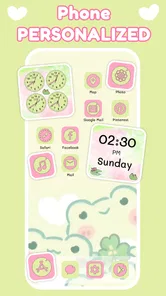
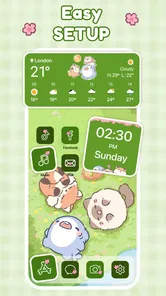
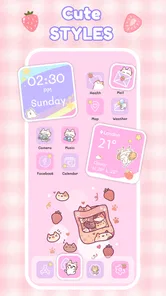
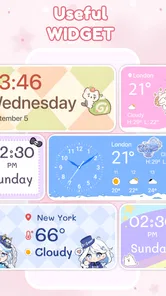
Analysis by Reviewed
I reach for ThemeMax: Widgets & Wallpapers when my home screen feels more like a pile of shortcuts than a space I chose for myself. It’s a free personalization app from Wow Themes & Fulll HD Themes, aimed at people who want to coordinate icons, widgets, and backgrounds without designing every element from scratch. The key is to treat it as a small makeover workflow: choose a visual direction, check how it works with the apps you actually use, then decide whether the finished screen is still practical.
Start with the screen you already use
Before browsing, I’d look at the home screen’s real job. If you check the time and weather at a glance, a decorative widget should not make those details harder to read. If your most-used apps sit in a familiar order, leave room for them rather than building a layout around a striking wallpaper. This simple check helps avoid a common customization trap: choosing attractive pieces individually that feel crowded or mismatched once they share a screen.
That makes this a better fit for someone who enjoys occasional visual changes than for someone who wants a complete phone overhaul every day. On Android, the app is listed for devices running version 7.0 or later, and its Everyone age rating makes it broadly accessible. It has a 3.7 average from around 3,400 ratings, so I’d approach it as a useful option to explore rather than assume every part will suit every setup.
Unveiling the World of Customization
Okay, so first things first, the sheer variety of options in ThemeMax: Widgets & Wallpapers is mind-blowing. I’m talking hundreds of widgets and wallpapers that you can mix and match to create your perfect home screen.
The app is super easy to navigate, too. Once you open it, you’re greeted with a sleek interface that makes browsing through themes a breeze. I have to say, the design is pretty intuitive, which is always a plus in my book.
Widgets Galore
One thing I absolutely love about this app is the selection of widgets. From clock designs that are minimalist yet chic, to weather widgets that keep you updated in style – there’s something for everyone. I found myself spending way too much time just scrolling through all the options!
Plus, you can customize these widgets to suit your taste. Whether you want to change the color scheme or tweak the transparency, the app gives you the flexibility to do so. It’s like having a mini design studio right in your pocket.
More From Our News Desk

 Gmail
GmailGmail in a Busy Inbox: Who Benefits Most?
From first account to crowded workday, Gmail earns its place through dependable search and flexible sorting—but its best fit depends on how much inbox maintenance you can tolerate.

 Prime Video
Switching to Prime Video: What Changes in Your Viewing Routine
Prime Video can make a compelling second home for streaming, but switching means learning a different catalog, rental layer, and route from browsing to playback.

 Universal TV Remote Control
Universal TV Remote Control Works Best as a Reliable Backup
A phone remote earns its place through quick setup and reliable habits. Here is how to get more from Universal TV Remote Control—and where its limits show.

 Weather - By Xiaomi
Weather by Xiaomi Review: Clear at a Glance, Less Clear Up Close
Xiaomi’s weather app makes everyday forecasts quick to scan, but its calm surface can leave useful details and recovery paths harder to find than they should be.

 X
XX Under Pressure: Can It Recover When Posting Goes Wrong?
A resilience-focused review of X, examining setup, mistaken posts, interruptions, weak connections, and the gaps that matter when recovery needs to be dependable.

 Clash of Clans
Clash of Clans Is Won Between the Battles
Its raids are quick; its community is a long-term project of coordination, teaching, rivalry, and shared responsibility—with all the friction that entails.
Latest News



Wallpapers to Wow
Now, let’s talk about the wallpapers. Whether you’re into vibrant landscapes or sleek abstract designs, ThemeMax has got you covered. I found some stunning HD wallpapers that made my home screen pop like never before. And the best part? They’re regularly updated, so you’ll never run out of fresh choices.
Oh, did I mention you can also create your own wallpapers? Yep, unleash your inner artist and craft something truly unique. It’s features like these that really set ThemeMax apart from the rest.
Making the choices work together
My practical tip is to pick the wallpaper first, then test widget colors and transparency against it. A pale clock over a bright sky can disappear in daylight, while a detailed background behind several widgets may make the screen feel noisy. I’d also keep one uncluttered page for everyday tasks and use a second page for a more decorative arrangement. That way, experimenting doesn’t make the phone slower to navigate by habit.
A realistic use case is a quick seasonal refresh: I might swap a muted background for something brighter, adjust the clock widget to keep it legible, and leave my app positions alone. This is where ThemeMax’s mix-and-match approach can be more convenient than hunting through separate wallpaper, widget, and icon sources. The trade-off is that a dedicated launcher or a phone’s built-in theme controls may offer tighter control over the whole interface, especially if your goal is to change system-wide appearance rather than just the home screen.
From browsing to a usable layout
I’d treat the process as a series of small handoffs rather than expect one tap to produce a finished screen. First, settle on the wallpaper’s mood and dominant colors. Then choose a widget that supports what you check most often, instead of adding several simply because they look good in a preview. Finally, place the familiar apps around that arrangement and judge the screen at its normal viewing distance. This sequence makes it easier to identify what is causing a clash.
One useful refinement is to test contrast in more than one setting. A design that looks clear indoors may be harder to read in bright light, particularly if the background is busy or the widget uses a similar shade. I’d also consider the shape of the empty spaces: a large widget can make a page feel intentional, but it may push frequently used apps away from their usual positions. If that happens, changing the wallpaper or widget size is often a better fix than rearranging the whole phone.
Where the makeover can snag
Customization still takes some trial and error. A widget that looks balanced in a preview may compete with app labels or occupy space you need, so I’d make one change at a time and check the actual home screen before committing to a full layout. If you mainly want a plain background and never adjust widgets, a basic wallpaper app or the phone’s existing settings will probably be quicker and less distracting.
There’s also a sensible spending question: the app is free to download, with optional in-app purchases ranging from $0.99 to $11.99 per item. I’d first see whether the free choices give you the look you want before paying for anything. ThemeMax has reached over one million installs, and its current version is 20251123; those details make it an established option to consider, but they don’t replace checking how its particular styles fit your device and taste.
Who will get the most from it
I think ThemeMax is most useful for someone who wants a visible change without committing to a new launcher or rebuilding the phone’s entire interface. It suits people who enjoy choosing colors and balancing a few elements, but still want their ordinary app layout to feel familiar. Someone setting up a phone for a fresh term, a new job, or a change of season could use it to give the main screen a different feel while keeping the same daily shortcuts.
It is less compelling if your priority is strict consistency across every screen and system menu. A launcher may be the better route when you want to control navigation, icon placement, and the broader layout together. Built-in phone personalization can also be a simpler choice for someone who only wants a background or a small set of coordinated system styles. ThemeMax makes more sense when the visual combination of its wallpaper and widget choices is the point.
Small checks that save a second redesign
Before settling on a layout, I’d take a moment to check whether the wallpaper leaves enough quiet space behind the widgets. A focal point placed beneath a clock or a dense group of icons can make both the image and the information harder to take in. I’d also avoid changing several parts at once: keep the app positions stable while testing a new background, then adjust one widget if the screen still feels off. That makes it easier to undo only the choice that caused trouble.
For a workday screen, I’d favor quick recognition over decoration: one information widget, the apps I reach for most, and enough contrast to scan the page without stopping. For a personal or weekend page, I’d be more willing to use a bolder image and accept a little less space for shortcuts. That split is a practical way to enjoy customization without asking one screen to be both a mood board and a fast control panel.
Wrapping Up the Experience
All in all, I’m genuinely impressed with what ThemeMax: Widgets & Wallpapers has to offer. It’s a paradise for anyone who loves to tweak and personalize their device. If you haven’t tried it out yet, I highly recommend giving it a go. Trust me, once you do, you’ll wonder how you ever managed without it!
So, what are you waiting for? Dive into the world of customization and let your creativity flow. Your phone deserves a makeover, and ThemeMax is just the app to make it happen.
My final advice is to judge the result by everyday use, not just the preview: can you read the clock, spot your regular apps, and still enjoy the background after a week? The app is best for people who like making those small visual decisions and are happy to refine a screen gradually. If you want a highly coordinated, system-wide transformation with minimal tweaking, I’d compare it with the theme or launcher options already available on your device before settling on this approach.
ThemeMax: Widgets & Wallpapers Frequently Asked Questions
What does ThemeMax: Widgets & Wallpapers let me customize?
ThemeMax: Widgets & Wallpapers focuses on personalizing your phone’s home screen with aesthetic icons, widgets, and wallpapers. It brings these options together in one app, so you can explore different looks and choose a style that suits your preferences. If you enjoy refreshing your screen’s appearance, its central purpose is to help you make that everyday interface feel more personal.
Is ThemeMax: Widgets & Wallpapers compatible with my Android device?
ThemeMax is an Android personalization app, and it supports devices running Android 7.0 or later. Before downloading, check the Android version in your device settings to make sure it meets that requirement. Compatibility is worth checking first, particularly if you use an older phone or tablet, since an incompatible operating system can prevent an app from installing or working as intended.
What is ThemeMax: Widgets & Wallpapers and what does it offer?
ThemeMax: Widgets & Wallpapers is a versatile app that allows users to customize their smartphone's appearance with a variety of widgets and wallpapers. The app offers a vast library of themes, widgets, and wallpapers that cater to different styles and preferences, enabling users to personalize their device to reflect their unique taste.
Is ThemeMax: Widgets & Wallpapers free to use or does it require a subscription?
ThemeMax offers both free and premium options. While users can access a decent selection of widgets and wallpapers for free, unlocking the full potential of the app, including premium themes and ad-free experience, requires a subscription. The subscription provides access to exclusive content and regular updates. In-app purchases are available, with prices ranging from $0.99 to $11.99 per item, so review the purchase details before paying.
How user-friendly is ThemeMax: Widgets & Wallpapers for beginners?
ThemeMax is designed with user-friendliness in mind, making it accessible to both novices and experienced users. The intuitive interface guides users through the customization process, allowing them to easily select and apply new themes and widgets. The app also provides tips and tutorials to enhance the user experience.
Pros
- Highly customizable widget options
- Vast selection of HD wallpapers
- User-friendly interface
- Regular updates with new features
- Supports both Android and iOS
Cons
- Some features require premium version
- Occasional ads can be intrusive
- Limited free customization options
- Can drain battery quickly
- Requires constant internet connection












