Baby Sleep Sounds
- 7.00
- 3.7
- Installs
- 10.00K
- Price
- Free

Screenshots
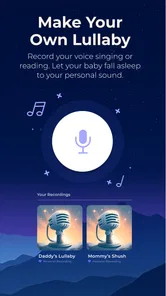
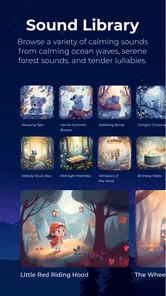
Analysis by Reviewed
With a newborn, bedtime can feel less like a routine and more like a series of small experiments. I like that Baby Sleep Sounds keeps the idea simple: choose a sound, see whether it settles your baby, and adjust from there. It is a free parenting app from OddLabs, with optional in-app purchases ranging from $0.99 to $19.99 per item. Its Everyone age rating makes the audience clear, though the sounds are intended for caregivers to use thoughtfully.
What to expect on your first visit
The app is focused on audio rather than a full sleep-tracking or parenting system. That narrow purpose is useful when you want something quick during a fussy moment, but it also means you should not expect it to explain why your baby is waking or replace a bedtime routine. I would treat it as one calming tool, not a guaranteed sleep solution: babies respond differently, and a sound that helps one night may not work the next.
For context, it has a 3.7 average from around 67 ratings and over 10,000 installs. Those figures suggest that families are trying it, but they are not a promise that it will suit every household. I would judge it by whether its sound choices and playback fit your own routine, rather than expecting a particular result based on its popularity.
Make the first setup low-pressure
When you open it, start with one sound and keep the first test uncomplicated. The app includes white noise, nature audio and familiar household sounds, so there is no need to build a complicated mix before you know what your baby tolerates. Keep the phone somewhere stable and out of the sleep space, then use a comfortable volume; the goal is a consistent background, not a sound that competes with everything else in the room.
If your baby is already upset, this is not the moment to audition every option. Pick one plausible sound, give it a little time, and watch your child rather than the screen. That small workflow is more useful than constantly switching tracks, which can make it harder to tell whether a particular sound is helping. I also recommend deciding where the phone will sit before starting, so you are not handling it over the crib while trying to settle your baby.
Why Baby Sleep Sounds is a Game Changer
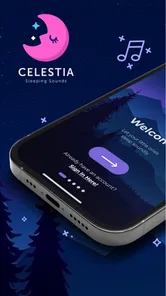
First off, the Baby Sleep Sounds app is super user-friendly. You don't need to be a tech guru to navigate through it. It's all about simplicity, which is great when you're juggling a baby and everything else life throws at you. The interface is straightforward, allowing you to quickly select the sound you want without any fuss.
Variety of Soothing Sounds
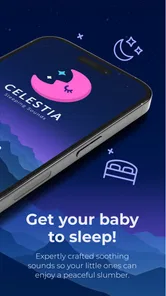
The app boasts a wide range of soothing sounds that are perfect for helping your little one drift off to dreamland. From white noise to nature sounds, and even household sounds like a vacuum cleaner or hairdryer, it covers all bases. I found the "Rainfall" and "Womb Sounds" to be particularly effective in calming my baby. There's something about these sounds that mimics the kind of white noise babies are used to in the womb, and it works like a charm.
More From Our News Desk

 Gmail
Gmail in a Busy Inbox: Who Benefits Most?
From first account to crowded workday, Gmail earns its place through dependable search and flexible sorting—but its best fit depends on how much inbox maintenance you can tolerate.

 Prime Video
Switching to Prime Video: What Changes in Your Viewing Routine
Prime Video can make a compelling second home for streaming, but switching means learning a different catalog, rental layer, and route from browsing to playback.

 Universal TV Remote Control
 Works Best as a Reliable Backup
A phone remote earns its place through quick setup and reliable habits. Here is how to get more from Universal TV Remote Control—and where its limits show.

 Weather - By Xiaomi
Weather by Xiaomi Review: Clear at a Glance, Less Clear Up Close
Xiaomi’s weather app makes everyday forecasts quick to scan, but its calm surface can leave useful details and recovery paths harder to find than they should be.

 X
X Under Pressure: Can It Recover When Posting Goes Wrong?
A resilience-focused review of X, examining setup, mistaken posts, interruptions, weak connections, and the gaps that matter when recovery needs to be dependable.

 Clash of Clans
 Is Won Between the Battles
Its raids are quick; its community is a long-term project of coordination, teaching, rivalry, and shared responsibility—with all the friction that entails.
Latest News



Customizable Experience
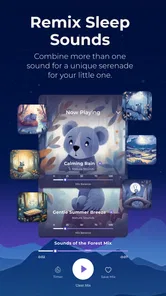
One of the standout features is the ability to customize the sound experience. You can mix and match different sounds to create the perfect sleep environment for your baby. Plus, the app allows you to set a timer, so you don't have to worry about turning it off once your baby is asleep. This feature is a lifesaver, especially during those late-night sleep sessions when you're half asleep yourself!
A useful way to explore the mixing option is to change only one layer at a time. For example, if rainfall seems close but not quite right, keep it steady and add or remove just one other sound. That makes it easier to notice what your baby responds to, and gives you a repeatable combination for naps away from home. The timer also has a practical trade-off: it can prevent audio from running longer than you want, but if your baby relies on continuous sound, playback ending may wake them. I would test the timing during a daytime nap before relying on it overnight.
Portability and Convenience
The convenience of having this app on your phone cannot be overstated. Whether you're at home, in the car, or visiting family, you can always have your sleep-inducing sounds at the ready. It's like carrying a portable sleep machine in your pocket. No more lugging around bulky sound machines or worrying about access to plug points.
Another thing I love is that it doesn't require an internet connection to play the sounds. This means you can use it anywhere, anytime, without any interruptions. Perfect for those long car rides or flights where getting your baby to sleep is crucial.
Where it fits in a real routine
Imagine visiting relatives after a long day: the room is unfamiliar, the usual bedtime cues are missing, and your baby is getting overtired. I would use the same familiar sound combination from home, start it before the bedtime routine reaches its most difficult point, and keep the phone in a safe, predictable place. That gives the sound a chance to become part of the routine instead of a last-second response to crying. Offline playback is especially handy when travel means unreliable reception, though you will still want enough battery for the rest of your trip.
Compared with a dedicated sound machine, the app is easier to carry and can offer more flexibility through mixing. A physical device may be the better choice if you want a separate control that another caregiver can find immediately, or if you do not want your phone occupied during naps. Compared with a general music or audio app, this one is more directly organized around baby-calming sounds, but it is less useful if you want songs, sleep logs or broader routine planning.
Small trade-offs worth knowing
Phone-based playback is convenient, but it ties the sound to a device you may also need for calls, messages or other tasks. Before a nap, I would set the sound and timer first, then avoid changing apps unless necessary. If the phone is also your only way to monitor or contact someone, a separate sound machine may be less distracting. And while the app is free to try, optional purchases mean I would explore the basic experience before deciding whether any paid item is worthwhile.
The app has been available since June 6, 2024, and its current version is 0.2.24, with Android support from version 5.0 onward. Those details matter if you are checking an older device before installing. For a first-time user, the most important test is still practical: can you find a sound quickly, keep playback convenient, and repeat the setup without adding stress to bedtime?
Choosing a sound that suits your baby
One thing I would avoid is assuming that the sound with the most obvious “sleepy” label will be the best choice. A steady, simple noise may be less distracting for one baby, while another may settle more easily with rainfall or a familiar household sound. Use the app as a way to test possibilities, not as a menu with one universally correct answer. If a sound seems to make your baby more alert or unsettled, stop it and try a quieter, simpler option another time.
It can also help to keep a brief note outside the app about what you tried and when. You do not need a formal sleep log: a few words such as “rainfall, afternoon nap” can help you avoid repeating experiments when you are tired. This is particularly useful if more than one caregiver takes turns. Agreeing on one or two familiar choices makes handoffs smoother than asking the next person to guess which combination you used.
When the phone is not the right tool
Although portability is a real advantage, it comes with a practical compromise: the phone is a shared household device, not a dedicated nursery control. If you rely on it for calls, a baby monitor, or instructions from another caregiver, starting audio may add one more thing to manage. I would set up playback before settling in, and keep the phone accessible to an adult without placing it in the crib or other sleep space. If managing the device becomes more work than the sound is worth, a basic standalone sound machine may be the calmer choice.
There is also a difference between helping with a familiar settling cue and solving a difficult night. A sound app cannot tell you whether discomfort, hunger, illness, or a change in routine is behind crying. I would stop treating the audio as the answer if your baby seems distressed or the usual soothing approach is not working. Its best role is modest: it can provide a consistent background while you respond to your child in the way the situation needs.
Who will get the most from it
I think the app makes the most sense for caregivers who are curious about sound but do not yet know which kind their baby prefers. It is also handy for families who move between rooms or homes and want to carry a familiar audio option without packing another device. The ability to combine sounds gives you room to make small adjustments, while the timer can suit a nap when you do not want playback to run indefinitely.
It is less compelling if you already own a sound machine that your baby likes, if you want an app that tracks sleep patterns, or if keeping a phone nearby would make you feel distracted. It is also not the right fit if you expect a sound choice to produce a reliable result every time. In my view, the most realistic reason to try it is that it is free to start and easy to assess in your own routine; the optional purchases are a reason to decide based on actual use rather than impulse.
A reassuring first test
For a first meaningful test, I would choose a calm moment before your baby is overtired, select one sound, set a comfortable level, and let it play while you follow your ordinary settling routine. Give yourself a simple measure of success: perhaps the sound makes the room feel more consistent or helps your baby relax, even if sleep does not follow immediately. If it does not seem useful, there is no need to keep pushing it. Try a different option on another occasion rather than changing several things at once.
That approach also answers a common first-time concern: whether you need to buy anything or configure a perfect mix before getting started. You can begin with the basic experience, learn what your baby tolerates, and only consider an optional purchase if you have a clear reason. The app is intended for Everyone, but I would still treat it as a caregiver’s tool and keep the device and volume choices sensible around a sleeping child.
Final Thoughts
All in all, the Baby Sleep Sounds app is a must-have for any parent. It's a simple yet effective tool that can make a world of difference in your baby's sleep routine. The range of sounds, ease of use, and portability make it a no-brainer. If you're struggling with getting your baby to sleep, give this app a try – you won't regret it!
My recommendation is a little more specific: it is worth trying if you want a portable way to test white noise, familiar household audio or a custom mix without buying a separate machine first. I would skip it if you need sleep tracking, want music-led routines, or prefer not to use a phone near nap time. Keep expectations gentle, use a comfortable volume, and repeat the combinations that seem to help. That is the most reassuring path from installation to a useful first result.
Baby Sleep Sounds Frequently Asked Questions
What should I know about Baby Sleep Sounds before downloading it?
Baby Sleep Sounds is a parenting app by OddLabs, with a focus on white noise, sleep sounds, and a calm nursery atmosphere. It is free to download and is rated for everyone, so parents can explore its intended use before deciding whether its sound options fit their family’s bedtime routine.
What features does the Baby Sleep Sounds app offer to help my baby sleep better?
The Baby Sleep Sounds app provides a broad range of soothing sounds, including white noise, lullabies, and nature sounds, designed to help lull your baby to sleep. Users can customize playlists and set timers to ensure the sounds fade out gently after your child has fallen asleep, promoting uninterrupted rest.
Is the Baby Sleep Sounds app free to use or does it require a subscription?
The Baby Sleep Sounds app is available for free download with basic features accessible to all users. However, it offers in-app purchases, ranging from $0.99 to $19.99 per item, which can unlock additional sounds and features, such as ad-free listening, offline mode, and expanded access to exclusive content, enhancing the overall user experience.
How user-friendly is the interface of the Baby Sleep Sounds app?
The Baby Sleep Sounds app boasts an intuitive and user-friendly interface, making it easy for parents to navigate through its features. With straightforward controls, customizable playlists, and easily accessible settings, even sleep-deprived parents will find it simple to operate, ensuring a smooth and stress-free experience.
Can I play Baby Sleep Sounds on multiple devices simultaneously?
Yes, the Baby Sleep Sounds app supports multiple device usage. This means you can log into the app on several devices at once, ensuring that you have access to the soothing sounds wherever you and your baby are, whether at home or traveling. Check the app settings for specific instructions on device synchronization.
Pros
- Wide variety of soothing sounds
- User-friendly interface
- Customizable playlists available
- Works offline seamlessly
- High-quality sound effects
Cons
- Limited free version features
- Ads can be intrusive
- No sleep tracking functionality
- Sound loops could be longer
- Requires in-app purchases for more features