

Baby Monitor 3G - Video Nanny
- 240.00
- 4.4
- Installs
- 100.00K
- Price
- $5.99
Screenshots
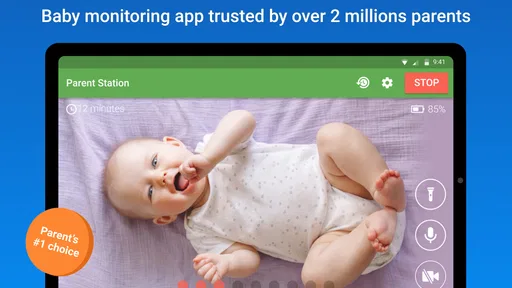
Analysis by Reviewed
For a household that already has two phones or tablets available, turning one into a nursery-side device can be a practical alternative to buying a separate monitor. Baby Monitor 3G - Video Nanny is a paid parenting app from TappyTaps s.r.o., built around that two-device arrangement. I find the idea most useful when a parent wants to check in from another room or step away briefly, while still keeping the setup simple enough to manage during an ordinary evening.
One pair of devices, one shared routine
A realistic use case is a child settling down for a nap while one caregiver tidies the kitchen and another takes a quick trip to a nearby shop. One device stays near the child, and the second travels with the adult who wants to listen or look in. That makes the app a better fit for families with a spare device than for someone who would need to buy hardware just to try it.
It also changes how a household should think about sharing. The nursery device is part of the room’s routine, while the parent’s device is personal and may move between people. I would agree in advance who is carrying the receiving device and who will respond if the child wakes; otherwise, two adults can assume the other one is listening. This is a small coordination step, but it matters more than adding another notification to an already busy household.
What a shared-device setup asks of you
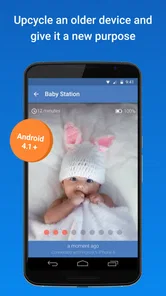
The most useful question to settle before installing anything is not just which phone goes in the nursery, but whether that phone can stay there consistently. If it is also the device someone needs for calls, work, or daily errands, the monitoring routine may be interrupted whenever it gets picked up. A spare tablet or an older phone can make more sense, provided it is compatible and can be kept in a stable, safe position.
For a household with separated caregiving shifts, I would make the handoff explicit: say who has the receiving device, when responsibility changes, and what to do if that person needs to leave the room. This is not a special family-management feature; it is simply a sensible routine around a shared tool. It also helps avoid the awkward situation where both adults believe the other is watching.
There is a privacy boundary here, too. Anyone who can access the receiving device may be able to take part in monitoring, so I would keep its use among caregivers who have agreed to it. For older children, I would explain why the device is present and when it is being used. A monitor can support care without turning ordinary family spaces into places where someone feels secretly observed.
Setting Up and Getting Started
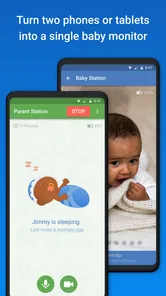
Getting started with Baby Monitor 3G - Video Nanny is a breeze. The app requires you to have two devices - one stays with your baby, while the other stays with you. You can use any combination of phones, tablets, or computers, which is pretty flexible. Just install the app on both devices, connect them to the same Wi-Fi network, and you're all set.
More From Our News Desk

 Gmail
GmailGmail in a Busy Inbox: Who Benefits Most?
From first account to crowded workday, Gmail earns its place through dependable search and flexible sorting—but its best fit depends on how much inbox maintenance you can tolerate.

 Prime Video
Switching to Prime Video: What Changes in Your Viewing Routine
Prime Video can make a compelling second home for streaming, but switching means learning a different catalog, rental layer, and route from browsing to playback.

 Universal TV Remote Control
Universal TV Remote Control Works Best as a Reliable Backup
A phone remote earns its place through quick setup and reliable habits. Here is how to get more from Universal TV Remote Control—and where its limits show.

 Weather - By Xiaomi
Weather by Xiaomi Review: Clear at a Glance, Less Clear Up Close
Xiaomi’s weather app makes everyday forecasts quick to scan, but its calm surface can leave useful details and recovery paths harder to find than they should be.

 X
XX Under Pressure: Can It Recover When Posting Goes Wrong?
A resilience-focused review of X, examining setup, mistaken posts, interruptions, weak connections, and the gaps that matter when recovery needs to be dependable.

 Clash of Clans
Clash of Clans Is Won Between the Battles
Its raids are quick; its community is a long-term project of coordination, teaching, rivalry, and shared responsibility—with all the friction that entails.
Latest News



Set clear boundaries before relying on it
The two-device approach is convenient, but it depends on both devices being ready when you need them. Before bedtime, I would check that the nursery-side device is positioned securely, has enough power, and is not likely to be covered by bedding or moved by a curious child. The receiving phone also needs to stay somewhere its owner can hear or see it. These are simple household checks, not complicated technical steps, yet they prevent avoidable surprises.
Because the app can use mobile data as well as home Wi-Fi, I would decide who is allowed to take the receiving device away from the house and when. That is especially useful in a shared home: one caregiver may be comfortable checking in while out, while another may prefer that monitoring stays within the household routine. The app is not a substitute for agreeing on those boundaries, and it should not be treated as permission for someone else to monitor without the family’s knowledge.
I would also try the full routine before counting on it during a nap. Put the nursery device where you expect it to stay, take the receiving device to the place you plan to use it, and confirm that you can hear or see what you need. Testing from the kitchen, hallway, or usual outdoor spot is more informative than checking only while both devices sit beside each other. It lets you find practical snags—such as a phone being too quiet or awkward to keep nearby—while someone is still in the house.
Features That Make It Stand Out
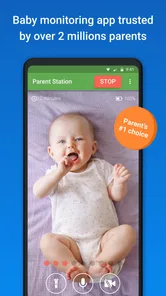
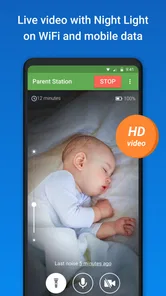
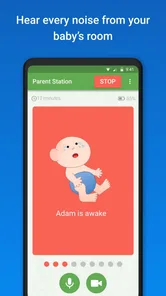
This app is packed with features that ensure you have a seamless monitoring experience. The video quality is top-notch, providing you with crisp visuals of your baby. It even works in low-light conditions, so you don't have to worry about dimly lit rooms. Audio monitoring is equally impressive, picking up every little sound your baby makes.
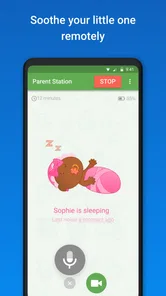
One feature I absolutely love is the two-way communication. Not only can you hear your baby, but you can also talk back to them. Whether it's singing a lullaby or soothing them back to sleep, this feature is a game-changer.
How to use sound and video thoughtfully
Video can be reassuring, but I would avoid turning every small movement into a reason to interrupt a nap. A quick glance can help answer a practical question—whether the child is still lying comfortably, for instance—while audio may be enough when the room is dark or you are busy. Two-way talk is most helpful when a familiar voice can settle a child; it is less useful if speaking through a device tends to wake or confuse them. I would try it during a calm moment rather than first testing it when everyone is already tired.
There is also a useful trade-off in relying on a phone rather than dedicated monitor hardware: you can use devices you already own, but those devices become part of the care setup. A phone needed for calls or other tasks may not be the best receiver during a nap. Keeping one device assigned to monitoring, even temporarily, makes the routine more dependable and avoids a caregiver having to choose between checking the child and using their phone for something else.
Two-way talk is worth treating as an option rather than an automatic response. If a child is settling independently, speaking at every sound may draw attention back to the monitor and make it harder to know whether they would have settled without help. I would save it for moments when a familiar voice is likely to be comforting, and use ordinary listening first to understand what is happening. That small distinction can make the feature more helpful and keep the receiving device from becoming a constant source of interruptions.
Staying Connected, Anytime, Anywhere
With Baby Monitor 3G - Video Nanny, you're not confined to your home Wi-Fi. The app allows you to switch to mobile data, so you can step out for a quick errand and still stay connected to your baby. It’s like having a piece of home with you wherever you go.
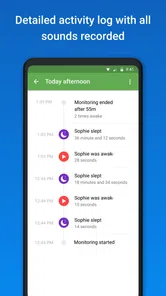
The app also provides activity logs, which are super handy. You can review past events and see if there were any disturbances during the night. This feature is particularly useful for tracking sleep patterns over time.
I would treat those logs as a way to revisit activity, not as a complete picture of sleep or a reason to diagnose a problem. They can help a caregiver compare notes after a disrupted night, but they cannot replace being present or discussing a persistent concern with a qualified professional. If you share care with another adult, a quick conversation about what the log shows is more useful than assuming both people interpret every event the same way.
Mobile access is most useful when the receiving adult has a clear reason to step away, not as a promise that monitoring will be equally dependable in every place and situation. I would keep the outing short and within a routine where another responsible caregiver can take over if needed. If leaving the home means the adult cannot respond promptly, the app should not be used to justify leaving a child without appropriate care.
Age, trust, and who should choose it
The app is rated Everyone, but that rating describes the app’s content, not whether every household setup is appropriate for every child. A parent or responsible caregiver still needs to place and manage the nursery device safely, and the child should not be left relying on a phone as a substitute for attentive care. For an older child, I would also be mindful that monitoring habits can affect privacy; explain the device in an age-appropriate way rather than making observation feel secretive.
Baby Monitor 3G suits caregivers who can keep two compatible devices available and value remote audio and video access. It is less compelling if you want a dedicated unit that stays installed in the nursery, or if your household does not want to depend on a phone and network connection for monitoring. In that case, a conventional baby monitor may be a better match. Its $5.99 price is a one-time purchase to consider against the cost and convenience of using equipment you already have, rather than against features you may never use.
Compared with a dedicated monitor, this approach can reduce the need to purchase another piece of equipment, but it asks you to manage two general-purpose devices instead. Compared with simply using a spare camera, its appeal is the paired listening and viewing arrangement rather than leaving a single camera to check later. If you mainly want a fixed nursery unit that another caregiver can pick up without thinking about phone availability, dedicated hardware is likely the easier choice. If your household already has spare devices and wants to check from a second phone, this app’s structure is more compelling.
Why Parents Love It
Parents rave about this app for its reliability and ease of use. There's no complicated setup or technical know-how required. Just a simple interface that does exactly what it promises. The peace of mind that comes with knowing you can always check in on your baby is priceless.
Moreover, the app is continuously updated to ensure compatibility with the latest devices and operating systems, which is a big plus. Knowing that the developers are actively working to improve the app gives a sense of security.
It has been available since April 29, 2014, and its current version is 7.0.0, with a minimum OS requirement of 6.0. I would still test the exact two devices you plan to use before making it part of a regular routine, particularly if one is older or borrowed. A little trial while an adult remains nearby is a better way to learn how the household setup behaves than discovering a mismatch after someone has stepped away.
For a sense of how established it is, the app has a 4.4 average from around 6,100 ratings, alongside more than 100,000 installs and 238 written reviews. Those figures suggest it has reached a sizeable audience, though they cannot tell you whether it will suit your home, devices, or caregiving habits. Its Everyone age rating is also worth distinguishing from the child’s age: it describes the app’s content, not a recommendation to let children operate the monitoring arrangement.
For a first evening, I would keep the test deliberately ordinary: use the same room, device positions, and caregiver roles you expect to have later. Check whether the nursery device can remain untouched, whether the receiving adult notices audio while doing a quiet task, and whether the image is useful from the places where that adult actually spends time. Testing the routine this way is more valuable than exploring every option at once, because it shows whether the basic arrangement fits your household.
A household decision, not just a download
I would choose this app when two-device flexibility and checking in from outside the room matter more than having dedicated monitor hardware. Before relying on it, make sure both caregivers understand which device is active, who is carrying it, and how mobile-data use fits the family’s routine. If either person needs a monitor that works independently of their phone, or if the household cannot keep both devices available, another kind of monitor is the more sensible choice.
For the right setup, the strongest benefit is not simply seeing a child on a screen; it is being able to share a predictable check-in routine without buying a separate camera system. I like that practical trade-off, as long as adults treat the app as a helpful aid rather than a replacement for supervision. My recommendation is therefore conditional but positive: it can make sense for a coordinated household with two suitable devices, while families who need a dedicated, always-ready monitor should look elsewhere.
In conclusion, Baby Monitor 3G - Video Nanny is a must-have for any parent looking to keep a close watch on their little ones. It's more than just an app; it's a reliable companion in your parenting journey. The ability to monitor your baby anytime, anywhere, coupled with the ease of use, makes it stand out in the crowded market of baby monitors.
Baby Monitor 3G - Video Nanny Frequently Asked Questions
What devices do I need to use Baby Monitor 3G - Video Nanny?
You need two compatible phones or tablets: one stays with your baby and acts as the camera, while the other serves as the parent unit for listening and watching. The app’s purpose is to turn two devices into a single baby-monitoring setup, so consider whether you have a spare device available before downloading. Its minimum OS requirement is version 6.0.
Who develops Baby Monitor 3G - Video Nanny, and what kind of app is it?
Baby Monitor 3G - Video Nanny is a parenting app developed by TappyTaps s.r.o. It is designed to use two phones or tablets as a baby-monitoring system, with one device placed near your child and another kept with the caregiver. The app is rated for Everyone, making it suitable for a broad audience, although its practical use is focused on parents and caregivers.
What features does Baby Monitor 3G - Video Nanny offer for monitoring my baby?
Baby Monitor 3G - Video Nanny provides a comprehensive range of features to ensure your baby's safety and your peace of mind. It includes high-quality video streaming, reliable audio monitoring, and a low-light night vision mode. The app also supports motion and sound alerts, allowing you to know instantly if your baby needs attention. Additionally, the app supports multi-parent access, so multiple caregivers can monitor the baby simultaneously.
Is Baby Monitor 3G - Video Nanny compatible with both Android and iOS devices?
Yes, Baby Monitor 3G - Video Nanny is designed to work seamlessly across both Android and iOS platforms. This cross-platform compatibility means you can use any combination of smartphones and tablets as the parent and child units. It's perfect for families with a mix of device types, ensuring everyone can stay connected and monitor the baby efficiently.
How secure is the Baby Monitor 3G - Video Nanny app?
Security is a top priority for Baby Monitor 3G - Video Nanny. The app uses secure encryption protocols to ensure that video and audio streams are only accessible to authorized users. Your data is not stored on external servers, which minimizes the risk of unauthorized access. Parents can confidently use the app knowing their privacy and their baby's safety are protected.
Pros
- Reliable connection over Wi-Fi or 3G.
- Easy setup and user-friendly interface.
- High-quality video and audio streaming.
- Supports multiple parent units.
- Cross-platform compatibility.
Cons
- Requires stable internet connection.
- Consumes a lot of battery power.
- No free trial available.
- Limited features on basic plan.
- Video quality reduces in low light.












