

Home Security Camera: Camerito
- 22.00
- 4.4
- Installs
- 10.00K
- Price
- Free

Screenshots
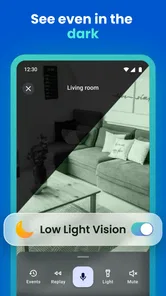
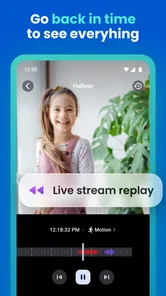
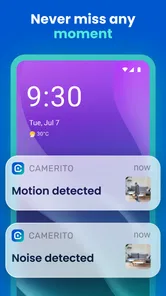

Analysis by Reviewed
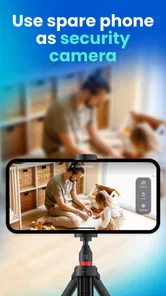
Turning an old phone into a useful home monitor sounds simple, but the quality of that idea depends on how quickly it becomes practical in everyday life. After spending time with Home Security Camera: Camerito, I found its central appeal easy to understand: instead of buying another camera, I can give a spare phone a second job as a WiFi-connected security camera. That makes it especially interesting for renters, students, parents, pet owners, and anyone who already has an unused Android device in a drawer.
This is a free House & Home app from TappyTaps s.r.o., aimed at an Everyone audience. Its current version is 4.8.0, and it runs on Android 7.0 or later. The app has an average rating of 4.4 from around 500 ratings, with more than 10 thousand installs, so it has attracted a modest but meaningful user base rather than appearing as an entirely untested experiment. In-app purchases range from $2.99 to $79.99 per item, which is worth keeping in mind before treating the free download as a complete replacement for dedicated hardware.
Why the spare-phone camera idea matters
The most important capability here is not merely seeing a live image. It is the option to reuse a phone that already has a camera, screen, battery, and WiFi connection. That changes the buying decision. A conventional indoor security camera is convenient, but it adds another device, another power adapter, and another piece of equipment to position. Camerito starts from something many people already own.
I see the strongest value in temporary or flexible monitoring. A spare phone can watch a hallway while I am waiting for a delivery, keep an eye on a sleeping child from another room, or let me check whether a pet is still settled while I am nearby but occupied. It can also be useful during travel when I want a simple view of a room without packing a separate camera. The phone does not need to become a permanent fixture to justify the app.
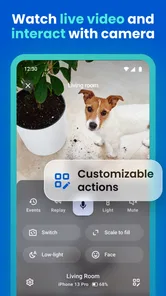
The live video function is the part that makes the arrangement feel immediate. I can use the viewing device to check what is happening rather than relying only on a notification. Alerts and clips add a second layer: instead of keeping the live feed open all the time, I can use activity as a reason to look closer. The practical benefit is turning occasional attention into an on-demand check. That is a more realistic use of an old phone than pretending it is a full professional surveillance system.
There is also a useful psychological advantage. When I use an existing phone, I can experiment with placement without feeling that I have committed to a permanent installation. If the hallway is a poor angle, I can move the phone. If the living room is more useful than the entrance, I can change the setup. This flexibility is easy to overlook, but it is one of the best reasons to choose this approach over a fixed camera.
What the app changes in an ordinary home
A spare phone camera is naturally more adaptable than a dedicated camera with one intended mounting position. I can place it on a bookshelf, a side table, or another stable surface, provided the camera has a clear view and the phone can remain powered. That makes Camerito suitable for short monitoring sessions where drilling, mounting, or routing a cable would be unnecessary.
More From Our News Desk

 Gmail
GmailGmail in a Busy Inbox: Who Benefits Most?
From first account to crowded workday, Gmail earns its place through dependable search and flexible sorting—but its best fit depends on how much inbox maintenance you can tolerate.

 Prime Video
Switching to Prime Video: What Changes in Your Viewing Routine
Prime Video can make a compelling second home for streaming, but switching means learning a different catalog, rental layer, and route from browsing to playback.

 Universal TV Remote Control
Universal TV Remote Control Works Best as a Reliable Backup
A phone remote earns its place through quick setup and reliable habits. Here is how to get more from Universal TV Remote Control—and where its limits show.

 Weather - By Xiaomi
Weather by Xiaomi Review: Clear at a Glance, Less Clear Up Close
Xiaomi’s weather app makes everyday forecasts quick to scan, but its calm surface can leave useful details and recovery paths harder to find than they should be.

 X
XX Under Pressure: Can It Recover When Posting Goes Wrong?
A resilience-focused review of X, examining setup, mistaken posts, interruptions, weak connections, and the gaps that matter when recovery needs to be dependable.

 Clash of Clans
Clash of Clans Is Won Between the Battles
Its raids are quick; its community is a long-term project of coordination, teaching, rivalry, and shared responsibility—with all the friction that entails.
Latest News



The trade-off is that a phone is not automatically designed for this role. It may be bulky, its battery may be tired, and its camera angle may be less convenient than a purpose-built indoor camera. The app makes the phone useful, but it does not change the physical limitations of the handset. In my experience, choosing the right old phone matters almost as much as installing the application.
A device with a reliable battery and a reasonably clear rear camera is a better candidate than a phone that shuts down unexpectedly or struggles to stay connected. I would also avoid placing it where people could easily knock it over. A perfect application cannot rescue a camera that is pointed at the ceiling after someone brushes past the table.
How using Camerito feels in practice
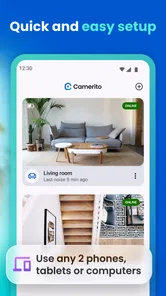
The basic workflow is easiest to understand as a two-device arrangement. One phone acts as the camera, while another device is used to view the live feed and respond to activity. That separation is important because it lets the camera phone stay in the room being monitored while I carry the viewing device with me. It is more convenient than repeatedly walking back to inspect the camera phone itself.
Setup is most successful when I plan the physical arrangement first. I choose a location with a broad view, connect the phone to WiFi, place it near dependable power, and make sure the lens is not blocked by a case or nearby object. I then check the image from the viewing device before leaving it unattended. That quick test catches the most common practical problems: an obstructed lens, glare from a window, an unstable stand, or a camera pointed too low.
The live view is useful for quick decisions. If I hear a sound from another room, I can look rather than guessing. If I am expecting movement, I can check the scene without opening the door or interrupting what I am doing. This is where the app feels more useful than a simple recording tool: the phone becomes a remote visual check rather than just a device that stores footage locally.
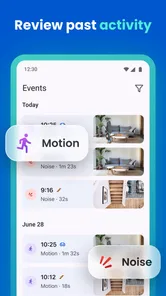
Alerts and clips are more valuable when I cannot watch continuously. In a realistic routine, I might leave the camera pointed toward a room while I work elsewhere. An alert can prompt me to open the live view, while a clip can help me understand what happened after an unexpected movement. This reduces the need to keep a video screen active, although I would still treat alerts as prompts for attention rather than proof that every important event will be captured perfectly.
That distinction matters because phone-based monitoring depends on several conditions at once. WiFi has to remain available, the camera phone must stay awake and powered, and the viewing device must be ready to receive information. A dedicated camera often feels more seamless because its entire design assumes continuous operation. Camerito is more hands-on, but that can be acceptable when the goal is affordable, occasional monitoring.
A practical setup habit that improves results
I recommend doing a short test at the exact time and from the exact location where the app will be used. Daylight can make a room look very different from the evening, and a window behind the subject can turn a useful view into a dark silhouette. I would also test the distance between the camera phone and the WiFi source, because a setup that works beside the router may behave differently in a distant room.
Another useful habit is to keep the camera phone dedicated to the task during monitoring. Switching between demanding apps, moving it around, or allowing the battery to run low introduces avoidable interruptions. An old phone used only as a camera is easier to troubleshoot than one being used simultaneously for calls, games, and background tasks.
Privacy deserves equal attention. I would not place the phone in a bedroom, bathroom, or any area where people reasonably expect private activity unless everyone affected clearly agrees. A spare phone is still a camera, and the convenience of reuse should not override consent. The safest arrangement is one where the camera’s position is obvious and its purpose is understood by everyone in the home.
The scenario where it makes the most sense
The clearest everyday scenario is checking on a pet during a short period away from the room. Imagine leaving a dog in the living room while working upstairs or stepping out briefly. I can position an old phone toward the area where the dog usually rests, connect it to WiFi and power, and use the viewing device to check whether the pet is calm. If movement triggers an alert or creates a clip, I have a reason to look rather than keeping the live feed open constantly.
This arrangement is particularly good when I need reassurance, not professional-grade protection. I can see whether the animal is near its bed, whether it has knocked something over, or whether a sound deserves attention. The phone can be moved later if the pet changes rooms. A fixed camera may be better for a permanent, multi-room setup, but the spare-phone approach is less expensive to try and easier to repurpose.
The same logic works for a child sleeping during a short household task, although I would not treat the app as a substitute for direct supervision. A live image can help me decide whether I need to enter the room, while alerts may reduce the temptation to keep checking continuously. The best use is supportive: it gives me another way to look, but it does not remove the responsibility to be present and attentive.
I also found the setup useful for temporary home situations. During furniture delivery, repair work, or a period when one room needs extra observation, a spare phone can be deployed without permanently changing the home. Once the situation ends, I can remove the app’s role from that phone and return the device to ordinary use. That temporary quality is a genuine strength that dedicated equipment does not always match.
Where a different option is better
I would not choose Camerito as my first option for a property that needs continuous, unattended security coverage. A dedicated security camera is usually a better fit when I need a purpose-built enclosure, dependable long-term placement, or a setup that other household members can operate without explanation. The phone solution asks me to think about power, positioning, WiFi, and the condition of the old handset.
It is also not the right answer when I need several camera angles around a home. Reusing multiple phones may sound economical, but it quickly becomes a collection of devices to power, position, and maintain. In that situation, a dedicated multi-camera system may be easier to manage even if it costs more at the beginning.
Likewise, people who want advanced security features should compare expectations carefully. Camerito’s appeal is its accessible phone-based design, not the promise of replacing every function of professional equipment. If I need a camera that is always ready in a fixed position, a purpose-built model may provide less daily friction. The app makes the most sense when flexibility and reuse matter more than a fully installed system.
Trade-offs that become clear after regular use
The first trade-off is convenience versus hardware reliability. The app can reuse a phone, but the phone’s condition becomes part of the security setup. An aging battery, unreliable charging port, overheating, or an operating system problem can interrupt monitoring. Before relying on it, I would run the phone for the intended period and confirm that it remains stable.
The second is alert usefulness versus alert fatigue. Alerts are helpful when they point me toward meaningful activity, but any movement-based monitoring can become less useful in a busy room. Curtains, pets, changing light, or people passing through may create events that do not require action. I would begin with a quiet location and observe how often alerts arrive before deciding whether the setup is suitable for a busier space.
Clips are valuable because they provide context, but I would not assume that every moment will be equally informative. A camera angle can miss activity outside its view, and a short event may not explain what happened before or after it. The best results come from aiming at a defined area rather than trying to watch an entire room with one phone.
There is also a practical question about storage and attention. Clips can be useful when I need to review an event, but too many recordings can make the important ones harder to find. I would use a narrow monitoring purpose: the pet’s bed, the doorway, or the crib area, rather than pointing the camera at a large room and expecting every event to be meaningful.
Cost is another nuance. The app itself is free to install, which lowers the barrier to trying it. However, in-app purchases run from $2.99 to $79.99 per item, so I would inspect what a particular purchase unlocks before paying. The free starting point is attractive, but anyone planning a long-term setup should decide whether the paid options fit the intended use rather than assuming every capability is included automatically.
The age rating of Everyone makes the app approachable for general household use, but that does not mean every monitoring situation is automatically appropriate. The important decisions still involve consent, camera placement, and who can access the viewing device. A simple interface can make a setup easy to create; responsible use still requires judgment.
Three small decisions that make the phone-camera approach stronger
- Use the rear camera when possible: it is usually the more natural choice for a stationary room view, while the front camera may be more convenient only when the phone’s position makes it easier to aim that way.
- Frame one purpose instead of one whole room: watching a doorway, pet bed, or sleeping area gives alerts and clips a clearer meaning than pointing at a wide, cluttered scene.
- Keep a backup viewing plan: if the camera phone loses power or WiFi, I want to know that before relying on it for an important period. A quick check before leaving is more useful than discovering the interruption later.
These are not flashy features, but they change the experience. The app is strongest when I treat it as a focused monitoring tool rather than a magic conversion of any old phone into a complete security installation.
Who gets the most value from it
I would recommend Camerito to someone who already owns a spare Android phone and wants a low-commitment way to check a room. It is especially appealing for renters who cannot or do not want to install hardware, families who need temporary observation, and pet owners who want a quick look during the day. The free entry point makes experimentation straightforward, while the phone-based design keeps the setup flexible.
It can also suit people who are comfortable managing their own equipment. If I am willing to test the WiFi connection, keep the phone charged, adjust the angle, and check alerts sensibly, I can get meaningful value from the app. The experience rewards a little preparation rather than requiring a complicated installation.
I would be more cautious recommending it to someone who wants a completely hands-off solution. If the expectation is that a camera should remain permanently installed, work without regular checking, and provide a broad set of dedicated security controls, another option may be more appropriate. Camerito is clever because it reuses what I have, but that same reuse means I inherit the limitations of the phone.
The developer, TappyTaps s.r.o., has positioned this as an app in the House & Home space rather than as a replacement for every kind of security equipment. That framing feels fair. The app’s value is concentrated in one clear capability: making a spare phone useful for remote visual checks, live viewing, alerts, and clips. It does not need to be everything to be worthwhile.
After using it, my recommendation is fairly specific. Choose Home Security Camera: Camerito when you need flexible, temporary, or budget-conscious monitoring and already have a suitable phone available. Start with a defined scenario, test the camera in its real location, and keep expectations realistic about WiFi, power, framing, and alerts. If those conditions work for you, the app can turn forgotten hardware into a surprisingly practical household tool.
For permanent protection or a larger home-monitoring system, I would spend more on dedicated equipment instead. For checking a pet, watching a single room, or creating a temporary camera without buying another device, I think this app is a smart option. Its strongest quality is not that it makes an old phone identical to a security camera; it is that it gives that phone a useful second life with very little initial commitment.
Home Security Camera: Camerito Frequently Asked Questions
Can I use an old or spare phone as a camera with Camerito?
Yes. Camerito is intended to turn a spare phone into a WiFi security camera, so it can give an older device a new purpose for watching a room, entrance, or pet area. Before relying on it, make sure the phone can run the app and has a working camera, a steady power source, and a dependable WiFi connection. Continuous use may also affect battery life and device temperature.
What is Home Security Camera: Camerito used for?
Home Security Camera: Camerito is designed to turn compatible smartphones or devices into a basic home monitoring system. After installation, users can use the camera to watch a room, entrance, pet area, or other location remotely. It may be useful for checking activity while away, although it should not be treated as a replacement for a professional alarm, surveillance service, or emergency response system.
How does Camerito connect and work between devices?
Camerito generally requires the participating devices to be configured through the app and connected to the internet or the same network, depending on the available features and setup method. One device acts as the camera, while another is used for viewing. Before downloading, users should check whether their phones meet the supported Android or iOS requirements and whether a stable connection is available for reliable video access.
Can Camerito send alerts or save video clips?
Camerito’s short description highlights live video, alerts, and clips, making it useful for checking activity rather than only opening a camera feed manually. The practical experience can depend on network reliability, device settings, and which features are available in the app. Before depending on alerts or saved clips, review the app’s current options and test the setup so you know how it behaves in your home.
Does Home Security Camera: Camerito require a subscription or include extra costs?
The download and basic functions may be available without an upfront payment, but some features can depend on advertising, in-app purchases, premium access, cloud storage, or other optional services. Pricing and included tools can change with updates, so it is important to review the current store listing before installing. Users should also check whether recording, extended storage, or advanced monitoring features require payment. The app is free to download, with in-app purchases ranging from $2.99 to $79.99 per item.
Pros
- Turns an old phone into a practical home monitoring camera.
- Supports remote live viewing for checking rooms while away.
- Motion alerts can help you notice unexpected activity quickly.
- Useful for monitoring pets
- children
- entrances
- or vacant rooms.
- A low-cost alternative to buying dedicated camera hardware.
Cons
- Both devices need stable internet connections for reliable remote viewing.
- Older phones may overheat or drain their batteries during long sessions.
- Video quality depends heavily on the camera and phone used.
- Privacy risks require careful account
- permission
- and camera placement settings.
- Some advanced monitoring features may require in-app purchases or subscriptions.








