Baby Leap: Baby Tracker, Diary
- 191.00
- 4.5
- Installs
- 100.00K
- Price
- Free

Screenshots


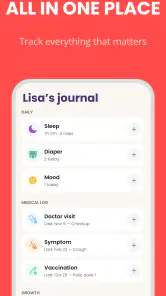

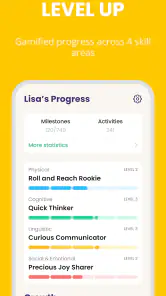


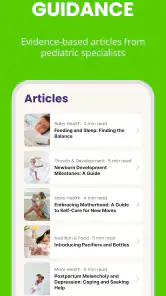
Analysis by Reviewed
When a newborn day feels like a collection of half-remembered naps, feeds, diaper changes, and sudden questions, a simple record can make life feel more manageable. I tried Baby Leap: Baby Tracker, Diary with that reality in mind: not as a replacement for medical advice, but as a practical parenting notebook that stays close to the moments parents actually need to remember. It is a free parenting app from Omega Solutions, Inc., designed around newborn journaling, baby milestones, sleep, and feeding.
My first impression is that Baby Leap is most useful when I treat it as a shared memory aid rather than a source of strict instructions. The best result is not a perfect chart. It is being able to answer a question quickly when I am tired: when did the baby last feed, how long was the previous sleep, or what new milestone did I notice this week? That distinction matters, because parents who want a highly technical health dashboard may find the experience too gentle, while first-time parents looking for an organized daily diary are more likely to appreciate it.
What to expect from Baby Leap
The app sits in a familiar parenting space, but its appeal comes from bringing several small jobs together. Instead of keeping feeding notes in one place, sleep observations in another, and milestone memories in a paper notebook, I can use one baby-focused record. That reduces the mental effort of remembering where each detail belongs.
Its store summary describes a newborn diary with baby milestones plus sleep and feeding tracking, and that is the right way to understand the product. I would not install it expecting a full pediatric consultation tool or a substitute for a clinician. I would install it because the early months are repetitive, exhausting, and full of details that become difficult to reconstruct later.
The app is free to download and is rated for Everyone, which makes it approachable for a household where more than one adult may need to understand the interface. It has an average rating of 4.5 from around 4.2 thousand ratings, and it has passed the 100 thousand install mark. Those figures suggest that the concept is resonating with a substantial group of parents, although popularity alone does not tell me whether its workflow suits my family.
One practical strength is the combination of immediate logging and longer-term memory. A feeding entry answers a short-term question, while a milestone note becomes part of a broader story about the child’s development. I like that these are different kinds of information living in the same parenting context. The daily record helps with today; the diary and milestone side helps me look back without relying on memory.
There is also a useful emotional benefit. New parents often feel that every day disappears into a blur. A short entry can preserve something that would otherwise be forgotten, whether that is a first smile, a new movement, or a change in sleep. I would avoid turning every moment into a data point, but I do find a lightweight record reassuring when the days begin to blend together.
Who will get the most from it
Baby Leap makes the most sense for a first-time parent who wants structure without building a spreadsheet. It can also suit a parent who is already keeping notes but wants a more focused place for baby-related information. If I regularly find myself asking, “Was that yesterday or the day before?”, the app addresses a real problem.
It is particularly helpful during transitions. A newborn’s routine can change quickly, and a diary makes it easier to notice that a pattern has shifted rather than trusting a tired impression. The point is not to diagnose anything from a log. The point is to give myself a clearer account of what happened before I speak with a healthcare professional or discuss the day with another caregiver.
I would be more cautious if I wanted detailed clinical calculations, extensive customization, or a tool built primarily for professional health monitoring. Baby Leap’s focus is everyday parenting organization. A dedicated medical tracker or advice from a qualified professional may be a better fit for concerns involving symptoms, growth, medication, or feeding difficulties.
Getting started without creating extra work
The first setup should be deliberately small
My advice to a new user is not to try to document the entire history of the baby on the first visit. Start with the information needed for the next few entries. The app becomes useful when it reflects real life, and a setup process that feels like paperwork can make parents abandon it before they see the benefit.
After installing it, I would begin by identifying the baby profile and then looking through the main areas for diary entries, sleep, feeding, and milestones. The goal is simply to understand where a normal event belongs. I would spend a minute tapping through the interface before the next feed or nap, because learning the basic path while calm is easier than learning it with a hungry baby nearby.
Baby Leap is currently listed as version 1.53.2 and supports devices running Android 9 or later. That is worth checking before installing, especially if the app is going onto an older phone kept for baby-related tasks. The developer is Omega Solutions, Inc., and the app’s current version information gives me a useful reference point when comparing what I see on my device with another caregiver’s experience.
I would also decide in advance what I actually want to record. Some parents need feeding and sleep notes most often. Others care more about milestones and a diary of memorable moments. Choosing two or three priorities keeps the app from becoming another obligation. A good tracker should reduce remembering, not make me feel guilty for missing entries.
A realistic first-day routine
Imagine a parent waking after a broken night and wondering whether the baby’s last feed happened before or after the parent finally fell asleep. Instead of reconstructing the night from messages or guesswork, I would open the feeding area and record the event as soon as it happens. Later, after the baby settles, I would add the sleep information while it is still fresh.
That workflow is more realistic than promising to enter everything at the end of the day. Delayed logging is where most tracking systems fail. A short entry made at the relevant moment is usually more accurate than a long attempt to remember six events at once. If I miss one, I would continue from the next event instead of trying to recreate a perfect record.
The same principle applies to the diary. I would write a brief note when something meaningful happens, rather than waiting for a quiet evening that may never arrive. A sentence about a new expression or a change in behavior is enough to preserve the memory. The app works better as a series of small observations than as a formal journal that demands polished writing.
The first meaningful success
The first success I look for is simple: I want to open Baby Leap after a feed or sleep period and find a record that answers a real question. If I can see what happened most recently without searching through a paper notebook or a chat conversation, the app has already earned a place in my routine.
To reach that point, I would create one feeding entry, one sleep entry, and one short diary or milestone note over the first day. This is not about filling every category. It is a small test of whether the app’s organization matches the way I think. If those entries feel quick and easy to find later, I would continue. If recording them interrupts care or feels confusing, I would adjust my approach before committing to daily use.
A less obvious benefit of this test is that it reveals which information is genuinely valuable to my household. I may assume I need every possible detail, then discover that the most useful records are simply the latest feed and the most recent sleep. Another parent may find that milestone notes are the part they return to. Baby Leap gives me a way to learn that through use rather than planning an elaborate system in advance.
Using it with another caregiver
For families sharing care, consistency matters more than volume. Before asking another adult to use the app, I would agree on what counts as an entry and when it should be recorded. For example, everyone can log an event immediately after it happens and avoid adding guesses later. That small agreement prevents a shared diary from becoming a mixture of precise notes and vague estimates.
I would also use the app as a conversation starter, not as a way to police another caregiver. If the record shows a different pattern from what I expected, I would ask what happened rather than assuming the entry is wrong. This is one of the most important trade-offs in tracking: more information can improve coordination, but it can also create unnecessary tension if every missing entry becomes an argument.
Where new users may feel confused
A tracker is not a medical verdict
The most important boundary is the difference between recording and interpreting. A sleep or feeding log tells me what I entered. It does not, by itself, explain whether a pattern is normal for my child. Babies vary, and a change that worries me deserves a conversation with a healthcare professional rather than a conclusion drawn from an app.
I would keep this in mind when reviewing old entries. It is easy to see a few difficult nights and immediately search for a cause, or to feel reassured by a neat-looking record. Neither reaction is necessarily justified. The log is useful evidence for a conversation, but it should not replace professional judgment.
Do not confuse completeness with usefulness
Another common mistake is trying to record every possible event. That can make the app feel like a time clock. In my experience, the strongest workflow is selective: record the events that help with handoffs, reveal a routine, preserve a milestone, or answer a question I am likely to have later.
One non-obvious tip is to use the diary and the structured trackers for different purposes. I would keep feeding and sleep entries factual and brief, while using diary notes for context that numbers cannot capture, such as an unusual day, a new reaction, or something I want to remember. Mixing all of that into one type of note would make the record harder to scan.
Be mindful of the paid layer
The app includes in-app purchases ranging from $9.99 to $199.99 per item. That does not make the free starting point unusable, but it does mean I would pay attention to any premium prompts before building my entire routine around a feature I cannot access without an additional purchase. I would first test the free experience during ordinary days and decide whether the available tools already solve my problem.
This is also where Baby Leap may not be the right choice for everyone. Parents who want a completely free, minimal note-taking method may prefer a basic notes app or paper log. Those alternatives offer less baby-specific organization, but they may feel faster and avoid the distraction of optional purchases. On the other hand, a general notes app usually does not give the same focused context for milestones, sleep, feeding, and newborn memories.
Keep entries honest when the day is chaotic
Newborn care rarely follows a tidy schedule. If I do not know an exact time, I would rather make a clear approximate note than pretend the record is precise. The value comes from a truthful overview, not from false accuracy. If the app encourages me to log only when I can be exact, it becomes less useful on the very days when I need it most.
I would also avoid using an incomplete record to compare my baby with another child. Tracking can show changes within my own routine, but it is not a competition. A milestone diary is most helpful when it preserves my child’s individual progress and gives me material for thoughtful conversations, not when it creates pressure to match someone else’s timeline.
How it compares with familiar alternatives
The usual alternative is a paper notebook. Paper is wonderfully immediate, works without learning an interface, and can be passed between caregivers. It is also easy to misplace, difficult to search, and not always available when a question comes up. Baby Leap’s advantage is having baby-related records organized on the phone I already carry, with sleep, feeding, and milestone notes kept in one dedicated setting.
A general notes app is another option. It can be customized and may be ideal for a parent who wants total freedom. The downside is that I have to invent the structure myself, and the record can become a long stream of text. Baby Leap is better when I want the app’s parenting focus to guide the organization. The notes app is better when my needs are unusual or I dislike predefined categories.
Some parents may prefer a narrowly focused feeding or sleep tracker. That can be a stronger choice when one specific routine requires close attention and detailed analysis. Baby Leap is more appealing when I want a broader newborn diary instead of several separate tools. The trade-off is that a broad app may feel less specialized than a single-purpose tracker.
I would choose Baby Leap over a paper log when handoffs between caregivers are frequent and I need a consistent digital record. I would choose paper when the phone is often unavailable or when writing by hand feels less intrusive during nighttime care. I would choose a medical or specialist tool when a clinician has asked me to monitor a particular health issue in a prescribed way.
Making the routine last beyond the first week
The best next step after the first successful entries is to create a habit that survives tired days. I would attach logging to events that already happen, such as putting the bottle away, settling the baby after a nap, or washing up after a feeding. That is easier than setting aside a separate daily appointment with the app.
Once there are several entries, I would review them for practical questions rather than staring at the record without a purpose. Is the handoff to another caregiver clearer? Can I remember the previous feed more confidently? Did I preserve a milestone I would otherwise have forgotten? These answers tell me whether Baby Leap is earning the small amount of attention it requires.
A useful advanced workflow is to review the diary separately from the routine logs. The structured entries help with immediate coordination, while the diary can be revisited later for memories and conversations. Keeping those purposes distinct prevents the app from feeling like a constant performance report and lets the sentimental side remain enjoyable.
I would also reassess the app after the newborn stage changes. The information that matters in the early weeks may not be what matters later. If the app continues to make daily care easier, keep it. If it starts creating more work than value, exporting the memories I care about or moving to a simpler system may be sensible. A tracker should serve the family’s current needs, not become a permanent obligation.
My recommendation for a first-time parent
I recommend Baby Leap to a first-time parent who wants one focused place for everyday baby records and personal milestone memories. The free entry point makes it reasonable to try without committing immediately, and the combination of diary, feeding, sleep, and milestone tracking gives it more range than a plain notes page.
I would skip it if I know I will resent logging, if I need a specialist medical record, or if optional in-app purchases are likely to distract me from a simple routine. I would also avoid treating its entries as instructions or diagnoses. Its real value is quieter: it helps me remember, coordinate, and notice my own baby’s story during a period when exhaustion can make ordinary details surprisingly hard to hold onto.
After using it, my advice is to start with one day, not an entire parenting system. Record the next meaningful feed, the next sleep period, and one observation worth remembering. If those entries make tomorrow’s questions easier to answer, Baby Leap is doing its job. For me, the strongest reason to keep it installed is that it turns scattered newborn moments into a record I can actually use.
Pros
- Quick logging for feeds
- naps
- diapers
- and milestones
- Useful timeline helps identify changes in daily routines
- Multiple baby profiles support families with more than one child
- Photo and note entries make the diary more personal
- Helpful reminders can reduce the chance of missing routine tasks
Cons
- Some features may require a paid subscription or in-app purchase
- Frequent tracking can feel time-consuming during especially busy days
- Data entry depends on caregivers remembering to log events consistently
- Shared access may require extra setup for all family members
- Too many notifications could become distracting for some parents

- Category
- Parenting
- Version
- 1.53.2











