

ATIS App
- 25.00
- 4.2
- Installs
- 10.00K
- Price
- Free

Screenshots
Analysis by Reviewed
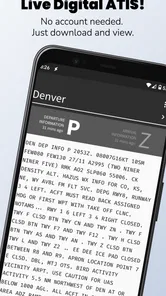
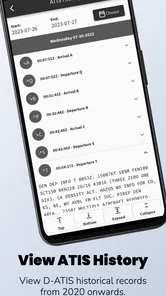
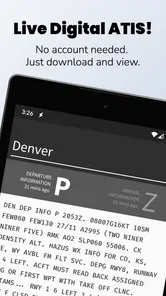
I came away from ATIS App with the impression that it is a focused tool rather than a general-purpose weather companion. Its job is to put live Digital ATIS weather reports from the FAA in front of you, and that narrow purpose is exactly what makes it useful. If you fly, help someone prepare for a flight, or simply need airport information in a shared household where one person handles the weather check, this app can be a practical addition to the phone.
I would not choose it as my only source for everyday weather, travel forecasts, rain alerts, or a family’s weekend planning. It is built around aviation information, not the broad visual forecasts most people open a weather app for. Used with the right expectations, though, it saves a step: instead of treating an airport’s conditions as just another forecast card, I can go directly to the kind of report pilots and aviation-minded users actually need to consult.
How ATIS App fits into a shared household
When I think about fitting ATIS App into a shared household, I see it less as a family weather screen and more as a specific reference that one person can check and explain to others. Agreeing in advance on who verifies the report and how its timing is communicated can prevent an old observation from being mistaken for a current one. That simple handoff is especially useful when several people are coordinating around the same trip.
A useful handoff when one person checks the airport
A realistic household use case is a shared tablet or a phone passed between two people before a flight. One person may be organizing bags and transport while the pilot or aviation enthusiast checks the airport situation. In that moment, ATIS App works best as a quick handoff tool. The person who knows what to look for can open it, review the report, and communicate the relevant details without asking everyone else to learn a full aviation workflow.
That arrangement is different from sharing a normal weather app. A typical forecast app is designed for broad, glanceable information: temperature, precipitation, wind icons, and a timeline. ATIS App is more specialized. The value is not that it gives the prettiest overview, but that it points the user toward live Digital ATIS information from the FAA. For a household coordinating around an airport, that focus can be more valuable than another general forecast screen.
I also like the fact that a shared-device role does not require the app to become a family information hub. It can remain the aviation reference on the device while other household members use their preferred tools for ordinary weather. That separation keeps expectations clear. The person checking the airport report should not assume it replaces a broader forecast, and the person planning a commute should not have to navigate aviation terminology just to know whether to take an umbrella.
What the app is, and what it is not
ATIS App belongs in the weather category, but that label can create the wrong first impression. This is not the sort of app I would install for animated radar, a seven-day outlook, pollen information, or a collection of city forecasts. Its store summary is centered on live Digital ATIS weather reports from the FAA, so the useful question is whether you need airport-specific aviation reporting rather than whether you want another general weather dashboard.
More From Our News Desk

 Gmail
GmailGmail in a Busy Inbox: Who Benefits Most?
From first account to crowded workday, Gmail earns its place through dependable search and flexible sorting—but its best fit depends on how much inbox maintenance you can tolerate.

 Prime Video
Switching to Prime Video: What Changes in Your Viewing Routine
Prime Video can make a compelling second home for streaming, but switching means learning a different catalog, rental layer, and route from browsing to playback.

 Universal TV Remote Control
Universal TV Remote Control Works Best as a Reliable Backup
A phone remote earns its place through quick setup and reliable habits. Here is how to get more from Universal TV Remote Control—and where its limits show.

 Weather - By Xiaomi
Weather by Xiaomi Review: Clear at a Glance, Less Clear Up Close
Xiaomi’s weather app makes everyday forecasts quick to scan, but its calm surface can leave useful details and recovery paths harder to find than they should be.

 X
XX Under Pressure: Can It Recover When Posting Goes Wrong?
A resilience-focused review of X, examining setup, mistaken posts, interruptions, weak connections, and the gaps that matter when recovery needs to be dependable.

 Clash of Clans
Clash of Clans Is Won Between the Battles
Its raids are quick; its community is a long-term project of coordination, teaching, rivalry, and shared responsibility—with all the friction that entails.
Latest News



That distinction matters in a family setting. A teenager checking the weather for a bicycle ride, a parent planning a school pickup, and a pilot preparing for a departure all have different information needs. The first two are better served by a conventional weather service. The third may appreciate a direct aviation-oriented reference. When several people use one device, naming that boundary out loud prevents the app from being judged unfairly for not doing a job it was never intended to do.
In my experience, the strongest workflow is to use it late in the preparation process. A general forecast can help with the day’s broad conditions, while ATIS App can be opened when the airport report itself becomes relevant. That two-stage approach is more sensible than trying to make one app answer every weather question.
Keeping setup simple without assuming shared accounts
The app is free to install, which makes trying it on a household device relatively low-risk. It is suitable for everyone from a content-rating perspective, but that should not be confused with being equally understandable to every age group. The interface may be accessible enough to open and inspect, yet the meaning of aviation weather information still depends on context and experience.
I would set it up on a shared device only after deciding who is responsible for interpreting the report. That is a small but important boundary. A child or casual user might be able to open the app, but that does not mean they should be the person making a flight-related decision from unfamiliar information. The app can support communication; it should not replace the judgment of the person responsible for the flight.
There is also a practical account boundary to consider. I would not assume that a shared household device should carry one person’s aviation routine without discussion. If several people use the phone, agree on where the app belongs, who checks it, and whether the device is being used for a quick look or as part of a formal preflight process. Those are household habits rather than advertised app functions, but they make the experience much less confusing.
The current version is 3.6.2, and the minimum operating system is Android 7.0. That makes the app approachable for many older Android devices, which is helpful if the household keeps an inexpensive spare phone in a vehicle bag or near travel equipment. I would still test it on the exact shared device before relying on it, especially if that phone is old, has limited connectivity, or is usually used in places where signal quality changes.
Coordination is where the narrow focus pays off
The most useful non-obvious benefit is coordination. A live airport report can act as a common reference point between the person at home, the person traveling to the airport, and the pilot or crew member making the operational assessment. Instead of everyone quoting different weather widgets, one person can check the same aviation-oriented source and pass along what they see.
That does not mean the app creates a shared workspace or automatically synchronizes a household. I would treat it as a reference that supports a conversation, not as a coordination system in its own right. The household still needs to decide how information is relayed. A short spoken summary may be enough for a family member, while a pilot may need to inspect the report directly and consider it alongside other required sources.
A useful habit is to separate observation from interpretation. The person opening the app can say what report is visible and when it was checked, while the qualified user decides what it means for the flight. This reduces the risk of a well-meaning family member turning a weather observation into an overconfident instruction. It is one of those small workflows that makes a specialized app safer and more useful without pretending the software can make the decision for you.
Another practical tip is to avoid treating a single glance as a permanent answer. Conditions can change, and a live report is most useful when checked at the point in the preparation process where it matters. If someone checks it early and then the household spends a long time getting ready, the earlier observation should not be treated as current simply because it came from a live source at the time.
Age, trust, and the limits of a simple aviation tool
Because the app is rated for everyone, it can sit comfortably on a family device from a content perspective. The more important issue is trust and understanding. Aviation reports contain information that may be meaningful to an experienced user but opaque to someone who has never dealt with airport operations. I would be comfortable letting a younger household member explore it with guidance, but I would not hand over responsibility for interpreting it without supervision.
This is also where the app’s simplicity can be misleading. A focused screen may feel easy because it does not surround the user with many unrelated features. Yet a concise aviation report can demand more knowledge than a colorful consumer forecast. For shared use, I would explain the purpose first: this is a place to view airport weather reporting, not a game, not a general family forecast, and not an automatic go-or-no-go answer.
The app does not need to be treated as a child-focused product just because its age rating is broad. In a household, trust should follow the task. A child can help locate the app, an adult can read the report aloud, and the pilot or responsible traveler can make the relevant judgment. That division is clearer and more responsible than assuming that everyone who can open the screen can safely act on it.
I would also be careful about sharing screenshots or copied details outside the immediate conversation. The app’s role is to help people consult aviation weather information, but a forwarded image can lose the context of when it was checked and who interpreted it. If the information matters, the person using it should verify the current report and understand what they are looking at rather than relying on an old household message.
Where it beats ordinary weather alternatives
Compared with a standard weather app, ATIS App has a clear advantage when the user’s question is aviation-specific: “What is the current airport information I need to examine?” A general app may show wind, visibility-related conditions, or a forecast in a friendly format, but it may not be the right place to look for a live Digital ATIS report. The specialized focus reduces the amount of unrelated information between the user and the airport report.
That advantage disappears when the question is broader. For deciding whether to walk the dog, planning a barbecue, comparing temperatures across cities, or checking tomorrow’s rain, I would reach for a mainstream weather app instead. Those tools are usually organized around ordinary daily decisions, and their visual summaries are easier for a mixed household to understand at a glance.
The trade-off is therefore not simply “specialized versus better.” It is “specialized versus broader.” ATIS App can be the better choice for a pilot or aviation-focused household, while a conventional weather app remains the better companion for everyone else. Keeping both roles separate is more useful than expecting this app to replace the household’s existing weather routine.
I would also avoid comparing it with flight-planning software as though they served the same purpose. A report viewer can be one part of preparation, but it is not automatically a complete planning environment. If your routine depends on route planning, aircraft information, navigation tools, logs, alerts, or a comprehensive briefing process, you should use the appropriate aviation tools alongside it. The narrowness that makes ATIS App convenient is also the reason it should not be mistaken for an all-in-one cockpit assistant.
Small frictions that affect real use
The first friction is the learning curve around aviation language. Someone who expects a weather app to translate everything into familiar icons may find the experience less welcoming. That is not necessarily a flaw for the intended audience, but it does make the app less suitable as a household’s only weather tool. A shared device can magnify this issue because different users arrive with very different levels of aviation knowledge.
The second is dependence on the usefulness of the available live report. A specialized viewer is only as helpful as the airport information relevant to the user’s situation. I would not install it and assume that opening the app automatically resolves every airport-weather question. The user still needs to select or consult the relevant information and understand whether it applies to the airport and moment under consideration.
The third is the temptation to over-trust convenience. Because the app puts a focused report close at hand, it can feel more authoritative than a casual forecast card. I see that as a reason to use it carefully, not a reason to dismiss it. The best workflow treats it as a direct source for the information it presents, then combines that information with proper aviation judgment and any other required checks.
There are in-app purchases priced at $4.99 per item. That means the free entry point is useful for evaluating the basic experience, but I would inspect the purchase screen carefully before assuming every function is included at no cost. In a shared household, the person installing the app should tell other users whether purchases are allowed on the device. That avoids an accidental charge and keeps the boundary between free access and optional paid items clear.
Who should install it, and who should skip it
I would recommend trying it if you are a pilot, a student pilot, an aviation enthusiast, or the family member who regularly helps check airport conditions. It also makes sense for a household that keeps one device dedicated to travel or flight preparation and wants a direct way to consult FAA Digital ATIS information without mixing that task into a general forecast routine.
I would skip it if your main goal is ordinary local weather. If you want a simple answer about rain, temperature, storms, or the week ahead, this app’s aviation focus will add more specialized information than you need. I would also skip it as a first choice for a young or casual user who has no reason to interpret airport reports. A broad weather app will be easier for that person to understand and more relevant to daily life.
For professional or safety-critical use, I would treat it as one component rather than the entire process. The app can make a particular report easier to reach, but software convenience should not replace established procedures, current verification, or qualified decision-making. That is the most important trade-off: it improves access to a narrow kind of information, but it does not remove the responsibility to interpret and use that information correctly.
My household verdict
ATIS App has a clear identity, and I prefer that to an overloaded weather product that tries to serve every possible audience. Developed by iawix ltd., it has built a modest but positive reception, with an average rating of 4.2 from around 69 ratings and more than 25 written reviews. Its install base is over 10 thousand, which suggests that it has found a specific audience without pretending to be a universal weather choice.
The free price makes it easy to test, while optional in-app purchases at $4.99 per item mean I would review the purchase boundaries before placing it on a device used by several people. The everyone age rating is reassuring for shared access, but the aviation subject matter still calls for adult guidance when younger users are involved. Those two points belong together: accessible content does not automatically mean simple interpretation.
My recommendation is straightforward. Keep a normal weather app for the family’s everyday questions, and add ATIS App if someone in the household genuinely needs FAA Digital ATIS reports. Use it as a focused checkpoint, communicate the time and context of what was observed, and leave operational decisions to the person qualified to make them. Its real strength is directness, not breadth.
For that reason, I would recommend it to the right friend without hesitation, but I would first ask what they expect from a weather app. If they need airport-focused aviation information, this specialized approach can be genuinely useful. If they simply want to know whether it will rain after lunch, another app will be the better fit.
ATIS App Frequently Asked Questions
Is ATIS free to download, and are there in-app purchases?
ATIS is free to download, so you can install it without paying an upfront price. The app also offers in-app purchases, with items priced at $4.99 each. Check the purchase details in the app before buying, and make sure any optional paid features suit the way you plan to use ATIS. Its free download makes it possible to explore the app before deciding whether to purchase anything.
What is the ATIS app used for?
ATIS is designed to provide access to Automated Terminal Information Service data, helping pilots obtain important airport information before and during flight preparation. Its store summary describes the app as a way to view live Digital ATIS (D-ATIS) weather reports from the FAA. Depending on the supported airport and service coverage, it may also display details such as runway information, active approaches, traffic notices, and other operational updates. Always compare the information with official aviation sources and current ATC instructions.
Does ATIS support all airports and regions?
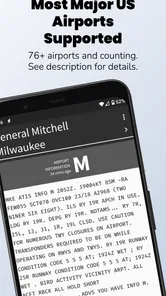
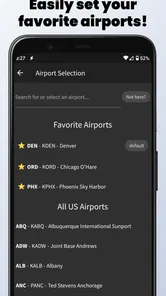
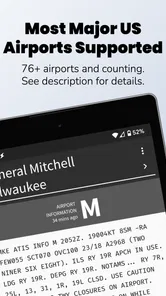
Coverage depends on the specific ATIS app version, the airports included by its provider, and the availability of compatible data services. Before downloading, check the app listing or in-app airport directory to confirm that your intended locations are supported. Some airports may have limited information, delayed updates, or no data at all, especially outside major aviation regions or when the relevant service is temporarily unavailable.
Can pilots rely on ATIS as the only source of flight information?
No. ATIS should be treated as a convenient supplementary source rather than a replacement for official aeronautical information, flight briefings, navigation databases, NOTAMs, weather products, or direct instructions from air traffic control. Information can change quickly, and an app may experience connectivity, processing, or update delays. Pilots should verify critical details through approved sources and follow the latest clearance received from ATC.
Does the ATIS app require an internet connection or location access?
Many ATIS features require an active internet or mobile data connection because the application must retrieve current airport information from online services. Location permission may also be requested to identify nearby airports or simplify airport selection, although its necessity depends on the app’s design. If you are using the app while traveling or flying, review data charges, battery consumption, and offline limitations before depending on it.
Pros
- Provides quick access to real-time public transport information.
- Clear interface makes routes and stops easy to find.
- Useful for planning journeys before leaving home.
- Supports checking service updates in one place.
- Helpful for regular commuters and occasional travelers.
Cons
- Coverage and accuracy may vary by city or transport operator.
- Some features may require an active internet connection.
- Arrival times can occasionally differ from actual vehicle locations.
- The app may feel limited outside supported service areas.
- Notifications and background updates can affect battery usage.











