AngelSense Guardian
- 455.00
- 4.6
- Installs
- 100.00K
- Price
- Free

Screenshots
Analysis by Reviewed
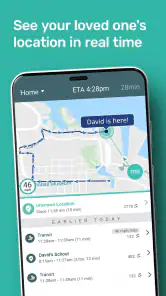
AngelSense Guardian is the kind of parenting app I would consider when ordinary location sharing is not enough. Its focus is children and adults with special needs, combining live location, alerts, and two-way voice in one place. After looking at how those pieces fit together, my view is clear: this is most useful as a supervision and reassurance tool for families who need a more focused way to understand where someone is and whether a routine is unfolding normally.
It is not simply a map with a family member’s dot on it. The real value is the attention it gives to changes in a person’s usual day. A parent may care less about checking a map every few minutes and more about knowing when a child has left school, arrived somewhere familiar, or taken an unexpected route. That shift—from manually watching to receiving useful prompts—is what makes AngelSense Guardian different from a basic location-sharing app.
How AngelSense Guardian fits into everyday family routines
The app belongs to the parenting category and is developed by AngelSense. It is free to install, carries an Everyone age rating, and runs on devices using Android 12 or later. Its current version is 4.4.2. Those practical details matter because this is an app intended to become part of a family’s routine, not something opened only during an emergency.
In my experience, a location tool becomes genuinely helpful when it answers a question before anxiety turns into repeated calls. A caregiver might want to know whether a child has reached school after leaving home, whether a familiar journey is taking longer than usual, or whether an adult who needs support has arrived at an expected destination. AngelSense Guardian is built around those moments rather than around casual social sharing.
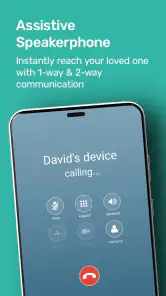
The live-location element gives a direct view of where the person is, while alerts reduce the need to keep checking manually. Two-way voice adds another layer: instead of relying only on a phone call that may not be answered, a caregiver has a communication option designed to sit alongside location awareness. That combination is particularly relevant when the person being monitored may not reliably explain where they are or respond to ordinary messages.
I also like the distinction between reassurance and surveillance. The app can be useful when everyone understands why it is being used and what kind of information is appropriate to check. It should support independence, not quietly replace trust. For older children and adults with special needs, involving them in the setup and explaining the purpose can make the arrangement feel more respectful and sustainable.
The strongest part is the routine-based thinking
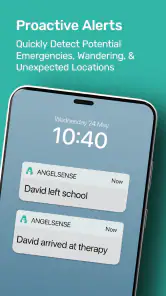
Most general-purpose family location tools start with a map. That is useful, but a map still leaves the caregiver to interpret what they are seeing. AngelSense Guardian is more compelling when the family has recurring places and journeys that can be understood as a pattern. A departure, an arrival, and an unexpected change have different meanings, and alerts can make those moments easier to notice.
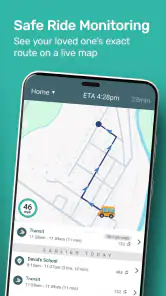
Consider a realistic weekday. A child leaves home for school, travels along a familiar route, and normally arrives within a predictable part of the morning. Instead of opening a map repeatedly, a parent can use the app’s alerts as a prompt to pay attention when the routine changes. If the child is late, is somewhere unexpected, or needs a voice connection, the parent has a more useful starting point than a vague feeling that something may be wrong.
That workflow is one of the less obvious strengths. The app is not only for finding someone after they have gone missing. It can help a caregiver notice small deviations early, when a delayed bus, a missed stop, or an unplanned change may still be easy to address. This makes it more practical for daily support than an emergency-only tracker.
Another useful approach is to decide in advance which alerts deserve immediate attention. If every notification is treated as urgent, the system can become tiring and the important signals may lose their impact. I would begin with the places and journeys that matter most, then adjust the routine as the family learns which alerts are genuinely helpful. The goal is not maximum notification volume; it is better timing.
Two-way voice adds value, but expectations should stay realistic
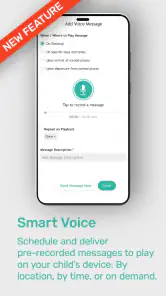
The two-way voice feature is important for situations where a text message is too slow, too complicated, or unlikely to be answered. A caregiver can use voice contact when a person needs a simple instruction, reassurance, or a quick check-in. In a stressful moment, that can be easier than sending several messages and waiting.
At the same time, I would not treat it as a guarantee that communication will always work exactly when needed. Any voice-based contact depends on the device being available and the person being able or willing to respond. The feature is best understood as an additional channel, not a replacement for teaching safety habits, maintaining appropriate supervision, or having a backup plan for important journeys.
This is a meaningful trade-off. Families may be tempted to think that live location plus voice removes uncertainty. It does not. What it can do is shorten the time between noticing a concern and trying to clarify it. That is still valuable, especially when the alternative is repeated calling through a general phone app or waiting for a reply that may never come.
Where it is better than ordinary location sharing
Standard family maps are often designed for broad household sharing. They can be perfectly adequate when everyone carries a familiar smartphone, answers messages, and mainly wants occasional visibility. AngelSense Guardian makes more sense when the person being supported has different communication needs or when the caregiver needs alerts tied to everyday movement rather than a map that must be watched.
The difference is not that a general location app is bad. It is that the usual alternative places more responsibility on the caregiver to interpret the information. AngelSense Guardian is aimed at a more specific problem: keeping track of someone whose safety may depend on recognizing changes in routine quickly. That narrower purpose is its main advantage.
I would also compare it with a simple phone call. A call can provide human reassurance, but it does not automatically tell a caregiver that someone has reached a place or taken an unusual route. Conversely, a tracking app without voice may show movement but offer no immediate way to speak. AngelSense Guardian’s appeal comes from putting these needs closer together instead of forcing a family to switch between several tools.
There is a practical setup lesson here. Before relying on it, I would map out the person’s normal day on paper: home, school or work, regular transport points, therapy or activity locations, and the people who may need to respond. That exercise helps identify which alerts matter and prevents the app from becoming a noisy stream of information. It also reveals where human arrangements are still needed.
The main weakness is the burden of constant digital supervision
The same focus that makes AngelSense Guardian useful can also make it feel heavy. Families may need to spend time deciding which alerts are meaningful, explaining the system to the person being supported, and agreeing on who should respond when something changes. If those expectations are not clear, the app can create more worry instead of less.
Privacy is another serious consideration. Live location is sensitive information, particularly when it concerns a child or an adult who may have limited control over how their information is shared. I would keep access limited to the people who truly need it, discuss the arrangement openly, and review that decision as the person’s age, abilities, or independence change. Convenience should not be the only factor.
There is also a risk of overinterpreting an alert. A route change may be harmless; an unexpected stop may have a simple explanation. The app can point to a situation that deserves attention, but it cannot understand every personal context on its own. Caregivers still need judgement, patience, and a sensible escalation plan.
For a family that only wants occasional location sharing between independent adults, this may be more specialized than necessary. A regular family map and ordinary messaging may be simpler and less intrusive. I would also hesitate to recommend it to someone who dislikes notifications, does not want a structured monitoring routine, or expects technology to provide complete certainty.
Who will get the most from it
The clearest audience is a parent or caregiver supporting a child with special needs, especially when predictable journeys and location changes are important. It can also suit families supporting adults with special needs who value a balance between independence and a safety net. In both cases, the app is strongest when there are recurring destinations and a real need to know about departures, arrivals, or deviations.
It may be particularly helpful during transitions. Starting a new school, returning to work, learning a familiar route, or gradually allowing more independent travel can be stressful for everyone. AngelSense Guardian does not remove that challenge, but it can give the caregiver a way to observe progress without making constant phone calls. Used carefully, that can support a gradual increase in independence rather than an abrupt jump from close supervision to no visibility.
A less obvious use is coordination between caregivers. If more than one trusted adult helps with a person’s routine, shared awareness can reduce confusion about whether someone has arrived or whether another adult needs to step in. I would still establish clear responsibility: an alert should not be sent to several people with the assumption that somebody else will act. Technology works better when the human handoff is explicit.
On the other hand, I would steer away from it for a teenager or adult who is fully independent, understands personal safety, and simply wants occasional family contact. In that situation, the monitoring emphasis may feel disproportionate. A lighter location-sharing arrangement could respect privacy better while still covering ordinary check-ins.
What the app’s reception suggests, and what it does not prove
AngelSense Guardian has an average rating of 4.6 from around 900 ratings, with more than 400 written reviews, and it has passed 100 thousand installs. That level of adoption suggests the app is reaching families who see a real need for this kind of support. I would treat the reception as encouraging, but not as a substitute for matching the app to your own routine and expectations.
Ratings for a safety-focused app can reflect very personal circumstances. One family may find alerts transformative because they solve a daily problem; another may find the same level of monitoring unnecessary or demanding. The important question is not whether everyone needs it, but whether your household needs a focused combination of live location, alerts, and voice contact.
The free price makes trying the app less intimidating, especially for families who want to understand its approach before committing time to a full routine. Still, “free” should not be confused with effortless. The real investment is attention: configuring the experience sensibly, discussing privacy, and learning how the alerts fit into the day.
Small habits that make the experience more useful
My first recommendation is to begin with one important routine rather than attempting to monitor every movement immediately. Choose the school journey, work commute, or another regular trip that causes the most concern. Once the family understands how the alerts and voice contact fit into that situation, expand only if there is a clear benefit.
Second, write down what each alert should trigger. For example, an arrival alert might simply close the loop, while an unexpected route change might lead to a voice check-in before anyone contacts transport staff or another caregiver. This prevents emotional reactions from deciding the response every time.
Third, use the app as part of a broader safety conversation. Practice what the person should do if a journey changes, a device is unavailable, or a caregiver cannot answer immediately. AngelSense Guardian can improve awareness, but it cannot teach every decision that may be needed away from home.
Finally, review the arrangement periodically. A routine that was appropriate for a young child may become too intrusive later. A new school, job, transport method, or support plan may also change which alerts matter. Treating the setup as adjustable keeps the app aligned with the person rather than freezing them into an old level of supervision.
My final recommendation
I see AngelSense Guardian as a focused tool for families who need more than a shared map. Its strongest case is the combination of live location, routine-aware alerts, and two-way voice for children and adults with special needs. Those features address the practical gap between knowing nothing and watching a map continuously.
Its limitations are equally important. It requires thoughtful setup, careful privacy decisions, and realistic expectations about what an alert or voice connection can accomplish. It is not the right choice for every family, particularly those seeking only casual location sharing or those who want minimal monitoring.
For the right household, I would recommend giving it a careful trial around one real daily routine and judging whether it reduces uncertainty without creating a new source of stress. The best reason to use AngelSense Guardian is not constant control, but timely awareness that supports safer independence. That is a meaningful goal, and this app is more convincing when it is used to serve that goal deliberately rather than simply turned on and left to manage the family’s worries.
Pros
- Reliable GPS tracking designed for children and vulnerable family members.
- Geofencing alerts can notify caregivers when someone leaves or enters a location.
- Location history helps identify travel patterns and unexpected route changes.
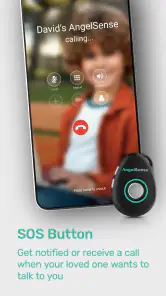
- SOS and assistance features provide extra support during urgent situations.
- Works with a dedicated wearable
- reducing the need to give a child a smartphone.
Cons
- Requires a subscription for most tracking and safety features.
- The wearable may need regular charging depending on tracking frequency.
- Privacy concerns may arise from continuous location monitoring.
- Some features depend on cellular coverage and a stable app connection.
- The device and service can be expensive compared with basic GPS trackers.

- Category
- Parenting
- Version
- 4.4.2











