

Amazing Aurora
- 19.00
- 4.3
- Installs
- 10.00K
- Price
- Free

Screenshots
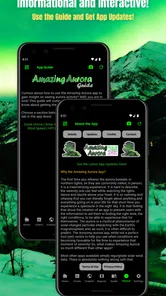
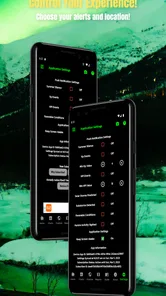
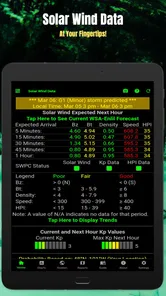
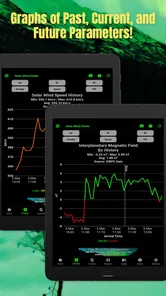
Analysis by Reviewed
I like weather apps that answer a practical question instead of throwing a wall of numbers at me. Amazing Aurora takes that narrower approach: it is built around the possibility of seeing the aurora, rather than trying to replace a full daily forecast. That focus makes it easy to understand, but it also means its value depends heavily on what I want from a weather tool.
In my experience, this is best treated as a planning companion for aurora watchers. It can help me decide whether it is worth stepping outside, driving away from city lights, or staying awake a little longer. It is not the app I would choose for rain timing, commuting conditions, pollen, or a detailed weekend forecast. That distinction matters more than the attractive idea of an aurora app by itself.
How Amazing Aurora fits into everyday sky watching
Sharp Rock Ventures developed Amazing Aurora as a free weather app for everyone, with a simple purpose: provide information about the potential to view the aurora. Its store presentation is brief, and that is actually useful because it sets a fairly clear expectation. I am not opening it for a complete meteorological dashboard; I am opening it when the northern or southern sky might offer something special.
The app makes the most sense for someone who has already developed a habit around sky watching. Perhaps I check conditions before an evening walk, keep it ready during a winter trip, or use it to decide whether a late-night drive is sensible. For a casual user who only wants to see the aurora once, it may be helpful during a promising period but unnecessary the rest of the year.
That focused role is also its main strength. A conventional weather app often buries unusual-sky information among hourly temperatures, wind charts, radar layers, and alerts. Amazing Aurora gives the aurora question priority. I spend less time translating a general forecast into “is this worth trying?” and more time making a direct decision.
Still, I would not rely on it as my only source when a trip depends on precise local conditions. Aurora visibility is affected by several things at once, including darkness, cloud cover, surrounding light, and where I am standing. A favorable indication is a reason to investigate further, not a promise that I will see glowing colors overhead.
A useful routine before leaving home
My preferred workflow is to check Amazing Aurora first, then compare the result with the ordinary weather information I already use. If the aurora outlook looks encouraging, I check cloud conditions, wind, temperature, and road safety separately. This two-step routine prevents a common mistake: treating a good aurora opportunity as automatically worth a long journey.
More From Our News Desk

 Gmail
GmailGmail in a Busy Inbox: Who Benefits Most?
From first account to crowded workday, Gmail earns its place through dependable search and flexible sorting—but its best fit depends on how much inbox maintenance you can tolerate.

 Prime Video
Switching to Prime Video: What Changes in Your Viewing Routine
Prime Video can make a compelling second home for streaming, but switching means learning a different catalog, rental layer, and route from browsing to playback.

 Universal TV Remote Control
Universal TV Remote Control Works Best as a Reliable Backup
A phone remote earns its place through quick setup and reliable habits. Here is how to get more from Universal TV Remote Control—and where its limits show.

 Weather - By Xiaomi
Weather by Xiaomi Review: Clear at a Glance, Less Clear Up Close
Xiaomi’s weather app makes everyday forecasts quick to scan, but its calm surface can leave useful details and recovery paths harder to find than they should be.

 X
XX Under Pressure: Can It Recover When Posting Goes Wrong?
A resilience-focused review of X, examining setup, mistaken posts, interruptions, weak connections, and the gaps that matter when recovery needs to be dependable.

 Clash of Clans
Clash of Clans Is Won Between the Battles
Its raids are quick; its community is a long-term project of coordination, teaching, rivalry, and shared responsibility—with all the friction that entails.
Latest News



I also use the app as a decision filter rather than staring at it continuously. Checking once when I begin planning and again closer to the intended viewing time is more sensible than refreshing every few minutes. The app can guide my attention, but it cannot remove the uncertainty that comes with a natural event.
For an everyday example, imagine I am home on a clear-looking evening and considering a short walk outside. Amazing Aurora can help me decide whether the possibility is interesting enough to bundle up and find a darker viewpoint. If I am planning a remote excursion, however, I would combine its information with a proper forecast, a map, travel time, and a backup plan.
What the current release tells me
The current version is 12.1.2, which suggests the app has continued through multiple rounds of maintenance rather than remaining at its original launch state. It first appeared on March 20, 2021, so the product has had time to settle into its specific role as a dedicated aurora-viewing tool. I see that history as reassuring in principle, although a version number alone does not tell me that every part of the experience will suit every phone.
It supports Android 7.0 and later, keeping the technical entry point relatively broad for people using older devices. That is especially relevant for travel, because some users keep an older phone as a spare camera, navigation device, or night-out companion. I would still check the app’s behavior on my particular device before depending on it during a remote trip.
The app has reached over ten thousand installs and holds a 4.3 average from roughly fifty ratings. Those figures indicate a modest but positive audience rather than the reach of a mainstream weather service. I interpret that carefully: the people who find it useful appear to appreciate its purpose, but the smaller audience means I should not assume the same level of polish, coverage, or support that comes with a major all-purpose forecast platform.
There are also about twenty written reviews, giving prospective users some community feedback to examine. I would pay more attention to comments that describe actual viewing routines than to short reactions. For a specialized tool like this, usefulness depends on location, expectations, and how someone interprets the information.
What has changed for people who already use it
For an existing user, the move to version 12.1.2 is most relevant as a sign of continued product evolution. I would install updates when available, especially before a planned trip, but I would avoid assuming that a newer version automatically changes the app’s central purpose. The confirmed identity remains consistent: this is a focused aurora-information app, not a new kind of general weather platform.
That continuity can be a benefit. If I already use it as a quick aurora check, I do not need to rebuild my entire routine around a radically different product. I can keep the app in the same place on my phone, use it at the same planning stage, and let my broader weather tools handle the details it is not designed to replace.
There is a practical trade-off here. A dedicated app can be faster to understand than a large forecast service, but it may offer less context around the decision. Existing users should therefore think of updates as a reason to revisit the experience, not as permission to discard their other preparations. For serious viewing plans, I would still verify the sky and travel conditions independently.
Where it stands beside ordinary weather alternatives
Compared with a standard weather app, Amazing Aurora wins on focus. General weather apps are excellent when I need an hourly rain forecast, a temperature trend, radar, or information for several locations. Their weakness is that aurora viewing may be only one small layer among many. I often have to combine several indicators mentally before deciding whether the night is promising.
Amazing Aurora reverses that priority. It is more convenient when my question is specifically about the aurora, while a conventional app remains better for the conditions surrounding the outing. I would not call one a universal replacement for the other. The strongest setup is often a dedicated aurora check paired with a familiar weather service.
It also differs from simply searching the web for aurora information. A web search can produce broad explanations and scattered forecasts, but it may take longer to turn those results into a personal decision. A focused app has the advantage of being ready when I want a quick check. The downside is that a narrow interface may not teach a newcomer what each indicator means, so beginners should take time to understand the information before planning a major trip around it.
For photography, the comparison becomes even clearer. Amazing Aurora may help me decide whether the sky is worth monitoring, but a photography workflow still needs camera preparation, battery planning, darkness, cloud checks, and a safe location. I would use it as an early-stage signal, not as a substitute for photographic planning.
Small habits that make the app more useful
One useful habit is to separate “possible” from “practical.” Even when the aurora potential looks appealing, I ask whether the sky is clear enough, whether I can reach a dark place safely, and whether I am prepared for the temperature. This sounds obvious, but a specialized app can make the exciting part of the decision feel more important than the ordinary constraints.
Another is to compare the app’s indication with what I can actually observe. If the sky is clear and I see nothing immediately, I do not conclude that the app failed. Aurora visibility can be subtle, intermittent, or affected by local conditions. I give myself a reasonable observation window and avoid treating a single glance as a definitive test.
I also find it helpful to use the app before making social plans. If friends are visiting and want to see the aurora, I can check whether it is worth organizing a short outing, while keeping expectations modest. That is a better use than promising a spectacular display based on one favorable reading.
A final tip is to keep the app’s role narrow when traveling. I would check it before leaving accommodation, but I would not let it make the entire trip schedule. A viewing opportunity can change, and a safe return route matters more than squeezing every possible minute out of a hopeful forecast.
Costs, access, and the audience it suits
Amazing Aurora is free to install, which makes experimenting with it straightforward. The app includes optional purchases priced from ninety-nine cents to $14.99 per item. That means I can begin without paying, but I would look carefully at what any purchase adds before spending money. For a specialized tool, the right question is not whether an extra option sounds attractive; it is whether it improves the exact viewing routine I already have.
The Everyone content rating makes it suitable for a broad audience, including families who want to introduce children to sky watching. I would still supervise younger children during late-night or outdoor viewing, of course, because the age rating describes the app’s content rather than the safety of the outing itself.
The app is a particularly good fit for people living in or traveling to areas where aurora viewing is realistic, hobbyists who regularly monitor the sky, and curious users who want a dedicated place to begin. It is less compelling for someone who lives under persistent light pollution and rarely travels, unless the educational or planning aspect is enough to justify keeping a specialized app.
I would also steer away from it if my main need is severe-weather awareness, dependable commute planning, or detailed local forecasting. In those situations, a mature general weather app is the better primary choice. Amazing Aurora can sit beside that tool, but it should not be forced to do a job outside its design.
Gaps I would keep in mind
The biggest limitation is the narrowness that makes the app appealing. A dedicated aurora indicator cannot answer every question that comes before an outdoor viewing attempt. I still need to think about cloud cover, visibility, darkness, local lighting, transport, clothing, and safety. Anyone expecting one screen to settle all of those issues may feel disappointed.
There is also an interpretation gap for newcomers. The store summary explains the purpose, but a first-time viewer may still wonder how strongly to act on the information. My advice is to treat the app as a prompt for observation and cross-checking. It is most useful when I understand its place in a larger process, not when I ask it for certainty.
The optional purchase range is another point worth considering. Free access lowers the barrier to trying the app, but possible spending means I would review each purchase carefully and avoid paying simply because I am excited about an upcoming night. If the free experience already answers my question, there may be no reason to add anything.
The modest size of the user base also affects how I judge it. A 4.3 average is encouraging, but a specialized app with a smaller audience does not provide the same broad testing signal as a universally popular service. I would test it during ordinary local evenings before trusting it as the only planning aid for an expensive holiday.
What I would watch as the app continues
Because version 12.1.2 is the current release, I would watch future updates for improvements that make interpretation easier without turning the app into a cluttered general forecast service. Clearer context around the aurora potential would be valuable, especially for people who are still learning how to turn an indication into a sensible plan.
I would also look for continued compatibility with older Android phones and a smooth experience during travel. Those details matter to users who may rely on spare devices or have limited connectivity options while away from home. I would rather see a focused, dependable tool than a long list of unrelated weather features.
For existing users, the sensible approach is simple: keep updating, but keep cross-checking. The app’s evolution is worth following, yet no version number changes the basic uncertainty of aurora watching. The sky remains the final judge, and local weather can still defeat an otherwise promising opportunity.
My recommendation after using it
I recommend Amazing Aurora to anyone who wants a quick, dedicated way to think about aurora-viewing potential. Its free entry, broad Everyone rating, and focused purpose make it easy to try, while the current release shows that Sharp Rock Ventures has continued developing it since its original launch. I especially like it as the first step in a short evening decision process.
I would not recommend using it alone for a long drive, a costly holiday, or a safety-sensitive outdoor plan. Pair it with a normal forecast, check the actual sky, and keep expectations realistic. That approach turns the app from a promise generator into something more useful: a compact signal that helps me decide when looking up might be worthwhile.
My bottom line is that Amazing Aurora is best for focused aurora planning, not everyday weather coverage. If that is the question I ask often, it earns a place on my phone. If I need one app to handle every part of weather and travel planning, I would choose a broader alternative and use this only as a companion.
Amazing Aurora Frequently Asked Questions
Is Amazing Aurora free, and what should I know about its cost before downloading?
Amazing Aurora is free to download, though it offers in-app purchases priced from $0.99 to $14.99 per item. The app is listed for everyone, and its current version is 12.1.2. Check the purchase options in your app store before downloading, especially if you plan to let children use the app or want to avoid optional spending.
What devices can run Amazing Aurora?
Amazing Aurora is a weather app for Android and iOS. On Android, it requires version 7.0 or later, so check your device’s operating system before installing. The app is developed by Sharp Rock Ventures and was released on March 20, 2021. Its age rating is Everyone, making it suitable for a general audience.
What is Amazing Aurora, and what can I do with it?
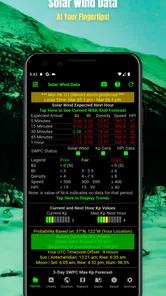
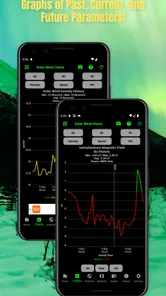
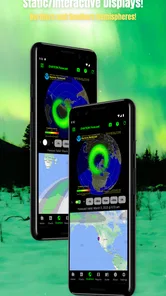
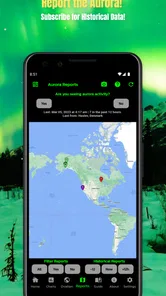
Amazing Aurora is an app focused on helping users discover, view, and enjoy aurora-related content. Depending on the version and platform, it may provide aurora forecasts, viewing information, photos, alerts, or educational details about the Northern and Southern Lights. It is most useful for travelers, photographers, and anyone interested in planning a possible aurora-watching experience.
Does Amazing Aurora require an internet connection or location access?
An internet connection may be necessary to load updated forecasts, maps, alerts, images, or other online information. Location access can also improve the relevance of the app by identifying your area and showing conditions nearby. You should review the permission requests carefully and enable only the access you are comfortable with. Some features may still work without location services.
Can Amazing Aurora guarantee that I will see the Northern Lights?
No application can guarantee an aurora sighting. Amazing Aurora can help by presenting forecast data, visibility conditions, weather information, or notifications, but the final result depends on solar activity, cloud cover, light pollution, location, and timing. Forecasts can change quickly, so users should treat the app as a planning aid rather than a promise that the aurora will appear.
Pros
- Displays vivid aurora forecasts with clear activity levels.
- Offers useful location-based viewing recommendations.
- Includes educational information about auroras and solar activity.
- Clean interface makes browsing forecasts quick and easy.
- Helpful alerts can notify users about potential aurora activity.
Cons
- Forecast accuracy depends heavily on local weather and cloud cover.
- Some advanced features may require a paid subscription.
- Aurora visibility is limited in areas with significant light pollution.
- Background location access may affect battery life.
- Solar activity data can be confusing for first-time users.











