ALDI USA
- 6.52K
- 4.7
- Installs
- 5.00M
- Price
- Free

Screenshots

Analysis by Reviewed
When I’m planning an ALDI run, the most useful thing a phone app can do is help me decide what to buy before I reach the aisles. ALDI USA is built around that kind of focused trip: I can browse weekly ads, prepare a shopping list, look up a store, and use recipes for meal ideas. It is less a general grocery marketplace than a companion for shoppers who already have ALDI in mind.
When a connection matters
The app is most useful when you can get online to check the current weekly ads, plan a list, or look up a store before setting off. I’d browse the offers at home, then use the list as a reminder in the aisle rather than relying on a last-minute search while juggling groceries. That small change makes the app feel more like a planning tool than something I need to operate constantly during the shop.
A practical routine is to check the ad before deciding what to cook, add the relevant sale items to your list, and then review the list once before leaving. It helps keep a promotion from becoming an impulse purchase: I can ask whether I actually have a meal in mind for the item instead of buying it just because it caught my eye. For shoppers who already visit ALDI regularly, that connection between browsing and list-making is the most useful part of the workflow.
One helpful distinction is that an ad is a prompt for planning, not a guarantee that every tempting offer belongs in the basket. I’d first decide which meals or household basics I need, then scan for offers that fit those plans. That order makes the app more useful for controlling a shop than simply collecting attractive-looking deals.
Useful on the move, with a little preparation
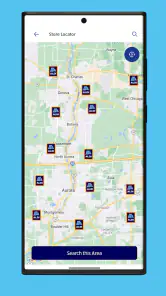
The store locator is particularly handy when plans change. If I’m away from my usual area, I can look up a nearby ALDI and check its hours and directions before making a detour. I’d do that while stopped, not while driving; the feature is useful for choosing where to go, but it is not a reason to handle a phone on the road.
For a rushed trip, I’d open the weekly ad and list before entering the store, then keep the list focused on what I came for. That is a better fit than browsing every offer in the middle of shopping. If reception is unreliable inside a building, checking the information beforehand is a sensible precaution; I wouldn’t assume every screen or detail will be available without a connection.
This preparation is especially useful when the errand is part of a larger route. I can check whether a nearby ALDI fits the day’s plans before leaving, rather than discovering only after a detour that the stop is inconvenient. The locator answers a practical “where and when” question, while a map app may be better if I need to compare several kinds of destination or coordinate a longer journey.
You May Like

Clash of Clans Is Won Between the Battles

Android Auto Makes the Case for Quieter Car Software

MobiOffice: Transforming Mobile Productivity with Seamless Integration

EA SPORTS FC™ Mobile Soccer: Redefining Mobile Sports Gaming

How Microsoft OneDrive Became a Mobile Productivity Giant

How Google Translate Breaks Language Barriers Effortlessly
Recovery and a more careful routine
If a page takes a while to load or a search does not respond, I’d first check whether the phone has a usable connection, then try again once it is stable. For a trip already in progress, a note or screenshot made beforehand can serve as a simple backup for the items I meant to buy, though it won’t replace a current ad or a fresh store lookup. Keeping the important details ready before leaving reduces the chance that a slow moment turns into a frustrating one.
Data-conscious shoppers can also limit unnecessary browsing by checking only the ad pages and store information they need, then relying on their prepared list. I’d avoid repeatedly refreshing a screen when the signal is weak; it rarely helps the shopping decision. This is a modest but useful trade-off: the app can make planning easier, while good preparation keeps the trip from depending on constant connectivity.
If a lookup still fails, I’d switch to the information I already have rather than letting troubleshooting take over the errand. A saved note can keep the shopping list usable, while a store-hours question is better checked again when the connection is working. That separation matters: the app can help prepare a trip, but it is sensible to have a basic fallback for the details I need in the moment.
Getting Started
First things first, downloading the ALDI USA app is a breeze. It’s available on both Android and iOS, so no matter your device preference, you’re covered. Once you get it on your phone, the app welcomes you with a clean and intuitive interface. Seriously, it’s like the app knows you don’t have time to mess around and just want to get to the good stuff—like finding those killer weekly deals.
It is free, which makes it easy to try alongside whatever routine I already use. I would not install it expecting it to replace every grocery tool on my phone; its value is narrower and more practical when ALDI is already part of the plan. The developer is ALDI International Services SE & Co. oHG, and the app’s focus comes through in its offers, recipes and store information.
Features that Stand Out
One of the coolest features I stumbled upon is the “Weekly Ads” section. It’s like having the Sunday paper right in your pocket, minus the ink stains. You can browse through the latest deals with just a few taps, and let me tell you, some of these deals are too good to pass up! Plus, there’s a handy shopping list feature that lets you add sale items directly from the ads. Oh, and if you’re someone who likes to plan meals around sales, this is a total game-changer.
There’s a small planning trade-off here: sale browsing works best when I already know what kinds of meals or staples I need. I’d use the ad to spot relevant offers and build a short list, rather than treating every featured item as a reason to change my plan. That keeps the list practical and makes it easier to compare a special purchase with the ingredients I would have bought anyway.
A useful way to keep that list manageable is to separate the things I came for from the offers I might consider. Even without turning the app into a full household inventory, that mental distinction helps me avoid forgetting essentials while still leaving room for a worthwhile special. It also makes the list more useful to another person doing the shop: they can see the priorities without needing to repeat my browsing.
Now, I’m someone who loves efficiency, so the “Store Locator” feature definitely caught my eye. Whether you’re at home or out and about, finding the nearest ALDI store is as simple as pie. The app even provides store hours and directions, which is pretty nifty if you’re in an unfamiliar area. Who doesn’t love a good shortcut to groceries?
That makes it a useful companion for a familiar errand as well as an unfamiliar one. Before leaving home, I can check the hours and directions; if I’m choosing between shops, I can use that information to decide whether an ALDI stop fits the route. It is less suited to someone who needs a broad comparison of many grocery chains in one place, since its strength is helping with an ALDI-focused trip rather than surveying the whole market.
For a household that shares errands, I’d treat the list as the handoff point: one person can plan around the ad, then pass along a concise set of intended purchases. The other shopper still needs to make their own judgment in store, especially if a planned item is unavailable or a substitute does not suit the meal. That is a more realistic use than expecting a list to manage every detail of a shared grocery routine.
The User Experience
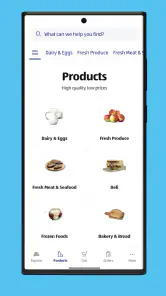
Using the app feels like having a personal shopping assistant at your beck and call. It’s fast, responsive, and doesn’t bog you down with unnecessary information. The categories are well-organized, so if you’re looking for something specific like organic produce or gluten-free snacks, you’re just a few taps away. I found the navigation to be pretty seamless, which is a big plus in my book.
For a realistic weekday use, I’d check the ad while planning dinner, add only the ingredients that make sense to the list, and confirm the store route before leaving work. At the shop, the list becomes a quick prompt rather than a reason to keep scrolling. That suits someone who wants a simpler ALDI visit; if you depend on one app to compare inventory, prices and services across several retailers, a multi-store shopping tool may be a better fit.
That contrast is worth considering before making it part of a regular routine. A general shopping or grocery app may be more convenient for someone building a list across several stores, while this one keeps attention on ALDI’s own offers and locations. I see that focus as an advantage when I know where I am shopping, but a limitation when I am still deciding which retailer best fits the week’s needs.
ALDI USA is a free shopping app from ALDI International Services SE & Co. oHG. It has a 4.7 average from around 30,000 ratings, and more than 5 million installs. The Everyone age rating makes it broadly suitable for general household use. For shoppers deciding whether to try it, the key question is whether they want help with ALDI offers, lists and locations—not a universal grocery marketplace.
It has been available since August 26, 2011, and the current version is 9.2535.0. On Android, it requires version 9 or later. Those details are useful when checking whether an older phone can run it, but they do not answer the more personal question of whether its planning style suits me. I’d judge that after trying a simple trip: check an offer, make a short list, and see whether the routine saves effort rather than adding another step.
Recipes for practical meal planning
Another highlight is the “Recipes” section. I’m not exactly a kitchen whiz, but the app offers some simple and delicious recipes that make me feel like I could be! The ingredients are usually items you can find at ALDI, which means less running around and more cooking.
I’d use a recipe as a starting point, then check the ingredients against what I already have and the current offers. That avoids buying a full set of ingredients for a dish I may only make once. It also gives the recipe section a practical role beyond inspiration: it can help turn a few sale items into a coherent meal, as long as I’m willing to adapt the plan to my pantry and preferences.
For a busy evening, I might use a recipe to settle the question of what to cook, then make the shopping list only after checking what is already in the kitchen. This avoids a common planning trap: buying ingredients twice because I started with an appealing dish instead of the pantry. If a recipe calls for something I do not want to purchase for one meal, I’d adapt the idea or choose another dinner rather than treating the recipe as a strict shopping instruction.
Who will get the most from it
I think the app is best for people who shop at ALDI often, like to plan around weekly offers, or occasionally need to find a store while away from home. It also makes sense for a household where one person checks promotions and shares a concise list with whoever is doing the shopping. If you rarely visit ALDI, prefer to choose groceries only after seeing them in person, or mainly need cross-store comparisons, the app may not earn a regular place on your phone.
The current version is 9.2535.0 and requires Android 9 or later. A rating is a useful sign of how other shoppers respond, but I’d still judge the app by whether its ad-and-list routine fits my own habits. The best reason to keep it is not to browse more; it is to make a planned ALDI trip easier to carry out.
Someone who shops spontaneously can still get value from the store locator, but may not benefit much from keeping up with the weekly ad or planning recipes in advance. Conversely, a shopper who compares every grocery purchase across retailers may prefer a broader tool and use this app only when an ALDI trip is already likely. I’d skip it if I rarely shop there or want one place to manage a multi-store basket; the narrower focus is the point, but it will not suit every routine.
For a first try, I’d keep expectations modest: choose one upcoming trip, check the ad for a few genuinely useful items, and see whether the list is easier to follow in store. That gives a clearer answer than browsing every section at once. If it fits, the app can become a small part of the weekly routine; if not, a paper note or a general list app may be enough for the way I shop.
Final Thoughts
All in all, the ALDI USA app is a solid companion for anyone looking to streamline their shopping experience. It’s packed with features that save you time and money, which, let’s be honest, who couldn’t use a bit more of both? While it may not replace the charm of a leisurely stroll through the aisles, it definitely makes the whole process a lot more efficient.
My strongest recommendation is for an ALDI regular who wants to connect weekly offers with real meals and a short, usable list. The app is less compelling if I need extensive cross-store research or expect every part of a shopping trip to work without a network connection. A little preparation—checking information before leaving and keeping the essentials at hand—makes its connected features easier to rely on.
So, if you’re looking to make your grocery runs a bit smoother, give the app a whirl. It might just become your new best friend in the world of grocery shopping.
ALDI USA Frequently Asked Questions
Is the ALDI USA app free to download?
Yes. ALDI USA is free to download, and its content rating is Everyone. You can use the app to browse ALDI shopping information and prepare for a trip without paying for the app itself. Keep in mind that the app’s download cost is separate from the cost of groceries or other products you choose to buy.
What kind of app is ALDI USA?
ALDI USA is a shopping app for people interested in ALDI’s groceries and other products. It is intended to help shoppers explore store information and get ready for a visit. The app’s focus is reflected in its description: ALDI is a home for low prices on high-quality groceries and products. You can download it on a supported device and explore its shopping features.
Is ALDI USA suitable for first-time ALDI shoppers?
Yes. ALDI USA is a shopping app for people who want to browse grocery and product information and prepare before visiting a store. Its weekly ads, deals, shopping lists, and store-finding tools can help newcomers get familiar with what is available and plan a trip. The app is free, and its content rating is Everyone.
What devices can I use to download ALDI USA?
ALDI USA is available for Android and iOS users, so you can check your device’s app store for the version that works with your phone or tablet. On Android, the current version is 9.2535.0 and requires Android 9 or later. The app is free to download, making it easy to try its shopping tools without an app purchase.
Who develops ALDI USA, and is it widely used?
ALDI USA is developed by ALDI International Services SE & Co. oHG. It has an average rating of 4.7 from around 30,000 ratings, with about 6,500 written reviews and over 5 million installs. These figures suggest that many shoppers use the app, though personal experience can vary depending on how you use its features and what you expect from a grocery-shopping companion.
Pros
- User-friendly interface for easy navigation.
- Offers exclusive discounts and promotions.
- Convenient store locator feature.
- Supports online shopping and delivery.
- Provides nutritional information for products.
Cons
- Limited product selection compared to rivals.
- Requires account registration to use app.
- Occasional bugs and app crashes.
- Some features require stable internet.
- No option to create shopping lists.

- Category
- Shopping
- Version
- 9.2535.0