AirMirror: TV Cast via AirPlay
- 87.00
- 4.4
- Installs
- 1.00M
- Price
- Free

Screenshots


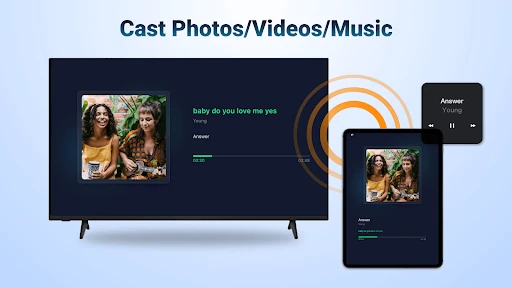
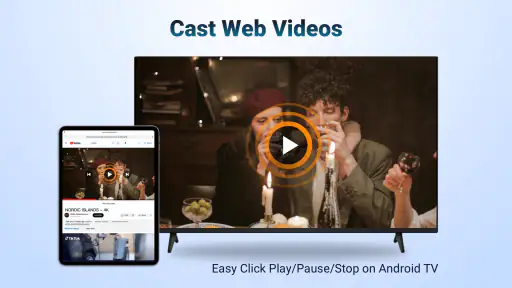
Analysis by Reviewed
I find AirMirror: TV Cast via AirPlay most useful when I want to move something from a phone to an Android TV without turning the moment into a setup project. The idea is simple, but the experience depends on the connection: the phone and TV need to be on the same Wi-Fi network, so a reliable home network matters more than a long feature list. If the signal is weak or the devices are separated across a busy network, mirroring can feel less effortless than it does in a quiet room.
Where a shared screen fits into the day
A practical use is pulling up a short web video for a few people in the living room instead of passing a phone around. I’d also consider it for showing a photo album or a slide deck when everyone is already gathered near the TV. For those situations, the bigger display is the real benefit; the phone stays in your hand as the source, while the TV makes the content easier for a group to see.
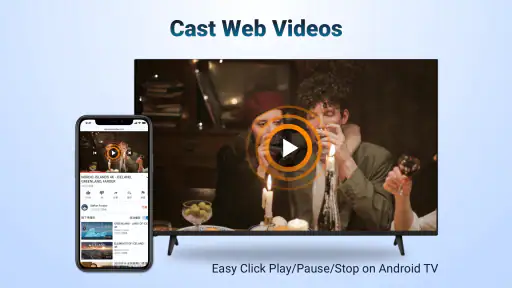
There is a useful distinction between casting a web video and mirroring the whole screen. Casting is a better fit when I want to keep the phone available for other tasks, while full-screen mirroring makes sense for material that does not have a straightforward TV playback option. Before presenting, I’d open the content and check that it is ready to display, then connect. That small bit of preparation avoids making guests wait while I search through tabs or files.
Network habits and sensible expectations
For a smoother session, I’d check that both devices are connected to the same Wi-Fi before opening the app, especially after switching between home and guest networks. If the TV does not appear, I’d first verify that shared connection rather than repeatedly tapping through the app. Restarting the connection or reopening the app is a reasonable next step if the devices seem stuck. These are simple checks, but they address the most likely source of friction in a network-dependent setup.
Keep in mind that mirroring can show phone notifications and other on-screen activity. I’d enable a quiet mode or clear anything private before sharing a screen in a meeting or with family. That is a small privacy habit, not a special feature, and it makes the app more comfortable to use in public settings.
Seamless Streaming Experience
First things first, the installation and setup of AirMirror are incredibly straightforward. You simply download the app, ensure your devices are on the same Wi-Fi network, and you're good to go. No need for any tech wizardry here. The app’s interface is user-friendly, making it super easy to navigate, even for those who aren’t tech-savvy. With just a few taps, your phone’s screen is mirrored on your TV, allowing you to enjoy content in a much more immersive way.
Compatibility and Performance
One of the standout features of AirMirror is its compatibility. It works flawlessly with various smart TVs and streaming devices. Whether you have a Samsung, LG, Sony, or any other popular brand, this app has got you covered. The performance is also top-notch. Streaming is smooth with minimal lag, and the quality is crystal clear. You can watch your favorite movies or play mobile games on the big screen without any interruptions or degradation in quality.
More From Our News Desk

Clash of Clans Is Won Between the Battles

Android Auto Makes the Case for Quieter Car Software

MobiOffice: Transforming Mobile Productivity with Seamless Integration

EA SPORTS FC™ Mobile Soccer: Redefining Mobile Sports Gaming

How Microsoft OneDrive Became a Mobile Productivity Giant

How Google Translate Breaks Language Barriers Effortlessly
In day-to-day use, I would treat broad compatibility as a reason to try the app, not a guarantee that every TV setup behaves identically. The receiver matters, as do the network and the content source. If a particular video refuses to play or the picture does not look right, I’d compare a web-video cast with screen mirroring and see which route suits that content better. For fast-action games, even a little delay can be distracting, so I would use the phone display instead when precise timing matters.
Endless Entertainment Options
What I absolutely love about this app is the endless entertainment possibilities it opens up. Want to showcase your vacation photos to family and friends? Easy peasy. Need to give a presentation without fumbling with cables and connections? Done and dusted. Or perhaps you’re in the mood for a gaming marathon on a big screen? Go right ahead. The app supports all sorts of media, making it versatile for any occasion.
The trade-off is that a wireless route is not always the best route. A direct TV app is usually the simpler choice if the video service already runs on the television, and a cable can be more predictable when Wi-Fi is congested or a presentation must work on a tight schedule. I see AirMirror as a handy bridge for content that starts on a phone, rather than a replacement for every TV app or wired connection. It is especially appealing when convenience matters more than having every control on the television remote.
Choosing the right source and route
One small decision can save time: decide whether you need the TV to show a single web video or everything visible on the phone. If it is just a clip, starting with the web-video route keeps the phone more usable for checking a message or finding the next item. If the material is a page, photo, or slide that does not have its own TV playback option, mirroring may be the more natural approach. I would make that choice before guests arrive rather than switching modes while everyone waits.
This is also where AirMirror differs from the usual alternatives. A native streaming app on the TV avoids using the phone as the source, while a casting feature built into a particular video service may be more convenient for that service alone. AirMirror makes more sense when the content is already on the phone or in its browser and I want one shared screen without searching the TV for another app. The trade-off is that the phone remains part of the chain, so its network connection and activity matter throughout the session.
When a portable setup is less convenient
The same network requirement that is easy to meet at home can be awkward elsewhere. In a hotel, office, or shared building, a phone and TV may connect to separate networks, or a guest network may limit communication between devices. I would not assume that seeing Wi-Fi on both screens means they can discover each other. If I need a presentation to work on arrival, I would test the connection ahead of time and keep a cable or locally available presentation method in mind as a backup.
For travel, this app is best when the room’s network and television are already familiar or easy to test. It is less appealing when I have only a few minutes, cannot change network settings, or need a display method that works independently of the local setup. That does not make the app unsuitable; it simply means its convenience is conditional. At home, where the TV and phone usually share a stable network, the same steps can feel much more natural.
Who will get the most from it?
AirMirror is aimed at Android TV owners who want an AirPlay-style way to bring phone content to the larger screen. BoostVision develops the app, which sits in the video-player and editing category. It is free to install, rated for Everyone, and offers in-app purchases; the average rating is 4.4 from around 12,000 ratings, with over one million installs. Version 1.4.7 supports Android 6.0 and later.
I’d recommend trying it if you often share web videos, photos, or presentation material from a mobile device and your TV is on the same dependable network. I’d be less inclined to rely on it as the only option for travel, crowded networks, or latency-sensitive gaming. A wired connection or a native TV app may be a better fallback in those cases. The practical question is not just whether the TV can receive a cast, but whether the network and source content make that convenient when you need it.
What to check before a longer session
If I planned to watch a longer video, I would start with a short test clip and confirm that both the picture and connection behave as expected before settling in. This is a practical way to catch a weak signal or a source-specific playback issue while changing plans is still easy. I would also keep the phone close to the same Wi-Fi coverage as the TV and avoid moving it to another network mid-session. Those habits do not make a poor network reliable, but they reduce avoidable interruptions.
Cost is another reason to try it rather than commit to it as a replacement for every viewing method. The app is free, while optional in-app purchases range from $1.99 to $10.99 per item. I would first see whether the basic workflow fits my routine and only consider a purchase if I understand what it adds for my own use. If all I need is occasional photo sharing, a paid option may not be relevant; frequent phone-to-TV use makes it more reasonable to explore.
Final Thoughts
In conclusion, AirMirror: TV Cast via AirPlay is more than just an app; it’s an essential tool for anyone who loves convenience and quality in their streaming experience. It brings a new level of enjoyment to watching content and ensures you’re getting the most out of your TV. Give it a try, and I promise you won’t be disappointed. Whether it's movie night, a business presentation, or just showing off your latest photos, this app has got your back. So, what are you waiting for? Dive into a world of seamless streaming with AirMirror.
My connectivity verdict
For a realistic evening at home, I’d use it to put a recipe video or a travel clip on the TV while keeping the phone nearby to pause or move to another item. I would avoid starting a cast while walking between rooms or relying on a guest network I have not tested; both make connection problems harder to diagnose. If the TV is not found, I’d check the shared Wi-Fi first, then reopen the app and try again before switching to another method. For longer viewing, I’d also keep the phone close enough to stay connected and avoid using it for tasks that interrupt the content.
My overall view is that AirMirror is most valuable as a convenient, network-dependent shortcut, not a universal solution for every screen or situation. Its free entry point makes it easy to test with your own TV, while optional purchases range from $1.99 to $10.99 per item. If the first connection is straightforward and your regular use is sharing content from a phone, it can earn a place in your routine. If you need guaranteed playback regardless of network conditions, a TV’s built-in app or a cable is the safer choice.
AirMirror: TV Cast via AirPlay Frequently Asked Questions
What devices do I need to use AirMirror: TV Cast via AirPlay?
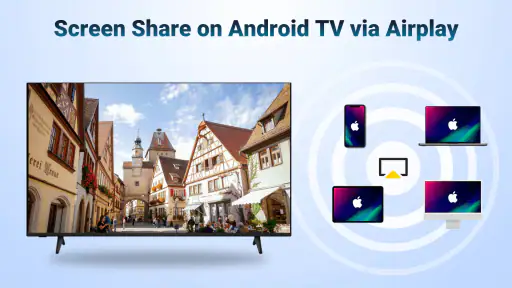
AirMirror is an app for mirroring or casting web videos to an Android TV through AirPlay. Your phone or tablet and the TV need to be able to communicate over the same Wi-Fi network for the connection to work. Before downloading, check that your TV supports the required AirPlay receiving function and that your mobile device can install the app; compatibility can vary by device.
What is AirMirror: TV Cast via AirPlay and how does it work?
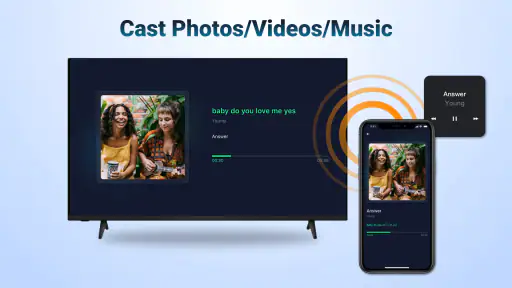
AirMirror: TV Cast via AirPlay is an application that enables users to mirror their smartphone or tablet screens directly to their TV using the AirPlay protocol. It works by connecting your device and TV to the same Wi-Fi network, allowing seamless streaming of videos, photos, and other media. This app is ideal for presentations, watching movies, or sharing content with a larger audience.
Is AirMirror compatible with all smart TVs and devices?
AirMirror is designed to be compatible with a wide range of smart TVs that support AirPlay. However, not all devices may be supported, particularly older models or those without AirPlay capabilities. Users should check their TV's specifications to ensure compatibility. Additionally, the app is available for both Android and iOS devices, making it versatile for different users.
Can I cast web videos without mirroring everything on my phone screen?
AirMirror’s description highlights both screen mirroring and casting web videos to an Android TV through AirPlay. That makes it worth considering if you want to watch online video on a larger display, rather than only sharing your full phone screen. The experience depends on your devices and network connection, so check that your TV can receive the AirPlay stream before relying on it.
Are there any costs associated with using AirMirror: TV Cast via AirPlay?
AirMirror is free to download, with in-app purchases priced from $1.99 to $10.99 per item. You can try the app without paying upfront, while optional purchases may be available for users who want additional access or features. Check the purchase details in your app store before confirming anything, since the amount and terms can depend on the specific item offered.
Pros
- Easy to set up and connect devices.
- Supports multiple media formats.
- Provides high-quality streaming.
- User-friendly interface design.
- Works with various smart TV brands.
Cons
- Requires stable Wi-Fi connection.
- Limited features in free version.
- Occasional lag in screen mirroring.
- Not compatible with all devices.
- Ads in the free version can be intrusive.

- Category
- Video Players & Editors
- Version
- 1.4.7