AGAMA Car Launcher
- 981.00
- 4.5
- Installs
- 5.00M
- Price
- Free
Screenshots
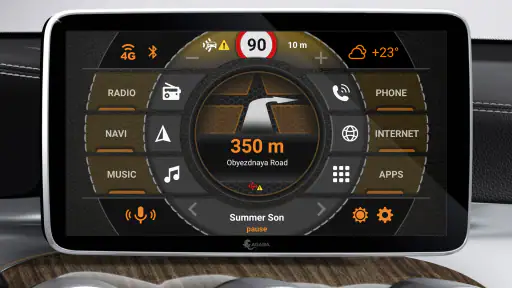
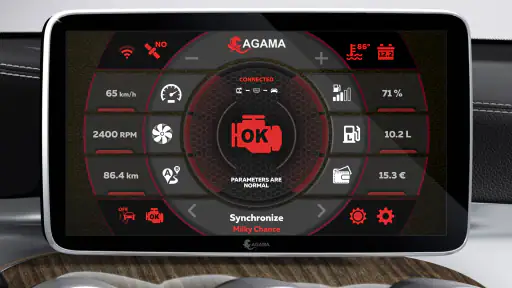
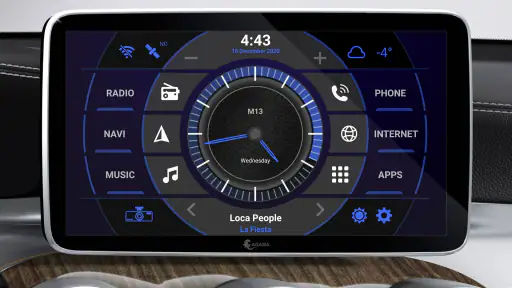
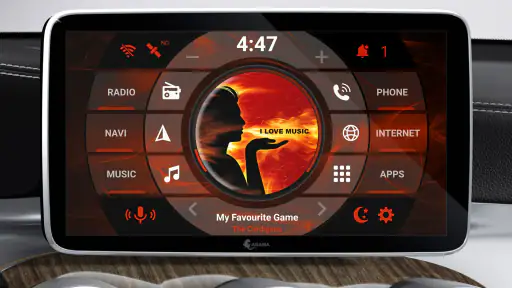
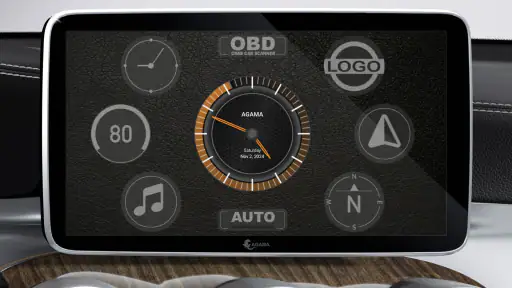
Analysis by Reviewed
For a driver, a launcher is useful only if it makes the next action easier without becoming another screen to manage. AGAMA Car Launcher is built for Android car multimedia systems, and its appeal is the chance to shape a dashboard around the apps and controls you already use. I like that idea, but I would judge it by a practical test: does it help me reach the right thing quickly, including when a connection is unreliable?
Network matters most through the apps you open
A car dashboard is most useful when the things you need are easy to reach, but the experience can depend on what is connected around it. Navigation and music are the obvious examples: a route may need current map information, while playback depends on the music service or files you use. I treat AGAMA as the home screen that brings those activities together, not as a replacement for the apps or connections behind them.
That distinction matters before a trip. I would choose the navigation and audio apps I expect to use, put their shortcuts where I can reach them, and check that the phone or head unit is connected as intended before setting off. A tidy launcher can reduce screen-hunting, but it cannot fix a weak connection or make an app's content available when that app cannot reach it.
This makes the launcher’s value partly dependent on the setup around it. If your route app, audio app, and head unit already cooperate, a well-arranged landing screen can make the handoff between them feel more direct. If those pieces regularly disconnect or behave differently from one another, AGAMA cannot smooth over every fault. I would think of it as an organizer for a connected driving setup, not as the connection itself.
Making a car screen feel like your own
Picture this: you're about to hit the road, and with a simple touch, your car's interface transforms into something that feels uniquely yours. That's precisely what the AGAMA Car Launcher offers. It’s a versatile launcher designed specifically for cars, making it easier to access essential apps and information while you’re on the go. The app supports both Android and iOS, so no one feels left out!
Design that rewards a little planning
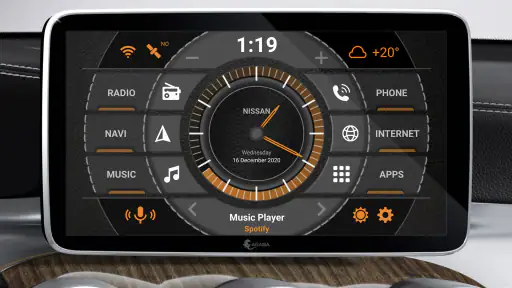
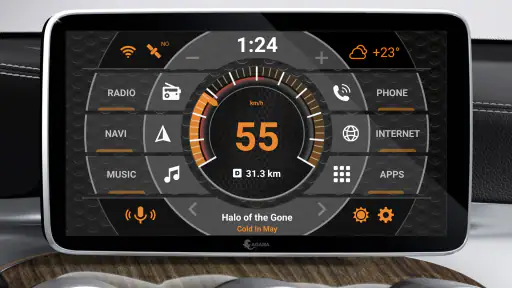
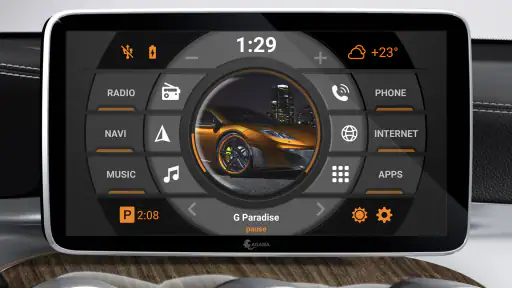
The design is where AGAMA truly shines. It offers a sleek and modern interface, customizable to suit your tastes. Whether you want a minimalist look or something more vibrant, AGAMA's got you covered. The colors, widgets, and layouts can be adjusted with ease, ensuring your car's dashboard looks as good as it feels to use.
One of my favorite features is the ability to set up shortcuts for your most-used apps. This means less fiddling with your phone and more focus on the road. The app is intuitive, with a user-friendly interface that makes navigation a breeze. Even someone not tech-savvy will find it accessible and straightforward to use.
More From Our News Desk

Weather by Xiaomi Review: Clear at a Glance, Less Clear Up Close

X Under Pressure: Can It Recover When Posting Goes Wrong?

Clash of Clans Is Won Between the Battles

Android Auto Makes the Case for Quieter Car Software

MobiOffice: Transforming Mobile Productivity with Seamless Integration

EA SPORTS FC™ Mobile Soccer: Redefining Mobile Sports Gaming
My practical tip is to configure the layout while parked, then spend a short stationary test making sure the important controls land where your hand expects them. Keep the first screen spare: navigation, audio, and perhaps one other frequently used destination are easier to identify quickly than a crowded grid. This is a small trade-off—less decoration in exchange for fewer distractions—and it makes customization serve the drive rather than compete with it.
There is also a useful way to decide what deserves that prime screen space: think about the order of actions you take when setting off. If you usually start a route and then choose audio, place those destinations where you can find them in that sequence. Less-used tools can remain out of the way. That approach is more effective than designing the screen around appearance alone, because it turns the layout into a simple routine rather than a collection of attractive options.
I would avoid testing a new arrangement for the first time in traffic. A change that seems obvious while parked can feel different once you are watching the road and making quick decisions. After settling on a layout, try it during a stationary check and remove anything that takes too long to identify. A car interface should be judged by legibility and reach, not by how many shortcuts it can display.
What the launcher organizes—and what it does not
AGAMA isn't just about looks; it's packed with features that enhance your driving experience. From GPS navigation integration to music control, it covers all the bases. The app can sync with your favorite music apps, allowing you to enjoy your tunes without switching screens. Plus, it supports voice commands, which is a lifesaver when you need to keep your hands on the wheel and eyes on the road.
Another notable feature is the real-time vehicle diagnostics. It provides vital information about your car's performance, such as speed, fuel level, and engine status, all displayed in a clear and concise manner. This is especially handy for those long road trips where keeping an eye on your car's health is crucial.
These strengths suit drivers who regularly use an Android-based car multimedia system and want a more focused front page than a general-purpose phone home screen. A useful everyday routine is to set the launcher up before leaving, open the route and audio you need, and then rely on the prepared shortcuts instead of browsing for apps at traffic lights. The convenience is strongest when the underlying apps already work well on the device; AGAMA organizes access, rather than replacing their individual functions.
That also explains who may prefer another approach. If your car already has a familiar built-in interface that handles your essentials cleanly, changing the home screen may add little. Likewise, if you mainly want a phone-only dashboard or expect the launcher itself to supply navigation, music, or vehicle data, it is worth checking how your existing apps and equipment fit together first. A launcher is the doorway, not the whole house.
Compared with leaving the standard home screen in place, a car-focused layout can make frequently used destinations easier to spot and can give the dashboard a more intentional feel. The ordinary home screen may still be preferable if you rarely use the car display or value a familiar arrangement over customization. Built-in interfaces can also be the simpler choice when they already provide the controls you need; replacing a working setup just to gain a different look is not automatically an upgrade.
The diagnostics angle is best treated as a convenient glance at information shown by the setup, rather than a substitute for proper attention to a vehicle problem. If a reading seems unexpected, I would not rely on a launcher to explain its cause. Its strongest role is putting useful items within reach, while actual vehicle care and troubleshooting remain separate tasks.
Everyday use, from the driveway to the commute
Imagine leaving home for a familiar commute. While parked, I would open the route I expect to use, choose the audio app, and check that both appear where I want them on the dashboard. Once moving, the benefit is not that the launcher does everything; it is that I do not have to search through unrelated screens to reach those prepared choices. If the route needs a change, I would handle that only when safely stopped or through a suitable voice control.
For a longer journey, the same preparation helps with a different problem: interruptions. A brief stop may mean returning to the car and wanting to get back to navigation or audio without rebuilding the whole setup. Keeping the key shortcuts in consistent places makes that restart less fussy. The trade-off is that a highly customized dashboard requires a little initial attention, so it suits drivers willing to establish a layout and then leave it alone.
It is also a better fit for a shared car when each driver can agree on a simple, recognizable front screen. If one person fills it with shortcuts and another has to search through them, customization has stopped helping. I would prioritize a few common destinations and keep the arrangement stable, especially when more than one person uses the same head unit.
When a connection falters
If a route or music service stops responding, I would first check the connection and the app providing that service rather than repeatedly tapping the launcher. Then I would return to AGAMA and reopen the relevant shortcut once the service is available again. This is a sensible recovery habit because a home screen can make apps easier to reach, but it does not control their network access or repair a problem in the phone, head unit, or service.
A practical recovery sequence is to distinguish between the screen and the destination: is the launcher visible and responsive, or is the app opened from it the part that is struggling? If only one service is affected, I would avoid changing the whole dashboard. If several connected tasks fail together, I would check the device or connection before rearranging shortcuts. That small bit of diagnosis can save time and prevent a temporary network problem from turning into unnecessary setup changes.
Voice commands can be useful when they work with the apps and equipment in your car, but I would not make them the only way to reach an essential function. A command may be less convenient if the relevant service cannot connect or fails to recognize what you asked. Keeping the important shortcut visible gives you another route to the app, while still leaving any service-specific problem to be resolved in that app or connection.
For data-conscious driving, prepare what you can in the apps you use before leaving, and avoid exploring settings or searching for content while moving. This is particularly helpful on a long drive or in places where reception may vary. I would also keep the dashboard layout focused: fewer live tasks and clearer shortcuts make it easier to understand what is happening without turning the car screen into another phone to manage.
For anyone wondering whether the launcher itself is enough to keep a trip working when reception drops, I would not plan on that assumption. The reliable approach is to check what your chosen navigation and audio apps can do in advance and follow their own preparation options. AGAMA can help you reach those apps, but it does not replace their network behavior or content.
Trial, compatibility, and the decision to keep it
The app is free to try for a 30-day trial, with in-app purchases priced at $6.99 per item. It is rated for Everyone, comes from altergames.ru, and its Android release requires version 5.0 or later. Its rating averages 4.5 from around 45,000 ratings, with more than 5 million installs. Version 4.3.0 is the current version, and the app was released on July 27, 2017.
Because AGAMA is intended for Android car multimedia systems, the first question I would settle is whether the screen where I want to use it is an Android-based system that can run the app. A phone-only setup or a car display with a fixed interface is a different situation, and the launcher should not be mistaken for a universal add-on to every dashboard. If you are unsure, checking the device’s app compatibility before spending time on customization is the sensible first step.
The trial is useful as a real fit check, not just a chance to admire themes. I would use it to see whether the layout remains clear at a glance, whether the shortcuts lead to the apps I actually use, and whether the head unit responds as expected during ordinary starts and stops. If those basics feel right, then the purchase decision is more informed. If they do not, no amount of visual tweaking will make the setup a better match.
AGAMA is less suitable for someone who wants a complete navigation or entertainment package in one app, since its central job is to arrange access to other functions. It may also be unnecessary for a driver whose existing car interface is already quick and comfortable. On the other hand, someone who regularly uses an Android multimedia system, values a personalized dashboard, and is prepared to test the fit should find the trial a practical way to decide.
My connectivity verdict
In a world where staying connected is key, the AGAMA Car Launcher offers a seamless and stylish solution for drivers. It combines functionality with flair, ensuring that your driving experience is both efficient and enjoyable. While there are other car launchers out there, AGAMA's combination of customization, ease of use, and robust features makes it a standout choice.
If you're looking to upgrade your car's infotainment system, I highly recommend giving AGAMA a try. It’s more than just an app; it’s a driving companion that keeps everything you need just a touch away.
My verdict is positive for drivers who want a customizable, car-focused landing screen and are comfortable arranging their own apps around it. Compared with sticking to a phone's standard home screen, its vehicle-oriented layout can make frequent controls feel more deliberate; compared with a built-in interface that already suits you, it asks you to spend time setting up another layer. I would use the trial to check that the launcher fits your screen, habits, and connected apps before deciding whether its paid options are worthwhile. If your priority is a simple, familiar setup with no customization, the default interface may be the better choice.
Connectivity shapes the experience, but it does not define the whole value. When the network and the apps you rely on are working, an organized front screen can reduce small, repeated distractions. When they are not, the benefit is limited to easier access and clearer recovery—not a fix for the underlying issue. That is why I would recommend trying it to drivers who want control over their Android car display, while advising anyone satisfied with a simpler existing interface to keep what already works.
AGAMA Car Launcher Frequently Asked Questions
Can AGAMA Car Launcher be used on an Android phone or tablet, or is it meant for a car screen?
AGAMA Car Launcher is designed as a home screen for car multimedia systems running Android, rather than as a general-purpose launcher for everyday phone use. It may run on other compatible Android devices, but its layout and purpose are tailored to in-car use. Before downloading, consider whether you want a driving-focused interface on the device you plan to use.
Will AGAMA Car Launcher replace my car’s existing multimedia system?
AGAMA Car Launcher provides a home screen for compatible Android car multimedia systems; it is an app, not a replacement for the hardware itself. It can give you a different interface on an Android-based unit, while the system remains responsible for its underlying functions. Check that the device runs Android and meets the app’s requirements before deciding whether it fits your setup.
What Android version does AGAMA Car Launcher require?
AGAMA Car Launcher is made for Android car multimedia systems and requires Android 5.0 or later. Before downloading, check the Android version on the system where you plan to use it, especially if the unit is older. The app is intended to provide a home screen for compatible car systems, so its suitability depends on the Android software running on that device.
Is AGAMA Car Launcher free, and is there a trial period?
AGAMA Car Launcher is free to download and includes a 30-day trial. The app also offers in-app purchases priced at $6.99 per item, so consider whether you want to continue using it after the trial before installing. Its Everyone age rating makes it suitable for a general audience, while the trial gives you time to explore the launcher on your system.
What is AGAMA Car Launcher and what features does it offer?
AGAMA Car Launcher is an innovative application designed for Android devices to enhance the user interface of car infotainment systems. The app offers a customizable home screen, integration with various navigation apps, music playback controls, and real-time weather updates. It provides a user-friendly design that can be tailored to suit individual preferences, making it easier to access essential functions while driving.
Pros
- Highly customizable interface
- Smooth performance and transitions
- Supports a wide range of widgets
- User-friendly navigation
- Compatible with most car models
Cons
- Limited free version features
- Requires access to numerous permissions
- Occasional minor bugs
- May drain battery faster
- Ads present in free version
- Category
- Auto & Vehicles
- Version
- 4.3.0