AfterShip Package Tracker - Tr
- 33.28K
- 4.6
- Installs
- 10.00M
- Price
- Free

Screenshots
Analysis by Reviewed
I find AfterShip Package Tracker most useful when several orders are moving through different delivery networks and I want one place to check their progress. It is a free shopping app from AfterShip Limited, and its focus is practical: bring package updates together instead of making me search through separate retailer pages and carrier apps. That convenience depends on connectivity, though. When a carrier’s tracking information changes, the app can show the update; when there is no fresh information to retrieve, I still have to wait.
When an update matters more than a map
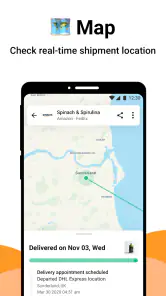
For a routine order, I usually do not need to watch every scan. The value is being able to check a saved shipment when I need to decide whether to stay home, ask someone else to collect it, or carry on with my day. A status change can be helpful, but tracking is only as current as the information available from the carrier. I treat a quiet tracking page as “no new scan yet,” not proof that a parcel has stopped moving.
That distinction matters most for international orders or handoffs between carriers. A package may appear to pause while one delivery service passes it to another, and a connection cannot make those separate tracking systems report at the same pace. I would use AfterShip to bring the trail together, then check the carrier’s own tracking page if a delivery decision depends on a precise or newly changed status.
Useful in the middle of an ordinary day
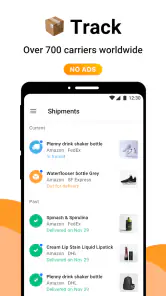
Imagine I have a parcel due while I am on my way to work and another headed to a relative. Instead of opening multiple retailer emails, I can check the shipments I have saved in one place. That is a small convenience, but it becomes more noticeable when orders come from different shops and use different carriers. AfterShip is especially suited to people who shop across retailers, receive frequent parcels, or help keep track of deliveries for a household.
It is less compelling if I only receive the occasional package. A retailer’s order page may already answer the one question I have, and the carrier’s app can be the better choice when I need carrier-specific delivery options or want to deal directly with the company handling the parcel. AfterShip is a tracking organizer, not a substitute for every service a retailer or carrier provides.
What to do when tracking goes quiet
When an update seems stuck, I first check whether the tracking number was entered correctly and whether the carrier has posted anything new. I avoid repeatedly refreshing as if that will speed up a parcel or force a new scan. If a delivery is late or the status looks inconsistent, the carrier or seller is the sensible next stop, since they can handle questions about the shipment itself.
For a cleaner view, I save tracking numbers as soon as I place orders, while the confirmation message is easy to find. I also keep alerts focused on the changes I genuinely need to act on; otherwise, frequent notifications can become noise. If a number is not recognized right away, I would give the carrier time to register the shipment and check again later rather than assume the package has gone missing.
You May Like

Clash of Clans Is Won Between the Battles

Android Auto Makes the Case for Quieter Car Software

MobiOffice: Transforming Mobile Productivity with Seamless Integration

EA SPORTS FC™ Mobile Soccer: Redefining Mobile Sports Gaming

How Microsoft OneDrive Became a Mobile Productivity Giant

How Google Translate Breaks Language Barriers Effortlessly
Why AfterShip Stands Out
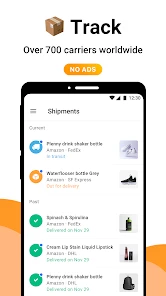
So, you might be wondering, "What makes AfterShip Package Tracker different from all the other tracking apps?" Well, buckle up because there’s quite a bit to unpack here. First off, this app supports more than 700 carriers worldwide. That’s right, 700! Whether you’re waiting on a parcel from halfway across the globe or just around the corner, AfterShip has got you covered. I mean, how cool is it to have all your shipping info in one place?
Features that Make Life Easier
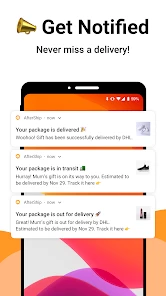
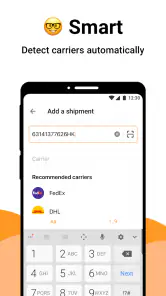
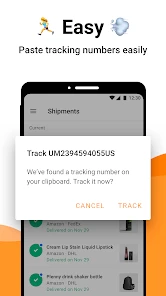
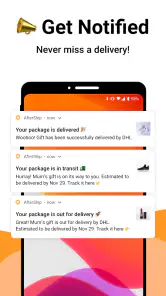
Let’s dive into the features, shall we? One of the things I absolutely adore about AfterShip is the real-time notifications. You get updates the moment there’s a change in your package status. It’s like having a personal assistant who’s always on top of things. Plus, the interface is super intuitive. You don’t need to be a tech whiz to navigate through it. Just enter your tracking number, and voila, all your package details appear!
Another nifty feature is the ability to save your tracking numbers. If you’re anything like me, juggling multiple online orders at once, this feature is a lifesaver. No more scrambling through emails or texts trying to find that elusive tracking number. And let’s not forget about the delivery notifications. They’re customizable, so you only get the alerts that matter to you. It’s all about keeping it simple, right?
Checking the details that affect your plans
For a useful routine, I check a shipment when an update could change what I do next, rather than turning tracking into a constant activity. A status such as “out for delivery” may help me decide whether to stay nearby, but it is not a guaranteed arrival time. If I need to coordinate a building’s reception desk, a workplace delivery, or a family member’s availability, I use the app as a prompt to check—not as a promise that the parcel will arrive at a particular moment.
That is also why I would not rely on a single notification for a time-sensitive delivery. Carrier scans can be delayed, and an alert may arrive after the event it describes. For an expensive or urgent order, I keep the seller’s confirmation and the carrier’s own tracking route handy. AfterShip makes the status easier to monitor; it does not take over the seller’s responsibility for an order or the carrier’s responsibility for delivery.
A sensible fit for frequent online orders
The app’s reach is its clearest advantage over tracking each parcel separately: it is designed to handle shipments from many carriers in one view. A carrier app can offer a more direct relationship with that carrier, while retailer tracking is often convenient for orders from that one shop. I prefer AfterShip when the problem is “Where can I see all these tracking numbers together?” I would choose a retailer or carrier service when the problem is changing delivery details or resolving a missing parcel.
Its scale is reflected in its average rating of 4.6 from around 262,000 ratings, and it has been installed more than 10 million times. Those figures suggest it has broad appeal, but the right choice still depends on how you shop: someone with one delivery every few months may have no reason to add another app, while someone who routinely has parcels in transit may appreciate having a dedicated place to check them.
Privacy-minded habits and practical limits
Because tracking involves shipment identifiers and delivery updates, I add only the packages I actually want to follow and avoid treating a shared device as a private notebook. If I am tracking a delivery for someone else, I make sure I have a good reason to keep its details in my account. This is a simple habit, but it keeps a convenience tool from becoming a cluttered record of every purchase.
For data-conscious use, I also keep notifications purposeful and open the app when I need a status rather than checking it out of habit. The app’s current version is 5.24.3, and it supports devices running Android 5.1 or later. It is rated for Everyone, which makes it broadly accessible, though that age rating does not change the practical point: a tracking number is still information worth handling thoughtfully.
Why You’ll Love It
Now, let’s talk about why you’ll fall head over heels for this app. It’s not just about the functionality; it’s about the peace of mind it brings. Knowing exactly when your package is arriving eliminates so much stress. No more guessing games or pacing the floor waiting for the delivery guy. With AfterShip, you can plan your day without worrying about missing a delivery.
Plus, it’s free! Of course, there’s a premium version if you’re looking for more advanced features, but the basic version is more than sufficient for most of us casual users. It’s like having a superpower in your pocket, minus the cost.
Using it while moving between networks
The app is most useful when I have a brief moment to check a parcel but not enough time to hunt through several accounts. On a commute, for example, I can look at the last status before deciding whether to ask a neighbor to keep an eye out. That quick check still depends on an internet connection and on the carrier having supplied a new scan. If reception is poor, I avoid making a decision based on a page that may not have refreshed; I check again when I have a reliable connection or use the carrier’s direct channel for an urgent matter.
There is a useful distinction between a tracking update and a delivery arrangement. A tracking app can help me see movement, but a request to redirect a parcel, change a delivery preference, or report a problem belongs with the carrier or seller. I would not plan a workday around a notification as if it were an appointment. The app’s strength is reducing the effort of checking, not removing the uncertainty built into delivery schedules.
Small habits that make a tracking list useful
I find it easier to keep a tracking list meaningful if I add a parcel when its number is available and remove my attention from it once it no longer affects a decision. When several family members order items, I also use a simple naming habit in my own notes or order records so I can distinguish a household item from a personal one. The point is not to create a second inventory system; it is to avoid confusing two similar shipments when a status changes.
Another practical trade-off is notification volume. Alerts are helpful when a parcel is moving toward a delivery point or when a status changes in a way that affects my plans, but every minor scan can make the phone feel busier. I set the level of interruption according to how important the order is. For a routine purchase, checking at convenient moments is enough; for something I need soon, I pay closer attention while still treating carrier information as an estimate of progress rather than a guarantee.
Choosing the right tracking route
People often ask whether a multi-carrier tracker replaces retailer and carrier apps. In my experience, it replaces the repetitive part—opening different pages just to see where parcels are—but not the service functions those sources provide. Retailer pages are handy for checking an order record, while the carrier is the right place to pursue a delivery issue or a change that requires its direct involvement. Keeping those roles clear prevents frustration when an aggregator shows a status but cannot resolve the underlying problem.
It is also reasonable to skip a dedicated tracker if your shopping is occasional and each retailer already gives you a clear update. The extra place to maintain tracking numbers may not be worth it for one parcel every so often. I see the better fit in people with overlapping orders, international purchases, or deliveries split among household members. In those cases, a single overview can save small amounts of time repeatedly, which is where the convenience becomes real rather than theoretical.
Final Thoughts
In a world where we’re constantly on the move and heavily reliant on online shopping, an app like AfterShip is not just a convenience; it’s a necessity. It takes the guesswork out of package tracking and makes the entire process as seamless as possible. So, if you haven’t already, give it a whirl. Trust me, once you start using it, you’ll wonder how you ever managed without it.
So there you have it, folks. Whether you’re an online shopping aficionado or just someone who values efficiency, AfterShip Package Tracker is worth downloading. Happy tracking!
AfterShip Package Tracker - Tr Frequently Asked Questions
Is AfterShip Package Tracker available on iOS as well as Android?
AfterShip Package Tracker is an app for following package deliveries, and the Android version requires Android 5.1 or later. If you use an iPhone, check the App Store for availability and compatibility before downloading. On either platform, make sure you select the app developed by AfterShip Limited so you install the intended package-tracking app.
Do I need an account to use AfterShip Package Tracker?
AfterShip Package Tracker is intended to bring shipment tracking together in one place, with tracking numbers used to look up packages from supported carriers. Before downloading, consider how you prefer to manage your delivery information and review the app’s setup choices. The central benefit is having a single place to check shipments rather than visiting multiple carrier websites.
Can I use AfterShip Package Tracker for orders from online shops?
Yes, the app is relevant if you shop online and want to follow packages handled by supported delivery companies. Its focus is package delivery tracking, and it brings shipments from different carriers into one place. You can use it to check progress as a parcel moves through delivery, rather than relying on a separate tracking page for each courier.
Does AfterShip Package Tracker work on my phone?
AfterShip Package Tracker is available for Android devices running version 5.1 or later. It is rated for Everyone, so its content rating is suitable for a broad audience. Before downloading, check that your phone meets the minimum operating-system requirement and that you are selecting the AfterShip Package Tracker app from AfterShip Limited.
What is AfterShip Package Tracker and how does it work?
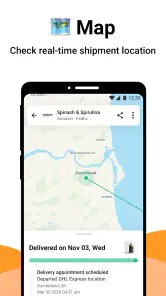
AfterShip Package Tracker is an app designed to help users easily track and manage all their shipments in one place. It supports over 700 carriers worldwide, allowing users to enter their tracking numbers and receive real-time updates on their package's location and status. The app sends notifications for any delivery changes, providing peace of mind to those expecting important parcels.
Pros
- Real-time tracking updates.
- User-friendly interface.
- Supports multiple carriers.
- Customizable notifications.
- Free basic version.
Cons
- Limited features in free version.
- Occasional sync issues.
- Ads in free version.
- No dark mode available.
- Requires internet connection.

- Category
- Shopping
- Version
- 5.24.3