Adobe Premiere Rush
- 3.70K
- 3.2
- Installs
- 5.00M
- Price
- Free

Screenshots
Analysis by Reviewed
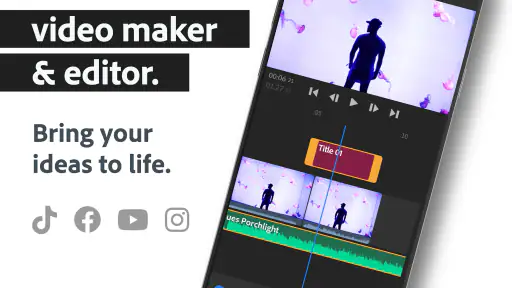
Have you ever wanted to dive into the world of video editing without having to deal with complicated software? Well, let me introduce you to Adobe Premiere Rush. This app is like that easy-going friend who makes everything fun and simple. It's a user-friendly video editing tool that lets you create stunning videos on the go, and I've taken it for a spin just to share my experience with you.
Getting Started with Ease
Right off the bat, Adobe Premiere Rush greets you with a clean and intuitive interface. I mean, I was up and running in no time! Whether you’re using your phone or tablet, the layout is pretty straightforward. You’ll find all the essential tools right at your fingertips. I started my project by simply importing clips from my device. The drag-and-drop feature is a lifesaver, especially when you’re trying to piece together different shots quickly. It’s almost like playing with digital Lego blocks!
Editing Tools: Simple Yet Powerful
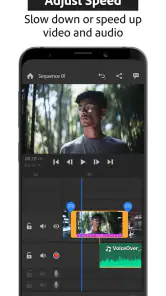
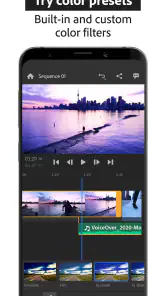
Now, let's talk about the real deal - the editing tools. Adobe has done a fantastic job of incorporating some of the classic tools from their pro software into this app, without overwhelming newbies like me. Trimming clips, adjusting colors, and adding transitions are all super straightforward. And the best part? The app offers a variety of templates to help you get started, which is perfect if you’re like me and sometimes hit a creative block.
Sound and Music: A Cinematic Touch
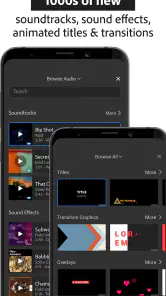
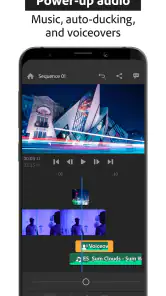
No video is complete without a great soundtrack, right? Adobe Premiere Rush offers an array of soundtracks and you can even import your own music. It’s almost like having a mini recording studio in your pocket. I found the audio mixing tools to be surprisingly robust, allowing for easy adjustments to ensure that the music doesn’t overpower your voiceovers or dialogues.
Seamless Sharing: Show Off Your Masterpiece
Once my video was polished to perfection, sharing it was a breeze. Adobe Premiere Rush lets you export and share videos directly to popular social media platforms like Instagram, YouTube, and Facebook. It’s like it was made for the social media generation. Plus, it supports 4K video export, which is a huge win if you’re aiming for that professional look.
In conclusion, if you're looking for a hassle-free video editing experience, Adobe Premiere Rush is your go-to buddy. It’s perfect for beginners and those who need something quick and efficient without compromising on quality. So, whether you’re a vlogger, a small business owner, or just someone who loves creating videos, give Adobe Premiere Rush a shot. You might just find yourself editing videos more often than you thought!
More From Our News Desk

Weather by Xiaomi Review: Clear at a Glance, Less Clear Up Close

X Under Pressure: Can It Recover When Posting Goes Wrong?

Clash of Clans Is Won Between the Battles

Android Auto Makes the Case for Quieter Car Software

MobiOffice: Transforming Mobile Productivity with Seamless Integration

EA SPORTS FC™ Mobile Soccer: Redefining Mobile Sports Gaming
Adobe Premiere Rush Frequently Asked Questions
What is Adobe Premiere Rush and who is it for?
Adobe Premiere Rush is a simplified video editing app designed for on-the-go content creators who wish to produce professional-quality videos quickly and easily. It is particularly beneficial for YouTubers, social media influencers, and small business owners who need to edit videos without the complexity of full-scale editing software. The app is available on both Android and iOS platforms, making it accessible to a wide range of users.
Does Adobe Premiere Rush require a subscription to use?
Adobe Premiere Rush offers a free starter plan that allows users to create and share a limited number of projects. However, for unlimited exports and access to premium features, such as advanced audio tools, enhanced video editing functions, and additional cloud storage, a subscription is required. Users can opt for a standalone plan or access Rush through an Adobe Creative Cloud subscription.
What are the key features of Adobe Premiere Rush?
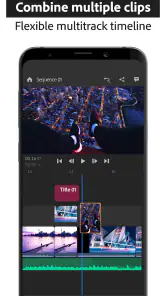
Adobe Premiere Rush comes equipped with a variety of features, including multi-track timeline editing, customizable motion graphics templates, and built-in camera functionality for capturing high-quality videos directly within the app. Additionally, users can benefit from seamless integration with other Adobe products, such as Adobe Premiere Pro, for more advanced editing capabilities, and access to a vast library of royalty-free music and sound effects.
Can Adobe Premiere Rush be used offline?
Yes, Adobe Premiere Rush can be used offline, allowing users to edit videos without an internet connection. However, some features, such as cloud syncing and access to Adobe's stock media library, require an internet connection. It is recommended to periodically connect to the internet to back up projects and download any updates or new features that may enhance the app's functionality.
Is Adobe Premiere Rush suitable for beginners?
Adobe Premiere Rush is designed with beginners in mind, offering an intuitive and user-friendly interface that simplifies the video editing process. The app includes helpful tutorials and guides to assist new users in navigating its features. Despite its simplicity, it provides powerful editing tools that allow users to produce high-quality videos, making it an excellent choice for both novice and experienced editors alike.
Pros
- Cross-platform compatibility
- User-friendly interface
- Auto-sync across devices
- Built-in camera functionality
- Supports 4K video editing
Cons
- Limited advanced features
- Subscription required for full features
- Occasional performance issues
- Limited export formats
- No multi-cam editing
- Category
- Video Players & Editors
- Version
- 2.11.0.14













