adidas: Shop Shoes & Clothing
- 11.71K
- 4.8
- Installs
- 50.00M
- Price
- Free

Screenshots

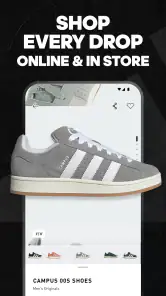
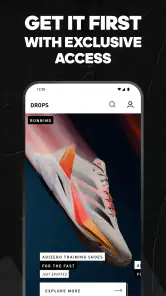
Analysis by Reviewed
I find the adidas shopping app most useful when I already have a rough idea of what I want: a replacement pair of trainers, a training top, or a tracksuit to compare with one I own. It is a free shopping app from adidas, and its focus is firmly on the brand’s own shoes, sportswear and clothing. That makes browsing feel more direct than in a general fashion marketplace, but it also means the range is limited to adidas rather than competing labels.
Where shopping can feel less straightforward
The main friction is not finding a product; it is deciding whether the item is right for you. A polished product page can make browsing enjoyable, but clothing and footwear still involve personal questions such as fit, intended use and how a color looks in everyday light. I would check the available product details carefully and compare them with something I already wear before ordering. If I am unsure between styles, I would narrow the choice to a couple of options instead of relying on recommendations to make the decision for me.
Another practical trade-off is staying current with new releases and notifications. Alerts can be handy if I am watching for a particular item, but frequent shopping updates can become noise. I would enable only the notifications I actually want, and use the app when I am ready to browse rather than treating every alert as a reason to buy. Availability and offers can also vary, so I would confirm the details shown for the item and my location before planning around a particular purchase.
Shopping adidas with a clear plan
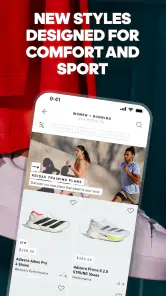
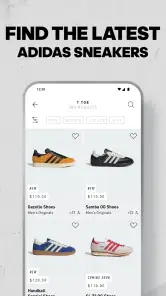
Shopping on the adidas: Shop Shoes & Clothing app feels like a breeze. It's designed to be super user-friendly, so even if you're not a tech wizard, you'll find it easy to navigate. The layout is clean and intuitive, with categories clearly defined, making it super simple to find what you're looking for. Whether it's the latest sneakers or an iconic tracksuit, it's all just a few taps away.
That focused layout is most helpful when I know what I need but want to compare a few adidas options without the distraction of unrelated brands. I would start with a category, then compare the product details that matter to the purchase: style, intended activity, color and available choices. If I am shopping for a specific use, such as everyday walking rather than training, I would keep that purpose in mind instead of choosing solely by appearance. The app is a convenient place to narrow down options, but it cannot replace trying a shoe on or seeing fabric in person.
Exclusive access and offers
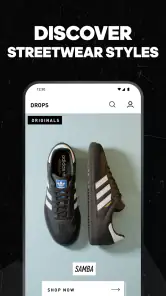
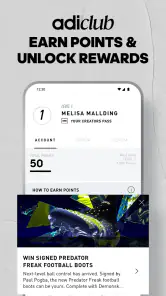
One of the coolest things about this app is the exclusive access it provides to new releases and special offers. You get a firsthand look at upcoming products and sometimes even early access to new drops. Plus, the app often features member-exclusive discounts, which is a sweet bonus if you're looking to snag some gear at a lower price.
I would treat those opportunities as a reason to check an item, not as a reason to rush into buying it. When a release or offer catches my attention, I would first make sure it is the right product and that the displayed terms suit me. A discount only matters if I would have considered the item at its regular price, and a new release is not automatically the best choice for a practical replacement. This habit keeps the shopping experience useful rather than turning every alert into pressure.
More From Our News Desk

Weather by Xiaomi Review: Clear at a Glance, Less Clear Up Close

X Under Pressure: Can It Recover When Posting Goes Wrong?

Clash of Clans Is Won Between the Battles

Android Auto Makes the Case for Quieter Car Software

MobiOffice: Transforming Mobile Productivity with Seamless Integration

EA SPORTS FC™ Mobile Soccer: Redefining Mobile Sports Gaming
Personalized for you
The app does a great job of personalizing your shopping experience. As you browse and shop, it learns your preferences and starts recommending products that match your style. It's like having a personal shopper who knows exactly what you might like. This feature really amps up the convenience factor, making it easy to discover new styles that you might not have considered otherwise.
Recommendations work best for me as a discovery tool, especially when I am browsing without a fixed item in mind. They are less useful when I have a strict budget, a particular activity or a replacement model to find. In that case, I would use the suggestions to spot alternatives, then return to the details and compare them against my actual need. Personalization can make browsing feel more relevant, but it should not decide what is worth buying.
Checkout and order confidence
Now, let's talk about the checkout process. It's straightforward and hassle-free. You can save your shipping and payment details, which is a major time-saver during future purchases. Plus, the app supports multiple payment methods, so whether you're using a credit card, PayPal, or another method, it's all taken care of seamlessly.
Convenience does not mean I would skip the final review. Before placing an order, I would check the selected size and color, the delivery information, and the payment details shown on screen. Saved information is handy for repeat purchases, but it can be out of date after a move or a card change. If I am buying a different kind of item from my usual order, I would also pause to reconsider fit rather than assuming a familiar size will work the same way across every style.
Notifications without the noise
With the app, you're always in the loop. It sends you notifications about upcoming sales, restocks on popular items, and new arrivals. This way, you never miss out on the chance to grab that pair of sneakers you've been eyeing or a jacket that's just perfect for your collection.
For a calmer routine, I would keep notifications limited to the updates I genuinely care about. If I am waiting for a particular item, an alert may save me from repeatedly checking; if I am not shopping, the same message can become a distraction. I would also avoid treating a restock notice as proof that the item is the right purchase. Checking the product page and my needs again is a better final step than buying simply because something is available.
Setup checks and a calmer shopping routine
Before blaming the app for a stalled purchase, I would check the basics: make sure the phone has a working connection, close and reopen the app, and confirm that the device meets its minimum operating-system requirement. The current version is 5.55.11, and the app supports devices running OS 9 or later. If a page takes a while to load, switching between Wi-Fi and mobile data can help identify whether the connection is the issue.
For a less rushed checkout, I would sign in before I start comparing items and review the delivery and payment information before placing an order. Saved details can speed up a repeat purchase, but they are worth checking each time, especially if an address or payment method has changed. I would also keep a note of the exact product name or color I am considering; that makes it easier to resume browsing without starting over if I leave the app.
A useful everyday example is replacing worn training clothes during a short break in the day. I would first identify what is missing, browse only the relevant category, and save the names of the two or three items worth a closer look. Later, when I have time, I can compare their details and check the order carefully instead of making a rushed decision on a small screen. That simple split between discovery and purchase is particularly helpful if I am shopping for several things at once.
Recovering a disrupted workflow
If browsing or checkout interrupts, I would first return to the product page and check whether the selected size, color and other choices are still correct. Then I would review the basket and order details before trying again, rather than tapping the purchase control repeatedly. That small pause helps avoid confusion about whether an order went through. If the app continues to misbehave, restarting it and trying again later is a sensible next step; for a payment or order-status concern, use the appropriate adidas support route rather than assuming a second attempt is harmless.
For everyday shopping, I like a simple workflow: browse a category, open a few candidates, compare their details, then make one deliberate decision. For example, if my training shoes are wearing out, I can look for a replacement while checking whether the model suits the kind of activity I do. If I am only browsing for inspiration, recommendations can help me notice other adidas styles, but I would avoid letting a personalized feed replace a clear budget or shopping list.
If I lose track of an item while browsing, I would use its exact name or color as my reference when returning, rather than trying to reconstruct the search from memory. That is a small but practical way to reduce duplicate browsing. If a page or checkout behaves unexpectedly, I would distinguish between an interrupted screen and a confirmed order: check the basket or order status first, then decide what to do. This is safer than making several attempts and wondering later which one succeeded.
When another option makes more sense
This app suits people who already like adidas and want a focused way to browse that brand’s range. Its 4.8 average from around 642,000 ratings and more than 50 million installs suggest broad uptake, while its Everyone age rating makes it suitable for a general audience. adidas, the developer, has built a dedicated storefront rather than a multi-brand comparison tool. If I want to compare several sportswear brands side by side, a general retailer or a visit to a physical shop is more useful. In person, I can judge fit and feel directly; in the app, I can browse adidas products without mixing them with unrelated labels.
The comparison depends on what I value most. A general marketplace is better for checking different brands and price points in one place, while a physical shop helps when fit, feel or color is hard to judge from a screen. The adidas app makes more sense when I already want to shop this brand and prefer a direct, focused catalogue. I would skip it as my main shopping tool if I am undecided about the brand, need to compare a wide range of labels, or will not buy without trying an item on first.
The app was released in 2017, and its current version is free to install. I would treat it as a convenient shopping channel, not a guarantee that every item will suit me or that every offer will match my needs. It is less compelling if I rarely buy adidas, prefer to try shoes on before choosing, or want the widest possible range across brands. Its biggest advantage is focus; that same focus is its clearest limitation.
For most people, the practical question is whether they want a dedicated adidas storefront or a broader shopping comparison. If they already know the brand and have a product in mind, the app can make browsing and returning to an item straightforward. If they are still deciding between brands, need hands-on fit advice, or are shopping mainly by the lowest available price, other routes are more useful. I would choose the app for focused browsing and use another option when comparison or in-person judgement matters more.
My practical verdict
Overall, I would recommend the adidas: Shop Shoes & Clothing app to someone who regularly shops the brand and wants a convenient way to browse its shoes and clothing. Its strengths are focus, an approachable shopping flow and useful discovery when I am open to seeing more than the one item on my list. I would keep my expectations grounded: product suggestions are not a substitute for checking details, alerts do not make an offer essential, and a screen cannot tell me exactly how footwear will feel.
It is free, rated for Everyone, and adidas remains the clear center of the experience. The app is less suited to a shopper who wants a multi-brand catalogue or needs to try products before deciding. For a brand-loyal buyer, though, it is a sensible place to begin a search, compare a few options and complete a considered purchase. I would use it with a specific need in mind, take a moment to verify the basket before checkout, and choose a physical store or broader retailer whenever those better match the decision I need to make.
adidas: Shop Shoes & Clothing Frequently Asked Questions
Is the adidas app free to download, and do I have to buy anything?
The adidas: Shop Shoes & Clothing app is free to download, so you can install it and browse without paying for the app itself. It is a shopping app for adidas shoes, sneakers, activewear, and clothing. Any purchase you choose to make is separate from downloading the app, and you can decide whether to proceed after exploring the products.
Who makes the adidas: Shop Shoes & Clothing app?
The app is developed by adidas and is focused on shopping for the brand’s shoes, sneakers, activewear, and clothing. It brings product browsing and purchasing into an app-based experience, so it may be useful if you already shop for adidas items or want to explore what the brand offers. Its content rating is Everyone.
What should I know about adidas: Shop Shoes & Clothing before downloading it?
adidas: Shop Shoes & Clothing is a shopping app from adidas for browsing and buying shoes, sneakers, activewear, and clothing. It is free to download and is suitable for everyone. The app is available for devices running Android 9 or later. Its focus is on shopping for adidas products, with features intended to support browsing, product discovery, and purchases.
Can I browse products in the adidas app without creating an account?
You can use the app to explore adidas shoes, sneakers, activewear, and clothing and search for items that interest you. An account can be useful for features such as saving favorites, accessing member offers, and keeping track of purchases, but browsing products is a natural place to start. If you decide to buy something, follow the account and checkout options presented in the app.
What features does the adidas app provide to enhance my shopping experience?
The adidas app offers several features to elevate your shopping experience. It provides personalized product recommendations based on your preferences and browsing history. You can also access exclusive deals and early access to new releases. The app includes a seamless checkout process, order tracking, and the ability to save your favorite items for future purchase. Additionally, its barcode scanner allows you to find online availability of in-store items.
Pros
- Extensive range of products available.
- User-friendly and intuitive interface.
- Frequent updates with new features.
- Seamless checkout process.
- Integrated size guide for convenience.
Cons
- Limited offline functionality.
- Occasional app crashes reported.
- High data usage for browsing.
- Few customization options.
- Limited customer support availability.
- Category
- Shopping
- Version
- 5.55.11











