17TRACK Package Tracker
- 12.88K
- 4.1
- Installs
- 10.00M
- Price
- Free

Screenshots
Analysis by Reviewed
If you're like me and constantly shopping online, keeping track of your packages can feel like a full-time job. That's where 17TRACK Package Tracker comes into play, and let me tell you, it's a game-changer for anyone who loves the thrill of an online purchase.
The trouble with delivery tracking usually starts after checkout. One order may have a tracking number ready immediately, while another may show no useful movement for a while. I find it helps to treat a tracking app as a place to gather carrier updates, not as a promise that every parcel will produce fresh information at every moment. That expectation makes the experience much less frustrating.
Why a package can appear stuck
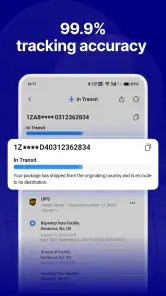
A tracking page can stay unchanged while a parcel is moving between facilities, waiting for a carrier scan, or passing from one delivery service to another. The app can only show the events that are reported to it, so a quiet timeline is not proof that the shipment has stopped. I check the time and wording of the last scan before deciding whether anything needs attention.
Another common snag is an unclear or incomplete tracking number. Some retailers display an order reference beside the actual shipment code, and those are not necessarily interchangeable. When an entry produces no useful result, I compare the number in the app with the tracking details in the retailer’s order page rather than repeatedly trying similar-looking codes.
It is also worth remembering that a parcel’s tracking history and its delivery arrangement are separate things. For a change of address, a missed delivery, or instructions for a driver, I would go to the retailer or the carrier handling the parcel. A tracking view is useful for visibility, but it is not a substitute for contacting the party that can make a delivery decision.
Tracking Made Easy
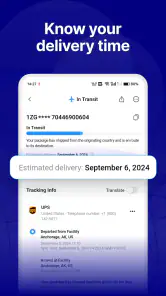
First off, the user-friendly interface of 17TRACK Package Tracker is a breath of fresh air. From the moment you open the app, it’s clear that it’s designed with the user in mind. You can track packages from more than 220 countries and regions, and the app supports multiple languages too. It’s like having a personal assistant for your deliveries.
For me, the practical benefit is less about watching every scan and more about having a single place to check when I have orders with different sellers. The app is in the shopping category, and 17TRACK is its developer. It is free to download, though in-app purchases are available. Its Everyone age rating makes it broadly suitable, but I would still think of it as a utility for people who regularly receive parcels rather than something every phone owner needs.
More From Our News Desk

Weather by Xiaomi Review: Clear at a Glance, Less Clear Up Close

X Under Pressure: Can It Recover When Posting Goes Wrong?

Clash of Clans Is Won Between the Battles

Android Auto Makes the Case for Quieter Car Software

MobiOffice: Transforming Mobile Productivity with Seamless Integration

EA SPORTS FC™ Mobile Soccer: Redefining Mobile Sports Gaming
Multiple Carriers, One App
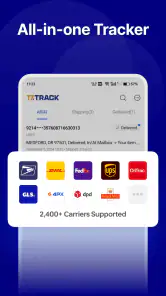
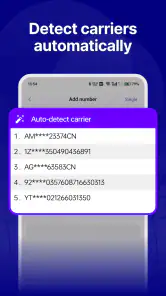
One of the standout features is its ability to track shipments from a multitude of carriers worldwide. Whether you're getting something from FedEx, UPS, DHL, or any other courier, this app has you covered. And the best part? You don’t have to juggle multiple tracking numbers from different websites. Just input your tracking number once, and you're set!
That convenience matters most when an order crosses borders or changes hands. I might buy several items from different shops, then have to remember which carrier page belongs to which tracking number. A consolidated tracker gives me one place to start, even though the carrier’s own page remains the better destination for detailed delivery instructions or a dispute.
A useful habit is to keep the retailer’s order confirmation until the parcel has arrived. If an entry in the tracker is hard to identify, the confirmation helps match the shipment to the item and seller without guessing. This becomes especially helpful when several packages are moving at once and their tracking numbers are visually similar.
Real-Time Updates
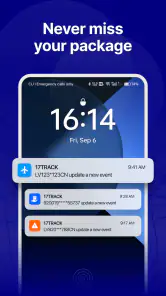
Another thing I absolutely love is the real-time updates feature. No more hitting refresh on your browser every few minutes. The app notifies you as soon as there’s a status change with your package. Plus, the notifications are customizable, so you can choose to be alerted at specific times of the day. Say goodbye to package anxiety!
I would still avoid interpreting “real-time” as a guarantee that every carrier event appears instantly. Tracking depends on updates being made available by the shipping service, and scans can arrive in batches or leave gaps. If a notification does not arrive, opening the app and checking the latest displayed event is a sensible first step; if the carrier’s own tracking page has newer information, use that for the most direct view.
There is a small trade-off between staying informed and letting parcel alerts interrupt the day. I prefer notifications that help me decide whether I need to act, rather than checking every minor movement. If a package is not time-sensitive, occasional manual checks may be enough. For a delivery I need to receive in person, alerts are more useful because they can prompt me to check the carrier’s available options.
Organize Your Deliveries
If you're a bit of a neat freak like me, you'll appreciate the organizational features. You can label and color-code your packages, making it super easy to manage multiple orders. It’s perfect for online sellers as well, who need to keep track of several shipments simultaneously.
Labels become more valuable when they answer a practical question at a glance. I would use a short label such as the item or shop name, rather than a long note, and choose colors consistently—for example, one color for parcels I am waiting to receive and another for shipments I am monitoring for someone else. That personal system is easier to scan than a list of indistinguishable codes.
For a small online seller, a shared tracking view can help with routine checks, but it should not become the only record of an order. I would keep the sales and customer details in the normal business workflow and use the tracker to follow shipment progress. That division avoids relying on a parcel label or status entry to answer questions about payment, stock, or customer communication.
Getting the first tracking entry right
When I add a parcel, I start with the exact tracking number shown in the order details and give the entry a label I will recognize later. If the app cannot identify the shipment immediately, I first check for a copied space, a missing character, or a mistaken order number. Then I compare the displayed status with the retailer’s shipment page before changing anything. This simple sequence prevents duplicate entries created by repeatedly pasting the same code.
If the service or carrier is uncertain, I would avoid selecting one at random just to make the parcel look more complete. A wrong match can make an otherwise valid number appear untrackable or show confusing results. Letting the app identify the shipment where possible, and checking the carrier information supplied by the seller when needed, is a more reliable approach.
For multiple purchases arriving around the same time, I add and label them as soon as I have their shipping details rather than waiting until I need to check one urgently. That is not a special trick; it is a way to avoid mixing up packages later. If a shipment has not yet received a carrier scan, I leave it alone and revisit it after the seller’s stated dispatch window rather than repeatedly creating new records.
A realistic day with several deliveries
Imagine I have ordered a household item from one shop and a small accessory from another. In the morning, I check both entries in one place rather than opening separate carrier pages. One parcel has a new scan; the other has not changed since the previous update. I note the difference, but I do not assume the quiet parcel is lost. Later, if the first shipment is marked as delivered and I cannot find it, I use the carrier or retailer’s own support route instead of expecting the tracker to resolve the delivery itself.
This kind of routine is where a multi-carrier app earns its place: it reduces the number of places I need to check without taking over the whole delivery process. It is particularly handy during busy shopping periods, when several shops may send separate parcels and the emails announcing them quickly become difficult to search. A short, recognizable label can save more time than refreshing a status page repeatedly.
How it compares with carrier apps and retailer pages
The usual alternatives each do a different job. A retailer’s order page is often the simplest way to confirm what was bought and whether the seller has shipped it. A carrier’s own app or website is usually the better place to look for carrier-specific delivery choices or to ask about a problem. A multi-carrier tracker is more convenient when I want a broad overview across different sellers and delivery services.
That means I would not replace every carrier app with 17TRACK. If I am expecting one important parcel from a single carrier and need to manage its delivery, going directly to that carrier may be clearer. If I shop across several stores and mainly want a central status check, a consolidated tracker is a better fit. The strongest setup is often to use the tracker for overview and the original retailer or carrier channel when an action is required.
Compared with checking email alone, a tracking app can make ongoing shipments easier to review because the parcel status is not buried among receipts and promotions. But email remains useful for order numbers, seller messages, and proof of purchase. I keep both roles in mind: the tracker helps me follow movement, while the shop’s messages preserve the context around the order.
When the app is not the cause
If a status seems wrong, I check whether the same event appears on the carrier’s page and whether the retailer has posted a separate shipping update. A delay in visible tracking may come from the carrier’s scanning process or from a handoff between services, rather than from the app. Looking at the original source before reinstalling or repeatedly re-entering the number can save time and avoid losing track of which entry is which.
If there is no movement for longer than the delivery estimate given by the seller, I contact the seller or carrier through their normal support channel. The tracker can help me describe the last visible event, but it cannot confirm why a package is delayed or arrange a replacement. For a parcel marked delivered but not received, I check the delivery details available from the responsible carrier and ask the seller what to do next.
App troubleshooting should be proportionate. If the screen appears stale, I can reopen the entry later and compare it with the carrier’s tracking page. If the number itself is rejected, I verify it against the order details. I would not delete and re-add every shipment simply because one update is missing; that creates extra work without changing whether the carrier has reported a new scan.
Who will get the most from it
I would recommend this to frequent online shoppers, people ordering from multiple sellers, and anyone who regularly receives international parcels and wants one place to review tracking. It can also be useful for small sellers keeping an eye on outgoing shipments, provided they maintain their usual order records separately. Its broad audience is reflected in its 4.1 average from around 483 thousand ratings, while more than 10 million installs suggest that many people use it for this everyday task.
On the other hand, someone who rarely orders online may find a retailer’s email and the carrier’s page perfectly adequate. It is also not the right tool for people who expect guaranteed delivery times, live customer support for every shipment, or the ability to change a delivery without going to the carrier. I would skip adding another tracking app if one trusted service already covers all of my parcels and I have no need for a combined overview.
The app has been available since November 11, 2014, and its current version is 3.1.6893, with Android support beginning at version 5.0. Those details matter mainly as a compatibility check: before relying on it, I would make sure the device can run the current release. The free starting point makes it easy to try, while optional in-app purchases range from about two dollars to about one hundred dollars per item, so I would review any purchase prompt carefully and decide whether the free experience already meets my needs.
Final Thoughts
All in all, 17TRACK Package Tracker has really stepped up my package tracking game. It’s like having a little slice of magic in your pocket, ensuring you’re always in the know about your packages. If you’re sick of losing track of your orders or just want a more streamlined process, this app is definitely worth checking out. Seriously, it’s a no-brainer for anyone who shops online regularly.
My practical verdict is a little more specific: I would use it as a convenient overview, not as the authority on every delivery. Its value rises with the number of shops and carriers involved, and falls if I only need to follow one parcel or make a carrier-specific change. Keeping order confirmations, checking the original carrier when something important happens, and using clear labels are small habits that make the app more useful without expecting it to do more than tracking.
17TRACK Package Tracker Frequently Asked Questions
Can I track a package without creating an account?
17TRACK is built around looking up parcels with their tracking information, so the practical starting point is to enter a tracking number in the app. You can use it to bring shipment updates into one place instead of switching between shopping apps or carrier pages. If you prefer to keep order details private, avoid sharing your tracking number with people you do not trust.
Is 17TRACK suitable for people who shop from international stores?
It can be useful when an order passes between a store and one or more delivery services, since 17TRACK is designed to gather package updates in one place. The app’s summary highlights Amazon, AliExpress, eBay, and other shopping sources. For an international order, the information you see still depends on the tracking updates made available by the carriers handling that shipment.
Can I receive notifications when a package status changes?
Notifications can make a package-tracking app more convenient by letting you notice shipment changes without repeatedly opening the app. 17TRACK is intended to help users follow deliveries and view their tracking progress in one place. If notifications matter to you, check the app’s notification settings after installing it and ensure notifications are enabled for 17TRACK in your phone’s system settings.
Does 17TRACK Package Tracker show where my package is right now?
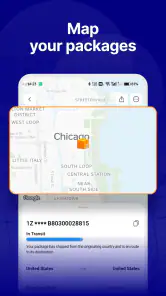
17TRACK displays shipment information associated with a tracking number, including status and location updates when those details are available from the relevant courier. It is helpful for checking a parcel’s progress, but it should not be treated as a live map of every delivery vehicle. The timing and detail of updates depend on the information supplied through the courier’s tracking system.
Can I use 17TRACK to follow an order from a shopping app or online store?
Yes. 17TRACK is a shopping-focused package-tracking app, and its summary describes tracking deliveries from Amazon, AliExpress, eBay, and more. You can use it to keep shipment updates together rather than checking each order in a different place. The tracking information still comes through the relevant carrier, so the app is a convenient place to follow a parcel, not a replacement for the seller or courier.
Pros
- User-friendly interface
- Supports multiple carriers
- Real-time tracking updates
- Multi-language support
- Free to use
Cons
- Ads can be intrusive
- Limited features in free version
- Occasional tracking delays
- Requires internet connection
- No offline mode
- Category
- Shopping
- Version
- 3.1.6893











