Vivid Color Paint By Number
- 697.00
- 4.7
- Installs
- 500.00K
- Price
- Free

Screenshots



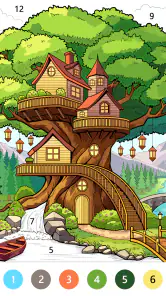
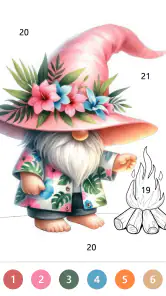
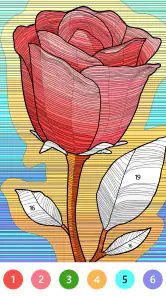
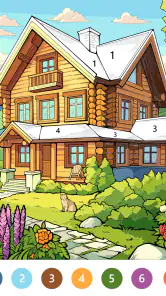

Analysis by Reviewed
I like Vivid Color Paint By Number best as a low-pressure way to occupy a few spare minutes, rather than as a serious art tool. Its number-guided format gives each session a clear next step, so I can settle into coloring without deciding what to draw or mixing colors myself. That focus is the appeal, though it also means people who want to build an image freely may prefer a different kind of creative app.
Getting Started with the Digital Canvas
From the moment you open the app, you’re greeted by a vibrant array of coloring pages to choose from. The interface is as user-friendly as it gets. You pick an image, and the app guides you through the process of coloring it in, number by number. It’s like paint-by-numbers, but without the mess or the need to stay inside the lines—because who needs those restrictions, right?
Features that Make It Stand Out
One of the coolest things about the game is the sheer variety of images available. Whether you're into landscapes, animals, or intricate mandalas, there’s something for everyone. And the best part? New images are added regularly, so you’ll never run out of things to color.
Interactive and Relaxing: The app isn’t just about coloring. It’s about taking a break from the hustle and bustle of everyday life. Each stroke of color is accompanied by gentle, soothing sounds that enhance the experience, turning it into a mini-meditation session.
Color Palette Variety: The color palette is nothing short of extensive. You have the freedom to experiment with different shades and hues, which adds another layer of creativity to the process. Who knew coloring could be so liberating?
How It Fits Into an Ordinary Day
For me, the most useful way to approach a paint-by-number game is to treat it as a short break with a natural stopping point. I might open a picture while waiting for an appointment or during a quiet pause at home, fill a few numbered areas, then put the phone away. The numbered structure helps me return later without needing to remember an artistic plan. It suits people who want a calming, guided activity more than people looking for a competitive game or a demanding puzzle.
A practical tip is to choose an image according to the time and attention you have, rather than picking only by subject. A detailed design can be satisfying when I have room to concentrate, while a simpler picture is a better fit for a brief interruption. If I’m using the app to wind down, I’d also keep the volume at a comfortable level; soothing audio is a personal preference, not a guarantee that every session will feel relaxing.
More From Our News Desk

Weather by Xiaomi Review: Clear at a Glance, Less Clear Up Close

X Under Pressure: Can It Recover When Posting Goes Wrong?

Clash of Clans Is Won Between the Battles

Android Auto Makes the Case for Quieter Car Software

MobiOffice: Transforming Mobile Productivity with Seamless Integration

EA SPORTS FC™ Mobile Soccer: Redefining Mobile Sports Gaming
Where the Format Helps—and Where It Falls Short
Compared with a physical coloring book, the digital approach avoids carrying supplies and dealing with marks or spills. Compared with free-drawing apps, however, numbered sections offer less control over composition: the picture and its color structure are already decided. That trade-off is central to the experience. I’d choose this when I want direction and an easy start, but reach for a blank canvas if I want to sketch my own subject or make deliberate design choices from scratch.
The guided format can also feel repetitive if I’m not in the mood to tap through small areas. It is not the best choice for someone who wants fast action, open-ended drawing, or a strong sense of challenge. Nor would I recommend treating it as a substitute for making art by hand; its strength is convenience and guided coloring, not practicing brush control or learning how colors behave on paper.
Who Is Likely to Enjoy It
Art Coloring Group makes a board-style coloring game aimed at a broad audience, and its Everyone age rating makes it suitable for a general audience. It is free to start, with optional in-app purchases priced from $0.99 to $59.99 per item, so I’d check the purchase choices before handing a device to a child. The game has a 4.7 average from around 4.9K ratings, alongside 697 written reviews and over 500K installs. Those figures suggest it has found an audience, but the right fit still depends on whether you enjoy guided coloring.
The game was released on January 4, 2024, and version 1.2.4 supports operating systems from 7.1 onward. If you are choosing it for a shared device, the straightforward number-based activity is easier to pick up than a drawing tool with a blank canvas. If you prefer to create every part of an image yourself, though, that same structure may feel limiting rather than helpful.
Choosing It for the Right Kind of Break
The distinction I would keep in mind is whether I want to make choices or simply work through a clear sequence. In a conventional coloring app, an open page may let me decide which colors belong in each area. Here, the numbered approach narrows that decision-making and makes starting simpler. That is useful when I’m tired or distracted, but it also means the finished image reflects the app’s design more than my own creative direction.
For a realistic everyday use, I’d keep it as a waiting-room or commute activity when I’m seated and have a few spare minutes, rather than expecting it to fill a long journey with varied gameplay. I can choose a picture, color a manageable portion, and stop when my attention shifts. The practical advantage is that I don’t need to set up materials or leave a physical project spread out; the compromise is that screen-based tapping may not feel as restful to someone who already spends much of the day on a phone.
One small workflow choice makes a difference: I’d avoid starting the most intricate-looking page when I only have a short window. A large number of tiny areas can turn a quick break into a stop-start task, while a more open image is easier to approach in fragments. When I do have longer, quieter time, the detailed work can become the point rather than a nuisance. Matching the picture to the length of the break is more useful than assuming every page offers the same kind of session.
What to Expect from the Coloring Routine
The central question for a new player is whether the activity is genuinely relaxing or just repetitive. For me, the answer depends on the moment: a clear sequence can settle my attention when I want something gentle to focus on, but repeated small taps are less appealing if I’m impatient or looking for a sense of surprise. The sound may add to the atmosphere for some people, while others will prefer a quiet session. I would treat it as an adjustable mood, not as a guaranteed way to relax.
Another useful expectation is that this is not a drawing lesson. Numbering removes much of the uncertainty about where a color goes, so it can make a picture feel approachable without teaching composition, shading, or how to plan an original image. If your goal is to practice those skills, a blank-canvas drawing app or real materials are a better match. If your goal is to complete a polished-looking picture through a guided routine, the structure is precisely what makes this appealing.
The same distinction matters when choosing between this and a physical paint-by-number kit. A kit gives you tactile materials and a result you can keep outside the screen, but it requires space and careful handling. This game is tidier and easier to pick up for a brief pause, though the experience stays on the device. I see them as different choices for different settings, rather than digital coloring being a full replacement for painting on paper.
Small Trade-Offs Before You Settle In
Because the pictures are already arranged into numbered regions, the game is more about following through than making every artistic decision. That keeps the barrier to entry low, but players who like choosing a palette from scratch may quickly want more freedom. I’d decide in advance which kind of satisfaction I’m after: completing a guided image or building a personal one. That simple distinction can prevent disappointment more effectively than judging the app by its colorful presentation alone.
For families sharing a phone or tablet, the broad age rating and straightforward activity make it easy to understand, but free access does not mean every optional purchase is irrelevant. I would look over the purchase screen with a child and agree on a rule before they begin. For an adult using the game alone, the same point is mainly about knowing that optional spending exists and deciding whether the free experience is enough for their needs.
It is also worth considering how you usually take breaks. If picking up a phone tends to pull you into messages and other apps, a physical coloring book may make it easier to stay away from notifications. If convenience is the deciding factor and you want to start without preparing anything, a digital page is easier. I’d choose based on the environment where I plan to use it, not just on whether I enjoy coloring in principle.
Why You Should Download It Right Now
This app is more than just a way to pass the time. It’s a creative outlet that fits right in your pocket. Think of it as a stress-reliever and a way to express yourself creatively without any of the usual art supplies.
No more worrying about running out of a specific color or dealing with paint spills. Everything you need is right there on your screen. Plus, sharing your creations on social media is a breeze, so you can show off your masterpiece to friends and family.
So, if you’re looking for a fun, relaxing, and inexpensive way to unwind, give it a try. It’s a delightful app that’s sure to add a splash of color to your day! My recommendation is strongest for anyone who likes a clear task and small, satisfying progress. If you want freedom to draw, a more open-ended art app will serve you better; if you want a tidy digital coloring session, this one is an easy place to begin.
Vivid Color Paint By Number Frequently Asked Questions
Is Vivid Color Paint By Number suitable for children?
Vivid Color Paint By Number is rated Everyone, so it is suitable for a broad audience, including children. Its paint-by-number approach provides a simple way to engage with digital coloring without needing drawing experience. Parents may still want to check the in-app purchase options and decide whether any purchase settings should be managed before a child plays.
What should I know about the app’s compatibility and developer?
Vivid Color Paint By Number is a board game developed by Art Coloring Group. It is available for Android devices running version 7.1 or later, which is worth checking before you download. The game offers a digital coloring activity built around numbered sections, making it approachable for players who want a calm, guided creative experience.
What is Vivid Color Paint By Number?
Vivid Color Paint By Number is a mobile application designed for both Android and iOS platforms, providing users with a relaxing and creative outlet through digital coloring. The app offers a wide range of images that users can paint by following number guides, making it easy for anyone to create beautiful artwork without any prior artistic skills.
How does Vivid Color Paint By Number work?
Vivid Color Paint By Number works by providing users with a series of images that are divided into numbered sections. Each number corresponds to a specific color, and users simply tap to fill the sections with the appropriate color. This guided coloring process allows users to effortlessly complete detailed and vibrant artwork at their own pace.
Is Vivid Color Paint By Number free to use?
Vivid Color Paint By Number is free to download and offers a free version with access to images and features. In-app purchases are available for players who want to buy additional content or options, with individual items priced from $0.99 to $59.99. Check the purchase choices before buying so you can decide what fits your preferences.
Pros
- Wide variety of color palettes available.
- Intuitive user interface for easy use.
- Regular updates with new artwork.
- Offline mode for uninterrupted painting.
- Detailed images for precise coloring.
Cons
- Limited free artwork selection.
- Some features locked behind paywall.
- Occasional ads can be disruptive.
- Requires large storage space for images.
- No social sharing features available.
- Category
- Board
- Version
- 1.2.4













