Nostalgia Color by number game
- 526.00
- 4.6
- Installs
- 500.00K
- Price
- Free

Screenshots

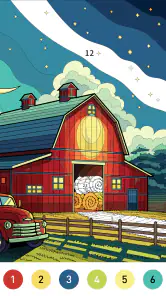
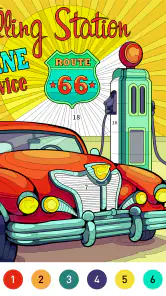
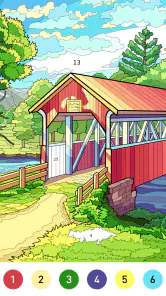
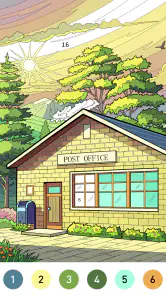
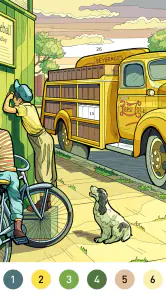
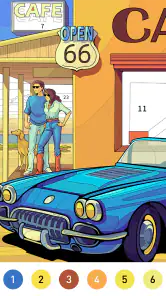

Analysis by Reviewed
I tend to reach for a coloring game when I want something gentle to do with my hands but don’t want to start a project that demands my full attention. Nostalgia Color suits that kind of pause: its numbered pictures give me a clear next step, while the act of filling them in keeps the mood unhurried. It is a board-style game from Art Coloring Group, and its nostalgic framing feels most convincing when I treat it as a quiet digital coloring book rather than a deep strategy game.
A small pause that fits an ordinary day
I can imagine opening it during a coffee break, choosing one picture, and stopping when the break is over. That works better than promising myself a long session: a detailed image can take patience, and the pleasure comes from gradually closing the gaps rather than racing to finish. If I were using it to wind down in the evening, I would pick a simpler-looking picture first, then leave a more intricate design for a time when I could give it steadier attention.
The numbered format also makes it easier to return after an interruption. I don’t have to remember a creative plan or decide which shade should go where; I can simply resume the next unfilled area. That convenience is the game’s strongest practical advantage over freehand drawing apps, which offer more control but ask me to supply the composition and technique myself. Someone who wants to sketch original scenes, mix colors freely, or build drawing skills would be better served by a proper art app.
How the coloring routine feels
As a number-coloring game, its basic loop is deliberately simple: select an image, match numbered spaces to colors, and tap to fill them. That makes it approachable for a casual player, but it also means the challenge comes mainly from locating and completing sections, not from tactical decisions. I would not choose it when I’m craving a puzzle with layered rules or a board game that rewards planning; its appeal is the steady, low-pressure rhythm.
A useful habit is to zoom in before tapping around dense parts of an image. The zoom function is especially relevant there: it can help me target small spaces rather than repeatedly tapping nearby areas. I’d also choose a picture based on the amount of detail I feel like handling, not only on its subject. A familiar-looking scene may still take longer if it contains lots of tiny sections, so matching the image’s complexity to my available time can make a short session more satisfying.
What to expect before downloading
The game is free to download and rated for Everyone, with optional in-app purchases listed from $0.99 to $59.99 per item. I’d start with the free experience and see whether its picture selection and pace suit me before spending anything. It has a 4.6 average from around 4,000 ratings and more than 500,000 installs, which suggests that many players have given it a try, but those figures can’t tell me whether its particular style will click with me.
It was released on February 5, 2024, and version 1.1.9 requires Android 7.1 or later. That makes the Android requirement worth checking before installing, especially if I’m using an older device. Its board-game label is useful context, but the actual experience is closer to guided digital coloring than a competitive tabletop match. If I want calm repetition and a finished picture to enjoy, that is a good fit; if I want multiplayer competition, open-ended art tools, or a demanding puzzle, I would look elsewhere.
More From Our News Desk

Weather by Xiaomi Review: Clear at a Glance, Less Clear Up Close

X Under Pressure: Can It Recover When Posting Goes Wrong?

Clash of Clans Is Won Between the Battles

Android Auto Makes the Case for Quieter Car Software

MobiOffice: Transforming Mobile Productivity with Seamless Integration

EA SPORTS FC™ Mobile Soccer: Redefining Mobile Sports Gaming
How the art and pacing shape the experience
The first thing that strikes you about Nostalgia Color by Number is its simplicity and ease of use. The app doesn’t bombard you with unnecessary ads or complicated menus. Instead, it’s as straightforward as picking a picture and starting to color. The interface is clean, and you can quickly navigate through different categories like animals, mandalas, landscapes, and more.
The Joy of Coloring
What truly stands out is the sheer variety of images available for coloring. Whether you’re in the mood for a calming landscape or a quirky cartoon, there’s something for everyone. Just tap on the image you like, and you’re ready to go. The app assigns numbers to different sections of the image, and you simply tap the corresponding colors. It’s like a digital paint-by-numbers, but way cooler!
And let’s talk about the color palette! It’s vibrant and extensive, ensuring that your creations are nothing short of stunning. I found myself spending hours lost in coloring, feeling a sense of zen and satisfaction with each completed piece.
Features That Woo Users
Aside from the coloring itself, Nostalgia Color by Number offers some neat features. One of my favorites is the ability to save and share your finished artworks. You can easily show off your masterpieces on social media or set them as your wallpaper. There’s also a handy zoom function, which is a lifesaver when you’re working on those intricate designs.
Another cool feature is the daily updates. Yes, you heard it right! The app regularly adds new images, so there’s always something fresh to color. This keeps the app exciting and ensures you never run out of options.
Making a picture fit the moment
For me, the most useful way to approach a session is to decide how much attention I can spare before choosing a picture. On a crowded commute, I would pick something with broad, easy-to-find areas; fine details are more likely to interrupt the flow when I have to keep looking up. At home, with a little more time, I can settle into a busier image and use zoom to work through small spaces deliberately. That simple choice helps the game feel relaxing rather than like another task I have left unfinished.
There is also a small trade-off in the numbered system: it removes the pressure of choosing colors, but that means my personal artistic decisions are limited. I can focus on completing the image and watching it take shape, not on inventing a palette or changing the composition. If I enjoy guided repetition, that restriction is part of the comfort. If I want every finished picture to reflect my own color choices, a freeform coloring tool will suit me better.
Where it sits among coloring games
Compared with a standard digital coloring book, the number-matching routine gives me a more directed next step. I don’t have to decide which region to color or guess which shade belongs there, so it is easier to pick up when I’m tired. Compared with a conventional board game, though, it has little of the competition, turn-taking, or planning that makes a match feel social or strategic. I’d think of it as a light, solo activity with board-game categorization, rather than a substitute for game night.
That distinction matters when deciding whether to install it. Someone who wants an uncomplicated way to finish attractive images may find the structure more satisfying than an empty canvas. A person who likes solving spatial puzzles, competing against another player, or making art from scratch may quickly find the routine too narrow. I would choose it for calm completion, not for a test of skill or a creative toolbox.
Why You Should Try It
If you’re looking to unwind after a long day, this app is the perfect companion. It’s not just a coloring app; it’s a stress-reliever, a creativity booster, and a nostalgic trip all rolled into one. The app is free, but there are in-app purchases available if you want to access premium content. But honestly, even the free version is packed with enough fun to keep you engaged.
For a practical first session, I’d open it when I have a few spare minutes, choose a picture that looks manageable, and see whether the tapping rhythm feels soothing or repetitive to me. I would avoid buying anything simply because I wanted to make the first image go faster; first I’d learn whether I enjoy the process itself. The optional purchase range is broad, so I’d treat spending as a personal choice rather than something needed to decide whether the basic coloring loop works for me.
The game is suitable for Everyone, but that does not mean it will suit every kind of player. I’d recommend it to someone who enjoys quiet, guided activities, likes seeing a picture gradually come together, or wants a simple screen-based break that does not require drawing experience. I’d skip it if I were looking for a more involved board-game challenge, a shared multiplayer activity, or tools for making original illustrations. The best match is a player who values a gentle pace more than freedom or complexity.
To sum it up, Nostalgia Color by Number is a delightful app that brings back the joy of coloring in a modern, digital format. It’s simple, fun, and oh-so-satisfying. So, grab your phone, download the app, and let your inner artist shine!
A calm finish, with clear limits
My overall impression is that its appeal depends less on mastering a game and more on settling into a small, repeatable ritual. The numbered spaces give each session direction, the pictures provide a visible goal, and the gradual fill-in supplies the reward. That combination makes it easy to return to after a pause, but it can also feel samey if I want changing rules or a stronger sense of discovery from one session to the next.
I’d keep it in mind for a quiet break, a low-effort evening activity, or a moment when I want to finish something without committing to a larger creative project. I would not make it my first choice for serious drawing practice or a puzzle-heavy mood. With that expectation set, its modest, unhurried routine is the point: it gives me a simple way to color, stop, and come back when I feel like it.
Nostalgia Color by number game Frequently Asked Questions
Is Nostalgia Color free to download, and what might cost extra?
Nostalgia Color is free to download, so you can try its number-guided coloring before deciding whether to spend anything. The game also offers optional in-app purchases, with individual items ranging from $0.99 to $59.99. These purchases are separate from the free download, so check the item details in the store before buying.
What is Nostalgia Color by Number game about?
Nostalgia Color by Number is a relaxing coloring app that allows users to fill in pixel art with colors by following a number-based guide. It offers a vast library of images ranging from simple to intricate designs, providing a calming activity for users of all ages to unwind and express their creativity. Its nostalgic theme makes the experience feel like a gentle break rather than a timed challenge.
How does Nostalgia Color by Number enhance the user experience?
The game enhances user experience by providing a straightforward interface, easy navigation, and a rich selection of images. Users can zoom in and out for precision, save their progress, and even share their completed artwork on social media. This makes it suitable for both casual users looking to relax and those wanting to showcase their artistic skills. The number guide also helps keep the coloring process approachable, even when an image has small sections.
Can I play Nostalgia Color by Number without an internet connection?
Number-based coloring can be an easy activity to pick up during a quiet moment, but whether every part of the game works offline may depend on the feature you want to use. For the most reliable experience, open the game while connected before heading out, especially if you plan to browse or access additional artwork. Your saved progress can also make it easier to return to a picture later.
Does Nostalgia Color by Number offer any in-app purchases?
Yes, Nostalgia Color by Number offers in-app purchases. While the app is free to download and provides a selection of images, there are additional premium content packs and features that can be purchased. This includes exclusive artwork, tools to enhance coloring precision, and an ad-free experience, offering more variety and convenience for dedicated users. Optional purchases are not required to enjoy the basic coloring activity.
Pros
- Relaxing gameplay experience
- Vast variety of images to color
- Simple and intuitive interface
- Offline mode available
- Regular updates with new content
Cons
- Ads can be intrusive
- Limited free content without payment
- Occasional app crashes
- No multiplayer feature
- Requires in-app purchases for best features
- Category
- Board
- Version
- 1.1.9













