Paint by Number: Coloring Game
- 117.97K
- 4.7
- Installs
- 100.00M
- Price
- Free

Screenshots





Analysis by Reviewed
I find the appeal of Paint by Number: Coloring Game easiest to understand once I start a picture: choose an image, tap a numbered area, and see its matching color appear. There is no blank page to confront and no design to plan. That makes the first move feel small and approachable, especially when I only have a little time. I’m not making a drawing from scratch; I’m watching a picture take shape through a string of simple choices.
That distinction matters when deciding whether this is the right kind of game for you. If you want a calm, guided activity with visible progress, the basic loop is a good fit. If you want to invent an image, compete for a score, or solve a puzzle with a definite challenge, the coloring process may feel too passive. I enjoy it most when I want something to do with my hands and attention, but not a demanding task.
Getting Started with Paint by Number
First things first, downloading and setting up Paint by Number: Coloring Game is a breeze. Available on both Android and iOS, it takes just a few taps to get going. Once you're in, you're greeted with an array of artwork that ranges from simple doodles to intricate masterpieces. The interface is super user-friendly, making it easy to dive right into your first piece without a hitch.
The Joy of Coloring
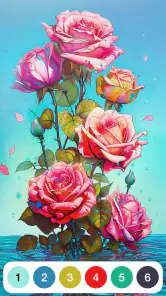
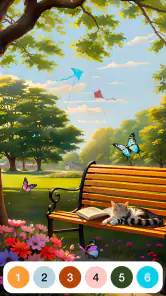
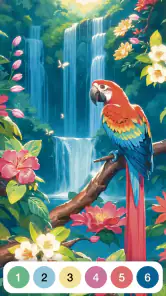
One of the standout features of this app is how it simplifies the coloring process. Each image is divided into tiny sections, each marked with a number corresponding to a particular color. All you have to do is tap on the numbers and watch as your picture comes to life, one shade at a time. It's oddly satisfying and almost meditative. Plus, the app offers a wide array of color palettes, so you never feel limited in your creativity.
The tiny cells are also the main trade-off. They give the finished image detail, but they can make coloring feel fiddly, especially if I am trying to work quickly on a small screen. I get more from it when I treat it as a quiet, focused activity rather than something to rush through. A useful approach is to choose a picture that looks manageable for the time I have, then stop when my attention starts wandering instead of turning a relaxing pastime into a chore.
From a Few Taps to a Finished Picture
The reward comes in stages: an empty-looking outline gains color, sections disappear from the remaining work, and eventually the image feels complete. That steady feedback is what makes it tempting to keep going for another minute. I find it works particularly well during a wait or while winding down in the evening, when I want a small task with a visible result but do not want the pressure of inventing something from scratch.
It helps to think about the session before opening an image. If I only have a couple of minutes, I can color a few areas and leave the rest for later; if I have more time, I can stay with the same picture and enjoy watching its details come together. The game suits interrupted routines better than activities that demand one uninterrupted stretch, though the most intricate-looking art may be less satisfying when I am repeatedly checking the clock.
More From Our News Desk

Weather by Xiaomi Review: Clear at a Glance, Less Clear Up Close

X Under Pressure: Can It Recover When Posting Goes Wrong?

Clash of Clans Is Won Between the Battles

Android Auto Makes the Case for Quieter Car Software

MobiOffice: Transforming Mobile Productivity with Seamless Integration

EA SPORTS FC™ Mobile Soccer: Redefining Mobile Sports Gaming
Choosing a Picture for the Time You Have
One small decision can change the feel of a session: I try to match the picture to my attention, not just to its appearance. A design with lots of tiny regions may look appealing in the gallery, but it asks for more careful tapping than a simpler-looking choice. When I’m waiting for an appointment or have a short pause between tasks, I’d rather pick something that seems easy to make progress on than begin a highly detailed image and feel obliged to finish it.
If I do choose a complicated picture, I treat it as a project I can revisit rather than a task to complete in one sitting. That removes the pressure to race through the small sections. I also find it helpful to focus on one color at a time: it gives my eyes a clear target and makes the remaining work easier to scan. The trade-off is that the picture may develop in patches, but for me that is preferable to tapping randomly and losing track of what I intended to do.
Why It's More Than Just a Coloring App
What makes this app a notch above the rest is its community and interactive features. You can share your completed works with friends or even post them in the app's community section to get feedback and inspiration from fellow users. I found this aspect particularly engaging; it's like being part of a virtual art club where everyone is just as keen to share their creations.
That social side is a bonus rather than a reason everyone should choose it. I would pick this over a physical coloring book when I want convenience and a guided process, but I would choose paper and pencils if I wanted to select my own colors, make marks freely, or keep a tangible piece of art. Compared with freehand drawing apps, this is far less demanding, but it also offers less room to make the picture unmistakably my own. The key distinction is whether I want to create the image or simply enjoy completing it.
There is another useful comparison with traditional board games. Those usually ask me to learn rules, take turns, or aim for a win; this game asks for patience and attention instead. That makes it easier to pick up in a brief lull, but it also means there is no strategic contest to keep me engaged. I’d recommend a conventional puzzle or competitive game if I want a mental challenge with a clear finish condition. Here, the reward is the gradual visual change, not beating an opponent or solving a difficult problem.
A Good Fit for a Particular Kind of Break
Whether you're a kid looking to pass the time or an adult needing a break from the daily grind, Paint by Number: Coloring Game caters to all. The app is designed to be intuitive, meaning anyone can pick it up and start creating. It's a great way to unwind and forget about the stresses of the day, even if just for a few minutes.
There is a practical age and spending detail worth keeping in mind: it is rated Everyone 10+, it is free to download, and it includes optional in-app purchases priced from $0.99 to $189.99 per item. I would keep that in mind if a child will use it, and check purchase settings on the device rather than assuming every part of the experience is free. It is developed by Oakever Games, has a 4.7 average from around 1.9 million ratings, and has passed 100 million installs, so it is a well-established choice in the mobile board-game space. The current version is 4.31.6, with Android 7.0 as the minimum requirement.
For families, I’d think about the age rating and purchase controls before handing over a device, rather than treating the simple coloring mechanic as the whole story. For adults, the main question is whether repeating small taps feels soothing or tedious. The same detail that makes progress easy to follow can become a nuisance if a screen is small or my hands are tired, so I wouldn’t choose it for a session where I need to keep moving quickly.
A Routine That Makes the Loop Work
A realistic use for me is a short break at home while tea is cooling: I open a picture, work through a few areas, and stop when I’m ready to return to what I was doing. There’s no need to find pencils, clear a table, or decide what to draw. The completed sections give me a sense of progress, while the unfinished picture gives me a natural place to pick up again if I feel like returning later.
The reset is part of the appeal. Once an image is finished, I can move on to a new one and get that fresh start without changing the basic activity. But the loop can also become repetitive: the core action stays the same, so anyone who needs new rules, changing objectives, or a rising level of difficulty may lose interest. I’d treat it as a handy option for a particular mood, not a replacement for every kind of mobile game.
For a realistic everyday use, I can imagine opening it on a commute or during a quiet pause at home, finishing a few sections, then putting my phone away without needing to set up or clean anything. If I want a highly competitive game, a puzzle with a clear win condition, or complete freedom to draw, this would not be my first pick. Its strength is the low-pressure loop: tap, see progress, enjoy the near-finished image, and return when I want another calm task.
In conclusion, if you're searching for a fun, accessible way to unleash your inner artist, look no further. This app offers a delightful blend of creativity and relaxation, making it a must-try for anyone looking to add a splash of color to their day. I would recommend it most to people who enjoy guided coloring and small moments of progress; those who need deeper creative control or more active gameplay may be happier with another option.
Who Should Keep It—and Who Should Skip It
I’d suggest trying it if you like orderly, visual activities and want something that can be paused naturally. It suits people who enjoy seeing a defined picture emerge, including anyone who finds a blank canvas intimidating. It can also work well as a low-key alternative to scrolling through feeds during a spare moment, because each tap contributes to a visible result rather than leaving me with nothing to show for the time.
I’d skip it if the satisfaction you want comes from making creative decisions. The numbered spaces guide the result, so choosing a color, changing a composition, or adding your own marks is not the point. I’d also look elsewhere if tiny areas frustrate you, if you prefer games with a score and a clear win, or if you need an activity that stays mentally demanding over repeated sessions. For those needs, a freehand art tool or a more conventional puzzle game is a better match.
How I’d Decide Whether to Return
The question I’d ask after a first session is not whether I finished an image, but whether the repeated action felt pleasant. If tapping through sections helped me settle down, I’d come back when I wanted the same kind of calm. If I caught myself rushing just to clear the remaining cells, I’d take that as a sign to choose a simpler picture or switch to something else. The game works best when finishing is a bonus, not an obligation.
That is also why I see its strongest use as a small ritual rather than a long commitment. A few minutes can be enough to enjoy the color appearing and leave with a clear stopping point. People who want a substantial creative project may find the guided format restrictive, while people who want a quick, tidy activity may appreciate exactly that structure. My recommendation is straightforward: use it when you want a gentle sequence of actions and a visible payoff, and don’t expect it to become a drawing studio or a competitive board game.
Paint by Number: Coloring Game Frequently Asked Questions
Can I save my progress and return to a picture later?
The game is built around completing pictures one numbered section at a time, which makes it easy to pick up the coloring activity whenever you have a spare moment. If you like working through an image gradually rather than finishing it in one sitting, that format should feel comfortable. Your completed artwork also gives you a clear sense of progress.
What kind of artwork can I color in Paint by Number: Coloring Game?
Paint by Number: Coloring Game offers a range of pictures to fill in, with designs described as ranging from simple to intricate. Each image is divided into numbered sections, and matching colors guide you through the process. This keeps the activity accessible while still giving you different levels of visual detail to enjoy as you color.
Who developed Paint by Number: Coloring Game, and what kind of game is it?
Paint by Number: Coloring Game is a board game developed by Oakever Games. Its central activity is filling numbered areas with matching colors, turning a picture into a completed artwork one section at a time. The straightforward format makes it easy to understand, while the different images offer a simple pastime for anyone who enjoys digital coloring.
What is Paint by Number: Coloring Game?
Paint by Number: Coloring Game is a digital coloring app that allows users to paint beautiful artworks by following a number-based color system. It offers a wide range of designs, from simple to intricate, making it suitable for all ages. Users can enjoy the calming experience of coloring without the need for physical supplies.
Is Paint by Number: Coloring Game available for both Android and iOS?
Yes, Paint by Number: Coloring Game is available for download on both Android and iOS platforms. You can find it on the Google Play Store for Android devices and the Apple App Store for iOS devices. The app is free to download, with optional in-app purchases available.
Pros
- Extensive variety of coloring pages.
- User-friendly interface for all ages.
- Regular updates with new content.
- Offline mode available for convenience.
- High-quality graphics and illustrations.
Cons
- In-app advertisements can be intrusive.
- Limited free features without subscription.
- Occasional performance lags reported.
- Requires internet for some features.
- Coloring options can feel repetitive.
- Category
- Board
- Version
- 4.31.6