Checkers Online
- 14.84K
- 4.6
- Installs
- 100.00M
- Price
- Free

Screenshots

Analysis by Reviewed
I like checkers best when I can start a game without turning it into a project, and that is the appeal of Checkers Online. It brings a familiar board game to a phone, making it easy to fit a match into a spare moment or settle in for a longer session. The central question for me is whether that convenience is worth choosing this version over a physical board or another mobile checkers game.
Cost, play, and everyday value
I find the best value here starts with knowing what “free” means: you can begin without paying, while optional in-app items range from $0.99 to $49.99 each. I’d first decide whether the available ways to play suit my routine, then inspect an item’s in-game details before spending. That keeps the focus on the board and makes it easier to judge whether the game earns a place on my phone.
What the free download does—and what purchases mean
The game is free to download, so you can try it without paying upfront. It also offers in-app purchases, with individual items priced from $0.99 to $49.99. I’d treat those as optional spending rather than assume they are needed to enjoy a match; the price range alone does not tell you what each item adds. If you prefer to keep mobile games at no cost, you can begin without making a purchase and decide for yourself whether anything on offer is worth paying for.
That distinction matters because a free entry point is not the same as knowing the full cost of every extra. I wouldn’t buy anything on impulse just to get started. First, play enough to see whether the board, opponents, and pace suit you. If you only want occasional checkers, the free download may be all the commitment you need; if you are considering an item, check its description and price in the game before confirming.
Why the classic format works on a phone
As a board game, checkers needs little explaining once you know the basic rules, but it still rewards planning several moves ahead. This makes the app useful when I want something more involving than a quick tap-based distraction without taking on the setup of a full strategy game. A short match can fit into a break, while playing with someone beside you gives the familiar board a more social feel.
For example, if I have a few minutes while waiting for a ride, I can use that time for a focused game rather than start something that depends on a long story or complicated controls. At home, an offline match with a friend can be an easy way to pass time without needing to find a physical board. The appeal is not that checkers becomes a different game; it is that the phone makes the familiar one more available.
Where it fits among checkers options
Compared with a traditional board, a phone version is easier to carry and can provide opponents when nobody nearby is ready to play. A real board, on the other hand, is better if you want to sit face-to-face without screen distractions. Compared with a simple offline-only checkers app, the online emphasis can make it easier to seek a match beyond your household, while offline play remains useful when you want a local game. Which option is better depends on whether convenience, human company, or a screen-free setting matters most to you.
More From Our News Desk

Weather by Xiaomi Review: Clear at a Glance, Less Clear Up Close

X Under Pressure: Can It Recover When Posting Goes Wrong?

Clash of Clans Is Won Between the Battles

Android Auto Makes the Case for Quieter Car Software

MobiOffice: Transforming Mobile Productivity with Seamless Integration

EA SPORTS FC™ Mobile Soccer: Redefining Mobile Sports Gaming
One practical tip is to decide what you want before opening the game: a quiet solo challenge, an online opponent, or a match with a friend. That small choice helps keep a quick break from turning into a longer session than you intended. If you are playing with another person, agree on the pace and whether you want friendly conversation; checkers can be relaxed, but a competitive match can still demand attention.
Getting Started with Checkers Online
The first thing you'll notice about Checkers Online is its straightforward setup. Download it, and you're ready to dive into a world of strategic fun. The app doesn't bombard you with unnecessary complexities—it's just you, the board, and your opponent. Whether you're a seasoned pro or a newbie, the intuitive interface makes it easy to get started. And trust me, it’s a breeze to navigate!
Features That Stand Out
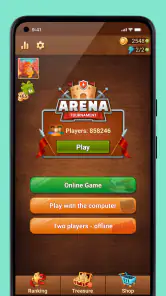
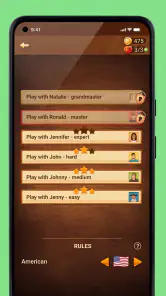
One of the standout features of Checkers Online is its multiplayer mode. You can challenge your friends or take on players from around the globe. The matchmaking system is pretty efficient, ensuring you’re paired with opponents of a similar skill level. And if you're more of a lone wolf, there’s also a solid single-player mode where you can test your skills against AI of varying difficulties.
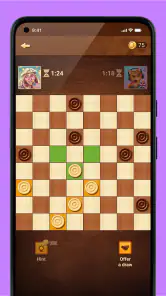
Another feature worth highlighting is the in-game chat. It adds a layer of interaction that brings a social vibe to the game. You can share a "good game" or engage in some friendly banter, making each match more lively. Plus, the app offers different board themes and checker pieces, letting you customize your gaming experience to your liking.
The Gameplay Experience
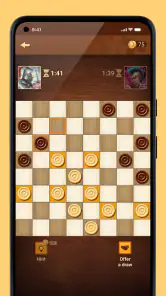
Playing checkers on this app is smooth and engaging. The graphics are crisp, and the animations are subtle yet effective. It's easy to keep track of the game, and the app’s responsiveness ensures that your moves are executed precisely. I found myself getting lost in the game for hours, strategizing and plotting my next move.
What I particularly love is how the game keeps you on your toes. Every match feels unique, and you learn something new each time. It’s not just about winning; it’s about refining your strategy and enjoying the process. Whether you're jumping over pieces or setting up a trap, there's always a thrill in outsmarting your opponent.
How I’d choose a mode and set expectations
If I’m learning or just easing back into checkers, I’d start with a solo game and treat it as practice: focus on protecting pieces and noticing what happens when a capture becomes available. Against a person, I’d expect a less predictable rhythm, so it helps to pause before each move instead of tapping quickly. The useful trade-off is choice—practice when I want control over the pace, and online play when I want an opponent whose decisions I can’t anticipate.
The social side is not automatically a plus for everyone. Chat can make a win feel friendlier, but anyone who prefers a quiet board may find it distracting and should simply avoid engaging with it. Likewise, online play depends on having a connection, so the offline option is the sensible fallback when reception is poor or I’m trying to keep a game local. I wouldn’t pick this solely for elaborate progression or a deep collection of modes; its strongest draw is still the board game itself.
A practical way to fit matches into the day
I find the game easiest to enjoy when I match the mode to the time I actually have. If I’m waiting somewhere and may be interrupted, I’d choose a solo session rather than start a game with another person and then have to leave them waiting. At home, I’d save a head-to-head match for a moment when both players can give it attention. That simple habit makes the phone version feel convenient rather than like another task competing for my time.
There is also a useful way to make a short session count: pick one decision to concentrate on, such as whether to protect a piece or trade it for a capture. Instead of treating every match as a test of overall skill, I can use a few moves to notice a recurring mistake. That’s a better fit for brief breaks and keeps losses from feeling like wasted time. It won’t replace deliberate study for a serious competitor, but it gives casual play a small learning purpose.
What to consider before choosing online play
Online matches are appealing when I want an opponent outside my immediate circle, but they are not interchangeable with playing someone I know. With a friend beside me, we can talk through the game and agree on a relaxed pace; with an online opponent, I have less control over the social atmosphere and the timing. I’d choose based on whether I’m after company or simply a fresh challenge, rather than assuming the online option will recreate a face-to-face game.
If you are considering this for a child or a family device, I’d think about the social features as well as the board. The Everyone age rating makes the game broadly suitable, but online interaction is still a reason for a parent to set expectations. A child who only needs a quiet board-game activity may be better served by playing offline with family, while an adult can decide whether online matches and chat suit their preferences.
Who is likely to enjoy it?
I’d recommend it to casual players who already enjoy checkers, people who want a familiar game ready on their phone, and friends or family looking for an easy offline match. New players can appreciate the approachable format, while experienced players can use solo games to think through choices and online matches for a different challenge. The game is rated for Everyone, and its broad appeal suits shared play, though a young player may still benefit from an adult helping them navigate online interaction.
I’d skip it if you dislike turn-based games, want fast action, or would rather spend game time away from a screen. A physical set is a better choice for face-to-face play without notifications, and another board game may suit you better if you want more varied rules or a longer campaign. Checkers is deliberately focused, so its simplicity is a strength only if that is what you are looking for.
Who makes it and how established it is
CC Games develops this board game, which was released on January 5, 2015. It has a 4.6 average from around 1.4 million ratings, with roughly 15,000 written reviews, and has passed 100 million installs. Those figures suggest that it has reached a large audience, but popularity does not guarantee that every match or social interaction will fit your preferences. I’d use the first few games to judge the experience for myself rather than treat its reach as a promise.
The current version is 2.47.0, and it requires Android 6.0 or later. If you are installing on an older phone, checking that requirement first can save a wasted download. The game is free to start, but the available purchases are a reason to be deliberate: I’d keep spending optional and only consider an item after deciding that the game has earned a place in my routine.
Final Thoughts
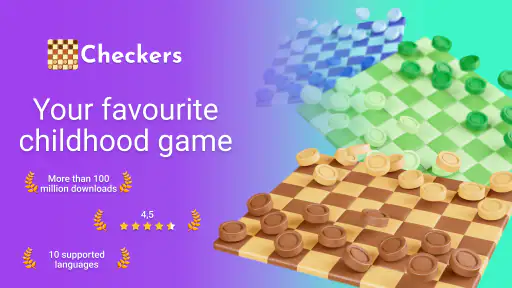
In conclusion, Checkers Online is a fantastic app for anyone looking to enjoy a classic game in a modern format. It blends simplicity with strategic depth, offering something for everyone. Whether you’re in it for a quick match or a long session, the app caters to all needs. So, if you’re ready to engage in some mind-bending fun, download Checkers Online and start playing today. You might just find yourself hooked!
My verdict is more measured: I’d try it if I wanted accessible checkers, the option of online opponents, and a way to play offline with a friend. I’d skip any purchase until I knew exactly what it offered, and I’d choose a physical board when conversation and screen-free play matter more. For a free way to get a familiar strategy game onto a phone, it is an easy recommendation—as long as checkers itself is the game you want.
Checkers Online Frequently Asked Questions
Can I play Checkers Online with friends?
Yes. Checkers Online’s store summary highlights playing offline with friends, making it a choice for a casual match when you are together. The game also focuses on online checkers play, so it offers a way to enjoy the classic board game beyond a single-device session. If playing with a friend is your main reason to download it, check the available match options in the app.
Is Checkers Online a good choice for someone new to checkers?
Checkers Online is based on the classic board game, so it may feel familiar if you already know the basic rules and can offer a straightforward place to start if you are new. You can use play against computer opponents to get comfortable with making moves before joining a match with someone else. As with any strategy game, learning comes through practice and trying different approaches.
What kind of game is Checkers Online?
Checkers Online is a board game centered on the classic game of checkers. Its store summary describes tournament play as well as offline games with friends, so it may suit players who want either a competitive goal or a more relaxed match. The short description is simply “Checkers Online,” making the main focus clear before you download.
Is Checkers Online suitable for children?
Checkers Online is rated Everyone, so its stated content rating makes it suitable for a broad audience. It is a board game built around checkers, which can be a simple way for children and adults to enjoy a familiar pastime. Parents may still want to review the game themselves and consider how their child uses online play and any optional purchases.
What is Checkers Online and how does it work?
Checkers Online is a digital adaptation of the classic board game, allowing players to engage in checkers matches against opponents from around the globe. The app provides a seamless online platform where users can either play against the computer or challenge friends and other users in real-time matches. It supports various levels of difficulty and offers a range of customization options to enhance the gaming experience.
Pros
- Engaging multiplayer mode
- User-friendly interface
- Variety of game modes
- Cross-platform compatibility
- Regular updates enhance gameplay
Cons
- Occasional server issues
- In-app purchases can be pricey
- Ads can disrupt gameplay
- Limited customization options
- Requires stable internet connection
- Category
- Board
- Version
- 2.47.0