Text or Die
- 22.27K
- 4.1
- Installs
- 10.00M
- Price
- Free
Screenshots
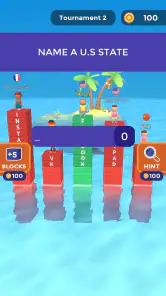
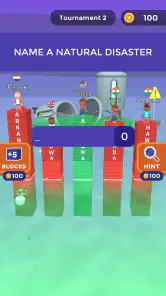
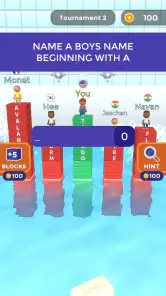
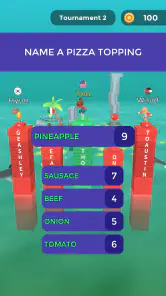
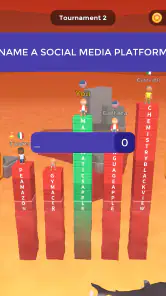
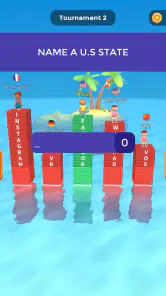
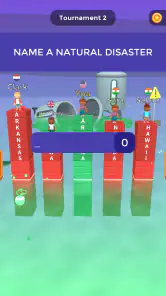
Analysis by Reviewed
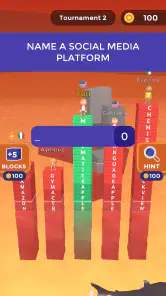
I spent time with Text or Die as a casual trivia game, but its real appeal is not simply knowing answers. The pressure comes from finding a word that fits the prompt and is longer than what other players might type, because your answer affects how safely you stay above the rising danger. That small twist makes familiar word knowledge feel surprisingly tense.
At first glance, this is an easy game to understand: read the question, type an answer, and try to protect your character. In practice, the game asks for a mix of vocabulary, spelling, speed, and calm decision-making. I found it most enjoyable in short sessions, especially when I wanted something more interactive than a standard quiz but less demanding than a full strategy game.
Rollic Games presents it as a free trivia title for Android and iOS, with an Everyone 10+ content rating. It has reached over ten million installs and holds a 4.1 average from around 285 thousand ratings, which gives a useful sense of its broad appeal without changing the fact that the experience is highly dependent on whether you enjoy wordplay under pressure.
How the game feels to read, control, and understand
I look at how Text or Die’s text-first controls shape the experience: what feels immediately clear, where typing adds friction, and how the screen’s reading demands affect a quick round. I’ll also consider a practical way to make answer entry more manageable, before turning to the situations where this format feels most worthwhile.
Readable questions with a simple central loop
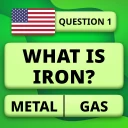
The strongest accessibility point is the basic structure. You do not need to learn a complicated map, remember a large set of controls, or understand a long tutorial before making progress. The question is the main thing on screen, and the answer is entered as text. That makes the game approachable for people who prefer language-based interaction over fast action controls.
I also like that the core challenge is visible in the answer itself. A player can often understand why one response is stronger than another: a longer valid word generally gives a better chance of staying safe. This is easier to grasp than a hidden scoring system, although the exact usefulness of an answer can still depend on the wording of the question and how other players respond.
There is an important difference between recognizing a correct answer and producing a long one. Someone who is excellent at general knowledge may still lose an advantage by choosing the first obvious word. Conversely, a player with a broad vocabulary can do well even without being a trivia expert. That balance makes the game feel less like a conventional quiz and more like a timed word puzzle.
More From Our News Desk

Weather by Xiaomi Review: Clear at a Glance, Less Clear Up Close

X Under Pressure: Can It Recover When Posting Goes Wrong?

Clash of Clans Is Won Between the Battles

Android Auto Makes the Case for Quieter Car Software

MobiOffice: Transforming Mobile Productivity with Seamless Integration

EA SPORTS FC™ Mobile Soccer: Redefining Mobile Sports Gaming
Why typing changes the accessibility picture
The text-entry format is convenient for people who are comfortable using a phone keyboard, but it also creates the first major barrier. Typing requires more precise interaction than tapping a multiple-choice option. Players with limited fine-motor control, hand tremors, joint pain, or difficulty using small touch targets may find the answer phase tiring, particularly when they feel rushed.
There is also a cognitive load that is easy to underestimate. You may need to interpret the prompt, think of several possible answers, compare their lengths, spell the best candidate, and submit it before the moment passes. For some players, that sequence is engaging. For others, it can turn what looks like a relaxed trivia game into a stressful test of processing speed.
I would not recommend judging the game only by whether someone knows the answers. The more relevant question is whether they can comfortably read, formulate, type, and check an answer in the available time. A player who needs extra time for any of those steps may experience the game very differently from someone who types quickly.
Visual and sensory comfort in ordinary play
The game’s premise is visually direct, but the surrounding presentation can still matter. A player who is sensitive to motion, changing scenes, or busy visual feedback should try a short session before committing to longer play. The central task is text, yet the game is designed to create urgency, so the overall experience is not as quiet as a paper crossword or an untimed word puzzle.
Sound is not essential to understanding the questions themselves, which is helpful if you play in a shared space or prefer silent gaming. I could focus on the written interaction without treating audio as the source of the challenge. That said, anyone sensitive to sudden game feedback should pay attention to how the presentation feels during a round rather than assuming that a text-based game will automatically be low stimulation.
For players with visual reading difficulties, the practical test is whether the question, input area, and feedback remain comfortable on their particular phone. Screen size, display scaling, brightness, and personal reading needs can make a substantial difference. I would avoid playing while walking or in a moving vehicle, not because the game requires constant attention to a complex world, but because reading and typing already demand enough concentration.
A realistic everyday use case
My favorite use case is a short break when I have only a few minutes and want a game with a clear beginning and end to each exchange. I can open it, answer a handful of prompts, and stop without needing to remember a complicated campaign. It works well as a quick distraction while waiting, provided I am somewhere I can safely look at the screen and type.
It is less suitable when I am tired, distracted, or using one hand while carrying something. The game rewards deliberate word selection, and divided attention makes it easier to submit a short answer or mistype a better one. That is a useful distinction: the sessions are short, but the mental task is not always light.
Learning the game without relying on fast reactions
New players should resist the habit of entering the first acceptable answer. Before submitting, I try to ask myself whether the prompt allows a broader category, a plural form, or a more specific word. This is not about guessing obscure vocabulary every time. It is about pausing long enough to consider alternatives, because the longest familiar answer is often more valuable than a merely correct one.
A second useful habit is to separate knowledge from spelling. If I know the answer but am unsure how to type it, I may choose a simpler valid word instead of losing time chasing a perfect option. That trade-off is especially relevant for players with dyslexia, language-learning challenges, or slower keyboard input. The game can reward vocabulary, but it also rewards choosing an answer you can reliably enter.
People playing in a second language may find the experience uneven. Common categories can be approachable, while prompts that depend on idioms, cultural familiarity, or subtle word choices may feel much harder. The game is therefore better for language practice as an informal challenge than as a dependable learning tool. It does not replace a structured vocabulary app, dictionary exercise, or accessible quiz with adjustable difficulty.
Situational access: when it works and when it does not
Because the game is free to download, it is easy to try without making an initial purchase. The current version is 30.0.1, and it requires Android 7.0 or later on Android devices. Those details make it practical for many existing phones, although anyone using an older device should check compatibility before planning around it.
The free entry point is useful for casual players, but the game includes in-app purchases ranging from $0.99 to $24.99 per item. I would treat those purchases as optional spending to consider carefully rather than as part of the basic reason to install the game. If you are looking for a completely purchase-free experience, the presence of optional items may be a reason to choose a different trivia title or to use device-level purchase controls.
It is also worth considering the setting. This is not my first choice for a noisy commute, a dark room, or a situation where I cannot comfortably type. A standard trivia game with multiple-choice buttons may be easier when attention is limited. On the other hand, the text format can be preferable for someone who dislikes rapid tapping, provided typing is physically comfortable and the screen is easy to read.
For families, the Everyone 10+ rating is a helpful starting point, but it should not be treated as a guarantee that every player will find the presentation comfortable. Younger players may understand the questions quickly yet struggle with the pressure to produce long answers. Older players may enjoy the vocabulary challenge but prefer a slower format. The right fit depends as much on pace and input comfort as on age.
Where the experience remains demanding
The biggest limitation is that the game’s accessibility depends heavily on timing and text entry. I found no reason to expect it to serve players who need a fully untimed mode, enlarged controls, alternative input methods, or a clearly adjustable pace. If those options are essential for you, a dedicated word puzzle with configurable difficulty is likely a safer choice.
Another limitation is the competitive logic of length. A very long answer is not automatically the most familiar, easiest to spell, or most inclusive answer for every player. The system encourages optimization, which can favor people with larger vocabularies or stronger command of the language used in the prompts. That is an interesting design choice, but it can make the game feel less fair when the challenge comes from language background rather than trivia knowledge.
There is a social consideration too. If friends compare answers, the game can prompt funny debates about whether a word really fits the question. That is part of its charm, but it may be frustrating for players who prefer objective questions with one clearly correct response. I would choose a conventional quiz for serious knowledge testing and this game for playful competition where word choice is part of the entertainment.
Players who dislike pressure should also be cautious. The danger theme gives each answer a consequence, which makes ordinary prompts more exciting, but it can turn a small mistake into a tense moment. Someone seeking a calming game for winding down may prefer a crossword, an untimed anagram game, or a trivia app that lets them answer at their own pace.
How it compares with familiar alternatives
Compared with a standard multiple-choice trivia game, Text or Die gives you more ownership over the answer. You are not selecting from four buttons; you are deciding how precise, broad, or lengthy your response should be. That makes victories feel more personal, but it also introduces spelling and typing as additional tests.
Compared with a crossword, it is faster and more competitive, but usually less reflective. A crossword lets me revisit clues, use crossing letters, and solve at a comfortable rhythm. This game asks me to make a useful decision immediately. If you enjoy the satisfaction of building a solution slowly, the usual puzzle format may suit you better.
Compared with a word-length or anagram game, it adds general knowledge and situational judgment. You are not simply rearranging letters or finding any word that fits a pattern. You must understand the prompt and then decide how ambitious to be. That combination is the reason I would recommend it to someone who finds ordinary quizzes too passive but does not want a complex strategy title.
The trade-off is that the game’s accessibility is less consistent than that of a simple tap-based quiz. Multiple-choice alternatives reduce spelling demands and are often easier for players with motor or language barriers. Text or Die is the better option when open-ended answers are the fun; it is the worse option when predictable controls and generous time are more important.
Who I would recommend it to
I would recommend it to players who enjoy word games, quick trivia prompts, and the small tactical question of whether a longer answer is worth the risk of typing it. It is particularly good for casual sessions with friends or for solo players who like seeing ordinary knowledge turned into a contest of wording.
I would skip it if you want deep explanations after every answer, a carefully structured educational curriculum, or a slow quiz experience. I would also hesitate to recommend it to anyone who finds small-screen typing painful or who needs strong control over timing, motion, and sensory intensity. In those cases, a conventional quiz or an accessibility-focused word game is likely to be more comfortable.
One practical approach is to treat it as a lightweight challenge rather than a test of intelligence. Use familiar, correctly spelled words first, then become more ambitious as you learn which kinds of prompts invite longer answers. This reduces frustration and gives players with different vocabulary levels a way to improve without turning every round into a high-stakes performance.
My inclusive verdict after playing
Text or Die succeeds because it makes a simple trivia question feel like a decision. The danger theme gives urgency, while the open text response lets vocabulary and judgment matter more than reflex tapping. I enjoyed the moments when a broad answer suddenly became the smart choice, and I appreciated that the game could fit into a short break without demanding a long commitment.
Its inclusive strengths are real but limited. Written prompts make the central idea easy to understand, and audio is not necessary to know what answer is being requested. At the same time, the combination of reading, language processing, spelling, touch typing, and time pressure creates barriers that a more configurable game could avoid.
For me, the final recommendation is positive with a clear condition: choose it when you want fast, playful word-based trivia and can comfortably type on your phone. Do not choose it as a substitute for an untimed puzzle, a structured learning tool, or a game built around extensive accessibility controls. As a free trivia game from Rollic Games, it is easy to sample, and its 4.1 average from roughly 285 thousand ratings reflects a broad audience, but your own comfort with its pace will matter more than its popularity.
The game is free, though optional purchases are available, and its Everyone 10+ rating makes it suitable for a wide audience when the playing conditions are right. My advice is to try a brief session in a quiet, well-lit place, use the simplest reliable answers before chasing maximum length, and pay attention to whether the typing pressure feels motivating or tiring. If it feels motivating, this is an unusually lively take on casual trivia; if it feels tiring, a slower alternative will serve you better.
Text or Die Frequently Asked Questions
How much storage space should I have before downloading Text or Die?
Before installing Text or Die, make sure your device has enough free storage for the game and its installation files. The space needed can vary by device and may change as the game is updated, so check the download details on your device’s app store and leave some room for routine updates. Keeping storage available can also help prevent installation interruptions.
Can I play Text or Die with friends, or is it mainly a solo game?
Text or Die is built around multiplayer matches, with players answering word prompts and trying to build a high platform before the water catches them. That competitive setup makes it more of a shared match experience than a traditional solo word puzzle. If you are downloading it to play with a particular friend, check the game’s current options after installation, as available ways to join matches can change.
What kind of questions and answers appear in Text or Die?
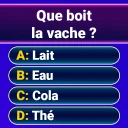
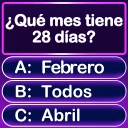
The game presents trivia-style prompts and asks you to type an answer, with longer valid words generally helping you stay above the water. It rewards quick recall and finding a fitting answer rather than simply tapping through a fixed set of choices. The exact prompts can vary, so expect a mix of topics and consider whether typing-based word challenges appeal to you.
Does Text or Die include advertisements or in-app purchases?
Text or Die is free to download, and optional in-app purchases are available. The free experience may also include advertisements, which can affect how uninterrupted a session feels. Purchases range from $0.99 to $24.99 per item, so it is sensible to review purchase settings before handing the device to a child or anyone who may tap offers accidentally.
How much typing is involved, and is Text or Die easy to learn?
Typing is central to Text or Die: each round asks you to enter a word in response to a prompt, and longer valid answers can give your character more protection. The basic idea is easy to grasp, so new players can get started without learning complicated controls. Fast recall and choosing words under pressure are the main challenges, which may suit word-game fans but feel stressful to some players.
Pros
- Simple controls make the game easy to pick up quickly.
- Short rounds suit quick gaming sessions on mobile devices.
- The word challenges encourage vocabulary and general knowledge.
- Character and skin rewards add a fun sense of progression.
- Online competition makes otherwise simple questions more exciting.
Cons
- Some answers may feel subjective or depend on regional knowledge.
- Repeated questions can make later rounds feel predictable.
- Ads may interrupt the experience
- especially between matches.
- Progress can feel slow without spending time on frequent matches.
- The game may become frustrating when opponents answer unusually fast.
- Category
- Trivia
- Version
- 30.0.1