Type Sprint: Typing Games
- 1.81K
- 4.4
- Installs
- 10.00M
- Price
- Free
Screenshots
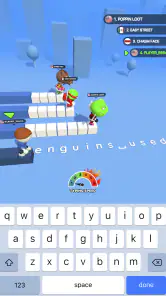
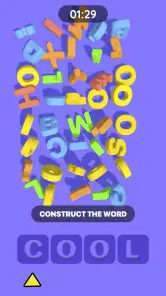
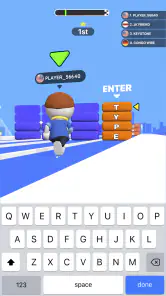
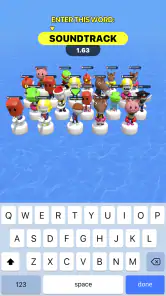
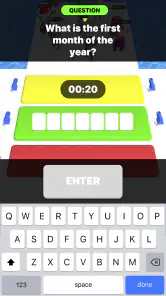
Analysis by Reviewed
I like the idea behind Type Sprint: Typing Games: instead of treating typing as a chore, it makes each burst of text entry part of a race. That can be an appealing change from ordinary trivia, where I usually tap a choice and move on. Here, reading and entering the prompt are the central actions, so the game is most enjoyable when I want a quick, active challenge rather than a quiet lesson.
Reading the Race and Finding Your Bearings
Before deciding whether this kind of game suits you, it helps to focus on what the screen asks you to do: read text, enter it, and keep the race moving. That simple loop is the clearest part of the experience. I find it easier to approach a typing game when the next action is obvious, rather than having to learn a complicated set of controls before playing. Still, a fast-moving challenge can make reading under pressure harder than reading at your own pace, so I’d treat it as a quick game first and a deliberate typing lesson second.
Type Sprint is a free trivia game from Masterskaya DK, and its typing-race idea gives it a different feel from a standard quiz that asks you to choose an answer. It has an average rating of 4.4 from around 103,000 ratings, with over 10 million installs. Those figures suggest a broad audience, but the practical question is whether the race format feels comfortable on your own device. The game is rated for Everyone, and version 1.7.3 requires Android 7.1 or later.
The Thrill of Typing Challenges
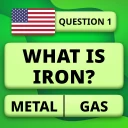
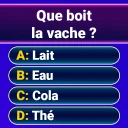
First off, let’s talk about what makes Type Sprint: Typing Games so captivating. This app is a delightful mix of fun and learning, designed to hone your typing skills through a series of engaging challenges. As soon as you open the app, you’re greeted with a vibrant interface that’s both user-friendly and inviting. The excitement kicks in as you dive into various typing games that test your speed and accuracy in different scenarios, making the whole learning process feel more like a gaming adventure than a mundane task.
Game Modes Galore
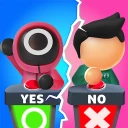
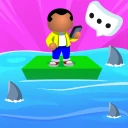
One of the highlights of this app is its wide variety of game modes. Whether you’re racing against the clock in a speed typing challenge or trying to out-type your friends in a multiplayer showdown, there’s something here for everyone. I personally loved the "Word Sprint" mode, where you need to type words as quickly as possible to keep your virtual character running. It’s thrilling and a great workout for your fingers!
Additionally, the app offers a "Story Mode," where you embark on different missions that require you to type out sentences correctly to progress. This mode not only improves your typing skills but also enhances your reading comprehension and vocabulary. Plus, for those who need a bit of competition to stay motivated, the leaderboard feature lets you see how you stack up against other players worldwide.
What the Race Rewards—and What It Doesn’t
The key trade-off is that a running battle rewards quick visual recognition and repeated finger movement, while careful typing practice usually rewards patience and correction. If you want to get faster at entering short text on a phone, the race format can make repetition feel less like a drill. If your goal is accurate work on a physical keyboard, though, a dedicated typing tutor with sustained lessons may transfer better. I’d use this game as a motivating extra, not as a replacement for focused practice.
More From Our News Desk

Weather by Xiaomi Review: Clear at a Glance, Less Clear Up Close

X Under Pressure: Can It Recover When Posting Goes Wrong?

Clash of Clans Is Won Between the Battles

Android Auto Makes the Case for Quieter Car Software

MobiOffice: Transforming Mobile Productivity with Seamless Integration

EA SPORTS FC™ Mobile Soccer: Redefining Mobile Sports Gaming
For a useful short session, I’d play when I have a few spare minutes and pay attention to the mistakes that slow me down, rather than chasing a win every time. That small change matters: speed without accuracy can teach rushed habits, while noticing a difficult letter pattern gives the next round a purpose. A commuter waiting for a train, for example, could play a brief round to turn idle time into light practice; someone who needs quiet concentration or has only one hand free may find the same moment is better suited to a slower activity.
Motor and Sensory Comfort
Typing races naturally place demands on both sight and movement. You need to follow the text while tapping quickly, so small screens, glare, tired eyes, or finger discomfort can make a round less enjoyable. I’d start slowly, keep sessions short, and stop if repeated tapping becomes uncomfortable. The fast pace may also feel intense for players who are sensitive to motion or sound; lowering the device volume is a simple way to make the experience calmer if the audio is distracting.
The game’s energetic presentation can be part of its appeal, but it also means this isn’t automatically the best option for every setting or ability. A player who prefers larger text, fewer visual distractions, or more time to respond should test a round before settling in. If reading the prompt and locating each key compete for attention, choosing a slower typing exercise—or practicing with a physical keyboard—may be more comfortable than trying to keep pace with a virtual race.
Making Practice More Useful
A small adjustment to how you play can make the rounds more worthwhile without turning them into homework. I’d pick one thing to notice at a time: perhaps whether I keep mistyping a particular letter, or whether I lose accuracy when I rush. Trying to fix every mistake while racing is likely to split attention; focusing on one pattern gives a short session a clear purpose. If the game’s pace encourages you to type carelessly, slow down mentally even if the race itself keeps moving.
It also helps to separate improvement in the game from improvement in everyday typing. A good run can show that you handled its prompts quickly, but it doesn’t automatically mean you’ll type a long message more accurately or become comfortable with a computer keyboard. I’d use the game as a prompt to practice, then judge real progress by whether ordinary text entry feels easier. That distinction is especially useful for students and anyone hoping to build a lasting skill rather than simply beat a rival.
Learning and Fun Rolled Into One
Now, I know what you might be thinking: "A typing app? Sounds a bit boring." But trust me, Type Sprint: Typing Games makes learning fun. The app is cleverly designed to keep you engaged, with colorful graphics and captivating sound effects that add to the overall experience. What I appreciate the most is the app’s ability to adapt to your skill level. Whether you’re a beginner just starting to learn touch typing, or a seasoned pro looking to refine your skills, the app provides challenges that are just right for you.
Moreover, the app tracks your progress over time, offering insights into your typing speed and accuracy improvements. It’s incredibly satisfying to see your hard work paying off as you climb up the skill levels. And let’s not forget the daily challenges that keep you coming back for more. There’s always something new to try!
Where It Fits in a Busy Day
I’d recommend it most to people who enjoy short competitive games, want a playful reason to type more often, or are looking for a light activity to share with friends. It can also suit students who want to make brief typing practice feel less like homework, provided they remember that game performance is not the same as polished typing technique. It is less suitable for anyone seeking a quiet, structured course, lengthy reading practice, or a tool designed around slower input.
A realistic moment for it is a short wait before an appointment: I could play a round, then put the phone away when my name is called without needing to commit to a long session. The same quick format can make it easy to invite a friend into a little competition when both of you have a spare moment. I wouldn’t choose it while walking, crossing a street, or doing anything that needs my attention; following text and tapping quickly are better suited to a safe, stationary pause.
Compared with common trivia games, which usually ask you to recall facts and tap an answer, this one puts the emphasis on entering text quickly. Compared with conventional typing tutors, it leans more toward the excitement of a race than step-by-step instruction. That distinction helps set expectations: choose it for a lively change of pace, and choose a lesson-based tutor when you want careful coaching. If you’re unsure, trying a short session is a sensible way to see whether the pace and screen presentation work for you.
What to Expect Before You Settle In
The game is free, which makes it easy to try without treating the first session as a commitment. I’d use that first round as a comfort check: can I read the prompt, find the letters, and keep up without straining? If the answer is yes, I’d try a few short sessions before deciding whether the competitive rhythm motivates me. If not, there’s little reason to force it; a slower exercise or a keyboard-based tutor is a better fit for that need.
Its Everyone content rating makes it broadly suitable from a content standpoint, but that label is not a promise that the fast visual and motor demands will suit every player. Younger users may enjoy the race, while a parent can still check whether the pace and screen presentation feel comfortable for them. Likewise, an adult beginner shouldn’t assume that a high score is required to belong here. The useful measure is whether playing feels inviting enough to encourage practice.
One practical question is whether it can replace typing lessons. I wouldn’t treat it as a full substitute: the appeal is quick, game-like repetition, while a structured tutor is the stronger choice when you need methodical instruction and deliberate correction. Another is whether it makes sense for someone who mostly types on a physical keyboard. It can still be a playful change of pace, but the phone-oriented tapping may not closely match the motions they want to improve. Choosing it for entertainment and light practice keeps expectations realistic.
Final Thoughts
All in all, Type Sprint: Typing Games is a fantastic app for anyone looking to improve their typing skills while having a ton of fun. It’s perfect for students, professionals, or anyone who spends a lot of time typing on their devices. The combination of engaging gameplay, educational value, and a friendly user interface makes it a must-have app. So, if you’re ready to take your typing skills to the next level, give this app a try. Happy typing!
My inclusive verdict is more measured: I like the idea of turning text entry into a playful contest, but the speed-first design will not feel equally accessible in every situation. The clearest way to decide is to try it when you’re rested, in a comfortable setting, and without treating a missed prompt as a test of ability. If the visual pace and repeated tapping feel good, it can be an enjoyable little routine; if not, a slower typing option is a perfectly reasonable choice.
Type Sprint: Typing Games Frequently Asked Questions
Does Type Sprint: Typing Games have an age rating, and is it appropriate for children?
Type Sprint: Typing Games has an Everyone content rating, so it is presented as suitable for a broad audience. Its core idea is a typing race: players enter text while a runner moves through the competition. Parents can still decide whether this fast-paced style and the on-screen content fit their child, and younger players may benefit from trying the game with an adult nearby.
What kind of game is Type Sprint: Typing Games?
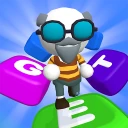
Type Sprint: Typing Games is a trivia game presented as a fast typing race. Its store description frames the action as typing text while running in a three-dimensional race, so the appeal is a mix of quick input and competitive movement rather than a conventional word processor or typing utility. It may suit players who enjoy short, reactive challenges.
Is Type Sprint: Typing Games free to download?
Type Sprint: Typing Games is free to download, so you can try its typing-focused gameplay without an upfront purchase. It is a game in the trivia category, built around typing text as part of a fast-paced running race. If you enjoy quick challenges that reward accurate, speedy input, its basic premise may suit you.
What devices can run Type Sprint: Typing Games?
Type Sprint: Typing Games is available for Android devices running version 7.1 or later. Before downloading, check your device’s operating system to make sure it meets that minimum requirement. The game’s central activity is typing text during a race, so consider whether your device’s screen and input method make that style of play comfortable for you.
Who developed Type Sprint: Typing Games, and is it popular?
Type Sprint: Typing Games is developed by Masterskaya DK. It has passed 10 million installs and has an average rating of 4.4 from 103,000 ratings, suggesting that it has reached a large audience. Those figures can offer a useful sense of its reception, though your experience will depend on whether you enjoy quick typing challenges and competitive running-game presentation.
Pros
- Enhances typing speed effectively.
- Engaging gameplay keeps users hooked.
- Variety of levels for all skills.
- User-friendly interface and controls.
- Boosts cognitive skills and focus.
Cons
- Limited customization options.
- Ads may interrupt gameplay.
- In-app purchases can be pricey.
- Requires internet for full features.
- Graphics could be improved.
- Category
- Trivia
- Version
- 1.7.3