Piano Music & Songs
- 65.00
- 3.7
- Installs
- 10.00M
- Price
- Free
Screenshots
Analysis by Reviewed
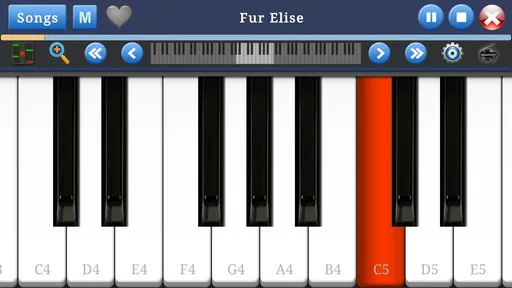
I’d approach Piano Music & Songs as a small, low-pressure way to explore piano playing on a phone or tablet, rather than as a substitute for a full instrument or structured lessons. It is a free music game from Indocipta Studio, and its simple keyboard format makes the basic appeal easy to understand: open it when you have a few spare minutes and try making music with the screen in front of you. That convenience is also the main trade-off. A touchscreen can make experimenting approachable, but it cannot give your fingers the feel or spacing of real piano keys.
What to expect from a quick session
For short sessions, the simplest way to judge the experience is to focus on what the small keyboard can do well: let you tap notes, try a melody, and get comfortable with the idea of playing. I wouldn’t expect a phone app to provide the same depth as a dedicated digital piano setup. Instead, I’d use it for casual practice, musical curiosity, or a few minutes of entertainment while waiting for something else.
That distinction matters if you are deciding whether to use this as a first step. A beginner can explore how notes fit together without bringing home an instrument, while someone who already plays may find it useful for a quick musical diversion. If your goal is to develop finger technique, read demanding scores, or prepare seriously for lessons, a real keyboard and a more structured learning tool are a better fit.
How I’d fit it into everyday practice
A realistic use is opening the game during a quiet break, picking a small musical idea, and spending a few minutes repeating it until the sequence feels familiar. I’d keep those sessions focused rather than trying to turn every spare moment into a full lesson. On a phone, tapping the same pattern repeatedly can become tiring, and the compact layout is less forgiving than full-size keys. A tablet may be more comfortable simply because it gives the keyboard more room, though the basic touchscreen limitation remains.
One useful habit is to treat each session as an experiment: try a short pattern, notice which taps feel awkward, then return later and see whether it feels easier. That gives casual play a little direction without assuming the app can replace a teacher or formal practice plan. If you are sharing a device, it can also be an easy way to let a family member try making a few notes, with the Everyone age rating making the intended audience broad.
Getting Started with the Melody
First things first, downloading the Piano Music & Songs app was a breeze. Available on both Android and iOS, it’s super accessible. Once I fired it up, I was greeted with a user-friendly interface that even a novice like me could navigate without feeling overwhelmed. The app offers a variety of songs ranging from classic pieces to the latest chart-toppers, so there's something for everyone!
The Learning Experience
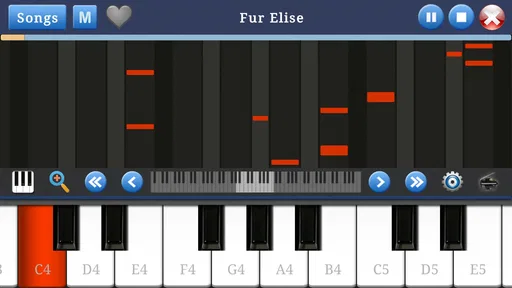
One of the standout features of this app is its interactive tutorials. Each lesson is crafted to guide you step-by-step, ensuring you understand the basics before moving on to more complex compositions. The app uses a combination of visual aids and audio cues to make learning intuitive and fun. I found myself quickly progressing from simple scales to playing my favorite tunes.
More From Our News Desk

Weather by Xiaomi Review: Clear at a Glance, Less Clear Up Close

X Under Pressure: Can It Recover When Posting Goes Wrong?

Clash of Clans Is Won Between the Battles

Android Auto Makes the Case for Quieter Car Software

MobiOffice: Transforming Mobile Productivity with Seamless Integration

EA SPORTS FC™ Mobile Soccer: Redefining Mobile Sports Gaming
What’s even cooler is the real-time feedback system. As I played, the app would recognize notes and chords, offering hints to improve my technique. It's like having a personal piano teacher right in my pocket! Plus, the ability to slow down difficult sections made practice sessions much more productive.
Features that Hit the Right Notes
The app isn’t just about learning; it's also about enjoying music. With its extensive library of songs, I could play along with popular hits or delve into timeless classics. The sheet music feature was incredibly helpful, allowing me to follow along with ease. For those who love to improvise, the app also provides a free play mode where creativity can flow without constraints.
Another nifty feature is the recording option. I could record my sessions and listen back to track my progress. It was surprising to hear how much I improved over time! Sharing my recordings with friends and family was a fun way to showcase my newfound skills.
Speed, stability, and device fit
For a simple keyboard game, my expectation is that getting into a brief session should feel straightforward, not like launching a complicated music workstation. The game has a long-standing presence, having been released on November 6, 2016, and its current version is 1.7.12. It supports Android 5.1 and later, which gives owners of older compatible devices a chance to try it. That compatibility is useful, but it is not a promise that every device will feel equally responsive: screen size, touch response, and the way a device handles sound can all affect the experience.
I’d be most cautious during longer or busier sessions, when repeated taps make any missed or delayed touch more noticeable. A practical workaround is to use a larger screen if one is available, keep the device steady, and test a short phrase before settling into a longer practice stretch. If the game closes or a session is interrupted, I would reopen it and check whether the task I was working on is still available rather than assuming an unfinished attempt was saved. That is a sensible habit with any mobile practice tool, especially when you are building a routine around brief sessions.
As a point of comparison, a physical keyboard is clearly better for touch, posture, and developing coordinated hand movement; a full music-learning app may also suit someone who wants a more formal course. This game makes more sense when portability and low commitment matter more than depth. It has attracted over 10 million installs and holds a 3.7 average from around 7,900 ratings, so it has reached a broad audience, though those figures alone cannot tell you whether its feel will suit your device or playing style. It is free to try, with in-app purchases ranging from $0.49 to $1.49 per item, so I’d treat any purchase as optional and decide only after the basic experience feels worthwhile.
Who should choose it—and who should pass
I’d recommend giving it a try if you are curious about piano, want a casual music game, or need something approachable to explore during a short break. It may also work for a parent or caregiver who wants to offer a child a simple music-themed activity, while staying nearby and keeping expectations realistic. The game is rated Everyone, but an age rating is not a substitute for deciding what is appropriate for a particular child or setting.
I’d skip it if you need a reliable route through music theory, detailed progress tracking, or realistic practice for an upcoming performance. In those cases, lessons with a teacher, a real keyboard, or a dedicated course will give you more useful structure. The main question to ask yourself is whether you want to play casually on a screen or learn piano as an instrument; the answer points clearly toward the right choice.
Making a few minutes count
For a more useful casual session, I’d pick one small goal before opening the keyboard: find a short tune by ear, repeat a note pattern evenly, or see whether a melody sounds different when played at another pace. The point is not to pretend that a few taps replace practice on an instrument. It is to give the screen time a purpose, so you leave with a tiny musical discovery rather than a vague sense of having pressed buttons.
This approach also helps when you are unsure whether a touchscreen piano suits you. Try the same short phrase on separate occasions instead of judging the game from a single burst of novelty. If the layout feels cramped, rotate to a more comfortable position or switch to a tablet when available; if precise finger placement remains frustrating, take that as a useful sign that you would be happier with physical keys. A small screen is convenient for exploring ideas, but it is not equally comfortable for every hand or playing style.
Choosing between a game, lessons, and a keyboard
The usual alternatives serve different needs. A physical keyboard gives you actual key spacing and resistance, which matters once you want to build control across both hands. A structured lesson app is a better match if you want a planned sequence and guidance that builds toward specific skills. A casual piano game sits at the lighter end: it is easier to pick up for an unplanned break, but that convenience comes with less dependable preparation for formal playing.
I’d treat it as a low-commitment trial of musical curiosity, not as a test of whether you can become a pianist. If a melody-making session leaves you wanting more, that is a good reason to explore lessons or borrow time on a keyboard. If you only want a quick way to interact with notes on a mobile device, the lighter format may be all you need. The better choice depends on whether you value structure, realistic touch, or immediate convenience most.
Small decisions that improve the experience
There are a few practical trade-offs I’d keep in mind. A quiet place makes it easier to hear what you are playing, while a stable surface can help reduce accidental movement during repeated taps. If you are trying a pattern, keep it short enough that you can remember it without constantly shifting attention between the screen and your hands. That makes the exercise feel more like listening and experimenting, and less like wrestling with a tiny layout.
I would also avoid measuring progress only by how many songs you can get through. A more useful check is whether you can repeat a short sequence with steadier timing or remember where the notes sit on the on-screen keyboard. Those are modest gains, but they suit a lightweight mobile game better than expecting it to teach a complete course. When you need more detailed feedback or a routine that adapts to your mistakes, a dedicated teacher or learning tool is the sensible next step.
Wrapping Up the Symphony
In conclusion, the Piano Music & Songs app is a fantastic tool for anyone looking to dive into the world of piano playing. Whether you're a complete beginner or an experienced player, this app offers valuable resources and an enjoyable experience. Its combination of educational content, enjoyable features, and user-friendly design makes it a top pick for music lovers.
So, if you're ready to embark on your piano journey, give this app a go. Trust me, your future self will thank you for it. Happy playing!
Piano Music & Songs Frequently Asked Questions
Is Piano Music & Songs free to download, and what might cost extra?
Piano Music & Songs is a free game in the Music category, so you can download it without paying upfront. It also offers optional in-app purchases, with prices ranging from $0.49 to $1.49 per item. These purchases may provide additional content or features, so check the purchase details in the app before confirming anything.
What age group can use Piano Music & Songs?
The game is rated Everyone, making it suitable for a broad audience, including children and adults interested in trying a piano keyboard on a phone or tablet. Its focus is music, and the basic idea is straightforward: learn and play piano on a mobile device. Parents can still review the app and its purchase options before letting a child use it.
What is the main purpose of Piano Music & Songs app?
The Piano Music & Songs app is designed to provide users with an engaging and interactive platform to learn, practice, and enjoy playing the piano. It offers a wide variety of songs across different genres, tutorials, and practice modes, making it suitable for both beginners and advanced players who want to enhance their skills or simply enjoy playing music.
Is Piano Music & Songs suitable for beginners?
Yes, Piano Music & Songs is highly suitable for beginners. The app offers step-by-step tutorials and easy-to-follow lessons that guide new users through the basics of piano playing. Additionally, it provides practice modes that help users gradually improve their skills, making it a perfect choice for anyone starting their musical journey.
Does the app require an internet connection to function?
While Piano Music & Songs offers many features that work offline, like basic tutorials and a selection of songs, an internet connection is required to access additional content, updates, and the full library of songs. To make the most of the app's features, it's recommended to have a stable internet connection.
Pros
- Wide song selection available.
- Engaging and interactive tutorials.
- User-friendly interface design.
- Regular updates with new songs.
- Offline mode for practice anytime.
Cons
- Limited free content access.
- In-app ads can be intrusive.
- Requires internet for new updates.
- Subscription model can be costly.
- Occasional app crashes reported.











