Kpop Piano Beats - Music Game
- 3.10K
- 4.7
- Installs
- 10.00M
- Price
- Free

Screenshots
Analysis by Reviewed
I find Kpop Piano Star - Music Game easiest to enjoy when I treat it as a quick rhythm challenge rather than a full music-learning tool. Its tile-tapping format gives K-pop fans an immediate way to engage with familiar music, and the difficulty choices make it approachable whether you are just starting out or already comfortable with fast rhythm games. The key question is whether you want a playful test of timing: if you mainly want to listen to complete songs or practise piano technique, a music player or instrument-learning app will suit you better.
Reading the screen and finding a comfortable pace
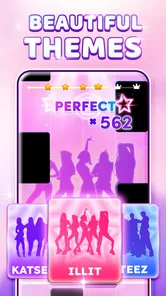
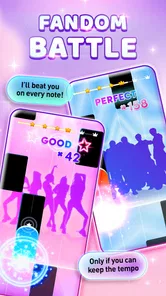
The bright, colorful interface makes the game feel energetic, though that visual intensity may not suit everyone. When I’m deciding whether to keep playing, I pay attention to whether I can follow the tiles without feeling rushed; choosing a lower difficulty is a practical first step, not a lesser way to play. It lets you learn the visual rhythm before trying faster patterns. The game is from Sonata Studio, and its current version is 4.3.0. It is free to download, with optional in-app purchases priced from $0.99 to $2.99 per item.
For a short session, I would start with a song I recognize and focus on the incoming tiles rather than trying to chase a score. That makes it easier to notice whether the screen’s movement and pace work for you. If the interface feels busy, keeping sessions brief can help; this is a game built around visual attention, so it may be a poor fit when you need a calm, low-stimulation break.
That first familiar song can also serve as a simple way to assess readability: watch the tiles for a moment, then tap only when you feel you can track their path. I would avoid judging the game by a single difficult run, since an unfamiliar pattern can make any rhythm game feel harder than it is. The useful question is whether the visual flow becomes understandable with a little practice, not whether you can immediately hit every note.
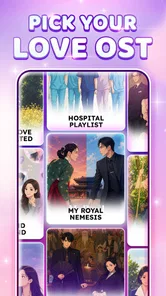
Navigation matters here because a short-session game works best when choosing a song and getting started feels uncomplicated. I would keep the first visit focused: look through the available choices, pick a track you know, and leave score chasing for later. That creates a low-pressure way to learn the screen instead of treating every menu decision as another challenge.
Finger timing, sound, and sensory comfort
The central action is tapping tiles in time, so the game relies on quick visual tracking and repeated touch input. That can be satisfying when your hands are free and you feel alert, but less comfortable if precise, rapid tapping is difficult or tiring. I would not mistake the simple controls for a guarantee that every sequence is easy: as the pace increases, timing and coordination matter more. Starting slowly and stopping when your hands feel strained is a sensible way to judge whether it works for you.
Sound is part of the appeal, but it is not the only cue described by the play style: the moving tiles provide a visual rhythm to follow. In a quiet shared space, I would keep the volume considerate or play without sound only if I can still follow the visual timing comfortably. For anyone sensitive to bright motion or fast-changing patterns, the colorful presentation and rising pace are real considerations, not details to brush aside.
More From Our News Desk

Weather by Xiaomi Review: Clear at a Glance, Less Clear Up Close

X Under Pressure: Can It Recover When Posting Goes Wrong?

Clash of Clans Is Won Between the Battles

Android Auto Makes the Case for Quieter Car Software

MobiOffice: Transforming Mobile Productivity with Seamless Integration

EA SPORTS FC™ Mobile Soccer: Redefining Mobile Sports Gaming
A practical trade-off is that looking at the tiles and listening to the track ask for attention at the same time. If you find that combination tiring, try treating one as the main cue: follow the visual pattern first, or let the music help you anticipate the beat when that feels easier. I would not assume that playing silently or turning the sound down will feel equally natural for every song; the best choice is the one that lets you tap without straining to keep up.
For hand comfort, a short pause between runs is more useful than pushing through a sequence that has become uncomfortable. The controls may be easy to understand, but repeated taps still require movement and timing. If one hand is less comfortable than the other, it is worth noticing whether holding the phone and tapping feels manageable before settling into a longer session. This is a rhythm game to fit around your comfort, not a reason to force a particular pace.
Where it fits into an ordinary day
I can see this working well during a short break, while waiting for an appointment, or when I want a small K-pop-themed distraction without committing to a long session. A useful routine is to choose an easier setting first, play one familiar track, then decide whether I want a quicker challenge. That gives me a natural stopping point and avoids turning a casual moment into a frustrating attempt to keep up.
For example, if I have a few minutes before meeting someone, I would choose a song I recognize and play one round rather than starting an extended session that is hard to interrupt. In a shared waiting room, I would keep the sound low enough not to disturb others and make sure I can still follow the taps. If the surroundings are noisy or distracting, I would save the game for later: missed beats can come from divided attention, not only from a song being too difficult.
It is also a better fit for an intentional little break than for playing while walking, talking, or doing another task that needs your eyes. The action depends on following the tiles, so splitting attention makes the central challenge less enjoyable and can lead to avoidable mistakes. I would set the phone down somewhere steady, play a short round, and stop when the interruption ends instead of trying to squeeze in one more run.
The game has a 4.6 average from around 93,000 ratings and has been installed over 10 million times. It is free to download and rated Everyone, while optional purchases cost from $0.99 to $2.99 per item. Those details help set expectations, but popularity cannot tell you whether the presentation suits your senses or whether the tapping feels comfortable. I would try the basic experience first and decide about spending only after I know I want to keep playing.
Compared with music games that center on broad genre variety, this one makes its appeal more specific: K-pop paired with piano-style tile tapping. That focus is a plus if you already enjoy the music and want a quick interactive spin on it. A conventional music player is better when you want uninterrupted listening; a piano-learning app is better when you want instruction and technique; and a rhythm game with a different musical focus may suit you more if K-pop is not what you want to hear.
The choice also depends on what you mean by “playing music.” Here, the satisfying part is responding to a moving pattern in time, not building a song from keys or practising an instrument. If you want to understand notes, learn a piece, or develop a routine around musical study, the tile format will not replace that work. I would recommend it to someone who wants a light K-pop rhythm test, not someone shopping for a structured lesson.
Getting into the Groove
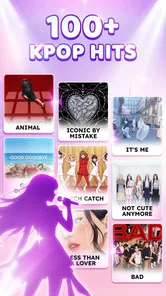
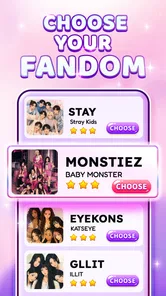
The moment I launched Kpop Piano Star - Music Game, I was greeted with a super vibrant and colorful interface. It's inviting and immediately sets the mood for some serious finger-tapping action. The app offers a wide range of Kpop songs, from the latest hits to the classics. Whether you are a fan of BTS, Blackpink, or EXO, you'll find something to play along to.
Gameplay and Features
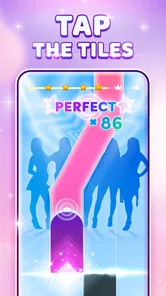
The gameplay is pretty straightforward - you tap the tiles as they slide down your screen in rhythm with the music. Sounds simple, right? Well, it is, but it gets challenging as you progress. The pace picks up, and it requires some serious focus and quick reflexes. I love how the game keeps me on my toes! Plus, the satisfaction of hitting the right notes is just unbeatable.
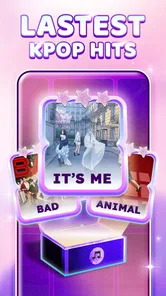
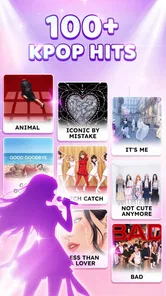
One of the features I really appreciate is the list of songs. They are updated regularly, so there’s always something new to play. You can also choose different levels of difficulty, which is great for both beginners and seasoned players. It’s like having a mini Kpop concert in your pocket.
Difficulty choices are most helpful when used as a way to pace yourself rather than as a badge to earn. I would replay an easier setting until the tile movement feels familiar, then move up when I can follow it without staring tensely at every tap. That small step makes the game more welcoming to new players while giving experienced rhythm-game fans a reason to test their timing. If a faster level stops being fun, stepping back down is a sensible choice, not a failure.
The song list gives the game its K-pop identity, but a familiar artist does not automatically mean every track will feel equally easy to play. I would sample different songs and notice which patterns feel comfortable, rather than sticking only with a favorite because I expect it to be simple. When you find one that clicks, it can become a good warm-up before trying a less familiar selection or a quicker difficulty.
Regular additions can make returning feel worthwhile, though I would treat that as a reason to check in occasionally rather than a promise that every session will offer a new favorite. For a player who wants a game to master once and finish, an ongoing selection may matter less than clear progression or a fixed endpoint. Its strongest use is as a casual, repeatable K-pop diversion, especially when you enjoy revisiting songs to improve your timing.
User Experience
Playing Kpop Piano Star - Music Game is a joy. The app runs smoothly without any glitches, and the graphics are crisp and clear. The sound quality is top-notch, which is crucial for any music game. I haven’t faced any lags, which is a big plus. The game is also pretty light on storage, so it doesn't hog your phone’s memory.
If you are someone who enjoys competing, the leaderboard feature will keep you engaged. You can compete with friends or other players worldwide. It adds a fun, competitive edge to the game.
Competition can add a useful goal when repeating a song, but I would treat a leaderboard as optional motivation rather than the measure of whether a session went well. Some players enjoy trying to improve a result; others would rather use the game as a private, low-stakes break. If comparing scores makes the experience tense, focus on following the rhythm and leave the competitive element alone. The tapping challenge is still the core appeal.
For anyone deciding whether to spend money, the free download provides a straightforward starting point. I would first see whether the available songs, pacing, and visual presentation keep me interested; optional purchases make more sense only if I already know what I want from them. The listed item range is modest, but even a small purchase is worth considering carefully if you are unsure whether you will return to the game.
One question people often have about a tile game is whether the simple premise stays engaging after the first few rounds. Here, the answer depends on whether changing songs and raising the challenge are enough for you. If you enjoy revisiting a track to sharpen your timing, that loop can be satisfying. If you need a story, elaborate objectives, or a deep instrument simulator to stay interested, the focused format may feel limited.
Who will enjoy it, and who may want something else
I would point K-pop fans toward this game when they want to do more than listen but do not want a long, involved session. It is also a reasonable starting point for someone new to rhythm games: the basic action is easy to understand, and the difficulty options let you approach faster patterns gradually. Players who already like tapping games can use it as a genre-specific alternative, particularly when they want familiar K-pop sounds rather than a broad mix of music.
I would hesitate to recommend it to someone who is looking for accessible play in every context. Fast visual tracking and repeated touch input are central, and colorful motion may be tiring or distracting for some people. Anyone who finds those demands uncomfortable should not feel they need to adapt to the game. A music player, a less visually active game, or a lesson-focused app may be the kinder choice, depending on what they want to do.
The game is for Everyone by age rating, but that label is not a promise that the pace, visuals, or tapping demands work equally well for every ability. I would make a personal trial the deciding factor: start at a comfortable speed, see how the screen feels, and stop if the visual or physical effort is unpleasant. An age classification and an individual accessibility fit answer different questions.
It also may not be the right pick for someone who wants a quiet screen, a slower form of interaction, or music outside the K-pop focus. Those are not flaws that need to be overcome; they are reasons to choose another kind of app. I see its best audience as people who already like the combination of K-pop, quick reactions, and a score-oriented rhythm challenge, and who can enjoy that combination in short bursts.
Final Thoughts
In conclusion, Kpop Piano Star - Music Game is a must-have for any Kpop fan who loves rhythm games. It’s engaging, fun, and offers a great selection of songs. The app is designed to keep you entertained for hours, whether you are killing time or just want to enjoy some music. So, go ahead and give it a try. You might just find your new favorite game!
Remember, it’s not just about hitting the notes, it’s about enjoying the music and having fun. Happy playing!
Kpop Piano Beats - Music Game Frequently Asked Questions
How much storage should I set aside for Kpop Piano Star - Music Game?
Before downloading, make sure your device has enough free space for the game and its installation. The amount needed can vary with the device and app version, so checking the download size in your app store is a practical step. Keeping some additional space free can also help your device manage updates and other apps comfortably.
Can children play Kpop Piano Star - Music Game?
The game has an Everyone age rating, so it is intended for a broad audience. Its central activity is tapping tiles in time with music, which can be approachable for younger players as well as adults. Parents may still want to supervise a child’s use of the device and review purchase settings before allowing play.
Is Kpop Piano Star - Music Game suitable for beginners?
Yes. The game’s tile-tapping format is easy to understand: follow the notes on screen and tap them in time with the music. New players can start by focusing on timing and accuracy, then build confidence as they play. Its music-game style makes it accessible to K-pop fans who want a casual rhythm challenge, as well as players who enjoy testing their coordination.
What is Kpop Piano Star - Music Game?
Kpop Piano Star - Music Game is a mobile application designed for Kpop enthusiasts and music lovers. It offers a unique gaming experience where players can enjoy their favorite Kpop songs while playing the piano. The app includes a variety of popular Kpop tracks and challenges players to hit the right notes, enhancing their rhythm skills and providing entertainment.
How do I play Kpop Piano Star - Music Game?
To play Kpop Piano Star - Music Game, you begin by selecting your favorite Kpop song from the app's extensive library. As the music plays, tiles will appear on the screen, and your goal is to tap them in time with the music. The game requires precision and offers various difficulty levels to test your skills, making it engaging for both beginners and advanced players.
Pros
- Wide variety of K-pop songs available.
- Engaging and addictive gameplay.
- Regular updates with new songs.
- User-friendly interface.
- Offline mode available.
Cons
- Contains ads that can be intrusive.
- Limited free songs
- requires purchases.
- Some songs may not be official versions.
- Requires precise touch controls.
- Graphics are basic
- not visually stunning.











