Easy Drum - Real Music Drum
- 38.00
- 4.7
- Installs
- 1.00M
- Price
- Free
Screenshots

Analysis by Reviewed
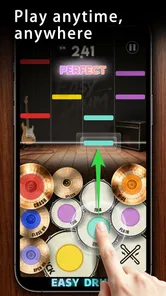
I first treated Easy Drum - Real Music Drum as something a household might pass around rather than as a serious music-learning tool. That distinction matters. It is a free rhythm game in the Music category from AVA GAMES, built around tapping drum parts along with recognizable-style tracks instead of sitting through lessons or configuring a full virtual kit. The appeal is immediate: pick it up, follow the beat, and see whether your hands can stay together with the music.
After spending time with it, I see the game as a light, accessible choice for short sessions on a shared Android device. It suits someone who wants a musical distraction, a child trying a rhythm game for the first time, or a group looking for a simple turn-taking activity. It is less convincing for a drummer seeking realistic technique, detailed practice feedback, or a substitute for an instrument. My recommendation depends heavily on which of those two expectations you bring to it.
How Easy Drum works in a shared household
I find a shared-household session works best when someone treats the phone as the host, not just the controller: set it on a steady surface, agree whose turn comes next, and let each player finish before handing it over. That small routine makes it easier to compare how people follow a beat without turning the game into a race. It also sets up a useful question about how the app’s sound and visual cues guide attention.
A quick game for passing between people
The strongest household use case is informal play. One person can start a song, tap through a run, and hand the phone or tablet to somebody else without requiring a long explanation. That makes it more approachable than many music apps that assume the player already understands rhythm notation, drum terminology, or recording workflows.
I can easily imagine using it during a quiet break at home: one child tries to keep up with a track, a parent takes a turn, and everyone compares how comfortably they followed the pattern. The activity works because the basic idea is visible immediately. You are not being asked to build a kit, connect hardware, or learn a complicated interface before hearing anything musical.
That simplicity also creates a useful boundary. The game is entertainment first. Tapping targets in time can encourage attention and timing, but it should not be presented to a child as formal drum instruction. It may help someone notice the difference between rushing and waiting for a beat, yet it does not replace an instructor, a practice pad, or structured exercises.
What to decide before installing it
The free price makes experimentation easy, but I would still decide what role the app is meant to play. If the goal is a few minutes of shared fun, the low commitment is a real advantage. If the goal is to develop dependable technique, I would choose a dedicated learning app or a physical instrument instead and use this game only as a change of pace.
More From Our News Desk

Weather by Xiaomi Review: Clear at a Glance, Less Clear Up Close

X Under Pressure: Can It Recover When Posting Goes Wrong?

Clash of Clans Is Won Between the Battles

Android Auto Makes the Case for Quieter Car Software

MobiOffice: Transforming Mobile Productivity with Seamless Integration

EA SPORTS FC™ Mobile Soccer: Redefining Mobile Sports Gaming
In-app purchases range from $0.99 to $5.99 per item. That is worth discussing before handing the device to a child, particularly if the device is linked to a household payment method. I would make the purchasing expectation clear in advance: free access can be tested without assuming that every available item or option is included. The important point is not to let a casual rhythm game become an accidental spending decision.
There is also a practical difference between a personal phone and a shared tablet. On a personal device, the player can simply begin whenever they like. On a shared device, I would agree on when it is available, keep the volume considerate, and ask the next player to wait until the current track ends. Those small habits prevent a simple game from turning into an argument over the screen.
Keeping expectations realistic across ages
The Everyone content rating makes the game easier to consider for a broad household audience. That does not mean every player will enjoy it equally. Younger users may appreciate the immediate tapping, while older players may want more challenge, more control over the music, or a stronger sense of progression. A rating describes suitability, not depth.
For a child, I would play alongside them at least once. That gives me a chance to see whether the controls feel comfortable on the particular device and whether the pace is enjoyable rather than frustrating. It also lets me explain that a missed beat is part of the game, not a reason to keep tapping harder or faster.
For a mixed-age group, turn-taking is more important than score comparison. A younger player may be learning the visual timing while an experienced rhythm-game player quickly understands the pattern. If everyone treats the app as a contest, the less confident player may stop participating. If the aim is shared play, I would praise staying with the song and improving over a second attempt rather than only celebrating the best result.
Device boundaries and account habits
I would not assume that a shared installation creates separate personal spaces. Household members should treat the device and its store account as shared territory unless the operating system already provides their own account separation. Before anyone plays, it is sensible to check which store account is active and who is responsible for any purchase prompt.
This is especially important when a child uses an adult’s phone. The child may see an in-game purchase as part of the play flow, while the account holder sees it as a real charge. A short conversation about asking first is more useful than relying on everyone to interpret the same screen in the same way.
I also prefer a simple handoff routine. The current player finishes the song, returns the device with the volume at a reasonable level, and tells the next person whether the game is ready to continue. That avoids someone opening the app in the middle of another person’s attempt and makes the experience feel cooperative rather than chaotic.
Where the rhythm design feels useful
The game’s best quality is its low barrier to musical interaction. Instead of asking the player to understand a complete drum arrangement, it turns the song into a sequence of timely actions. That is a good fit for people who enjoy music but have never held drumsticks. It also works for a player who wants a few minutes of concentration without committing to a long game session.
One non-obvious benefit is that it can reveal how different people listen. Some players follow the most noticeable part of a song, while others wait for a regular pulse. When two people take turns, they may discover that one is naturally patient and another tends to anticipate the next hit. I would use that observation as a conversation starter, not as a diagnosis of musical ability.
A second useful approach is to treat the first attempt as an orientation run. Rather than chasing a high result immediately, I would watch how the pattern relates to the music and identify the moments where attention slips. On a repeat attempt, focusing on one difficult transition is more productive than tapping aggressively through the entire track.
A third tip is to use headphones when the environment allows it. That can make the beat easier to follow without filling a shared room with repeated tracks. It also helps when several household members are doing different things nearby. I would still keep the device at a comfortable level, since rhythm games can encourage players to turn sound up when they miss a cue.
What it is not designed to replace
Compared with a drum machine or music-production app, this is much easier to start but far less suitable for creating your own arrangements. A production tool gives you control over sounds, patterns, recording, and editing; this game is about responding to prepared musical material. If your goal is to make a beat and save it, I would look elsewhere.
Compared with a rhythm-training app, it is likely to feel more playful and less academic. That can be an advantage for reluctant learners, but a disadvantage for someone who wants exercises separated by tempo, timing accuracy, or specific limb coordination. A dedicated trainer is the better choice when measurable practice is the priority.
Compared with a physical drum kit, the game is quieter, cheaper to try, and far easier to fit into a living room. It also removes the satisfying physical feedback of striking a real surface and does not teach posture, rebound, grip, or the feel of a pedal. I would recommend it as a screen-based introduction to rhythmic attention, not as evidence that someone is learning to play drums in the full sense.
Performance, comfort, and everyday friction
The current version is 1.12.0 and supports Android 7.0 or later. That gives the game a broad technical reach for compatible Android devices, although compatibility on paper does not guarantee that every screen will feel equally comfortable. A small phone can make tapping more cramped, while a larger display may be easier for two people to see during a shared session.
I would test the touch response before inviting a group to play. If the device is being held loosely, placed on a soft surface, or used with fingers that cover too much of the play area, missed inputs may feel like a gameplay problem when they are really a setup problem. A stable position and a clear view of the screen make turn-taking smoother.
Another practical issue is attention. Because the game is built around timing, interruptions are more disruptive than they are in a turn-based puzzle. Notifications, conversation, or someone moving the device can break concentration immediately. For a household session, I would keep rounds short and avoid presenting the game as something that must continue while everyone is busy with other tasks.
Trust, supervision, and responsible use
The Everyone rating supports casual use by different age groups, but trust still comes from the way the household manages the device. I would show a younger player where the game starts, explain that purchase prompts require an adult, and make clear that the phone or tablet belongs to everyone if it is a shared device.
I would also avoid claiming that the app teaches a child to drum simply because the child enjoys it. Honest framing protects the experience. Saying “this is a rhythm game” sets a clear expectation and leaves room for the child to discover whether they want deeper musical practice later.
For older children and adults, the same principle applies to time. A quick session can be refreshing, but repeated attempts can become less enjoyable when the player is chasing a result after concentration has already faded. I find that stopping after a satisfying run is better than continuing until the music feels like background noise.
Who should choose it, and who should skip it
I would recommend Easy Drum to casual players who like music-based games, families wanting a simple shared activity, and beginners who want to test whether rhythm tapping appeals to them. The free entry point, broad age rating, and straightforward concept make it easy to try without treating the first session as a major commitment.
I would be more cautious recommending it to someone who expects realistic drum simulation, custom composition, detailed statistics, or a complete lesson plan. A serious learner may quickly outgrow the game’s simplified interaction. Someone sensitive to timing frustration may also prefer a slower practice tool that explains mistakes instead of simply asking for another attempt.
The rating of 4.5 from around 673 ratings suggests that many players have responded positively, while the install base of over 100K shows that it has reached a meaningful audience. I treat those figures as signs of interest rather than proof that it will suit every household. Music games are personal: the same simplicity that makes one player comfortable can make another feel that there is not enough depth.
My household verdict
Easy Drum succeeds when I use it as a compact, friendly rhythm activity. It is quick to explain, inexpensive to test, and suitable for a shared-device setting when adults establish clear purchase and turn-taking boundaries. The developer, AVA GAMES, has positioned it in a space where immediate play matters more than technical realism, and that is a sensible fit for casual sessions.
My final advice is to install it with a specific expectation: use it for musical play, attention, and a little friendly coordination, not as a replacement for drum lessons or music-production software. Try it on the device that will actually be shared, check that the screen is comfortable, and agree who can approve purchases before passing it around.
For my own household recommendation, I would say yes if the aim is a short, accessible game that several people can understand quickly. I would say no if the main request is structured education or serious drumming practice. Within that boundary, it is a pleasant way to turn a spare few minutes into a small musical challenge, and its greatest strength is how little preparation it demands before everyone can take a turn.
Easy Drum - Real Music Drum Frequently Asked Questions
What kind of game is Easy Drum - Real Music Drum?
Easy Drum - Real Music Drum is a music game centered on playing virtual drums and enjoying rhythm-based play. Its short description is simply “Easy Drum,” while its main idea is captured by the invitation to play hit tracks. It is aimed at people who want a straightforward way to explore drumming on a mobile device, whether they are trying the activity for the first time or just looking for casual musical entertainment.
What is Easy Drum - Real Music Drum?
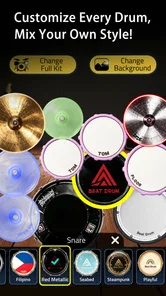
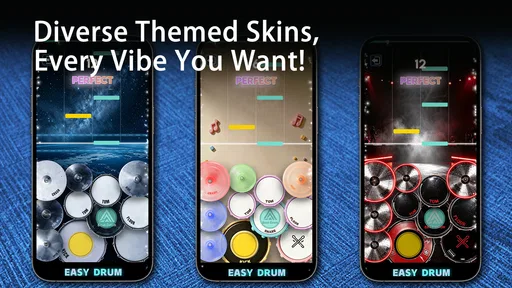
Easy Drum - Real Music Drum is a virtual drumming app that turns your Android or iOS device into a playable drum kit. It provides on-screen drums and cymbals that you tap with your fingers to create beats, practice rhythms, or simply have fun. The layout is designed for quick access, making it suitable for beginners and casual users who want to experiment with percussion without owning a physical drum set.
Is Easy Drum - Real Music Drum suitable for beginners?
Yes, the app is generally suitable for beginners because its controls are straightforward and do not require previous drumming experience. You can tap individual drums and cymbals, test different sounds, and gradually develop timing and coordination. However, it should be viewed primarily as a convenient practice and entertainment tool rather than a complete substitute for professional drum lessons or a full acoustic or electronic drum kit.
Can I use Easy Drum - Real Music Drum without an internet connection?
The core drumming experience may work offline after the application has been installed, allowing you to play the virtual kit without continuously connecting to the internet. Nevertheless, some features, advertisements, updates, or additional content may require connectivity depending on the version available on your device. It is a good idea to open the app once while online and review its permissions and feature behavior before using it offline.
Does Easy Drum - Real Music Drum offer realistic sounds and responsive controls?
The application is designed to provide recognizable drum and cymbal sounds through touch controls, and its usefulness depends largely on your device’s screen size, speakers, and performance. On a modern phone or tablet, taps can feel responsive enough for casual rhythm creation and basic practice. Still, touchscreen latency and small playing areas can limit precision, so demanding musicians may prefer dedicated electronic drums or professional music software.
Pros
- Responsive pads make basic rhythms easy to play.
- Works well for quick practice sessions and casual fun.
- Suitable for beginners learning common drum patterns.
- Touch controls feel natural on phones and tablets.
- Useful for experimenting with beats without extra equipment.
Cons
- Advanced drummers may find the sound library too limited.
- Small screens can make precise finger placement difficult.
- Some features may require in-app purchases or ads.
- Realistic drumming is restricted by touchscreen feedback.
- Audio quality depends heavily on the device’s speakers or headphones.











