Decor Life - Home Design Game
- 8.82K
- 4.5
- Installs
- 100.00M
- Price
- Free
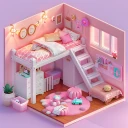
Screenshots






Analysis by Reviewed
Before installing, I’d decide what I want from a decorating game: a low-pressure way to play with room styles, not a blueprint for a real renovation. That expectation makes the first session much more satisfying. Decor Life - Home Design Game is a casual simulation from SayGames Ltd, and its appeal is in making visual choices and watching a room come together. I can change direction without worrying about real furniture, paint, or a shopping budget, so my first useful goal is simply to finish a room that feels coherent rather than perfect.
It is a particularly easy fit if you like interiors but have never tried design software. I would not treat it as a practical floor-planning tool or a source of professional renovation advice. Instead, I use it as a visual playground: I can test a mood, compare décor combinations, and enjoy the process without needing design experience. Knowing that distinction upfront helps me avoid expecting the game to solve real-world layout problems.
Getting comfortable with the first room
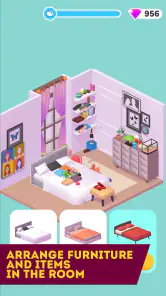
The first thing that caught my eye about Decor Life - Home Design Game is its user-friendly interface. You don’t need to be a tech wizard to navigate through the app, which is fantastic because I’m here to design, not solve tech puzzles. From the moment you open the app, you’re greeted with vibrant graphics and a simple menu that guides you straight into the heart of decorating bliss.
Reads About Decor Life - Home Design Game
Make one decision at a time
For a first session, I recommend focusing on the room in front of you instead of planning an entire home in your head. Start by choosing a general mood—quiet and simple, warm and layered, or bright and playful—then judge each furniture and décor choice against that direction. This small bit of restraint makes it easier to notice when an item clashes, and it gives you a clear sense of progress even if you only play for a few minutes.
One of the standout features is the extensive catalog of furniture and decor items. Want a minimalist living room or a bohemian bedroom? You got it! The app offers a plethora of options to suit every taste and style. I found myself spending hours just mixing and matching different items to create unique spaces. The best part? No budget constraints! You can go all out without worrying about breaking the bank—a dream come true for design enthusiasts.
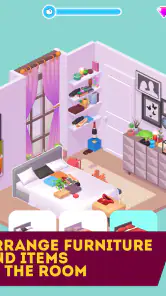
Another cool aspect is the ability to experiment with different color schemes and layouts. The app gives you the freedom to move furniture around and try out different arrangements until you find the perfect setup. It’s like having a virtual sandbox where you can let your imagination run wild.
A useful way to avoid design indecision
When I get stuck between two looks, I find it more helpful to change one thing at a time than to rebuild the whole room. Try moving a large piece first, then reconsider smaller décor choices once the layout feels balanced. That makes the cause of a better-looking arrangement easier to spot. It also keeps experimentation enjoyable instead of turning every choice into a long search for a perfect answer.
More From Our News Desk

Clash of Clans Is Won Between the Battles

Android Auto Makes the Case for Quieter Car Software

MobiOffice: Transforming Mobile Productivity with Seamless Integration

EA SPORTS FC™ Mobile Soccer: Redefining Mobile Sports Gaming

How Microsoft OneDrive Became a Mobile Productivity Giant

How Google Translate Breaks Language Barriers Effortlessly
This is a visual play space, so the strongest payoff is seeing a room take shape, not learning exact measurements or checking whether an arrangement would work in a real apartment. If you are planning an actual renovation, a room-measuring or floor-plan app is a better companion. I’d use this game to test a mood or get unstuck creatively, then verify real-world dimensions and practical details elsewhere.
What challenges add to the experience
If you’re someone who loves a bit of competition, the game offers various design challenges that you can participate in. These challenges are a great way to test your skills and earn rewards that can be used to unlock even more decor items. I found these challenges to be quite addictive, always pushing me to come up with innovative designs.
They can also help when an open-ended decorating session feels overwhelming: a specific brief gives you a reason to choose one direction and finish. I would treat the reward loop as a gentle nudge rather than a requirement to enjoy the game. If you prefer making rooms entirely on your own terms, you can focus on the creative side and not make every session about earning something.
Plus, the app has a social element where you can share your designs with friends and get feedback. It’s a wonderful way to connect with fellow design enthusiasts and get inspiration from their creations. I’ve learned so much from seeing what others come up with and incorporating their ideas into my own designs.
Who will enjoy it—and who may want another tool
I can see this fitting nicely into an ordinary evening: after work or school, I might open it, arrange a room for a short break, and leave once I have a look I like. It suits people who enjoy visual puzzles, playful home styling, and trying combinations without the cost or commitment of buying anything. Compared with many simulation games built around managing resources or running a business, its appeal is more about personal taste and room-by-room creativity.
On the other hand, players looking for detailed construction systems, realistic measurements, or a deep decorating simulator may find the experience too light. It is also not the best choice if you want a practical shopping plan, because enjoying an in-game arrangement does not guarantee the same pieces or proportions will work in a real room. For that, I would pair a casual design game with a dedicated planning tool.
The game is free to download, with optional in-app purchases ranging from $0.99 to $99.99 per item. I’d keep that in mind if you are choosing it for a younger player: it is rated Everyone, but purchase options are still worth discussing before handing over a device. SayGames Ltd is the developer, and the game has a 4.5 average from around 920,000 ratings, alongside over 100 million installs. Those figures suggest it has reached a broad audience, though the right fit still depends on whether you enjoy relaxed decorating more than management or realism.
Small expectations that make a difference
A common point of confusion with a game like this is expecting every room to behave like a real design brief. I try to separate “this looks pleasing on screen” from “this would be functional in my home.” That keeps the experience fun and makes the game’s freedom feel like a strength rather than a promise of practical renovation guidance.
If you are wondering whether you need decorating experience, I don’t think you do. The simple interface and open-ended choices make it approachable, and you can learn by testing arrangements instead of following formal rules. If you are wondering whether it is worth returning to after the first room, that depends on whether new decorating prompts and the act of experimenting keep you interested; the challenges offer a different kind of motivation from simply styling freely.
Taking a room from first idea to finished look
For a more deliberate first attempt, I’d make a quick mental checklist before touching the room: choose the mood, decide which large item should anchor it, and leave the small accents until the main arrangement feels settled. This is useful because décor can be tempting to place immediately, but little details are harder to judge when the larger pieces still feel out of balance. If the room begins to look busy, removing or changing one accent can be more effective than adding another item.
A realistic use for this routine is a short break while waiting for dinner or winding down before bed. I can pick up the game, work toward one clear visual result, and stop when that result feels complete instead of turning the session into an endless hunt for a flawless room. The game’s open-ended quality is a strength for relaxed play, but it also means I have to set my own stopping point. A simple “one room, one mood” rule keeps that freedom from becoming indecision.
Another helpful way to use the game is as a taste experiment. If I usually choose neutral interiors, I can try a more colorful direction without committing to it in real life; if I tend to add lots of decoration, I can see how a simpler arrangement feels. That is not the same as testing how materials look under real lighting or whether furniture fits through a doorway, but it can help me notice what styles I enjoy. I would treat any inspiration as a starting point, then check actual sizes, costs, and practical needs separately.
How it compares with other ways to decorate
Compared with a conventional home-design simulator focused on construction, budgets, or running a property, this game puts less emphasis on managing systems and more on the visual pleasure of arranging a room. That makes it easier to approach casually, but it also means players who want long-term planning or realistic building decisions may find more depth in a dedicated simulation. The trade-off is clear: this is better for trying looks quickly than for rehearsing a renovation from start to finish.
It also serves a different purpose from interior-design apps that let you map a real room. Those tools are more useful when you have dimensions, existing furniture, and a practical decision to make. Here, I can explore combinations without first measuring a wall, which removes friction and makes experimentation feel playful. I would choose this game for a creative reset, a floor-planning tool for checking fit, and a real shopping list only after verifying what is available and suitable outside the game.
For people who mainly want a relaxing activity, the absence of a real-world budget can be freeing: I can try an arrangement just because it looks interesting. The flip side is that the result may encourage unrealistic expectations if I mistake a pleasing screen layout for a workable home setup. Keeping that boundary in mind lets me enjoy the visual freedom without relying on it for decisions it is not designed to make.
Practical details before you settle in
The game is free, while optional purchases cost from $0.99 to $99.99 per item. That range makes it sensible to treat any purchase prompt as a separate choice rather than part of the basic decorating experience. If a child will be playing, I would talk about in-app spending beforehand and use the device’s purchase controls as appropriate. The Everyone age rating describes its general audience, but it does not remove the need for a household conversation about paid extras.
It runs on Android 8.0 or later, and the current version is 1.0.40. It has around 8,800 written reviews as well as its large rating total, but a broad audience does not guarantee that every player will enjoy the same pace. I would judge it by whether I like arranging rooms and making visual choices, not by popularity alone. If I want precise design work, I would use a practical planning app; if I want a light decorating session, this is the more natural fit.
Final Thoughts
Overall, Decor Life - Home Design Game has been a delightful addition to my app collection. It’s perfect for unwinding after a long day and letting my creativity flow. Whether you’re a seasoned designer or just someone who enjoys playing around with decor ideas, this app offers something for everyone. I highly recommend giving it a try and diving into the world of endless design possibilities. Trust me; you won’t regret it!
For a first-time player, my advice is to keep the first session modest: choose a look, make a few deliberate changes, and stop when the room feels finished to you. The current version is 1.0.40 and requires Android 8.0 or later. If you want a soothing creative break rather than a technical design tool, that is a sensible place to begin.
Decor Life - Home Design Game Frequently Asked Questions
Is Decor Life - Home Design Game suitable for children?
Decor Life - Home Design Game is rated Everyone, making it suitable for a general audience. Its central activity is arranging furniture and décor in virtual spaces, so it can appeal to players who enjoy creative, low-pressure simulation games. Parents should still consider whether in-app purchases are appropriate for their child and review the purchase settings on the device before downloading.
What kind of gameplay can I expect from Decor Life - Home Design Game?
The game is built around trying different furniture and décor in renovation settings. You can choose items and arrange them to explore different looks for virtual spaces, making the experience more about visual creativity than managing a household. If you enjoy experimenting with room layouts and interior styles, this straightforward decorating focus may suit you.
Is Decor Life - Home Design Game suitable for players who enjoy interior design?
Yes, the decorating theme is a natural fit for players who like exploring interior design ideas. The game lets you try out furniture and décor in virtual spaces and customize rooms to create different looks. It offers a relaxed way to experiment creatively, although its appeal will depend on whether you enjoy arranging items and making visual choices.
Who developed Decor Life - Home Design Game, and how popular is it?
Decor Life - Home Design Game is developed by SayGames Ltd and has attracted a large player community. It has over 100 million installs, with an average rating of 4.5 from around 920,000 ratings. Those figures suggest that many people have tried it, but personal preferences differ, so its decorating-focused gameplay is the best clue to whether it will suit you.
What is Decor Life - Home Design Game all about?
Decor Life - Home Design Game is an engaging mobile game that allows players to unleash their creativity by designing and decorating various virtual spaces. Whether you're interested in interior design or just looking for a fun way to pass the time, this game offers a wide range of furniture, decor items, and customization options to create your dream home.
Pros
- Engaging home renovation gameplay.
- Variety of decor options available.
- Easy to learn and play.
- Frequent updates with new content.
- Offline play mode available.
Cons
- Requires in-app purchases for some items.
- Ads can be intrusive.
- Limited energy restricts play time.
- Graphics could be more realistic.
- Loading times can be long.
- Category
- Simulation
- Version
- 1.0.40