Barbie Dreamhouse Adventures
- 25.34K
- 4.2
- Installs
- 100.00M
- Price
- Free

Screenshots







Analysis by Reviewed
I find Barbie Dreamhouse Adventures easiest to enjoy when I treat it as a collection of short, playful activities rather than a game with one demanding goal. Its dollhouse setting brings together character play, decorating, cooking, dress-up, and other diversions, so a child can choose a small task and move on when their attention shifts. That flexibility is a real strength, though the bright, busy presentation may not suit every player.
How the Dreamhouse Works in Practice
I like to think of the Dreamhouse as a set of little play invitations, not a checklist to clear. In this section, I’ll look at how its rooms and choices can help a player find a starting point, while also considering when all that visual activity may make orientation harder. That distinction matters especially for families deciding whether to explore together or let a child play independently.
Readability and finding your way
First things first, the app is all about exploring Barbie's fabulous dreamhouse. You get to move around, interact with different rooms, and even throw parties. It’s like having a digital dollhouse that's constantly buzzing with activities. The graphics are vivid and colorful, bringing Barbie’s iconic style to life in an engaging way. Everything from the poolside to the kitchen is designed to be interactive, keeping you hooked from the get-go.
The room-based setup gives play a useful sense of place: instead of choosing from an abstract list of unrelated games, you can explore the house and decide what to do next. I’d use that structure to help a younger player settle in: pick one room together, try an activity, then let them choose whether to stay or wander elsewhere. The visual richness is part of the appeal, but it also means a screen can feel crowded to someone who prefers restrained colors or sparse layouts.
Characters, stories, and familiar play
One of the coolest aspects of Barbie Dreamhouse Adventures is meeting Barbie’s friends. From Ken to her besties, everyone’s here ready to have fun. Each character has their own personality and style, adding diversity and richness to the experience. You can dress them up, host events, and even take part in mini-games that explore their unique stories. It’s almost like being part of your favorite TV show!
That mix makes the game a good fit for players who enjoy pretending, changing outfits, and inventing scenes more than chasing a score. It also gives a parent or sibling easy ways to join in without taking over: suggest a character or a party theme, then let the player decide how to dress the cast and arrange the play. If the main draw is deep storytelling, competitive challenges, or a clear campaign to complete, this is a lighter experience and may not hold attention in the same way.
Short activities and a useful way to play
Speaking of mini-games, this app is packed with them! Whether it's baking delicious cupcakes, dancing, or exploring fashion, there’s something for everyone. These games are not only fun but also creatively designed to keep you engaged without feeling repetitive. Plus, they offer a great way to earn in-game rewards which can be used to unlock even more exciting features.
More From Our News Desk

Weather by Xiaomi Review: Clear at a Glance, Less Clear Up Close

X Under Pressure: Can It Recover When Posting Goes Wrong?

Clash of Clans Is Won Between the Battles

Android Auto Makes the Case for Quieter Car Software

MobiOffice: Transforming Mobile Productivity with Seamless Integration

EA SPORTS FC™ Mobile Soccer: Redefining Mobile Sports Gaming
For an everyday use case, I can imagine opening it during a brief wait or a quiet stretch at home: choose a cooking or fashion activity, finish that small burst of play, and stop without needing to remember a complicated objective. A practical tip is to let the player decide on a single theme—such as getting ready for a party—then carry it from choosing clothes to decorating or hosting. That creates a satisfying little arc without turning casual play into a long session.
Making the house feel personal
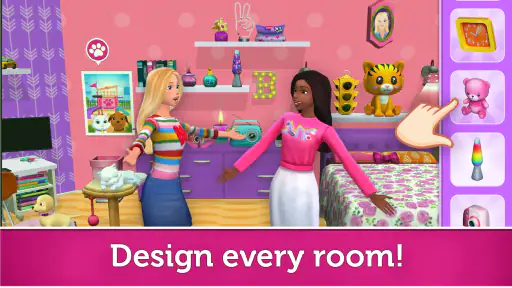
If you love customizing your own space, then you’re in for a treat. Barbie Dreamhouse Adventures allows you to decorate and design Barbie’s house to your heart’s content. From furniture to wallpaper, you have the freedom to make the dreamhouse uniquely yours. It’s a fantastic way to express your creativity and enjoy a personalized gaming experience.
Decoration also gives the game a different pace from its action-based activities. A player who enjoys choosing colors and arranging a space can spend time on that without needing to perform well at a mini-game. I’d treat customization as a creative prompt rather than a completion checklist: choose a room to change, make a few deliberate choices, and then use the room as a setting for pretend play. The trade-off is that players who want a building simulator with precise planning or extensive design controls may find this style more focused on accessible, playful choices.
Social play and shared-device expectations
Another standout feature is the multiplayer option. You can connect with friends and take part in activities together. Whether it’s a pool party or a fashion show, everything is more fun with friends. This social aspect adds a whole new level of enjoyment, making you feel like you’re part of a community.
Because playing together depends on connecting with friends, I would not assume it is the best choice for a child who needs a fully offline activity or for a caregiver looking for a game that is strictly solo. It is worth checking the available play options with the child before handing over a device, especially if the plan is to use the game in a place where connectivity or sharing is inconvenient. The multiplayer angle can add a shared imaginative activity, but it is not the reason I would choose the game for every situation.
Navigation, comfort, and different needs
One thing I really appreciate is how user-friendly the app is. Navigation is a breeze, thanks to the intuitive interface. Even if you’re new to gaming, you’ll find it easy to get around and explore all the fun features. The app’s design ensures that everything is just a tap away, making your experience smooth and enjoyable.
In my experience, familiar rooms and direct interaction make the basic idea approachable for players who are still learning how game worlds work. A caregiver can also turn exploration into a low-pressure shared activity by naming a room or asking what the character might do there. At the same time, the colorful scenes and frequent choices may be tiring for someone who is sensitive to visual stimulation or finds busy screens difficult to process. I would try a short session and watch how the player responds rather than assuming that an easy-to-understand theme makes every part comfortable.
For motor comfort, the appeal is that play centers on tapping and choosing rather than requiring mastery of a complex control scheme. Still, moving around and selecting small on-screen elements can be frustrating for someone who has difficulty with precise touch input. I’d let that player explore at their own pace and see whether the controls feel manageable on the device they use. If they need highly adjustable controls or a calmer, less visually active experience, a simpler dress-up or drawing game may be a better fit.
Situations where the format helps—and where it doesn’t
The game’s open-ended structure can be especially useful when a child wants to lead the play rather than follow instructions. I’d offer a choice between two simple starting points, such as visiting a room or dressing a character, and let the child decide what happens after that. This keeps the first step manageable without turning the session into a prescribed sequence. It can also work as shared screen time for a caregiver and child: one person can suggest a pretend scenario while the other makes the choices on the device.
That flexibility is less helpful when a player is looking for clear milestones or needs to know exactly how long an activity will take. The activities invite browsing, and moving from one possibility to another can make it harder to settle on a single task. For a family trying to keep play predictable, I’d agree on a simple stopping point before starting, such as finishing one chosen activity or completing a small pretend scene. This is a practical boundary, not a feature of the game, and it can prevent an open-ended session from stretching longer than intended.
Compared with a straightforward dress-up game, the Dreamhouse offers more context for role-play because outfits sit alongside rooms, characters, and household activities. Compared with a dedicated home-design simulator, though, the emphasis is less on detailed layouts and more on playful choices within Barbie’s world. I’d choose it when a child likes switching between kinds of make-believe; I’d choose a single-purpose alternative when they want either more focused styling or more deliberate design tools.
Purchases, pacing, and what families may want to check
The game is free to start, which makes it easy to try before deciding whether it suits a child. Optional in-app purchases are available, so I’d check purchase settings on a shared device and talk through what the child can expect before they begin. That small bit of preparation matters because a game built around collecting and unlocking can naturally prompt questions about what else is available. I wouldn’t frame every locked item as necessary to enjoy the basic imaginative play; instead, I’d let the child explore what is already available and decide whether the experience holds their attention.
Another useful approach is to treat a session as a choice of activity, not a mission to unlock everything. If the child starts asking to move rapidly between options, invite them to finish one small story first—for example, prepare for a party and then act out the event. This creates a satisfying endpoint using the play itself, rather than relying on a reward or purchase as the reason to continue. It also makes the game easier to fit into an ordinary routine, such as a short break before dinner.
As with any colorful game intended for casual play, the device and the setting can affect comfort. A small screen may make individual touch targets feel less comfortable for someone who has trouble with precise taps, while a busy room or a hurried moment can make exploring less enjoyable. If a player is easily distracted, I’d try it in a calmer setting first and offer help with navigation without making every decision for them. If the screen remains tiring or the controls feel awkward, choosing a quieter activity is a sensible response rather than pushing through.
Who it suits, and what to expect
Barbie Dreamhouse Adventures is a free simulation game from Budge Studios, released on September 11, 2018. It has an average rating of 4.2 from around 1.2 million ratings, and it has passed 100 million installs. The age rating is Everyone, while optional in-app purchases range from $0.99 to $39.99 per item. The current version is 2026.4.0, and it requires Android 5.1 or later.
Those details help set expectations: it is easy to try without an upfront purchase, but optional purchases mean I’d check the purchase settings on a device used by a child. The game’s broad mix of activities makes it most appealing to Barbie fans and players who enjoy open-ended role-play, fashion, and home decoration. Someone who prefers realistic simulation, demanding goals, or a tightly guided story should look elsewhere; a more focused game may offer a stronger sense of progress.
My inclusive verdict
All in all, Barbie Dreamhouse Adventures is a delightful escape into a world of creativity and fun. It’s perfect for kids and anyone who’s young at heart. The combination of engaging activities, vibrant graphics, and the opportunity to explore Barbie’s world makes it a must-try. So, if you’re ready to dive into a realm of fashion, friendship, and fun, give this app a download and start your own dreamhouse adventure today!
I’d recommend it most when the goal is relaxed, imaginative play that can shift between decorating, characters, and small activities. Its familiar dollhouse format can make it easier to share play with a child, while the busy visuals, touch interactions, and optional purchases are worth keeping in mind for individual needs and family routines. For a short creative break, it has plenty to explore; for a quiet, minimal, highly structured game, I’d choose something else.
Barbie Dreamhouse Adventures Frequently Asked Questions
Is Barbie Dreamhouse Adventures suitable for young children, and what should parents consider?
Barbie Dreamhouse Adventures has an Everyone content rating and focuses on creative, Barbie-themed simulation play, including fashion, design, cooking, makeovers, and nails. The game is free to download, but it offers optional in-app purchases, so parents may want to check purchase settings before a child plays. Its themes and accessible activities make it relevant to families considering a child-friendly game.
How much storage space does Barbie Dreamhouse Adventures need, and will it run smoothly on my phone?
Compatibility depends on the device and its operating system, so check that your phone meets the minimum requirement before downloading. On Android, the minimum operating-system version is 5.1. The game is available on both Android and iOS, and performance can vary between devices. Checking available storage and keeping the device software up to date are sensible steps before installing any game.
Does Barbie Dreamhouse Adventures contain optional purchases?
Yes. Barbie Dreamhouse Adventures is free to download and play, but it includes optional in-app purchases. These can add features, accessories, and exclusive items for players who want more ways to customize their experience. Purchases range from $0.99 to $39.99 per item, so parents may want to review purchase settings before a child plays. The core appeal remains its Barbie-themed activities and creative play.
What devices and operating systems does Barbie Dreamhouse Adventures support?
Barbie Dreamhouse Adventures is available on Android and iOS. On Android, the listed minimum operating system is version 5.1, so check your device’s software before downloading. The game is free to download, and its colorful simulation gameplay is designed around exploring Barbie’s world, decorating the dreamhouse, and trying different activities.
What is Barbie Dreamhouse Adventures about?
Barbie Dreamhouse Adventures is an interactive simulation game that allows players to explore Barbie’s world. You can decorate and customize the dreamhouse, engage in fun activities, and complete various missions with Barbie and her friends. The game offers a vibrant experience filled with creativity, puzzles, and mini-games.
Pros
- Vibrant graphics bring the Dreamhouse to life.
- Customizable rooms for personalized play.
- Engaging mini-games keep users entertained.
- Frequent updates add new features and content.
- Interactive characters enhance storytelling.
Cons
- In-app purchases can become expensive.
- Requires stable internet connection to play.
- Some features locked behind paywalls.
- Limited educational value for younger users.
- May drain battery quickly on older devices.
- Category
- Simulation
- Version
- 2026.4.0