SimCity BuildIt
- 190.34K
- 4.1
- Installs
- 100.00M
- Price
- Free

Screenshots


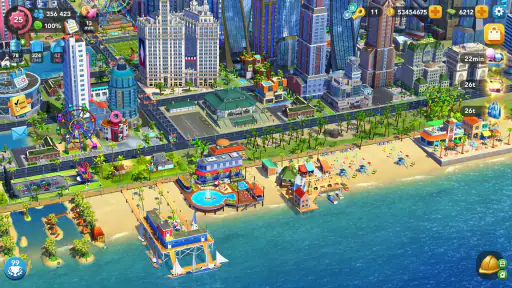
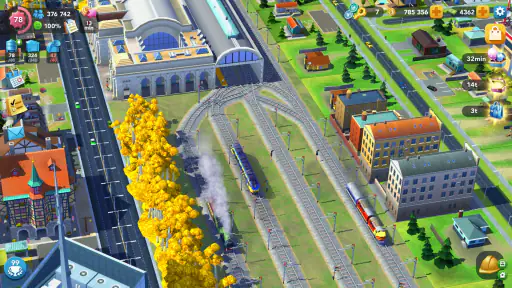
Analysis by Reviewed
I like city builders that let me make a plan, watch it take shape, and then fix the problems that plan creates. SimCity BuildIt suits that loop well: it’s a mobile simulation game from ELECTRONIC ARTS where zoning, services, money, and citizen needs all compete for attention. It can be a relaxed creative project, but it also asks for patience when growth depends on collecting the right resources.
A routine that makes progress feel manageable
My most useful habit is to treat each visit as a short planning session rather than trying to solve the entire city at once. I check what the current goal needs, collect or produce the materials I can use, and only then decide whether to place a building or spend resources on an upgrade. That small pause helps avoid filling the map with choices that look appealing but do not support the next step.
This approach is especially handy if I have only a few minutes between other tasks. I can make a couple of decisions, leave longer production or construction steps to run, and return later with a clearer idea of what is still missing. The trade-off is that the game’s pace can feel stop-and-start if I want a complete session of uninterrupted building.
Settings and choices worth checking
Before settling into a long-term city, I’d take a moment to look over the available game settings and make sure the experience suits how I plan to play. I also pay attention to the age rating: it is rated Everyone 10+, which is useful context for families deciding whether it fits their household. The game is free to start, while optional in-app purchases range from $0.49 to $99.99 per item, so I’d be cautious about spending quickly just to clear a bottleneck.
There is no need to treat every purchase prompt as a recommendation. I’d first ask whether the item solves a lasting planning problem or only speeds up one wait. If I’m playing casually, saving premium currency for a moment when it genuinely changes my options feels more satisfying than spending it whenever progress slows.
Building and Managing
Building your city isn’t just about aesthetics; it’s about strategy. You have to balance residential, commercial, and industrial zones while keeping an eye on pollution levels and citizen happiness. I found myself often pondering over the best placement for a new park or factory to optimize my city’s growth.
The game introduces specializations like education, transportation, and entertainment, which add layers of complexity. I particularly enjoyed the challenge of maintaining a positive cash flow while investing in these specializations. The game keeps you on your toes with various challenges that, if completed, reward you with valuable resources.
More From Our News Desk

Weather by Xiaomi Review: Clear at a Glance, Less Clear Up Close

X Under Pressure: Can It Recover When Posting Goes Wrong?

Clash of Clans Is Won Between the Battles

Android Auto Makes the Case for Quieter Car Software

MobiOffice: Transforming Mobile Productivity with Seamless Integration

EA SPORTS FC™ Mobile Soccer: Redefining Mobile Sports Gaming
Faster patterns for everyday play
When I’m short on time, I focus on a repeatable order: inspect the immediate need, gather what is ready, check what can be produced next, and make one deliberate city change. It is less flashy than redesigning several blocks at once, but it makes it easier to see which decision actually helped. I also avoid starting several resource-hungry plans together, since competing demands can leave the city feeling stuck.
A realistic routine might be checking in during a break, collecting completed goods, listing surplus materials at the trade depot, and noting what I need before the next visit. That makes the marketplace useful as a planning tool, not just a place to react when I run out. If I’m chasing an event goal, I compare its reward with the resources and time it would take; not every limited-time task deserves priority over steady city growth.
Your City, Your Rules
SimCity BuildIt offers a delightful escape into urban planning where you, as the mayor, wield the power to shape your city’s destiny. The game kicks off with a tutorial that guides you through the basics of city planning. I found this initial phase quite intuitive, easing me into the mechanics of the game without overwhelming me.
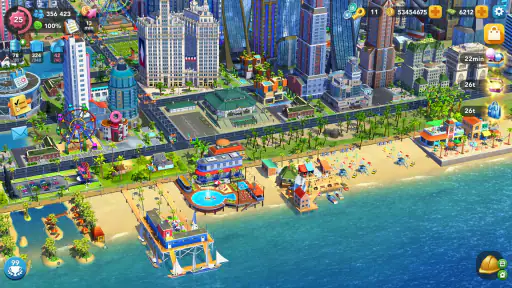
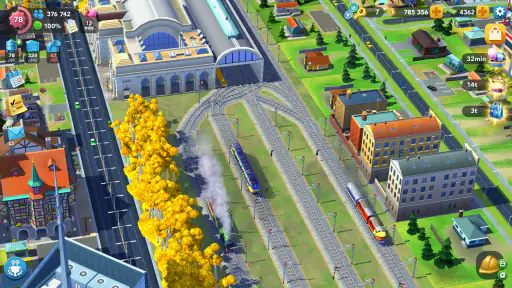
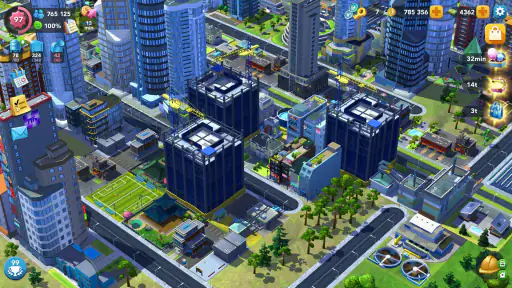
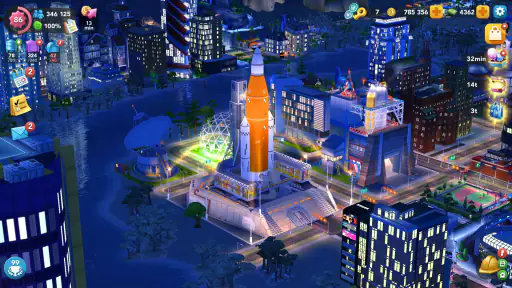
One of the first things I noticed was the stunning graphics. For a mobile game, the level of detail is impressive. From the bustling streets to the serene parks, every element is crafted with care, making it a joy to watch your city come to life. The game allows you to zoom in and out, offering a bird's eye view or an up-close look at your handiwork. It’s like having a mini SimCity right in your pocket!
Real-Time Challenges and Rewards
What sets SimCity BuildIt apart is its real-time challenges and events. These events are time-bound and encourage you to complete specific tasks to earn rewards. They add a sense of urgency and excitement to the game. I remember participating in a Club Wars event, which was a blast! Competing with other players in real-time added a competitive edge that kept me coming back for more.
The trade depot is another feature I loved. It allows you to buy and sell resources with other players, which is crucial when you’re in a pinch for specific materials. It’s like having a marketplace at your fingertips, promoting interaction and cooperation among players.
Trading without losing sight of the plan
I get the most from the trade depot when I treat it as a way to solve a specific shortage, rather than browsing and buying on impulse. If one missing material blocks a useful upgrade, I can check whether trading is a better fit than waiting to produce it. The reverse is true for surplus goods: selling them can clear room for the next task, but I avoid letting go of materials I already know I’ll need.
This makes trading a useful middle ground between waiting and spending on a purchase. It still depends on what is available and on having something worthwhile to offer, so it is not a guaranteed shortcut. I’d plan around a trade as an option, not the foundation of every project.
Where the city-builder format shows its limits
Compared with city builders that emphasize open-ended design, this one ties creative choices to practical resource management and timed goals. I enjoy that tension because each new district feels earned, but it may frustrate someone who wants to place buildings freely without waiting or checking back. For that kind of uninterrupted sandbox play, a builder with fewer timers and progression gates may be a better fit.
The game has a substantial audience, with an average rating of 4.1 from around 5.6 million ratings and over 100 million installs. Those figures suggest a well-established mobile game, but they do not mean every player will enjoy its rhythm. It was released on December 15, 2014, and its current version is 1.78.1.13772656; it supports Android 7.0 and up. I’d still check that my device meets the requirement before downloading.
In-App Purchases and Monetization
While the game is free to download and play, it does feature in-app purchases. These range from SimCash to special items that can boost your city's growth. Personally, I found that with a bit of patience and strategy, you can progress without spending a dime. However, if you’re looking to expedite your progress, investing in some in-app purchases can certainly give you an edge.
The ads are minimal, which I appreciated. They don’t disrupt the gameplay experience, allowing you to stay focused on building your city. However, for those who prefer an ad-free experience, there’s an option to remove them through a purchase.
Who will enjoy being mayor
I’d recommend this to someone who likes returning to a project in small bursts, planning around constraints, and seeing a city gradually become more developed. It can also suit players who enjoy trading resources and taking part in competitive events rather than building entirely alone. If you prefer quick rounds, constant action, or a game that never asks you to wait for resources, this is probably not the right match.
For a first-time player, the tutorial makes the opening approachable, but I would not rush to expand just because there is empty space. A compact, purposeful layout is easier to manage while learning how zones, services, and specializations affect the city. Later, when I understand which resources tend to bottleneck my plans, I can expand with a clearer reason instead of creating extra needs too early.
Choosing a pace that fits
The strongest fit is someone who enjoys checking in, setting up the next task, and letting the city develop between visits. That can make the game a pleasant companion to a commute or a quiet evening: I can decide what to build, collect what is ready, and leave the bigger redesign for a longer session. It is less suited to a player who wants every visit to deliver a complete, self-contained round.
It also helps to decide what kind of mayor I want to be before reacting to every prompt. I might focus on a tidy, attractive layout, or treat the city as a resource network where each upgrade supports the next one. Those aims can overlap, but not every pleasing placement is the efficient choice. Keeping a little room for adjustment is useful when a new need changes the plan.
Small decisions that prevent bigger stalls
One practical trick is to avoid using every available material as soon as I collect it. I check whether a current objective or planned improvement needs those goods first; selling or spending them immediately can turn a manageable shortage into a longer pause. On the other hand, holding everything “just in case” can slow routine progress. I find a quick check of the next concrete goal is a better guide than stockpiling without a purpose.
When a task requires several steps, I split it into pieces that fit separate visits instead of starting more projects than I can support. I can prepare materials now, make the placement later, and then review how the change affects the city. This makes cause and effect easier to read and reduces the temptation to spend simply because several timers or needs appear at once.
What to expect from a long-running game
Because the game has been around since 2014 and is now at version 1.78.1.13772656, it is a mature mobile title rather than a brief novelty. ELECTRONIC ARTS is the developer, and the familiar city-building foundation is expanded with trading, events, and specializations. That range gives me several ways to stay interested, though it also means a new player should expect more than placing roads and houses: managing the flow of goods becomes part of the routine.
The published review count is around 190,000, alongside the large rating and install totals. I see that scale as a sign that the game has broad appeal, not proof that its pacing suits everyone. Its Everyone 10+ rating is helpful when deciding whether it is appropriate for a younger player, while the optional purchases make it sensible for families to agree on spending expectations in advance.
What a normal session can feel like
On a busy day, I would open the city with one goal in mind: clear a bottleneck, rather than attempt a full makeover. I can collect finished goods, see whether the next building or upgrade is within reach, and choose one action that advances it. If I have time later, I can return to the visual side of city planning and decide whether the layout still feels right. That division keeps a quick check-in from turning into a messy chain of half-started projects.
For someone wondering whether the game works offline or whether every activity requires competition, I’d set expectations around its connected, evolving style: trading and timed events are part of its appeal, while the basic city-planning loop is still the main reason to play. Players who want a purely solitary sandbox or a self-contained session with a definite finish may prefer a different kind of builder. I like that there are several ways to engage, but I would not choose it for uninterrupted, no-pressure designing.
Final Thoughts
Overall, SimCity BuildIt is a fantastic pick for anyone who enjoys city-building games. It brings together strategic planning with creative expression, all wrapped up in a visually appealing package. While there are some challenges in balancing resources and managing your city, they only add to the game’s appeal, keeping you engaged and entertained for hours on end.
Whether you’re a seasoned city builder or a newbie looking to try something new, this game offers a little something for everyone. So, if you're ready to don the mayor’s hat and build your dream city, SimCity BuildIt is waiting for you. Happy building!
My main advice is to let the city grow at the pace that feels enjoyable: use events when their goals fit your plans, trade when a missing material blocks a useful next step, and resist spending simply because a timer is inconvenient. With that mindset, the game is a satisfying long-term project. Without it, its waits and competing demands can make the same project feel like a chore.
SimCity BuildIt Frequently Asked Questions
Is SimCity BuildIt free to download?
Yes. SimCity BuildIt is free to download and play, so you can try its city-building simulation without paying upfront. Optional in-app purchases are available for players who want to buy resources or speed up parts of development. If you share a device with a child, reviewing purchase controls before play can help you manage accidental spending.
What is SimCity BuildIt’s age rating?
SimCity BuildIt is rated Everyone 10+, which can help families decide whether its content fits a younger player. The core activity is designing and managing a city, but the game also has social features such as trading and clubs, along with optional in-app purchases. Parents may want to review those elements with children and consider purchase settings before installing it.
Does SimCity BuildIt require an internet connection to start playing?
SimCity BuildIt includes online features such as trading and club participation, so an internet connection is important when you want to use those parts of the game. If you are planning to play somewhere without reliable connectivity, consider how much you value those shared activities. Its social side is best suited to players who can connect when they want to interact with others.
Can I play SimCity BuildIt with friends?
Yes, the game includes social activities for players who want to connect with others. You can trade resources and join Mayor’s Clubs, where members can chat, share strategies, and take part in club activities. These features add a cooperative and competitive layer to developing your own city, so they may appeal if you enjoy playing alongside a community.
Is SimCity BuildIt appropriate for someone who prefers playing alone?
You can focus on building and managing your own city, but SimCity BuildIt also places emphasis on online activities such as trading, clubs, and challenges. Those features are not the only reason to play, yet they form a noticeable part of the experience. If you prefer a strictly solo game, consider whether the city-management side is enough to keep you interested.
Pros
- Stunning graphics with vibrant cityscapes.
- Engaging gameplay with real-time challenges.
- Frequent updates with new features.
- Community events keep players active.
- Offline mode for uninterrupted play.
Cons
- In-app purchases can be costly.
- Requires a stable internet connection.
- Large storage space needed.
- Long wait times for building upgrades.
- Limited customization options for buildings.
- Category
- Simulation
- Version
- 1.78.1.13772656