Antistress - relaxation toys
- 23.66K
- 4.7
- Installs
- 100.00M
- Price
- Free
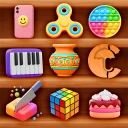
Screenshots






Analysis by Reviewed
When I need a small break that doesn’t turn into another task, I like having a few simple things to fiddle with on my phone. Antistress - relaxation toys is a puzzle game from JindoBlu built around that kind of brief, hands-on distraction. It is free to start, rated for Everyone, and has a 4.7 average from around 922,000 ratings, so it has clearly found a broad audience. I see it less as a game to conquer and more as a collection of tiny activities I can dip into when I want to reset my attention.
Picking a toy for the moment
The most useful way I’ve found to approach this collection is to match the activity to the kind of pause I actually have. If I’m waiting for a kettle or standing in a queue, I want something I can start and leave without needing to remember a goal. If I have a longer, quieter break, I’m more likely to explore an activity that holds my attention for a little while. That simple distinction keeps the app’s variety from becoming a reason to linger on the phone longer than I meant to.
It also helps to be honest about what “relaxing” means for you. Repeating a small action can feel soothing if you enjoy a steady rhythm and immediate feedback. If repetitive movement irritates you, or you’re already tired of looking at a screen, these digital toys may not provide the reset you’re after. I’d treat the app as one option in a break routine, not as a universal answer to every restless moment.
Reads About Antistress - relaxation toys
What a realistic break can look like
Imagine getting a few minutes between finishing a work task and joining a call. I’d open the game, choose one familiar activity, and keep the phone’s sound at a level that suits the room. When the call is about to start, I’d close the app rather than looking for one more toy. That is a practical use case for a collection like this: it gives an idle moment a small focus without asking me to commit to a long session or remember where I left off.
On a commute, the same approach depends on the setting. A brief wait at a stop is different from a crowded ride where keeping the phone accessible is inconvenient. I wouldn’t choose an activity that needs constant attention if I’m also watching for an announcement or looking after a bag. The game is best when I can give it a little attention safely, not when it competes with something I should be monitoring.
How it differs from familiar alternatives
Many puzzle games make their appeal clear through levels, goals, or a feeling of steadily improving. Antistress works in the opposite direction: I can interact without needing to solve a problem or prove I’m getting better. That makes it a lighter choice than a conventional logic game, but it also means players who rely on challenges to stay engaged may find the activities shallow after the novelty wears off.
Meditation apps serve a different purpose, too. They often ask me to follow guidance or set aside time for a particular exercise, while this game gives me something to touch and manipulate. If I want instruction or a more structured routine, I’d choose a guided option instead. If I simply want a low-pressure action to fill a short pause, the toys are a more direct fit. Neither approach replaces the other; the useful choice depends on whether I want to be guided, challenged, or casually occupied.
More From Our News Desk

Clash of Clans Is Won Between the Battles

Android Auto Makes the Case for Quieter Car Software

MobiOffice: Transforming Mobile Productivity with Seamless Integration

EA SPORTS FC™ Mobile Soccer: Redefining Mobile Sports Gaming

How Microsoft OneDrive Became a Mobile Productivity Giant

How Google Translate Breaks Language Barriers Effortlessly
Small habits that make it easier to stop
One trade-off with a collection is that deciding what to do can take more time than doing it. I find it helpful to remember a couple of activities I already enjoy, so I can open the game and begin rather than browsing each time. I also try to connect the break to a clear endpoint: finish the call, reach the next stop, or wait until the timer I already use says it is time to return to work. The endpoint comes from my own routine, not from expecting the app to manage my schedule.
For a quieter setting, I’d check the phone’s volume before starting and avoid assuming that a sound option will suit every moment. For a shared space, silent play is often the considerate choice; at home, sound may be welcome if it makes the interaction more pleasant. These are small decisions, but they matter because the app is meant to fit into ordinary pauses rather than demand a special setup.
The Calming Universe of Antistress
I approach Antistress as a pocket-sized pause rather than a game I need to finish. In this section, I’ll focus on how to make its collection feel calming instead of turning the choice of activity into another distraction. A useful starting point is to decide what kind of break you want before you unlock your phone.
A simple routine that works best in short bursts
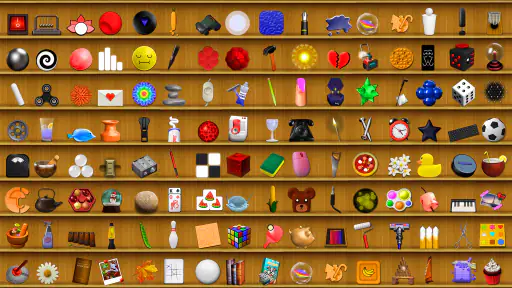
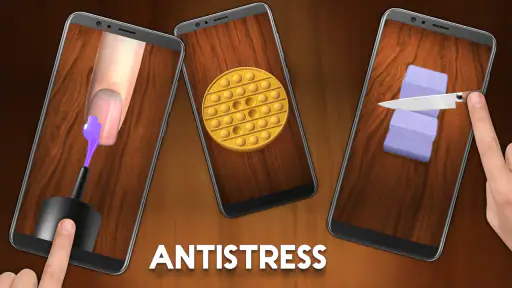
Once you dive into Antistress - relaxation toys, you’ll find yourself surrounded by an array of virtual toys that promise to relieve stress and provide a calming experience. From popping bubble wrap to spinning a fidget spinner, the app offers a wide range of options for everyone. Each toy is designed to mimic its real-life counterpart, giving you the same satisfaction but without any of the mess.
I get the most from it when I choose one activity before opening the app, rather than browsing indefinitely. For example, after finishing a call, I might spend a minute popping bubbles, then put the phone down instead of hopping between toys. That small boundary makes the break feel deliberate. The app is especially suited to people who enjoy tactile, repetitive actions and want a low-pressure pastime; it is less useful if you need a guided relaxation course, a structured puzzle campaign, or a lasting challenge.
Activities, settings, and a useful trade-off
One of my favorite features is the sheer variety of activities available. The app includes everything from simple activities like drawing on a chalkboard to more intricate options like playing with Newton’s cradle. The graphics are minimalistic yet effective, ensuring that the focus remains on relaxation without any unnecessary distractions.
The game has reached over 100 million installs, and its current version is 10.6.4. It also offers in-app purchases, with items priced from $0.99 to $10.99. I’d treat those as optional extras rather than a reason to begin spending: the basic appeal is the collection of small interactions, not a progression system. If you prefer a completely predictable break, decide beforehand whether you want to explore or repeat a familiar toy; browsing every option can easily take longer than the pause you intended.
Before settling into a routine, I’d check the available sound and background options and choose what feels comfortable for the moment. The original app experience highlights customizable background music, which can make an activity feel more immersive, but sound is not always welcome in a shared room or during a quiet work break. A practical habit is to set the phone’s volume before opening the game, then stick with one activity until you are ready to return to what you were doing.
Why I Keep Coming Back
The real charm of Antistress lies in its ability to cater to different moods and preferences. Whether I’m feeling anxious or just need a break from work, there’s always something that fits my mood. The app also allows you to customize the background music, which adds another layer of personalization and immersion. It’s these little details that make the app so appealing.
Another aspect I appreciate is its simplicity. There’s no need for a tutorial; the app is intuitive and user-friendly. You can jump right in and start exploring without any hassle.
For a faster pattern, I’d keep returning to a couple of favorites instead of treating the whole collection like a checklist. One familiar action is handy when I have a short wait, while a more involved toy can suit a longer pause. This is a small but useful distinction: the variety gives you options, yet choosing just one keeps the app from becoming another source of scrolling. It also makes it easier to stop when the break is over.
Where it fits—and where it doesn’t
Compared with a standard logic-puzzle game, this is not about solving levels or improving a score; compared with meditation apps, it offers interaction rather than guided breathing or instruction. That makes it a good fit for a commuter waiting for a connection, someone taking a desk break, or anyone who finds repetitive hand movements calming. If you want measurable progress, detailed coaching, or a demanding game to focus on for an hour, I’d choose a different kind of app. These toys can occupy a moment, but they are not a substitute for addressing ongoing stress or getting support when you need it.
There are also ordinary practical limits. A phone screen cannot reproduce the feel or resistance of a physical fidget toy, and the experience depends on tapping and swiping rather than real objects. The range can invite aimless sampling, and the option to spend on extras means it is sensible to keep purchases intentional. The game is free, its age rating is Everyone, and it supports Android 6.0 or later; those details make it accessible to many, but they do not change the fact that its best use is a brief, casual diversion.
Making a repeatable routine without turning it into homework
For experienced users, the best “system” is often a small one: keep a favorite activity in mind for quick pauses, use a different one when you want a change, and choose sound conditions that fit where you are. I wouldn’t try to optimize every session or work through the collection in order. That would make a casual diversion feel like another task, which misses the point. A familiar choice can reduce decision time, while occasional exploration keeps the collection from feeling stale.
There is a limit to how much settings can improve the experience. Adjusting the phone’s volume and choosing whether to use the available background music can make play more comfortable, but it cannot turn a touch screen into a physical object or make the activities into a guided relaxation program. If touch feedback is the main reason you reach for a real fidget, the digital version may feel like a compromise. If you mainly want a simple visual and interactive focus, that trade-off may be perfectly acceptable.
A low-pressure choice for little pauses
In a world that’s constantly on the go, having an app like Antistress is a blessing. It’s a perfect companion for those moments when you need to disconnect and recharge. Whether you have a minute or an hour, this app provides a quick escape from reality.
So, if you’re looking for a way to add a bit of tranquility to your life, give Antistress a try. It’s a simple yet effective tool that can make a significant difference in your day-to-day routine.
My recommendation is to use it with a modest expectation: pick an activity that suits your mood, enjoy the short pause, and close it when you feel ready. JindoBlu’s collection is at its strongest as an easy, repeatable ritual rather than a deep game or a complete wellness plan. If that is the kind of break you want, it is worth trying; if you need structure, challenge, or physical sensation, another option will serve you better.
Who is likely to enjoy it, and who may move on
I’d recommend trying it if you like small, tactile interactions, want a casual puzzle-game diversion, or need something uncomplicated to fill an awkward wait. It can also suit someone who does not want a lesson, score target, or long commitment every time they open a game. Its Everyone age rating makes it a broadly approachable choice, though younger players should still follow the usual family rules for device use and in-app spending.
I’d skip it if you are looking for a sustained challenge, a clear sequence of levels, or a tool that teaches a repeatable stress-management technique. People who prefer physical fidget objects may also find that tapping glass lacks the satisfying resistance they expect. And if your main goal is to reduce screen time, opening another phone activity may work against that aim; a brief walk, stretching, or simply setting the device aside could be a better break.
What to expect before installing
The game is free to download, with optional in-app purchases ranging from $0.99 to $10.99 per item, so I’d approach any purchase as a personal extra rather than something required to understand the basic appeal. It is a puzzle game by JindoBlu, released on November 8, 2016, and the current version is 10.6.4. On Android, it requires version 6.0 or later. Its reach is substantial, with over 100 million installs and around 24,000 written reviews, alongside its 4.7 average from around 922,000 ratings.
Those figures help explain why it is easy to find, but they cannot tell you whether its style will suit your hands or habits. I’d give it a try when I genuinely want a few minutes of casual interaction, not because I expect an app to solve a bigger problem. If the first activity feels satisfying and the routine stays easy to end, it has a clear place in a phone’s collection. If not, there is no need to force it: its strength is being a modest option, not an essential part of anyone’s day.
Antistress - relaxation toys Frequently Asked Questions
Is Antistress - relaxation toys free to download?
Yes. Antistress - relaxation toys is free to download, and its casual activities offer a way to fill a spare moment without requiring a purchase. The game also has optional in-app purchases, priced from about one dollar to eleven dollars per item. You can decide whether to make any purchases; the free download is the place to start.
What kind of game is Antistress - relaxation toys?
Antistress - relaxation toys is a puzzle game by JindoBlu that offers a casual way to take a break. Its short description is simply “Antistress,” while its central idea is to let you relax and have something to do during boring moments. It is designed for dipping into activities at your own pace rather than following a demanding story or competitive challenge.
Who might enjoy Antistress - relaxation toys?
This game may appeal to people who want a low-pressure activity for a spare moment, especially if they enjoy simple, hands-on interactions. Its general-audience rating makes it suitable for a broad range of players. It can be used as a brief diversion during a break, though it is best viewed as casual entertainment rather than a substitute for professional help with stress or anxiety.
What is Antistress - relaxation toys app?
Antistress - relaxation toys is a mobile application designed to help users unwind and relax through a variety of interactive and soothing games. The app includes a collection of virtual toys and activities such as calming sounds, tactile feedback games, and visual relaxation tools. It's perfect for those seeking a quick mental break from a stressful day.
Is Antistress - relaxation toys free to use?
Yes, Antistress - relaxation toys is free to download and use, though it may offer in-app purchases to enhance the user experience. These purchases could include unlocking additional toys or removing ads. Users can enjoy a substantial amount of content without spending any money, making it accessible to a broad audience.
Pros
- Wide variety of stress-relief activities.
- Intuitive and easy-to-use interface.
- Regular updates with new toys and features.
- No internet connection required.
- Enhances focus and relaxation.
Cons
- Some toys may feel repetitive over time.
- In-app purchases can be frequent.
- Ads can be intrusive in free version.
- Not suitable for competitive gaming.
- Limited customization options.
- Category
- Puzzle
- Version
- 10.6.4