Anima Color - Paint by Number
- 3.56K
- 4.6
- Installs
- 1.00M
- Price
- Free

Screenshots


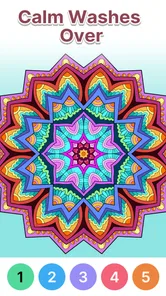
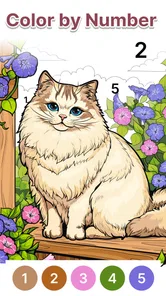
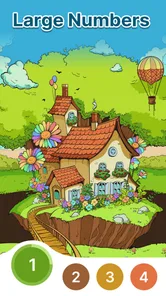
Analysis by Reviewed
I find Anima Color most useful when I want a quiet activity that asks for a little attention without demanding a plan, a score, or a competitive streak. It is a board-style coloring game from Candy Mobile, and its appeal is straightforward: choose a picture, follow its numbered areas, and gradually bring the image together. That simple rhythm can suit a short break as well as a longer, unhurried session.
Who will enjoy this kind of coloring
Anima Color - Paint by Number is aimed at older adults, but I would not treat it as an activity only for seniors. It can work for anyone who enjoys color-by-number and wants a gentle way to pass time. The Everyone content rating also makes it a reasonable option to consider for shared family use, though the best fit depends on the person’s eyesight, comfort with touchscreens, and interest in this style of puzzle.
A practical way to use it is to keep a session small: pick a picture, complete a few numbered spaces, and stop when you feel ready. That makes the game easier to fit around a cup of tea, a quiet afternoon, or a wait between errands. If the numbers or small areas feel tiring on your device, a larger screen may be more comfortable than trying to finish a detailed picture on a phone.
How it compares with other ways to unwind
Compared with a paper coloring book, a digital number-coloring game removes the need to gather pencils and keep track of which color belongs where. In exchange, it depends on a screen and tapping accurately. Compared with a conventional board game, it is a more solitary, low-pressure pastime: there is no opponent to beat or shared strategy to discuss. That is a strength when I want calm, but a limitation if I am looking for social play or a challenge that changes from one session to the next.
The game is free, and its current version is 1.9.1. It was released on November 28, 2023, and it requires Android 5.0 or later. Its 4.7 average from around 9,000 ratings, alongside over 500,000 installs, suggests that many players have tried it, though popularity alone cannot tell me whether its pace and visual style will suit a particular person.
At the time of writing, I’d describe it as a simple, focused choice rather than a full-featured creative studio. The main appeal is following numbered sections, not drawing freely or competing against other people. If you want to make a picture from a blank canvas, a drawing app is a better match. If you want a shared tabletop experience, a multiplayer board game will offer more interaction.
Getting Started with Anima Color for Seniors
Diving into Anima Color for Seniors is like opening a door to a world of color and creativity. From the get-go, the app is incredibly user-friendly. You don’t need to be a tech wizard to navigate it, which is a huge plus for seniors who might not be as tech-savvy. The interface is clean, intuitive, and designed to be easy on the eyes.
More From Our News Desk

Weather by Xiaomi Review: Clear at a Glance, Less Clear Up Close

X Under Pressure: Can It Recover When Posting Goes Wrong?

Clash of Clans Is Won Between the Battles

Android Auto Makes the Case for Quieter Car Software

MobiOffice: Transforming Mobile Productivity with Seamless Integration

EA SPORTS FC™ Mobile Soccer: Redefining Mobile Sports Gaming
Features That Stand Out
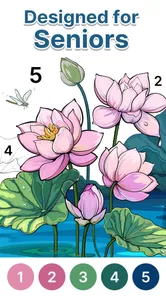
One of the standout features of Anima Color for Seniors is its vast collection of coloring pages. The app offers a variety of themes ranging from nature and animals to abstract designs. There’s something for everyone, regardless of their artistic preferences. The pages are detailed enough to be engaging but not overly complex, which can be discouraging for users looking for a relaxing experience.
Moreover, the color palette is extensive and easy to use. Users can select from a broad spectrum of colors and even create custom shades. This flexibility allows for endless creative possibilities, ensuring that every coloring session is a unique experience.
A Therapeutic Experience
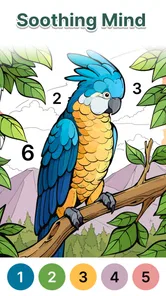
Coloring isn’t just a fun pastime; it’s also therapeutic. The app encourages mindfulness and can significantly reduce stress levels. Spending time coloring can help seniors focus, improve their fine motor skills, and provide a sense of accomplishment. It’s a great way to keep the mind sharp while enjoying a peaceful activity.
Additionally, the app includes calming background music that enhances the overall experience. Users have the option to turn it off if they prefer silence, but many find the music adds to the relaxation.
User-Friendly Accessibility Features
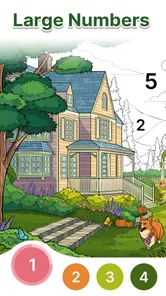
Accessibility is a key focus for Anima Color for Seniors. The app includes features like adjustable text size, voice instructions, and high contrast modes to cater to users with different needs. This ensures that everyone can enjoy the app without any barriers.
The developers have clearly put thought into making the app as inclusive as possible, which is a commendable effort. It’s apparent that the app was designed with seniors in mind, ensuring that it’s not just another coloring app but a tool that genuinely considers its audience.
Final Thoughts
In conclusion, Anima Color for Seniors is more than just a coloring app; it’s a gateway to creativity and relaxation for seniors. It’s thoughtfully designed to be accessible and enjoyable for its target audience, providing a therapeutic outlet that can be both fun and beneficial. Whether you’re looking to unwind after a long day or engage in a creative hobby, this app is a fantastic choice. With its user-friendly interface and a plethora of features aimed at enhancing the user experience, it’s an app that truly stands out in the world of digital coloring.
A sensible way to judge the fit
Before settling into a long session, I’d test the experience with one picture and see whether the numbered regions are comfortable to tap. That quick trial answers a more useful question than a feature checklist: does the pace feel soothing, or does locating tiny spaces become fussy? If the latter happens, taking breaks or choosing a device with a larger display may make the activity easier, while someone who prefers rapid feedback may simply find this format too slow.
For a family member considering it as a low-key pastime, I’d introduce the game without framing it as a remedy or a way to improve health. Coloring can feel absorbing and satisfying, but its effect is personal; it is best viewed as leisure, not a substitute for care or other activities. A short shared session can also help someone get comfortable with the basic idea before they decide whether they want to use it on their own.
Spending, pace, and confidence
The confirmed purchase context is clear: the game is free to download. That makes it easy to try without paying upfront, but I would not infer from that alone what optional purchases, advertisements, or other spending prompts may appear. Anyone setting it up for a child or older relative should check the current in-app experience and device purchase controls rather than assume that free download settles every cost question.
There is no head-to-head competition at the heart of this experience, so I would choose it for its calm, individual pace rather than for rankings or social pressure. The trade-off is that progress is about completing a picture, not mastering a changing strategy. If you want a board game with opponents, decisions, and a clear win condition, another game will be more satisfying; if you want to color without supplies or cleanup, this format is more convenient.
Making a session fit real life
One useful approach is to treat a picture as something you can return to rather than a task to finish in one sitting. For example, if I had a few quiet minutes while waiting for an appointment, I would choose a small part of the image and stop when my attention shifted. That gives the activity a natural endpoint and avoids turning a relaxing pastime into another item on a to-do list. It also helps someone test whether the numbered coloring itself holds their interest before they commit to a longer session.
For a person who is less comfortable with touchscreens, I would start by demonstrating the basic tap-and-fill rhythm, then let them try at their own pace. A family member can sit nearby at first without taking over the device; that small distinction matters because the pleasure comes from making the choices and completing the areas independently. If repeated tapping becomes awkward, there is little benefit in pushing through it. A paper book with larger spaces may be a kinder fit.
Small habits that can improve the experience
I would use a steady grip and tap deliberately rather than trying to move quickly across the picture. In number-based coloring, speed is not the point, and hurried taps can make the screen feel more fiddly than it needs to. If I notice myself hunting around for the next area, I would pause, adjust the viewing angle, and continue only if the image remains comfortable to follow. This is a simple way to distinguish a pleasing focus task from visual effort that is no longer enjoyable.
It is also worth choosing the moment with care. A bright, busy setting or a device being passed around may make it harder to concentrate on small sections. A quiet corner and a stable surface can make a short session feel more settled, especially for someone new to mobile games. These are practical adjustments rather than special game mechanics, but they can influence whether a person wants to come back to the activity.
Where it sits among coloring alternatives
Among digital coloring options, this one makes most sense for someone who wants the structure of numbered spaces. A freehand drawing app gives more control and room to experiment, but it asks the user to choose what to draw and how to make it look. A standard coloring app may offer open-ended filling without the same number-following task. I would choose this format when having a clear next step is part of the appeal, and choose a more open tool when personal design matters more than following a prepared image.
Paper coloring remains a strong alternative for anyone who prefers a tactile activity, wants to avoid screen time, or finds phone-sized details uncomfortable. It takes more preparation and physical supplies, but it does not require precise screen taps. The digital option is easier to pick up briefly and put away without a mess. Neither approach is universally better; the deciding question is whether convenience and guided completion matter more than the feel and flexibility of physical materials.
Choosing it for someone else
If I were recommending it to an older relative, I would first ask whether they already enjoy puzzles or coloring rather than assuming the age focus makes it suitable. The game is most likely to appeal to someone who likes orderly, small tasks and feels comfortable using a touchscreen. It may be less appealing to a person who wants conversation, movement, a changing challenge, or a finished creative work that reflects their own drawing choices.
For family use, the Everyone rating is a useful sign of broad suitability, but it does not guarantee that every screen element will be easy for every player to see or operate. I would let the intended player try it directly, with the device set up comfortably, instead of deciding for them based on the description. That brief hands-on test is more informative than treating the senior-oriented positioning as a promise of accessibility for every need.
What I would check before settling in
Small visual details matter more here than they do in many casual games. I would hold the device at a comfortable distance, check that the screen brightness is easy on the eyes, and try a few taps before committing to a detailed page. Those simple adjustments can make a bigger difference to enjoyment than trying to rush through a picture. It is also reasonable to pause whenever concentration fades; the appeal is a relaxed activity, not finishing quickly.
The app’s audience and age rating make it broadly approachable, while the gentle number-following format gives beginners a clear task to focus on. Still, it may not be a good match for someone who dislikes repetitive tapping, has difficulty distinguishing small numbered areas, or wants more control than filling predefined spaces. In those cases, paper coloring with larger outlines or a freehand art app may be a better alternative.
My trust verdict
I see this as a low-commitment option for people who already enjoy paint-by-number and want that familiar activity on a phone or tablet. Its free entry and broad audience are reassuring starting points, but they do not answer every practical question about spending or suit every person’s accessibility needs. I’d try a brief session, check that the visual scale feels comfortable, and decide from the actual experience rather than expecting the game to be more than it is: a quiet coloring pastime.
Anima Color - Paint by Number Frequently Asked Questions
Is Anima Color free to download, and what should I know about its cost?
Anima Color is free to download and is a board-style coloring game for seniors. You can try its paint-by-number experience without paying for the initial download. The game is aimed at making coloring a relaxed, accessible pastime, so it may appeal to users looking for a simple activity rather than a competitive game.
What devices can run Anima Color?
Anima Color is available for Android devices running Android 5.0 or later. Checking your device’s operating system before downloading can help avoid installation problems. The game is presented as a coloring experience for seniors, so a device with a screen that is comfortable for you to view and tap may make filling in numbered areas easier.
What is the main purpose of Anima Color for Seniors?
Anima Color for Seniors is designed to provide an engaging and relaxing coloring experience for the elderly. It offers a wide variety of intricate patterns and soothing color palettes tailored specifically for seniors. The app aims to stimulate creativity, improve concentration, and provide a calm and enjoyable pastime for users of advanced age.
Is Anima Color for Seniors easy to use for those who are not tech-savvy?
Yes, Anima Color for Seniors is designed with a user-friendly interface, making it accessible even for those who are not very familiar with technology. The app features intuitive navigation, clear instructions, and straightforward controls, ensuring that seniors can enjoy their coloring experience without any technical difficulties.
What kind of content is available in Anima Color for Seniors?
Anima Color for Seniors offers a rich library of coloring pages, including mandalas, nature scenes, and abstract designs. The app regularly updates its content to provide fresh and new patterns for users to enjoy. Additionally, it includes calming music and sound effects to enhance the overall coloring experience.
Pros
- User-friendly interface for seniors
- Wide variety of coloring options
- Enhances creativity and relaxation
- Supports offline use
- Frequent updates with new features
Cons
- Limited free content
- Ads can be disruptive
- No option for custom color palettes
- Requires in-app purchases for premium
- No multiplayer or community features