Zoom Earth - Live Weather Map
- 1.12K
- 4.8
- Installs
- 5.00M
- Price
- Free

Screenshots
Analysis by Reviewed
Before opening a global weather map, it helps to know what kind of app you’re choosing. Zoom Earth is less about a single city’s forecast and more about seeing weather systems in context: where clouds and storms are moving, and how conditions look across a wider area. I find that perspective especially useful when a local forecast leaves me wondering whether rain is nearby or part of a larger front.
What to expect from the map
Zoom Earth is a free weather app from Neave Interactive, with optional in-app purchases ranging from $1.99 to $11.99 per item. It’s rated for Everyone, and its 4.8 average from around 223,000 ratings reflects its broad appeal. The app has over 5 million installs, and version 5.0.1 requires Android 8.0 or later. Those figures are useful context, but the real question is whether a map-based view suits the way you check the weather.
For a first-time user, the best starting point is simply to find a familiar place and look around it. Zoom in to connect the broad weather picture with your neighborhood, then zoom back out to see whether the clouds or storm activity extend beyond it. This is a different habit from opening a standard forecast app and immediately scanning temperatures and hourly rain chances. If that quick forecast is all you need, your phone’s built-in weather app may be faster.
Getting oriented on your first visit
When I first open a weather map, I don’t try to interpret every layer at once. I start with the map itself, locate a place I know, and focus on one question: what is moving toward it? That simple approach makes a global display less overwhelming and gives me a useful first result without needing specialist knowledge.
A practical tip is to compare the view at two scales. At a wider zoom, you can see the shape and direction of a weather system; closer in, you can judge how it relates to a planned route or nearby area. Neither view should replace a local forecast when timing matters, but using both helps me understand why conditions may differ between two places that seem close together.
Where it fits into everyday plans
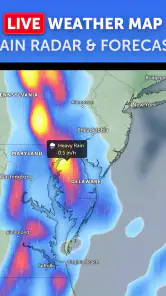
Imagine I’m deciding whether to take a longer outdoor route after work. I can check the area I’ll cross, then widen the map to see whether a rain band is approaching from beyond the city. That doesn’t guarantee what will happen at my exact starting point, but it adds useful context before I leave. For travel, the same broad view can help me see whether unsettled weather is limited to one stop or spans much of the route.
People who enjoy following hurricanes, watching weather patterns, or exploring the planet will likely get more from this style of app than someone who only wants a simple daily high and low. I’d keep a conventional forecast app alongside it for quick local details and planning by the hour. A map is strongest at showing spatial relationships; it is not automatically the clearest tool for every precise, immediate decision.
More From Our News Desk

Weather by Xiaomi Review: Clear at a Glance, Less Clear Up Close

X Under Pressure: Can It Recover When Posting Goes Wrong?

Clash of Clans Is Won Between the Battles

Android Auto Makes the Case for Quieter Car Software

MobiOffice: Transforming Mobile Productivity with Seamless Integration

EA SPORTS FC™ Mobile Soccer: Redefining Mobile Sports Gaming
Choosing it alongside a regular forecast
In the weather-app category, many familiar options lead with a location card: temperature, a short condition label, and a timeline for the day. That layout answers “What should I wear?” quickly. Zoom Earth asks a different question: “What is happening around this place?” I find the map especially useful when the local forecast feels isolated from the larger situation, while a compact forecast is more convenient when I’m already at the door and need a fast check.
I wouldn’t treat these approaches as competitors that must replace one another. A forecast app is usually the better first stop for a specific hour, and the map is a useful second look when I want to understand the area around that forecast. For a long drive, for example, I’d check the forecast for the destination and stops, then use the broader map to see whether unsettled weather appears to cover one region or several. That combination gives context without pretending a map can settle every timing question.
A first useful check, step by step
My recommended first session is deliberately simple. Search or move to a place you know well, pause long enough to recognize its outline, and inspect the nearby weather before changing the view. Then zoom out once and ask whether the pattern you noticed is local or part of something broader. This small comparison is a more useful introduction than trying to learn every control at once.
For a concrete everyday example, suppose I’m planning an outdoor lunch and the sky looks uncertain. I’d check the area where I plan to sit, then widen the map to see whether clouds or precipitation extend across the surrounding area. If the map suggests a broad system, I’d be less inclined to assume a brief clear patch means the plan is safe. If the view is unclear, I’d use a local forecast rather than trying to extract certainty from the map. The point is to make a better-informed choice, not to turn a visual display into a guarantee.
Small habits that make the map clearer
A less obvious but useful habit is to keep a mental record of what the map shows, then check again later rather than making a decision from one glance. The value is in noticing movement and change, not just collecting a snapshot. This is especially helpful for someone following a storm or checking whether a weather system is approaching a travel area. It also discourages overconfidence: a changing pattern can alter what seemed obvious a few minutes earlier.
I also recommend choosing a specific question before switching views. “Is the rain covering the whole route?” is easier to answer than “What does everything on this screen mean?” When a map presents several kinds of information, extra detail can become visual clutter instead of insight. Start with the issue that affects your plan, keep the view readable, and only explore further if you have a reason.
Another practical trade-off is the difference between exploring and acting. Zoom Earth can make it enjoyable to follow weather far beyond your home, but that curiosity can draw attention away from the small, local detail that matters for a decision. If I’m deciding whether to carry a raincoat, I don’t need to inspect the whole planet. If I’m trying to understand why weather is changing across a region, the wider view is the point. Matching the scale to the question keeps the app helpful rather than distracting.
Who is likely to get the most from it?
I’d recommend this app to people who naturally think in maps: travelers comparing regions, outdoor planners who want broader context, and anyone interested in how weather systems develop across a landscape. It can also be a satisfying tool for curious users who like to check conditions in places they may never visit. The appeal is not only the answer to a forecast question; it is the chance to see the weather as a moving pattern rather than a line of numbers.
On the other hand, someone who wants a minimal screen with a simple hourly forecast may find the map less direct than their usual weather app. The same is true if you need an unambiguous alert for a specific hazard or must make a high-stakes decision: use an appropriate local forecast and official warnings, not a broad visual overview on its own. I think Zoom Earth works best as a companion for context, not as a universal replacement for every weather tool.
Exploring the World in Real Time
The moment I opened Zoom Earth, I was hooked. The interface is smooth and intuitive, making it easy to zoom in and out of different locations. You can literally watch weather changes happening live. It’s like Google Earth, but with a twist of meteorological magic!
Features that Stand Out
One of the coolest features is the ability to view live satellite maps. These maps update every few minutes, providing a real-time view of weather conditions around the globe. Whether you’re tracking a storm or just curious about the climate in another region, this app keeps you informed.
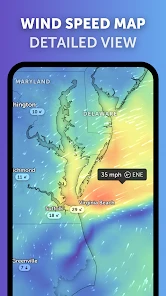
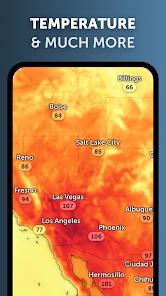
Another feature I loved is the detailed weather overlays. From temperature and precipitation to wind speed and pressure, you can layer these elements to get a comprehensive weather picture. It’s like being your own meteorologist, without all the technical jargon!
User Experience: Smooth Sailing
Using Zoom Earth is a breeze. The app is responsive and doesn’t lag, which is a big plus when you’re trying to track fast-moving weather systems. The graphics are crisp, and the colors make it easy to differentiate between different weather patterns.
Moreover, I found the app's notifications to be incredibly handy. You can set alerts for specific weather conditions or events, ensuring you’re never caught off guard by sudden weather changes.
Making the map useful without overreading it
My most useful habit with a layered map is to change one view at a time. If I’m checking rain, I leave other information aside until I understand the precipitation pattern; then I can switch perspective if I need more context. Turning on several overlays at once may look impressive, but it can make the map harder to read. Clear colors are helpful, yet a visual pattern is still an estimate of conditions, not a promise about the exact weather at one street corner.
That distinction matters when someone asks whether the app can replace a forecast or alert service. I wouldn’t rely on a satellite view alone for a time-sensitive safety decision. I use it to see the larger picture, then check a local forecast or official warning when the decision has real consequences. The app is most reassuring when it helps me ask a better question, not when I treat every moving cloud as a precise prediction.
Understanding the limits of a live-looking view
A map that changes as you watch can feel more immediate than a forecast card, but “live” should not be read as “certain at my exact location.” Weather displays represent conditions over an area, and the closer I get to making a street-level decision, the more cautious I become about interpreting them. I use the moving view to notice broad direction and coverage, then rely on a local forecast for the timing that affects a commute or appointment.
This is also why I avoid comparing a single screen with what I see outside and declaring one of them wrong. The map gives a broad visual picture; what I experience at one spot can differ from what is happening nearby. When the two don’t seem to match, I check the scale and the question I’m asking before drawing a conclusion. That habit makes the app more useful and keeps an interesting display from becoming false reassurance.
When the map is not the right tool
There are ordinary moments when I would skip the map. If I only need to know whether to bring a jacket, opening a location-based forecast is faster. If I’m deciding whether to travel during dangerous weather, I would not make that call from a colorful overview or a notification alone; I’d check official local guidance. And if I dislike exploring a map or changing views, the central appeal of this app may feel like extra work rather than a benefit.
That isn’t a knock on the app so much as a matter of choosing the right tool. A map is valuable when location and movement matter. A concise forecast is better for routine, immediate planning, while an authoritative warning source matters for safety. I’m happiest using Zoom Earth between those jobs: it adds perspective, but it doesn’t need to do everything.
Why You’ll Love It
If you’re a weather enthusiast, or just someone who likes to keep an eye on Mother Nature, this app is a must-have. It’s informative, engaging, and incredibly user-friendly. Plus, it’s a fantastic tool for those interested in geography and environmental science.
In conclusion, Zoom Earth is more than just a weather app; it’s a portal to the planet’s dynamic climate system. Whether you’re planning a trip or just want to explore the world from your couch, this app has got you covered. Give it a try, and you might just find yourself checking the weather in places you’ve never even heard of!
Zoom Earth - Live Weather Map Frequently Asked Questions
Can Zoom Earth help me follow a hurricane or other major storm?
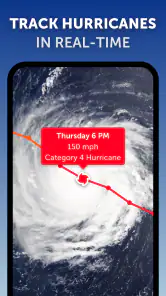
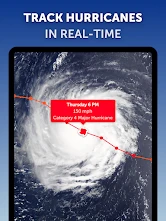
Yes. Zoom Earth is suited to visual storm monitoring, with a live weather map, satellite imagery, and storm-tracking features. Its store summary also highlights hurricane tracking and rain maps. These tools can help you follow a developing system and see its broader movement, but use current local alerts and official guidance when making safety decisions.
Does Zoom Earth show rain and satellite imagery on its map?
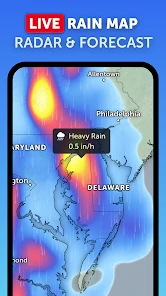
Zoom Earth offers satellite imagery and weather map overlays, including a rain map. Animated satellite views make it easier to watch weather patterns across regions, while map layers provide visual context for conditions and storms. The app is particularly useful if you prefer exploring weather on a map rather than relying only on a written forecast.
Can I explore weather conditions outside my current location?
Yes. Zoom Earth lets you explore different regions of the world through its map, so you can look at weather patterns beyond your immediate area. This can be handy when checking conditions at a destination or following a storm elsewhere. The app’s maps and satellite imagery provide a visual overview, though rapidly changing local conditions still deserve attention.
Is Zoom Earth suitable for checking weather before a trip or outdoor activity?
Zoom Earth can help you review weather conditions across different regions before heading out. Its live weather map, forecasts, satellite imagery, and storm-tracking features offer useful context for changing conditions and larger weather systems. It is best treated as one source of information rather than a guarantee of what you will encounter, especially when plans depend on local or rapidly changing weather.
Who makes Zoom Earth, and is the app free to download?
Zoom Earth is a weather app developed by Neave Interactive, and it is free to download. The app is rated for Everyone, so its content is intended for a broad audience. In-app purchases are available, so users may encounter optional paid offerings after installing. If you prefer not to make purchases, check the app’s purchase prompts and device settings before using it.
Pros
- High-resolution satellite imagery.
- Real-time weather updates.
- User-friendly interface.
- Detailed weather forecasts.
- Multiple map views available.
Cons
- Requires internet connection.
- Limited offline functionality.
- Can consume high data.
- Occasional slow loading times.
- Ads can be intrusive.
- Category
- Weather
- Version
- 5.0.1











