

Zipper Lock Screen: Zip Style
- 12.00
- 4.8
- Installs
- 1.00M
- Price
- Free
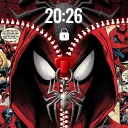
Screenshots
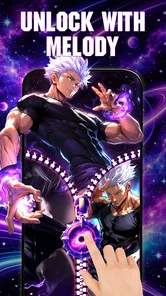
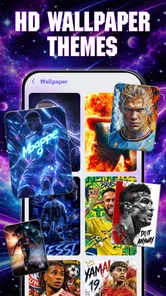
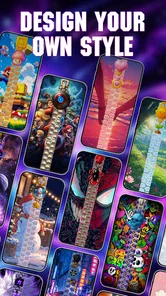
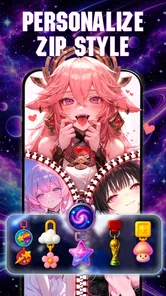
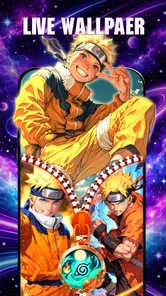
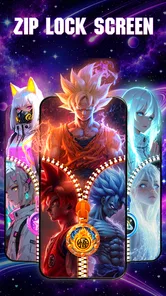
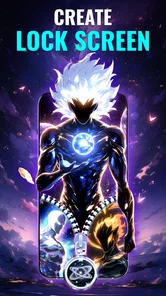
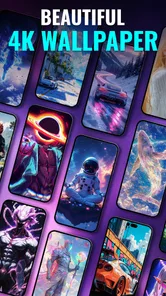
Analysis by Reviewed
One useful way to decide whether a zipper lock screen belongs on your phone is to think about how you use the screen before unlocking: do you glance at the time and move on, or do you enjoy a small visual flourish each time you wake the device? I find that distinction matters more here than the number of themes or the novelty of the effect. A lock screen is a practical surface first, so the design has to fit your habits as well as your taste.
Try it as a daily glance, not a one-time preview
When I evaluate this kind of personalization, I look at the screen in a few ordinary situations: a quick check while carrying groceries, a glance in bright daylight, and a wake-up in a dim room. These moments reveal whether the zipper styling feels like a pleasant signature or makes the display too busy. A theme that looks striking while you are choosing it may feel different when you only have a second to read the time.
I would also make the choice with notifications in mind. If you rely on the lock screen to scan incoming alerts without opening the phone, prioritize a design that leaves those details easy to distinguish. The zipper effect should frame the experience, not compete with the information you came to check. That is a small but practical test that helps avoid keeping a decorative setup you later find inconvenient.
For someone who changes their phone’s look with the seasons or their mood, this app can be a focused change rather than a full reset. You can think of it as dressing the lock screen while leaving the rest of your setup familiar. If that limited scope is exactly what you want, it is less work than rebuilding a whole theme; if you want every screen to match, it will feel incomplete.
The first thing I notice about Zipper Lock Screen: Zip Style is that it treats unlocking the phone as a small visual moment rather than a blank pause. The app is for personalizing a lock screen with zipper-themed designs and live wallpapers, so its appeal is easy to understand: if the standard screen feels dull, a zipper motif gives it a more playful identity. I like that this is a focused idea. It does not need to be a full home-screen makeover to make the phone feel more personal.
That focus also defines what I would expect from it. This is a personalization app, not a replacement for a phone’s security system or a broad theme suite. The central question is whether you enjoy seeing a zipper-style design whenever you wake the screen, and whether the visual change feels worth adding to a part of the phone you use repeatedly. In my view, it works best when treated as a small decorative layer, not as a reason to expect major changes to how the device works.
A zipper effect that changes the feel of unlocking
I find the zipper effect most useful when I treat it as a visual cue, not an extra step in using my phone. In this section, I focus on how that single design choice can make repeated screen checks feel more personal, while keeping readability and everyday comfort in view.
More From Our News Desk

 Instagram
Instagram’s Power Comes From Its Place in Your Phone
A close look at how Instagram turns Meta’s reach, recommendation systems and everyday camera habits into durable platform power—and what that costs users.

 Gmail
GmailGmail in a Busy Inbox: Who Benefits Most?
From first account to crowded workday, Gmail earns its place through dependable search and flexible sorting—but its best fit depends on how much inbox maintenance you can tolerate.

 Prime Video
Switching to Prime Video: What Changes in Your Viewing Routine
Prime Video can make a compelling second home for streaming, but switching means learning a different catalog, rental layer, and route from browsing to playback.

 Universal TV Remote Control
Universal TV Remote Control Works Best as a Reliable Backup
A phone remote earns its place through quick setup and reliable habits. Here is how to get more from Universal TV Remote Control—and where its limits show.

 Weather - By Xiaomi
Weather by Xiaomi Review: Clear at a Glance, Less Clear Up Close
Xiaomi’s weather app makes everyday forecasts quick to scan, but its calm surface can leave useful details and recovery paths harder to find than they should be.

 X
XX Under Pressure: Can It Recover When Posting Goes Wrong?
A resilience-focused review of X, examining setup, mistaken posts, interruptions, weak connections, and the gaps that matter when recovery needs to be dependable.
Latest News



One visual idea, used where it matters
The zipper theme is the distinguishing choice here. Many personalization apps lean on static wallpapers, icon packs, or elaborate theme collections. This one puts the lock screen itself at the center, using a recognizable zipper look alongside live wallpaper. That gives the screen a more tactile, playful style than a conventional background image, even though the phone remains the same device underneath.
The practical value is repetition: a lock screen is something you see in brief, frequent moments. A design that catches your eye can make those moments feel less routine, but it also has to remain comfortable after the novelty wears off. I would choose a zipper style that suits the wallpaper and does not make the screen feel visually crowded. A striking design is enjoyable for a while; one that competes with notifications or makes the screen harder to scan can become tiring quickly.
That is why I see the app’s strongest capability as a narrowly defined form of expression. Rather than changing every corner of the interface, it lets you signal a particular taste at the point where you pick up the phone. If you like playful, fashion-inspired, or novelty lock screens, that can be enough. If you want a coordinated transformation across icons, widgets, and menus, a broader customization tool is likely a better match.
What the live wallpaper adds
A live wallpaper can make a lock screen feel less like a fixed picture and more like a designed scene. In this app, that element supports the zipper concept: the theme is not only about choosing a static image, but about giving the screen a more animated visual character. I would approach that as an aesthetic bonus rather than a functional upgrade. The reason to use it is how it looks when you wake the device, not an expectation that it will make everyday tasks faster.
There is a useful trade-off here. Motion can make a design feel more distinctive, but a live background may not suit someone who prefers a quiet, restrained screen. It can also draw attention away from the time and notifications if the overall composition is busy. My advice is to judge the lock screen in the situations where you actually use it: outdoors, in a hurry, or with several notifications waiting. A look that is charming in a preview should still be easy to read at a glance.
How I would fit it into a normal day
I would fit a zipper-style lock screen around the moments when I naturally wake my phone, rather than making it a project I have to manage. The next section looks at a practical routine for trying the design and deciding whether its personality still feels welcome after the first few checks.
A quick check before heading out
Imagine reaching for your phone at the door to check the time, then waking it again while waiting for a bus. That is where a lock-screen customization has a chance to matter: it appears in short bursts, without asking you to spend time inside an app every day. With a zipper theme, the screen has a more personal visual cue each time it lights up. If you enjoy that little bit of character, the change can feel worthwhile precisely because it appears in an ordinary routine.
For a practical setup, I would first pick a design that leaves the important information easy to see, then use the phone normally for a day rather than deciding from a single glance. Notice whether the wallpaper makes the time or notifications harder to pick out, and whether the visual effect still feels appealing after repeated unlocks. That simple trial is more useful than choosing the most dramatic-looking option immediately. Lock screens are seen often, so comfort matters as much as novelty.
Another good use is giving a secondary or older phone a more distinctive look without changing the way you use it. If the device feels visually stale, a zipper-based screen can create a fresh impression without requiring a complete interface overhaul. I would not use it as a substitute for setting up a secure lock method, though. Personalization and device security serve different purposes, and a decorative theme should be considered separately from whatever protection you rely on.
Small choices that prevent visual friction
One non-obvious point with any animated lock-screen design is that the best-looking option is not always the best daily option. A bright or detailed background can reduce the contrast around the clock and alerts. I would favor a theme whose main visual feature has room to breathe, especially if I often glance at the phone rather than stopping to admire it. This is a practical way to keep the zipper effect distinctive without letting decoration get in the way.
I would also avoid judging the app only by how the screen looks when the phone is idle. The real test is the transition into normal use: do you still recognize notifications quickly, and does the design feel coherent when you wake the device several times in a row? If you use your phone in low light, consider whether a vivid or animated look feels comfortable there too. These are personal judgments, but they help separate a theme that is fun for a screenshot from one you will actually keep enabled.
Finally, treat a live wallpaper as a choice with a visual cost, not as an automatic improvement. If you find motion distracting, a simpler lock-screen treatment may be more pleasant. If you enjoy a screen with movement and personality, the animation is part of the appeal. The right option depends on how you use the phone, and there is no reason to keep a look that annoys you just because it is more elaborate.
Where it sits among personalization apps
Compared with the usual wallpaper-focused alternatives, this app has a more specific identity: its zipper styling is the point, rather than one item in a large collection of unrelated ways to customize a phone. That narrowness is an advantage if you already like the concept, because it gives the experience a clear visual direction. It is less compelling if you are shopping for a complete redesign or want to coordinate multiple parts of the interface at once.
It is also worth separating lock-screen decoration from deeper system customization. A wallpaper app may offer a wider range of general backgrounds, while an icon or theme tool may affect more of the phone’s appearance. Those alternatives can be more useful for someone who wants consistent styling from the home screen inward. Zipper Lock Screen: Zip Style is the more natural pick when the lock screen is the part you want to personalize and a playful zipper look is specifically what you are after.
For me, the deciding factor would be how often I enjoy seeing the design, not how many different customization categories an app claims to cover. A focused app can be a better fit than a sprawling one when its main idea matches your taste. On the other hand, if you change wallpapers frequently or want a subdued style that blends into the phone’s default appearance, a regular wallpaper collection gives you more flexibility with less emphasis on a single motif.
Who should try it, and who should pass
I would recommend giving it a look if you enjoy expressive lock screens, like the zipper aesthetic, and want a visual change that shows up in everyday use. It may also suit someone who wants a quick way to make a phone feel less generic without rebuilding the whole interface. The app is free, developed by MGlobal, and has a 4.8 average from around 4.5 thousand ratings, with over 1 million installs. It is rated for everyone, so its concept is broadly accessible rather than aimed at a particular age group.
The current version is 1.2609.25, and it supports Android 7.0 and later. That makes it relevant to a range of Android devices, including older ones that may not support the newest system releases. Still, I would make the decision based on the actual look and daily comfort, not the version number alone. A compatible phone does not automatically mean that a moving, decorative lock screen will suit your habits or personal taste.
I would skip it if you prefer a clean, minimal lock screen, dislike animated backgrounds, or want a toolkit for changing icons and home-screen layouts as well. It is also not the right answer if your main goal is stronger security or a new way to manage notifications. Those are different needs, and a zipper theme should not be mistaken for a security feature or a productivity tool.
My final take on the zipper style
Zipper Lock Screen: Zip Style makes sense when you want a lock screen with a playful visual signature and understand that the benefit is primarily aesthetic. Its focused approach is refreshing compared with apps that promise to customize everything, but that same focus limits its appeal for people seeking broad control. I would try a look that keeps the screen readable, live with it through ordinary checks during the day, and keep it only if the effect stays enjoyable after the first impression.
Overall, I see it as a small, specific personalization choice rather than an essential phone utility. For the right person, that is enough: a distinctive screen can make routine moments feel a little more individual. If you want a quiet background or a full interface makeover, choose another kind of customization app. If you like the zipper idea and want that style on the screen you see most often, this is a straightforward option to consider.
Zipper Lock Screen: Zip Style Frequently Asked Questions
What is Zipper Lock Screen: Zip Style?
Zipper Lock Screen: Zip Style is a personalization app that lets you give your phone’s lock screen a zipper-themed appearance. Depending on the version and device, it may offer choices such as zipper designs, backgrounds, colors, or decorative elements. The app is intended mainly for visual customization rather than adding substantial security, so check its store listing and settings to understand which features are available on your device.
Does Zipper Lock Screen: Zip Style securely protect my phone?
A zipper animation or themed lock screen should not be treated as a replacement for Android or iOS security controls. Before relying on the app, confirm whether it works alongside your device’s PIN, password, fingerprint, or face authentication, and keep the built-in screen lock enabled. App behavior can differ by operating system and release, so review the permissions and setup instructions rather than assuming the visual zipper itself protects personal data.
How do I set up and customize the zipper lock screen?
After installing the app, open it and follow its setup prompts; available options may include choosing a zipper style, wallpaper, or animation and enabling the lock screen feature. You may also need to grant permissions or adjust system settings for the design to appear. Exact menus and customization choices can vary by app version and phone, so consult the current in-app guidance and avoid granting access that does not appear necessary.
Is Zipper Lock Screen: Zip Style free, and does it include ads or in-app purchases?
The cost and monetization can vary by store, region, and version. Some personalization apps are free to install but display advertisements or offer paid options, while others may have different terms. Check the current Google Play or App Store listing for the price, in-app purchases, subscription details, and advertising disclosures before downloading. Also review the cancellation terms if you choose a recurring purchase, since deleting an app may not cancel a subscription.
What should I check before downloading Zipper Lock Screen: Zip Style?
Check that the listing is compatible with your device and operating-system version, and read recent reviews for reports about ads, crashes, battery use, or lock-screen behavior. Review the developer information, update history, privacy details, and requested permissions before installing. Because lock-screen apps may behave differently across devices, confirm that the app does not interfere with your existing security settings, and uninstall it if its access or performance seems inappropriate.
Pros
- Zip-themed design offers a playful alternative to a standard lock screen.
- The zipper animation makes unlocking feel interactive.
- A range of visual styles can help personalize the screen.
- Simple controls make the main feature easy to understand.
- Useful for users who want a decorative lock-screen effect.
Cons
- A zipper effect does not provide stronger security by itself.
- The animation may make unlocking slower than a standard screen.
- Lock-screen behavior can vary across Android versions and devices.
- Some themes or features may require in-app purchases or ads.
- It may request permissions that users should review before enabling.











