ZipLock - Zipper Lock Screen
- 26.00
- 3.4
- Installs
- 1.00M
- Price
- Free
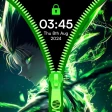
Screenshots
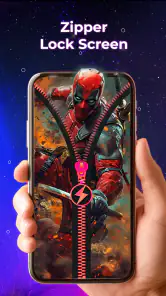
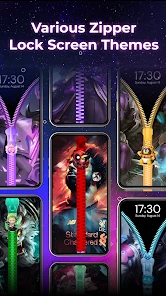
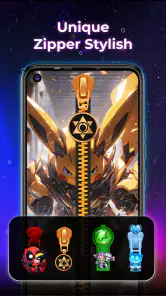
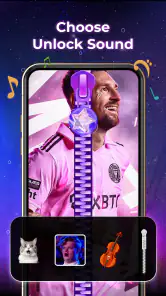
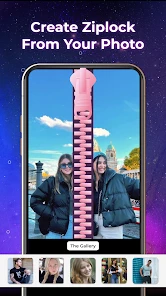
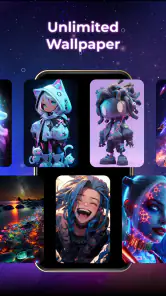
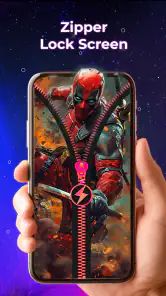
Analysis by Reviewed
Ever thought of adding a quirky twist to your phone's lock screen? Meet ZipLock - Zipper Lock Screen, the app that transforms your conventional lock screen into a fun and interactive zipper experience! I stumbled upon this gem while scrolling through the app store, and boy, what a delightful find it was!
Unzipping the Features
When you first install ZipLock - Zipper Lock Screen, you're greeted with a user interface that's as straightforward as it gets. The app allows you to customize your lock screen with a virtual zipper that you can pull down to unlock your phone. It's not just aesthetic; it's a tactile joy!
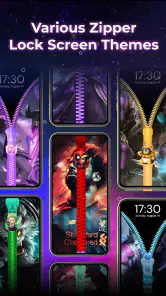
The customization options are pretty extensive. You can choose from different zipper styles and themes to suit your mood or personality. Whether you're feeling bubbly, classy, or just want a seasonal vibe, there's likely a theme for you. Not to forget, the app also lets you set personalized wallpapers behind the zipper. This little feature gives you a unique touch that makes your phone feel even more, well, yours!
Simple Setup and Usability
Setting up the app is a breeze. After downloading, a step-by-step guide helps you to enable the lock screen and choose your preferred settings. I love how intuitive it is—no tech expertise needed. You just tap your way through, and voila, your lock screen is ready for action.
One of the coolest features is the sound effects that accompany the zipper action. It might sound trivial, but it's these little details that enhance the user experience, making each unlock feel like a mini event. Plus, it’s not a battery drainer, which is a huge win in my book!
Why It Stands Out
What really sets this app apart is its novelty factor. In a world where most lock screens are either PIN or pattern-based, having a zipper mechanism is refreshingly different. It’s a conversation starter, for sure. Imagine pulling out your phone in a group and just casually unzipping it to unlock—guaranteed to get a few intrigued glances!
Moreover, the app doesn’t compromise on security. It works seamlessly with your phone’s built-in security features, so you’re not sacrificing safety for style. It’s like having the best of both worlds—fun and functional!
More From Our News Desk

Clash of Clans Is Won Between the Battles

Android Auto Makes the Case for Quieter Car Software

MobiOffice: Transforming Mobile Productivity with Seamless Integration

EA SPORTS FC™ Mobile Soccer: Redefining Mobile Sports Gaming

How Microsoft OneDrive Became a Mobile Productivity Giant

How Google Translate Breaks Language Barriers Effortlessly
If there’s anything to nitpick, it’s that the app might feel like a novelty to some. But if you’re like me and enjoy little quirks that add personality to your device, then this is a perfect match.
In summary, if you're looking to spice up your phone's lock screen, ZipLock - Zipper Lock Screen is definitely worth a try. It's quirky, fun, and oddly satisfying. Plus, it’s free to download, so why not give it a shot?
ZipLock - Zipper Lock Screen Frequently Asked Questions
What is ZipLock - Zipper Lock Screen?
ZipLock - Zipper Lock Screen is a unique app designed to provide a creative and fun way to secure your smartphone. Instead of the traditional lock screen methods, this app allows users to unlock their device by simulating the action of unzipping a zipper, adding both functionality and a touch of novelty to your phone's interface.
How does ZipLock enhance my phone's security?
ZipLock enhances your phone's security by offering a customizable lock screen that uses the concept of unzipping a zipper. While it provides a fun and engaging way to interact with your device, it also acts as a deterrent for unauthorized users by requiring the correct zip pattern to unlock the phone, ensuring your information stays safe.
Is ZipLock compatible with all smartphones?
ZipLock - Zipper Lock Screen is compatible with most Android devices. However, it's always recommended to check the app's compatibility with your specific device model before downloading. The app continuously updates its compatibility list, so ensure your phone's operating system is supported to enjoy a seamless experience.
Can I customize the appearance of the zipper lock screen?
Yes, ZipLock allows extensive customization options. Users can choose from a variety of zipper styles, backgrounds, and themes to personalize their lock screen. This feature not only enhances the aesthetic appeal of your phone but also provides a unique touch that reflects your personal style, making your device truly yours.
Are there any ads or in-app purchases in ZipLock?
ZipLock - Zipper Lock Screen is free to download, but it does contain ads to support its development. Users have the option to make in-app purchases which can remove ads and unlock additional features or themes. This allows users to enhance their experience and enjoy an ad-free interface if they choose to upgrade.
Pros
- Unique and creative lock screen design.
- Provides a fun way to unlock your phone.
- Customizable zipper styles.
- Lightweight app
- doesn't consume much memory.
- Compatible with most Android devices.
Cons
- Limited functionality beyond lock screen.
- Ads can be intrusive sometimes.
- May not be suitable for professional settings.
- No added security features.
- Customization options are limited.
- Category
- Personalization
- Version
- 1.1.6











