Zepp
- 27.91K
- 4.2
- Installs
- 10.00M
- Price
- Free

Screenshots
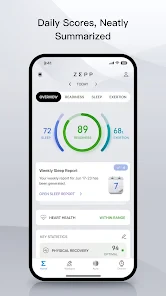
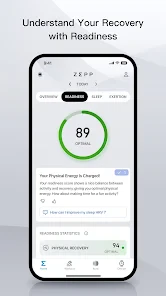
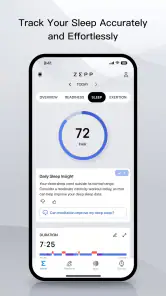
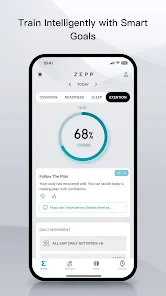
Analysis by Reviewed
I judge a fitness app by whether it helps me make a useful decision, not just by how many numbers it collects. Zepp is a health and activity app from Zepp, Inc., built to work with wearable devices and bring their records into one place. It is free to download, though that does not mean every possible purchase is free: the app includes optional in-app purchases, with listed item prices ranging from five cents to just under ninety dollars. I’d treat the free access as a chance to see whether its approach suits you, rather than assuming every function or device-related option has no cost.
What you get before spending
For someone who already owns a compatible wearable, the basic appeal is straightforward: activity, sleep and workout information can be viewed together rather than scattered across separate screens. The app’s value depends on whether that overview helps you notice patterns and adjust your routine. If you only want to count steps, a simpler phone-based tracker may be enough; if you want a record tied to a wearable, Zepp has a clearer reason to stay installed.
The optional purchases deserve a little thought before you tap through. I would first install the app, pair the device I plan to use, and check which parts of the experience are available without paying. Then I’d decide whether any paid item solves a real need, rather than treating a purchase as a prerequisite for getting started. This is a practical distinction: free entry makes it easy to explore, but the range of item prices means it is sensible to review each purchase on its own terms.
First Impressions
When I first downloaded Zepp, I was intrigued by its clean and user-friendly interface. You know how some apps just seem to have a cluttered look that makes you want to uninstall it immediately? Thankfully, this isn’t one of them. The design is sleek and intuitive, making it super easy to navigate through its numerous features without feeling overwhelmed. It’s almost like the app is holding your hand, guiding you on your fitness journey.
Features that Stand Out
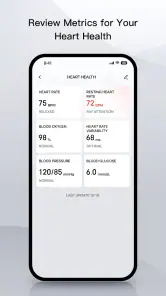
What I love about Zepp is how it seamlessly syncs with wearable devices to give you a comprehensive view of your health stats. From tracking your heart rate, steps, and sleep patterns to offering detailed workout analyses, it’s got all the bases covered. And let’s not forget the PAI (Personal Activity Intelligence) score – a unique feature that turns your heart rate data into a single, easy-to-understand metric that tells you how much activity you need to stay healthy. It’s like having a little coach in your pocket, always pushing you to do better.
That single score can be more useful than a long list of readings when I’m deciding whether I’ve been active enough across several days. I’d use it as a prompt to move, not as a medical verdict or a reason to chase a perfect number. A wearable’s readings are most helpful when viewed as personal tracking signals over time; they shouldn’t replace professional advice or be treated as a diagnosis.
Making the records useful
A useful habit is to check the app at consistent moments rather than constantly refreshing it. For example, I might review activity after a walk and sleep the next morning, then look for a broad pattern at the end of the week. That makes it easier to connect the record to real choices—taking a short walk after a sedentary day, or easing off when a workout feels unusually demanding—instead of reacting to every fluctuation.
More From Our News Desk

Weather by Xiaomi Review: Clear at a Glance, Less Clear Up Close

X Under Pressure: Can It Recover When Posting Goes Wrong?

Clash of Clans Is Won Between the Battles

Android Auto Makes the Case for Quieter Car Software

MobiOffice: Transforming Mobile Productivity with Seamless Integration

EA SPORTS FC™ Mobile Soccer: Redefining Mobile Sports Gaming
There is also a trade-off in relying on wearable-linked tracking: the app’s usefulness depends on having a device that can supply the information you care about and on keeping the connection and syncing routine workable. If you are not interested in wearing a tracker, or you want a purely manual training log, this may be more setup than you need. Before building a routine around any metric, I’d check that my device is recording consistently and that I understand what each displayed measure represents.
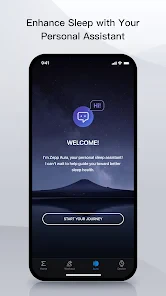
Another neat feature is its ability to monitor your sleep quality. There’s nothing more satisfying than waking up, checking your app, and seeing that you’ve had a solid night’s rest. It even breaks down the different stages of your sleep, so you know if you’ve been tossing and turning all night or if you’ve been in dreamland.
Everyday use and trade-offs
A realistic use case is a busy weekday when I have no planned workout. I can wear my device through the day, glance at the activity record in the evening, and decide whether a brisk walk fits before dinner. The next morning, I can check the sleep overview alongside how rested I actually feel. That comparison matters: a sleep-stage chart is an estimate to reflect on, not a substitute for how my body feels or a clinical assessment.
Compared with a basic step counter, the advantage here is the combination of wearable records, workout detail, sleep tracking and the PAI score. Compared with a dedicated training log, the trade-off is that Zepp’s appeal is more about connected health tracking than writing detailed notes about every session. If your priority is structured coaching, highly customized workout plans, or detailed manual journaling, I’d compare those options directly before settling on this as your main tool.
Usability
Using Zepp is as straightforward as it gets. Even if you’re not tech-savvy, you’ll find it surprisingly easy to set up and start using. The app provides detailed instructions and helpful tips along the way, ensuring that you’re never lost. Plus, it’s available on both Android and iOS, so no one’s left out. Whether you’re a seasoned athlete or just someone looking to get a bit more active, this app caters to all levels of fitness.
One thing that’s particularly impressive is the app’s accuracy. The data provided by Zepp is reliable and precise, giving you peace of mind that your health stats are being recorded correctly. It’s like having a reliable companion who’s always got your back, ensuring you’re on track to achieving your health goals.
Who is likely to get value?
I’d recommend trying it if you use a compatible wearable and want one place to review everyday activity, workouts and sleep without turning tracking into a second job. The combination can suit someone easing into exercise as well as someone who already trains and wants a convenient record. The app is rated for Everyone, and it has a 4.2 average from around 1.3 million ratings, which suggests a large audience has tried it; that broad response is useful context, but it cannot tell you whether your particular device or routine will feel right.
Zepp has been available since December 2016, and its current Android version is 9.14.2-play, requiring Android 7.0 or later. It has over 10 million installs, so it is an established choice rather than an obscure tracker. Still, popularity is not a reason to buy a wearable you do not want. I’d skip it if you need a completely independent phone-only solution, dislike health dashboards, or mainly want a specialized coaching experience rather than a connected overview.
Getting a fair read from your wearable
One detail I would make part of the setup routine is checking whether a record makes sense before treating it as a trend. If an activity summary looks unlike the walk or workout I remember, I’d first consider whether the device was worn as usual and whether the information has finished syncing. That small pause helps avoid changing a routine because of one odd-looking entry. I’d compare similar days and activities, rather than expecting every session to produce identical readings.
It is also worth choosing a few measures to pay attention to instead of trying to interpret every screen at once. A new user might begin with daily activity and the sleep overview, then add workout detail once those records have become familiar. Someone already comfortable with tracking could use PAI as a high-level nudge while checking individual sessions for context. This keeps the dashboard from becoming a source of needless pressure, especially when a busy week naturally disrupts normal habits.
Where it sits among alternatives
Many people already have a health app on their phone, and that may be enough if the only goal is a basic daily count. Zepp makes more sense when a compatible wearable is part of the plan and you want activity, sleep and workout information brought together. Its advantage is convenience across those records; its limitation is that a connected overview is not the same thing as a purpose-built running plan or a detailed training diary. I would choose the tool around the decision I need to make, not simply the number of charts it offers.
For example, if I wanted to build a habit of walking more, a wearable-linked summary could help me notice quiet days and make a manageable plan for tomorrow. If I were preparing for a specific event and needed structured sessions, progression and detailed notes, I would look for an app designed around that training goal instead. And if I wanted to track without wearing anything, a phone-first option would be the more natural starting point. Zepp is strongest when its wearable connection is a benefit rather than a chore.
Final Thoughts
In a world where fitness apps are a dime a dozen, Zepp stands out with its comprehensive features and user-friendly interface. It’s not just an app; it’s a lifestyle companion that motivates and guides you every step of the way. Whether you want to improve your fitness, track your health metrics, or simply understand your body better, Zepp has got you covered.
My verdict is to start with the free access and judge the app by how useful its records are in your actual routine. Check device compatibility, give syncing and regular reviews a fair try, and consider any optional purchase only if it clearly adds something you want. If those records help you make small, sensible choices, it can earn a place in your day; if you want no wearable dependency or a more specialized training tool, another kind of app will be a better fit.
If you’re looking for an app that’s more than just a step counter, give it a try. It might just be the push you need to start a healthier, more active lifestyle. And who knows? You might even find yourself looking forward to your next workout session!
Zepp Frequently Asked Questions
Who develops Zepp, and what kind of app is it?
Zepp is a sports-focused app developed by Zepp, Inc. Its store summary describes it as a personal digital health management platform, so it is intended to support health and activity management alongside compatible devices. If you are deciding whether to install it, consider whether its device-connected approach fits the way you want to manage your fitness information.
Is Zepp free to download, and can using it involve extra costs?
Zepp is free to download, so you can install it without paying an upfront app price. It also offers in-app purchases, with listed items ranging from $0.05 to $89.99 each. Those purchases are separate from downloading the app; check the purchase details shown in the app before buying anything so you understand the cost.
Is Zepp suitable for children and general audiences?
Zepp has an Everyone content rating, indicating that its app-store age classification is suitable for a general audience. Its focus is personal digital health management, so people may use it for activity-related purposes, but its usefulness depends on having a compatible device and the features you want. Review the app’s permissions and settings as part of deciding whether it suits your household.
Can I use Zepp without an Amazfit device?
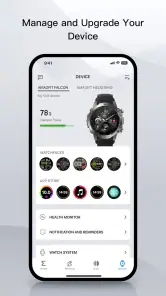
Zepp is primarily designed to pair with compatible Amazfit smart devices, so having one is the best way to use its tracking and device-management features. The app’s store summary describes it as a personal digital health management platform, which may still make it useful for exploring its interface, but the main experience centers on connecting and syncing a device.
What should I check before installing Zepp on my phone?
Check that your phone runs Android 7.0 or later if you are installing the Android version, and make sure you have access to the app store for your device. Zepp is a sports and health-focused app from Zepp, Inc. It is free to download, is rated for Everyone, and may offer optional in-app purchases.
Pros
- Intuitive user interface
- Extensive health tracking
- Customizable watch faces
- Seamless app integration
- Long battery life
Cons
- Limited third-party app support
- Occasional sync issues
- Restricted offline features
- Subscription for premium features
- Limited customization for notifications
- Category
- Sports
- Version
- 9.14.2-play





