

YouTube Lock - Parent Control
- 0.00
- 0.0
- Installs
- 10.00K
- Price
- Free

Screenshots
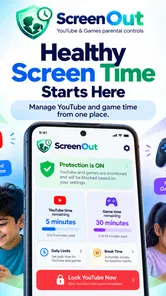
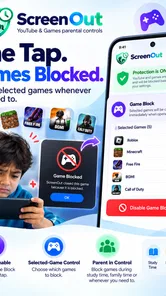
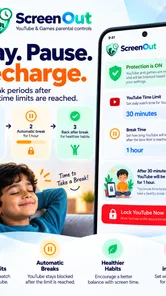
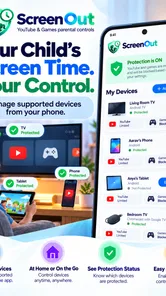
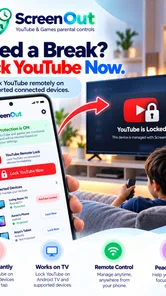
Analysis by Reviewed
I installed YouTube Lock - Parent Control to see whether it could make YouTube easier to manage in a real family routine, rather than simply adding another app to a parent’s phone. My first impression is that it is focused on one job: helping adults put practical boundaries around children’s YouTube use. That narrow purpose is useful, because the problem is rarely finding a video. The difficult part is stopping screen time at a reasonable moment without turning every evening into an argument.
Developed by Delveron, this free parenting app is aimed at families who want a more deliberate way to handle YouTube access. It is available for Everyone, runs on Android 7.0 and later, and the current version is 2.4.0. The app has passed the ten-thousand-install mark, which makes it a relatively small product compared with the largest family-control tools. I see that as a reason to approach it with realistic expectations: it is a focused YouTube-control utility, not a complete digital-safety suite for every device and service.
How I built a workable daily routine
The most useful way to approach YouTube Lock - Parent Control is to treat it as part of a routine, not as a button you press only when a child is already watching too long. I would set it up while the child is not using the device, decide what the normal viewing windows should be, and then explain the rule before the first limit takes effect. That small conversation matters. A control feels less arbitrary when a child already knows that videos are available after homework, for example, but not indefinitely.
In everyday use, I would begin with one simple boundary rather than attempting to solve every screen-time problem at once. A parent might allow YouTube during a quiet period after school, then use the app’s control approach to prevent the session from drifting through the rest of the afternoon. Another family might use it mainly before bedtime, when “one more video” tends to become several. The best starting point is the situation that causes the most conflict, because a clear improvement there makes the app easier to keep using.
A realistic example is a child who watches cartoons while a parent prepares dinner. Without a limit, the child may move from one recommended clip to another and still be watching when dinner is ready. With a planned boundary, the parent can offer the viewing period as a defined activity rather than relying on memory or repeated warnings. When the limit is reached, the adult still needs to communicate calmly, but the device is no longer the only thing enforcing the decision.
I also found that the app makes more sense when the parent chooses a consistent response after a session ends. If the child immediately receives extra access whenever they complain, the control becomes negotiable. If the rule is applied consistently, the child learns the rhythm more quickly. This is not a magical parenting shortcut, but it is a practical distinction: the software can make a limit visible and repeatable, while the family supplies the follow-through.
One important question is whether this replaces supervision. In my view, it does not. A time control can help reduce duration, but it does not judge whether a particular video is suitable, explain confusing content, or replace a conversation about advertising and online behavior. I would still check what younger children are watching, especially when they are exploring unfamiliar channels. The value here is control over access and timing, not a complete substitute for an adult being involved.
More From Our News Desk

 Gmail
GmailGmail in a Busy Inbox: Who Benefits Most?
From first account to crowded workday, Gmail earns its place through dependable search and flexible sorting—but its best fit depends on how much inbox maintenance you can tolerate.

 Prime Video
Switching to Prime Video: What Changes in Your Viewing Routine
Prime Video can make a compelling second home for streaming, but switching means learning a different catalog, rental layer, and route from browsing to playback.

 Universal TV Remote Control
Universal TV Remote Control Works Best as a Reliable Backup
A phone remote earns its place through quick setup and reliable habits. Here is how to get more from Universal TV Remote Control—and where its limits show.

 Weather - By Xiaomi
Weather by Xiaomi Review: Clear at a Glance, Less Clear Up Close
Xiaomi’s weather app makes everyday forecasts quick to scan, but its calm surface can leave useful details and recovery paths harder to find than they should be.

 X
XX Under Pressure: Can It Recover When Posting Goes Wrong?
A resilience-focused review of X, examining setup, mistaken posts, interruptions, weak connections, and the gaps that matter when recovery needs to be dependable.

 Clash of Clans
Clash of Clans Is Won Between the Battles
Its raids are quick; its community is a long-term project of coordination, teaching, rivalry, and shared responsibility—with all the friction that entails.
Latest News



Start with the child’s actual device habits
Before changing settings, I would watch the existing routine for a day or two. Is the problem long sessions, late-night viewing, arguments about stopping, or a child opening YouTube when they should be doing something else? Those are different problems. A limit aimed at total duration may help with marathon viewing, while a schedule-oriented habit may be more relevant when the issue is timing. The app is most effective when its controls are matched to the real source of friction.
I would also avoid setting a limit so tight that it fails on ordinary days. If a child regularly needs a few minutes to finish a tutorial or a song, an overly rigid boundary can create frustration and encourage requests for exceptions. On the other hand, a limit that is so generous it never changes the routine is not doing much work. The right setting is the one that reduces repeated negotiation without making normal use feel impossible.
For younger children, I would pair the app with a short list of approved viewing expectations: stay in the shared room, ask before switching to a different type of content, and stop when the session ends. For older children, I would explain the reason for the boundary and involve them in choosing a sensible viewing period. That approach gives the control a purpose instead of presenting it as unexplained surveillance.
Settings worth checking before handing over the phone
The first settings I would review are the ones that determine how much control the parent wants and how often the child should be allowed to use YouTube. A parent who only wants to prevent late-night viewing may prefer a narrower routine than someone trying to reduce daily consumption. I would make one change at a time, then observe whether it solves the problem. Changing everything at once makes it difficult to understand which part of the setup is helping.
It is also worth deciding who should operate the controls. If a child regularly has access to the parent’s unlocked phone, any parental-control app becomes less dependable as a boundary. I would keep setup and adjustment in the adult’s hands and avoid changing the rule in front of the child unless there is a genuine reason. This is a basic security habit, but it is easy to overlook because the app itself may be simple to use.
The free price makes trying the app straightforward, although in-app purchases are listed at forty-nine cents per item. I would check the purchase screen carefully before approving anything and make sure the adult account, not the child’s account, handles any optional transaction. The low individual cost may be convenient, but families should still understand what they are paying for before tapping through a purchase prompt.
Another setting-related question is compatibility. The minimum operating system is Android 7.0, so an older phone may not be suitable. Families using newer Android devices should still test the complete routine on the actual child’s phone rather than assuming that a setup on the parent’s device represents the child’s experience. Screen size, account configuration, and the way the phone is shared can all affect how comfortable the workflow feels.
I would also test the boundary at a calm time. Set a short practice session, observe what happens when the limit is reached, and confirm that both parent and child understand the result. This is one of the less obvious but more valuable preparation steps. Discovering a confusing behavior during a rushed school morning or at bedtime is much more stressful than discovering it during a planned test.
Use settings to reduce arguments, not to create surprises
A good control system is predictable. If the child knows when YouTube is available and what happens at the end, the parent spends less time improvising. I would tell the child about the rule before activating it, offer a warning based on the family’s normal routine, and avoid presenting the lock as a punishment unless the household has deliberately chosen that consequence.
I would be cautious about using the app as a response to every disagreement. If access is constantly removed and restored, the child may focus on finding the next exception instead of learning the boundary. The better pattern is to use the app for a small number of stable rules and handle unusual situations separately. That keeps the control meaningful and prevents the parent from becoming a full-time settings manager.
There is also a trade-off between convenience and precision. A simple limit is easy to remember and maintain, but it may not reflect every child’s needs. A more carefully adjusted routine can be fairer, yet it requires more attention from the adult. I would choose the least complicated setup that solves the family’s main problem. A control that is technically sophisticated but rarely maintained is less useful than a modest one that works every day.
Faster patterns that make the app easier to live with
Experienced users will probably get better results by connecting the app to repeatable moments rather than treating it as an emergency brake. For example, the parent can check the control before the child begins a planned viewing period, keep the phone in a shared area, and review the next day’s routine at the same time each evening. These small habits reduce the need to search through settings when everyone is tired.
I would create a simple verbal cue that always means the same thing: “YouTube time is finished.” The phrase should be separate from a long negotiation. If the child asks for more time, the parent can acknowledge the request without immediately changing the rule. This may sound like a parenting technique rather than an app feature, but it is exactly where a digital limit succeeds or fails in practice.
Another useful pattern is to reserve different kinds of viewing for different situations. A short, planned session might be appropriate while a parent cooks, while longer educational use could happen at a desk with an adult nearby. The app can support the timing boundary, but the parent still decides whether the context is suitable. Separating these situations prevents the family from treating all YouTube use as identical.
I would also avoid making the child responsible for remembering the technical details. Adults should know what the active rule is, when it changes, and how to restore the normal routine. Children can learn the household expectation, but the control should not depend on them managing it correctly. This is especially important with younger users, who may interpret a technical problem as permission to keep trying.
One non-obvious benefit of a focused app is that it can make the parent’s own decision clearer. When the only question is how YouTube access should be limited, it becomes easier to notice whether the family is asking for a time boundary, a content conversation, or a broader device rule. If the real issue is gaming, messaging, or general phone use, this app will not solve it. Recognizing that early prevents a narrow tool from being blamed for a wider household problem.
When a focused YouTube tool is better than a full family suite
Compared with broad parental-control systems, this app’s appeal is its narrow focus. A family that wants to manage one child’s YouTube routine may find a dedicated control easier to understand than a large dashboard covering web browsing, applications, contacts, location, and device activity. Fewer moving parts can mean fewer settings to maintain and a quicker path to a useful daily rule.
The opposite is also true. If parents need one place to manage several applications, multiple devices, or wider online safety concerns, a complete family-management platform may be a better fit. Installing a YouTube-specific tool alongside several unrelated controls can create overlapping rules and confusing results. I would choose this app when YouTube is the central problem, not simply because it is free.
Built-in device controls may also be preferable for families who want a single operating-system-level solution. Those tools can be convenient when the goal is to limit the entire phone rather than one service. The advantage of a dedicated YouTube control is concentration; the disadvantage is that it does not automatically become a universal screen-time policy. That distinction should guide the decision before setup.
Using stronger limits without making the routine brittle
For families with persistent problems, I would strengthen the routine gradually. Start with the main viewing period, then look at the moments when the child tries to bypass the intended schedule. If the issue is repeated access after the session ends, the parent should review who can change the control and whether the phone is being handed back without the adult checking it. If the issue is simply that the child loses track of time, a predictable warning and a visible household cue may be enough.
I would not use a strict limit as a replacement for sleep, schoolwork, or family time rules. Those activities need their own expectations. The app can help close one route to distraction, but a child may simply move to another application if the underlying routine is unclear. Stronger control works best when it is paired with a specific alternative: finish getting ready, read, play outside, help with dinner, or move to a pre-agreed activity.
Older children may also need a different conversation from younger ones. With them, I would explain that the purpose is not to inspect every interest but to make time use manageable. I would invite them to suggest a reasonable viewing pattern, then keep the final boundary with the parent. That gives the child some ownership without turning the control into a negotiation every time a video ends.
There is a practical limitation to remember: no app can guarantee that a child will respond well to a limit. A technically correct setup can still produce conflict if the rule is introduced suddenly or applied inconsistently. I would therefore judge success by whether the household has fewer repeated arguments and a clearer routine, not merely by whether the control activates.
Privacy is another reason to keep the setup proportionate. Parents should use only the level of control they genuinely need and explain it in age-appropriate language. A focused YouTube boundary is easier to justify than broad monitoring when the family’s concern is specifically excessive viewing. That makes the app a better match for households seeking a limited intervention rather than constant oversight.
Who should use it, and who should skip it
I would recommend this app to a parent whose main challenge is YouTube sessions that run longer than intended. It is also a reasonable option for families that want a free starting point, prefer a focused tool, and are willing to maintain the rules themselves. The Everyone age classification and support for Android 7.0 and later make it approachable for a wide range of compatible family devices.
I would skip it if the household needs comprehensive controls across many apps and devices, or if the parent expects the software to decide which videos are appropriate. I would also look elsewhere if the child uses an unsupported older phone or if the family wants a single system that combines broad device limits with detailed activity management. In those situations, the app’s narrow purpose becomes a limitation rather than an advantage.
Families should also think about how often rules change. If a child’s schedule is different every day and the parent cannot reliably update the routine, a simpler household agreement may work better. Conversely, if the family has a stable pattern and wants help enforcing it, the app has a clearer role. The deciding factor is not the number of controls available; it is whether the control can be used consistently in the home.
My verdict after settling into the routine
My overall view is that YouTube Lock - Parent Control is most useful as a focused habit-building tool. It does not attempt to solve every parenting challenge connected to phones, and that restraint is part of its appeal. When a family’s specific problem is uncontrolled YouTube time, a dedicated boundary can be easier to explain and maintain than a large collection of unrelated restrictions.
I especially like the idea of combining the app with a repeatable sequence: decide the viewing window, test the rule before using it, keep the adult in charge of changes, give the child a clear expectation, and apply the ending consistently. Those steps are more important than endlessly adjusting settings. The app supports the structure, but the structure is what makes the result dependable.
There is still friction. Parents must remain involved, children may challenge the rule, and a YouTube-only solution will not address every form of screen use. Optional in-app purchases priced at forty-nine cents per item also deserve a quick check before approval, even though the app itself is free. These are manageable concerns, but they mean I would not present it as a complete family-safety answer.
For a parent looking for a straightforward way to put limits around children’s YouTube sessions, I think it is worth trying on a compatible Android device. I would begin with one everyday problem, use a small and predictable rule, and review the routine after several days rather than changing it constantly. The strongest result comes from pairing the app’s limit with a calm, consistent family habit. Used that way, Delveron’s parenting app can reduce the number of repeated “just one more video” negotiations without pretending to replace parental judgment.
YouTube Lock - Parent Control Frequently Asked Questions
Is YouTube Lock - Parent Control available for my phone or tablet?
YouTube Lock - Parent Control is a parenting app from Delveron, and its current version is 2.4.0. It requires Android 7.0 or later, so check your device’s operating-system version before installing. If you use an iPhone or iPad, confirm availability and compatibility in the relevant app store before downloading, since support can differ between platforms.
What is YouTube Lock - Parent Control and how does it work?
YouTube Lock - Parent Control is designed to help parents limit access to YouTube and reduce unwanted viewing on a child’s device. Depending on the device and version, it may use a PIN, password, or restricted settings to prevent children from changing the selected controls. Before downloading, review the app’s current features and supported Android or iOS versions, as parental-control functions can vary between platforms.
Can children bypass YouTube Lock - Parent Control?
The app can make it more difficult for children to open YouTube or modify restrictions, but no parental-control tool should be considered completely impossible to bypass. A child may still access YouTube through a browser, another device, guest profile, screen mirroring, or by changing system settings if those areas are not protected. For better results, combine the app with device-level parental controls and keep the PIN private.
Does YouTube Lock - Parent Control block all inappropriate YouTube content?
YouTube Lock - Parent Control primarily focuses on controlling access to YouTube rather than reviewing every video on the platform. It should not be treated as a complete content-filtering solution, because YouTube contains constantly changing material, advertisements, comments, and recommendations. Parents should also consider YouTube Kids, Google Family Link, Apple Screen Time, supervised accounts, and regular conversations about safe and appropriate online viewing.
Is YouTube Lock - Parent Control free, and are there in-app purchases?
The app is free to download, with in-app purchases priced at $0.49 per item. Check the purchase details in the app store before buying anything, so you understand what an item provides and whether it suits your family’s needs. The free download lets parents try the app, while any optional purchases should be considered separately from the basic installation.
Pros
- Blocks YouTube access with a simple tap or scheduled lock.
- Helps reduce screen time without requiring changes to YouTube itself.
- Useful for parents managing viewing on shared Android devices.
- Lightweight design with minimal impact on device storage.
- Can discourage children from bypassing set viewing routines.
Cons
- May require accessibility or device-admin permissions to work correctly.
- Children may still access videos through browsers or other apps.
- Compatibility can vary after Android system or YouTube updates.
- Some features may be limited or unavailable without a paid upgrade.
- Not a complete parental-control suite for calls
- messages
- or other apps.











