Yoti - your digital identity
- 1.91K
- 4.3
- Installs
- 10.00M
- Price
- Free

Screenshots
Analysis by Reviewed
If you’re anything like me, you're tired of carrying around a bulging wallet filled with IDs, and you’ve probably heard about Yoti - your digital identity. This nifty app is here to revolutionize the way we handle personal identification, and honestly, it’s about time! Let's dive into what makes this app potentially your next must-have on your phone.
Deciding whether digital ID fits your routine
I’d judge a digital identity app less by how polished it looks and more by whether it fits the places where I actually need to prove who I am. A digital credential is useful only when the person or service checking it accepts that format. I’d keep my physical ID available for travel, official appointments, or any situation where a paper or plastic document is specifically requested, rather than treating a phone as a universal replacement.
That distinction matters in ordinary life. If I were heading out for an age check, I’d first think about whether the venue accepts Yoti, and I’d bring my regular ID if being turned away would cause a real problem. The app is more compelling as a convenient option for supported checks than as a promise that I can leave every other form of identification at home.
One useful way to decide is to start from a real upcoming need rather than from the idea of digitizing everything. Think of the shop, venue, or service where you might show ID, then find out whether it supports this kind of check. That small bit of preparation is more important than installing another app simply because digital credentials sound convenient.
Getting Started with Yoti
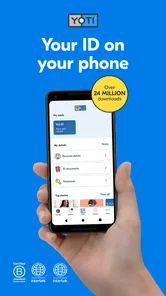
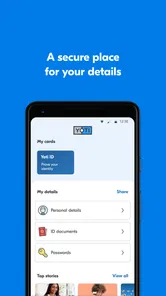
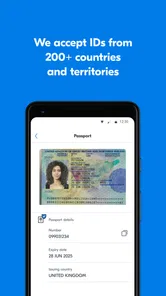
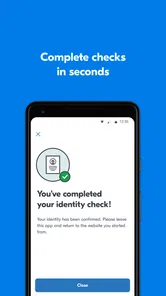
First things first, downloading and setting up Yoti is a breeze. Available on both Android and iOS, the app is lightweight and installs in a snap. Once you fire it up, you’re greeted with a clean, intuitive interface that guides you through the process of creating your digital ID. All you need is your smartphone camera and your actual ID to get started. Just snap a picture, let the app do its magic, and voilà, your digital identity is ready to roll.
In practical terms, I’d set it up at home rather than while standing in a queue. Give yourself time to take clear document photos and complete the identity checks without rushing. Before starting, make sure the ID is readable and the lighting is even; glare, shadows, or a cropped edge can turn a simple setup into a frustrating retry. I’d also check that the phone meets the app’s minimum operating-system requirement: Android 10.
Yoti is a free productivity app from developer Yoti. It launched on November 2, 2016, and version 3.72.0 is the current release. It is rated for Everyone, so its intended audience is broad, although the practical value still depends on whether the places you visit accept digital ID. The app has an average rating of 4.4 from around 36,000 ratings, with about 1,600 written reviews, and has been installed more than five million times. Those figures suggest it has reached a sizable audience, but they don’t answer the question that matters most to me: will it work for the specific check I need?
More From Our News Desk

Weather by Xiaomi Review: Clear at a Glance, Less Clear Up Close

X Under Pressure: Can It Recover When Posting Goes Wrong?

Clash of Clans Is Won Between the Battles

Android Auto Makes the Case for Quieter Car Software

MobiOffice: Transforming Mobile Productivity with Seamless Integration

EA SPORTS FC™ Mobile Soccer: Redefining Mobile Sports Gaming
For the smoothest setup, I’d treat the camera step as a small task that deserves decent conditions: use a clean lens, lay the document flat, and avoid reflections from overhead lights. If a scan does not come out clearly, I’d correct the lighting and try again instead of assuming the app has failed. This is a practical trade-off with phone-based onboarding: it avoids a trip to a counter, but the quality of the capture and the accuracy of the information still matter.
People often ask whether they can install it and immediately rely on it. I wouldn’t plan around instant readiness for an important appointment. Complete the setup ahead of time, make sure you can open the app again afterward, and leave enough room to use your regular ID if a check cannot be completed. That is a more realistic approach than discovering a setup issue when someone is waiting to verify you.
Features that Stand Out
What truly sets Yoti apart is its security features. In today’s digital age, safeguarding personal information is crucial, and Yoti nails it. The app uses facial recognition and biometric verification to ensure your identity is protected. Plus, your personal data is encrypted and stored securely, so you can breathe easy knowing your information is safe from prying eyes.
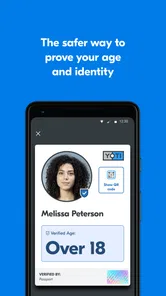
Another cool feature is the ability to share specific details with others. Whether you’re verifying your age or confirming your identity, Yoti lets you choose exactly what information you want to share, keeping the rest under wraps. It’s perfect for those moments when you need to prove your ID but want to maintain a level of privacy.
That selective-sharing idea is the part I find most useful to think about before a real check. If I only need to establish one detail, I’d rather share that than volunteer a broader set of personal information. I’d pause at the confirmation screen and read what the request is asking to verify, instead of tapping through automatically. A digital ID still involves a trust decision: I need to be comfortable with the specific request and the organization receiving the information.
For anyone wondering whether a phone-based ID is automatically safer than carrying a card, I’d call it a different trade-off, not a guaranteed upgrade in every circumstance. A physical card can work without a charged phone, while a digital credential can be convenient when it is accepted and the phone is available. I’d protect access to the handset, keep it charged before an outing where I may need identification, and avoid relying on the app as my only option for an important appointment.
Selective sharing is also a reason to slow down rather than treating every prompt as a routine “continue” button. I’d check the purpose of a request and the details it asks me to confirm, then decide whether that is proportionate to the interaction. The privacy benefit is most meaningful when I make that choice deliberately; it is not a reason to approve a request without understanding it.
There is a practical security balance here. A credential on a phone is easier to have with me than a separate card when I am already carrying my handset, but that convenience makes ordinary phone habits relevant. I’d use a screen lock, avoid handing an unlocked phone to someone to “sort it out,” and keep the device in my possession while a check is happening. Those are simple steps, yet they make more sense than assuming the word digital alone settles the security question.
Where it helps, and where other options fit better
So, how does Yoti fare in real-world scenarios? Pretty darn well, if you ask me. The app is widely accepted by numerous businesses and institutions, meaning you can use it for everything from checking into a hotel to proving your age at a bar. It’s like having a digital Swiss Army knife for identity verification. Plus, it can be a lifesaver if you ever find yourself without your physical ID.
I’d still separate the idea of having a digital ID from the practical question of acceptance. Before depending on it for a hotel check-in, a work-related process, or an age-restricted purchase, I’d look for signs that the particular business supports Yoti. Acceptance can differ between organizations, so a quick check ahead of time is more useful than discovering a mismatch at the counter. That simple habit makes the app easier to recommend to people who already know where they expect to use it.
Compared with keeping a photo of an ID in a phone gallery, a dedicated identity app is a more purposeful way to handle verification, especially when selective sharing is relevant. A saved image may be handy as a reference, but it is not the same thing as a supported digital credential, and it can expose more information than a narrow check requires. Compared with carrying only a physical wallet, Yoti offers a phone-based route where accepted, but the wallet remains the more dependable fallback when a service does not take digital ID or a phone is unavailable.
For example, imagine I’m going out after work and expect to make an age-restricted purchase. I’d check beforehand whether that particular retailer accepts Yoti, make sure my phone is charged, and still bring my physical ID if the purchase matters enough that I do not want a failed check to derail the trip. At the point of verification, I’d review what information is being requested instead of showing a saved photograph or approving a request automatically. That workflow uses the app’s convenience without pretending it removes the need for judgment or a backup.
This is where the usual alternatives divide up neatly. A physical ID is the straightforward choice when an organization explicitly asks for it, when I cannot risk phone battery or connectivity trouble, or when digital acceptance is uncertain. A photo stored on the phone may help me remember details, but I would not treat it as an equivalent substitute for a credential a checker can verify. Yoti makes the most sense in the middle: for supported identity checks where a phone-based option and limited disclosure are useful.
I would also distinguish an identity app from a password manager or a general document-scanning tool. Those tools may solve different problems, such as storing login details or keeping a copy of paperwork, but that does not make them interchangeable with a digital identity for a supported check. If my main goal is simply to keep a record of an ID image, Yoti may be more than I need. If I need to establish a credential in a context that accepts it, a gallery photo is the weaker comparison.
Moreover, Yoti is not just about convenience. It's contributing to a more sustainable world by reducing the need for plastic cards and paper documents. It's a small step towards a greener planet, and who doesn’t want to be part of that?
For a realistic routine, I’d use it as a backup alongside my physical ID: set it up before I need it, check acceptance for the venue, and keep the phone charged. That approach suits someone who makes occasional supported checks and wants fewer moments of rummaging through a wallet. It is less suitable for someone who needs a universally accepted document every day, dislikes identity verification on a phone, or cannot meet the Android minimum requirement. If those limits describe you, a physical document—or another option specifically accepted by the organization you’re dealing with—is the safer choice.
The switch itself is fairly low-commitment because the app is free, but I would not confuse free installation with zero effort. You need to complete identity setup, learn how the sharing decision works, and find out which checks accept the app. I’d keep the wallet arrangement unchanged at first, use Yoti for one predictable situation, and only adjust what I carry after that experience proves useful. There is no advantage in making a digital option your sole plan before you know how it performs in your own routine.
Who is it best for? I’d point it toward someone comfortable using a phone for identity tasks, who has a specific supported check in mind and values not disclosing more than that check requires. Someone who travels often, handles formal identity checks in places that insist on physical documents, or has a habit of leaving a phone uncharged should not treat it as a replacement. For those users, a physical ID remains the more dependable primary choice, with Yoti at most an additional option.
Another sensible question is whether it is worth keeping installed if use is occasional. I think that depends on whether you have a likely use case and are willing to maintain the setup. If the app sits unused and you have no reason to expect an accepting organization, it may not earn space or attention on your phone. If you do encounter supported checks, having prepared it in advance can be more convenient than beginning the process at the last minute.
My recommendation
All in all, Yoti is a solid app that’s well worth checking out. It combines convenience, security, and privacy in a user-friendly package that’s hard to beat. Whether you’re tech-savvy or a bit of a digital novice, you’ll find Yoti easy to navigate and incredibly useful in your daily life.
My recommendation is to try it if you want a digital identity for situations where the relevant business or institution accepts it, while keeping a physical ID for the rest. Yoti is free, which makes trying the setup low-commitment, but the real cost is the time spent adding your identity and learning where it works. I’d start with one likely use case rather than expecting it to replace a wallet overnight; if that first check goes smoothly, you can decide whether it earns a regular place on your phone.
While it might not completely replace your physical ID just yet, it’s certainly a step in the right direction. So go ahead, give it a whirl and join the digital identity revolution. Who knows, you might just find yourself wondering how you ever lived without it!
Yoti - your digital identity Frequently Asked Questions
What personal information should I be comfortable sharing with a digital identity app?
Before downloading Yoti, consider whether you are comfortable using a phone app for identity-related tasks and adding personal information to it. Yoti’s purpose is to provide a secure digital ID, so it is worth thinking about what identity details you may want to manage or share through an app. Review the app’s terms and privacy information, and make sure you understand the choices available to you before setting up an identity.
Can I use Yoti if I only need to prove my age or identity occasionally?
Yoti may be useful even if you expect to need digital identity checks only from time to time. It is designed for identity verification and sharing information with businesses or other people, including confirming age where this is required. Whether it is worthwhile depends on the services you use and whether they accept Yoti. You can consider those needs before deciding to install it.
What should I check before installing Yoti on my phone?
Yoti is a free productivity app from Yoti for creating and using a digital identity. Before downloading, check that your device runs Android or iOS and meets the app’s minimum operating system requirement. The app is rated for Everyone, and its purpose is reflected in its short description: Yoti is your secure digital ID. Consider whether you are comfortable using an app for identity-related tasks before adding personal information.
Is Yoti free, and what devices can I use it on?
Yoti is free to download and is available for Android and iOS. Its current version is 3.72.0, and the minimum OS requirement is 10. Yoti is a productivity app from the developer Yoti, designed around a secure digital ID. As with any app, check the compatibility details in the relevant app store before installing, since your device’s operating system needs to meet the stated requirement.
What is Yoti and how does it work?
Yoti is a digital identity app that allows users to securely verify their identity both online and offline. By using biometric data and government-issued IDs, Yoti creates a digital identity that you can share safely with businesses or other individuals. It's designed to protect your privacy by only sharing the necessary information without revealing everything about you.
Pros
- Easy to set up and use for digital identity verification.
- Highly secure with encryption and biometric login.
- Widely accepted across numerous services and platforms.
- Allows sharing only necessary personal information.
- Fast identity verification with minimal waiting time.
Cons
- Limited support for non-English languages.
- Some services may not accept Yoti for verification.
- Requires stable internet connection for use.
- Cannot be used offline; always online-dependent.
- Occasional glitches in the app during updates.











