Yelp for Business
- 5.11K
- 3.7
- Installs
- 1.00M
- Price
- Free

Screenshots
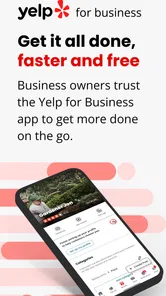
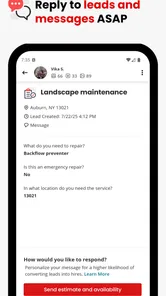
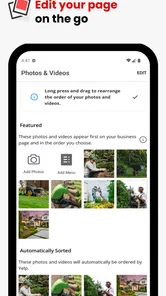
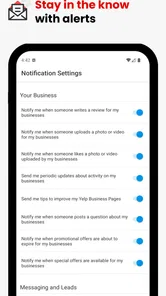
Analysis by Reviewed
When I manage a business away from a desk, the hard part is often catching a customer question or a new review at the right moment. Yelp for Business puts several day-to-day listing tasks within reach on a phone, which can be handy between appointments or during a quieter stretch at work. I see it as a companion to looking after a Yelp presence, not a replacement for every business tool you may already use.
Where a connection matters most
The app’s usefulness depends on being able to reach current business information and customer activity. Checking feedback, replying, or communicating with a customer is most valuable when the information is timely, so I’d plan on doing those tasks when I have a dependable connection. If service is patchy, I wouldn’t assume a reply or change has gone through until I can verify it in the app.
That makes a quick check between errands a sensible routine, but not a great moment to handle a complicated response while rushing through a weak-signal area. I prefer to read a review carefully, draft a thoughtful reply, and confirm the result when I’m back on a reliable network. That small pause is better than sending a hurried answer that misses the customer’s actual concern.
Choosing the right moments to check in
Not every task needs the same kind of attention. A short customer question may be easy to handle during a quiet gap, while interpreting page activity or writing a careful response to criticism deserves a few uninterrupted minutes. I’d match the task to the moment rather than treating every notification as an instruction to stop what I’m doing.
For example, a repair-shop owner might glance at customer activity after finishing an appointment, note a question about hours, and make the correction before the next customer arrives. If the shop is in a basement or a part of town with unreliable reception, I’d wait until the connection is steady before relying on that change being visible. The useful habit is not constant checking; it is choosing a time when I can both act and confirm the result.
Getting Started with Yelp for Business
First things first, setting up Yelp for Business is as easy as pie. Once you've downloaded the app, the user-friendly interface makes it super simple to claim your business. The app guides you through the process step-by-step, ensuring you don't miss a beat. And if you already have a Yelp listing, linking it to the app is a breeze.
Features That Shine
One of the standout features of Yelp for Business is its review management system. It allows you to monitor customer feedback in real-time, which is crucial for maintaining your business's reputation. You can respond to reviews directly from the app, which is a fantastic way to show customers you value their input.
More From Our News Desk

Weather by Xiaomi Review: Clear at a Glance, Less Clear Up Close

X Under Pressure: Can It Recover When Posting Goes Wrong?

Clash of Clans Is Won Between the Battles

Android Auto Makes the Case for Quieter Car Software

MobiOffice: Transforming Mobile Productivity with Seamless Integration

EA SPORTS FC™ Mobile Soccer: Redefining Mobile Sports Gaming
For a small business owner, a useful habit is to separate urgent questions from feedback that deserves a longer reply. I’d check customer activity at a planned point in the day instead of letting every notification interrupt a busy shift. When a review raises a recurring issue, noting the theme before responding can help you address the underlying service problem, rather than treating each comment as an isolated exchange.
Another nifty feature is the analytics dashboard. It gives you insights into customer behavior, showing you how many people viewed your business page and how they found you. This data is gold for tailoring your marketing strategies and understanding what works best for your clientele.
Reading activity without overreacting
Page activity is most useful when I compare it with a concrete question, such as whether a recent change to the listing seems to be helping people find the information they need. I would look for a pattern over time instead of drawing a conclusion from one quiet afternoon. A dashboard can help direct attention, but it cannot explain on its own why a customer chose one business over another.
This is where Yelp’s focus is both a strength and a boundary. It keeps listing engagement and customer feedback close together, which is convenient if Yelp is already a meaningful place where people discover your business. It is not a complete picture of every route customers use, so I would not treat its figures as a substitute for records from other channels or for direct conversations with customers.
Making the Most of Yelp's Advertising Tools
Yelp for Business also offers advertising options that can help increase your reach. You can create ad campaigns directly from the app, targeting specific demographics and geographic areas. The app provides budget control tools, ensuring that you can manage your advertising spend effectively.
I’d treat those tools as something to review deliberately, not a task to rush through on a phone while serving customers. Before changing a campaign, it helps to be clear about what you want to learn or improve; otherwise, it can be difficult to judge whether the spend is doing useful work. If I were comparing advertising with a broad social campaign, I’d first decide whether local discovery on Yelp is actually the audience I want to reach.
Plus, with the promotional tools available, you can offer deals or discounts to attract new customers and retain loyal ones. It's a win-win situation where you boost sales while making your patrons feel special.
Keeping a campaign decision grounded
A practical way to avoid impulsive changes is to write down the goal before opening the advertising controls: for instance, attracting attention to a particular service or checking whether a promotion brings the kind of visits you can handle. Then review the outcome against that goal rather than changing several things at once. This makes the app more useful as a place to manage choices, not just a place to spend a spare minute adjusting settings.
I would also distinguish between a listing task and a marketing task. Correcting a detail customers rely on is usually time-sensitive; deciding whether to continue a campaign can wait until I can think it through. A phone makes both accessible, but accessibility is not the same as a reason to make a decision immediately.
A Few Words on Customer Engagement
Engaging with customers has never been easier. The messaging feature allows for direct communication, enabling you to address any concerns or simply thank your patrons for their visit. It's these little gestures that can turn a one-time visitor into a regular.
A realistic use case is a café owner checking the listing after the morning rush, answering a customer’s question, then correcting a detail before the lunch crowd looks it up. I’d keep replies concise and specific, especially when a conversation involves a complaint: acknowledge the issue, avoid arguing in public, and move sensitive details to a more appropriate channel when needed. That approach is more useful than treating every interaction as a chance to promote the business.
One small but valuable workflow is to draft the substance of a sensitive reply before sending it, then reread it with the customer’s concern in mind. A public response can be seen beyond the original reviewer, so I’d avoid sharing personal details or making promises I cannot keep. If resolving the issue requires private information, the public reply should make clear that I want to help while keeping the details out of view.
Accurate details matter on a small screen
Moreover, the app helps you keep your business information up-to-date, ensuring that your customers always have the latest on your opening hours, contact details, and special announcements.
For businesses with changing schedules, a useful check is to review the listing before a holiday, an unusual closure, or a change in service, rather than waiting for a customer to point out a mismatch. I’d make one deliberate pass through the details customers act on, especially hours and contact information. On a phone, it is easy to focus on a single correction and forget the wider context, so checking the finished listing from the customer’s point of view is a worthwhile final step.
Using it on the move
For a business with one location and an owner who handles customer contact personally, a phone-based workflow can be simpler than repeatedly logging into a desktop just to check a review or confirm a listing detail. It is less compelling for someone who needs extensive reporting, shared approval steps, or a central view across many unrelated services; in those cases, a desktop dashboard or broader business-management platform may be the better everyday home base.
To keep mobile use practical, I’d reserve heavier decisions—such as interpreting page activity or reviewing advertising choices—for a calm moment with a stable connection. Short checks are better suited to a spare minute. This distinction helps prevent the phone from becoming a source of constant interruptions, while still making it easier to respond before a customer has waited too long.
Who benefits most from a phone-first workflow
I’d recommend it most to an owner or manager who already pays attention to a Yelp listing and needs to keep basic customer interactions moving while away from a computer. A service professional between appointments, a café manager after a rush, or a shop owner checking details before opening can all get practical value from having listing tasks close at hand.
By contrast, a team that routes replies through several people, needs formal approval before publishing a response, or relies on a broad view of sales and operations may find a dedicated desktop system easier to manage. The app can support quick individual work, but I would not make it the sole workspace for a business whose process depends on coordination across multiple tools or staff roles.
What to expect from the app
Yelp, Inc developed this free business app, which is rated for Everyone and has reached over a million installs. Its average rating is 3.9 from around eleven thousand ratings, alongside about 4,700 written reviews. Those figures suggest a useful but not universally loved tool: I would judge it by whether Yelp is already important to your customers, rather than assuming any business needs another management app.
The release dates back to December 2014, and version 25.46.0-28254601 supports Android 9 and later. If you’re choosing a phone for this workflow, check that it meets that minimum before relying on the app. The version number can also help when discussing an issue with support or checking whether you’re using the same release as someone else.
When a task does not complete as expected
If a reply or listing edit seems to stall while the connection is weak, my first move would be to check the current state in the app once service is reliable, rather than immediately repeating the action. That simple pause can prevent confusion about whether a customer might see duplicate communication or whether an edit has already taken effect. For something important, I’d confirm the visible result before moving on.
This is also why I would avoid making a delicate change while switching between networks or rushing out the door. The app is valuable for access, but mobile convenience cannot remove the need to review what actually happened. When an issue persists, noting the version in use and describing the task that failed gives a clearer starting point for troubleshooting than a vague report that “the app isn’t working.”
Keeping mobile use proportionate
For data-conscious use, I’d avoid leaving the app open just to watch for activity when I don’t need to. Check it when there’s a task to handle, and use a trusted connection for customer conversations or account changes. The app is most worthwhile when its updates lead to a clear action—replying, correcting information, or learning from page activity—not when checking numbers becomes a habit without a business question behind it.
That approach also helps separate useful monitoring from anxiety-driven refreshing. If I have already reviewed the day’s messages and listing details, repeatedly reopening the app is unlikely to improve the customer experience. A simple routine—one check during a quieter period and another when a specific issue needs attention—can keep the work manageable without turning every lull into another round of notifications and metrics.
My connectivity verdict
Yelp for Business makes the most sense when I can use it as a focused mobile companion: check customer activity, respond thoughtfully, and keep listing details current when a reliable connection is available. It is less suited to hurried work in poor coverage or to businesses that need a full management suite with collaborative controls. I’d try it if Yelp is already part of how customers find and contact the business, then keep it only if the app’s day-to-day tasks genuinely save time.
In conclusion, Yelp for Business is more than just an app; it's a powerful tool that can help you grow your business and connect with your community. Whether you're responding to reviews, analyzing customer data, or rolling out a new ad campaign, this app has got you covered. So, if you're looking to take your business to the next level, give Yelp for Business a try!
Yelp for Business Frequently Asked Questions
Can I use Yelp for Business on my phone while I’m away from work?
Yes. Yelp for Business is designed to help owners manage their Yelp presence on the go, including checking and responding to reviews and connecting with customers. The mobile format is useful for keeping an eye on customer feedback between tasks, though business owners should still take time to write thoughtful replies and review listing changes carefully.
What do I need to check before downloading Yelp for Business?
Yelp for Business is a free business app from Yelp, Inc. It is intended for business owners and managers who want to manage their listings and communicate with customers through Yelp. Check that your device meets the app’s minimum operating-system requirement, which is version 9, and consider whether managing your business presence from a mobile app fits your needs.
What is Yelp for Business and how does it benefit business owners?
Yelp for Business is a platform that enables business owners to manage their online presence on Yelp. It allows them to claim their business page, update important information like address and hours, and interact with customers by responding to reviews. This visibility can help attract new customers and enhance customer engagement, ultimately benefiting the business by increasing foot traffic and revenue.
How can I claim my business on Yelp for Business?
To claim your business on Yelp for Business, you need to create an account or log into your existing Yelp account. Then, search for your business on Yelp and click 'Claim This Business'. Follow the prompts to verify your identity, often through a phone call or email verification, to prove you're the legitimate owner or manager of the business.
What features does Yelp for Business offer to enhance customer engagement?
Yelp for Business offers several features to enhance customer engagement, including the ability to respond directly to reviews, both publicly and privately, which helps address customer concerns and show appreciation for feedback. Business owners can also post updates and special offers directly on their Yelp page, which can attract customers and encourage repeat visits.
Pros
- Simple interface for easy navigation
- Effective customer engagement tools
- Detailed analytics and insights
- Integration with social media platforms
- Mobile-friendly app
Cons
- Limited customization options
- Subscription costs can be high
- Occasional app performance issues
- Complex setup for new users
- Limited free features












