YASNAC - SafetyNet Checker
- 61.00
- 4.6
- Installs
- 500.00K
- Price
- Free

Screenshots
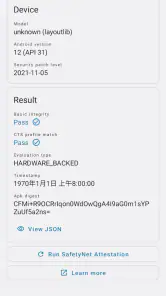
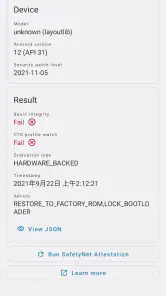
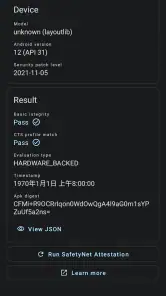
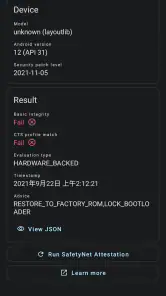
Analysis by Reviewed
I reach for YASNAC - SafetyNet Checker when I need a quick look at whether an Android device passes a particular integrity check, rather than a broad security audit. It is a focused utility from Xingchen & Rikka, and that narrow purpose is also its main limitation: a result can help explain why an app or service has trouble, but it does not tell me that the phone is secure in every sense.
What the free access is worth
The app is free, so there is no purchase decision or paid tier to weigh up before trying it. That makes it a low-commitment tool for someone troubleshooting a device, especially if they only need to run a check occasionally. Its audience is already substantial, with over 500,000 installs and an average rating of 4.6 from around 2,000 ratings; I take that as a sign of interest, not a guarantee that every device or result will be straightforward.
YASNAC sits in the Libraries & Demo area rather than the general antivirus or device-cleaner space. That distinction matters: I would not install it expecting malware scanning, privacy monitoring, or automatic repairs. The app’s value comes from checking SafetyNet attestation, not from replacing the security tools most people use day to day.
Ever wondered if your Android device is truly secure? Well, let me introduce you to YASNAC - SafetyNet Checker, an app that does exactly what its name suggests. As an Android user, security is always a priority, and having a trusty tool to verify that the device's security features are up to par is invaluable.
What is SafetyNet, Anyway?
First things first, let's break down what SafetyNet is all about. Essentially, SafetyNet is a suite of services and APIs provided by Google to protect Android devices from security threats. It checks the integrity of the device and ensures that apps and data remain safe from malicious entities. However, sometimes things can go awry, and that's where YASNAC comes in handy.
Getting Started with YASNAC
Installing YASNAC is a breeze. Just head over to the Google Play Store, search for the app, and hit install. The app interface is refreshingly straightforward, which is a relief considering the technical nature of what it does. Once you fire it up, you're greeted with a simple "Run SafetyNet Attestation" button. Tap it, and the app performs its magic.
A practical way to use that button is as a diagnostic step, not a verdict. For example, if a banking or streaming app stops working after you change your phone’s software setup, running an attestation check can help you see whether device integrity may be relevant. I would note the result before making changes, then test again after one deliberate change at a time. That keeps troubleshooting more useful than changing several settings and guessing which one mattered.
More From Our News Desk

Clash of Clans Is Won Between the Battles

Android Auto Makes the Case for Quieter Car Software

MobiOffice: Transforming Mobile Productivity with Seamless Integration

EA SPORTS FC™ Mobile Soccer: Redefining Mobile Sports Gaming

How Microsoft OneDrive Became a Mobile Productivity Giant

How Google Translate Breaks Language Barriers Effortlessly
How Does It Work?
YASNAC utilizes Google's SafetyNet Attestation API to verify the device's safety status. The app essentially runs a check to ensure that your device hasn't been tampered with or rooted, which could leave it vulnerable to threats. In a matter of seconds, YASNAC provides a detailed report on your device's security status. It's like having a mini security expert right in your pocket!
There is an important distinction here: an attestation result is a snapshot tied to this particular check, not a promise that every app will accept the device or that every risk has been ruled out. If a result looks unexpected, I would avoid treating it as proof that the phone is compromised. It is more useful as a clue to investigate alongside the device’s software state and the requirements of the app that raised the concern.
Why You Need YASNAC
In today's digital age, ensuring your device's security is more crucial than ever. With cyber threats evolving at a rapid pace, having an app like YASNAC gives you that extra layer of peace of mind. Whether you're a tech-savvy individual or just someone who wants to keep their data safe, YASNAC is definitely worth having on your device.
One of the standout features is its ability to provide detailed explanations for the test results. So, if you're not particularly techy, no worries! YASNAC breaks it down in a way that even your grandma would understand. Plus, it's lightweight, so it won't bog down your device.
Compared with searching forum posts or relying on a vague error message from another app, a dedicated checker gives you a more direct place to start. The trade-off is that it answers a narrower question than a full security suite, and interpreting a technical result may still take some context. I find it most useful for people who already have a reason to check attestation, rather than someone who simply wants a general-purpose safety app.
Where the check helps—and where it does not
If you are helping a family member diagnose why a particular app refuses to run, YASNAC can offer a concrete first step without asking them to install a broad suite of tools. I would have them run the check while the problem is happening and keep the displayed outcome available when seeking support. That is more actionable than saying only that “the phone seems fine,” while still leaving room for the app provider’s own rules to differ.
It is not the right choice if you want an app to remove threats, explain every Android security setting, or automatically fix a failed check. Nor would I recommend changing system software solely to chase a passing result unless you understand the consequences. A checker can inform a decision; it cannot make a risky modification safe or substitute for backups and careful research.
Compatibility and sensible expectations
YASNAC is listed for Android 5.0 and later, and its current release is v1.1.5.r65.15110ef310. It is rated for Everyone, though the technical subject is likely to matter more to curious Android users and people troubleshooting app compatibility than to younger users. Since it checks an Android-specific service, it is not an option for iPhone users.
One useful habit is to treat the result as a point-in-time observation and rerun the check only when something relevant changes, such as a software update or a device configuration change. Repeating it without changing anything is unlikely to answer a new question. If you are simply checking whether a favorite app works, testing that app directly remains the practical final step; attestation can add context, but it does not guarantee compatibility.
On a final note, while YASNAC is a fantastic tool for checking your device's security status, it's also essential to keep your device updated and practice safe browsing habits. Remember, security is a multi-layered approach, and YASNAC is just one piece of the puzzle.
My verdict on whether to install it
I would keep YASNAC in mind if I troubleshoot SafetyNet-related compatibility, support another Android user, or want a focused attestation check without paying to try the app. The developer, Xingchen & Rikka, has kept its purpose clear, and the free access makes experimenting with that purpose easy. If you want general protection, automatic repair, or a tool that explains every cause behind an app failure, I would choose a different kind of resource instead.
So, if you haven't already, give YASNAC a try. It's free, efficient, and could very well be the guardian angel your Android device needs!
A useful routine when an app suddenly stops cooperating
I would use the checker as one part of a small troubleshooting routine rather than opening it at random. First, I would write down which app is failing and what it actually does: refusing to launch, showing a warning, or losing a particular function. Then I would run attestation and keep the result alongside that symptom. This gives me two separate observations instead of jumping straight to a conclusion about the phone.
That distinction is useful when contacting an app’s support team or asking for help in an Android community. A concise report that includes the affected app, the timing of the issue, and the checker’s result is more actionable than a general claim that the device is “not secure.” I would still avoid sharing personal account details or unrelated private information when asking for help; the point is to provide enough context to investigate, not to expose more than necessary.
When a second opinion is more useful
If YASNAC returns a result that seems inconsistent with what is happening, I would not keep rerunning the same check in the hope that it changes. I would compare the result with the specific app’s behavior and any explanation that app provides. A service can apply its own compatibility rules, so a check that looks acceptable does not necessarily settle why that service is refusing access. Conversely, one unexpected result is a reason to investigate, not an instruction to reset or modify the device immediately.
This is where YASNAC differs from generic device-health dashboards. Those tools may present broad status indicators that are easy to scan, but they are not necessarily focused on this particular attestation question. A forum thread can offer richer context, yet it may describe a different Android version or setup. I see the checker as a useful first measurement between those extremes: more direct than guesswork, but not a replacement for situation-specific guidance.
Who is likely to get real value
The clearest fit is an Android user who has a concrete reason to check integrity: perhaps a device has been modified, a service has raised a compatibility warning, or the owner is helping someone narrow down a failure. It can also suit technically curious people who want to understand what an attestation check says without installing a full security suite. Because it is free, trying it to answer that focused question does not require weighing a purchase against uncertain benefit.
For an everyday user whose apps are working normally and who simply wants protection from malicious software, I would skip it as a routine installation. It is not a scanner that finds and removes malware, and running an integrity check does not replace sensible updates or careful app choices. The app’s strongest value appears when a specific problem makes its narrow purpose relevant; outside that context, it may offer little that changes your daily decisions.
Limits worth keeping in mind
The app can tell you about the attestation check it performs, but it cannot explain every possible reason an unrelated app behaves badly. Network trouble, an app-side outage, account restrictions, or a service’s own policies can all be separate issues. If the result passes and the original problem remains, I would shift attention to those other causes rather than treating the checker as a universal diagnostic tool.
There is also a practical risk in treating a failed result as a repair target. People can be tempted to make major changes to system software because they want a particular app to work, but a checker does not weigh the safety or convenience of those changes for them. My advice is to understand the change, back up anything important, and use the phone maker or service’s own support guidance when possible. If that feels like more effort than the app problem is worth, a different device or service may simply be the better choice.
Bottom line for a first-time installer
YASNAC is a focused, no-cost option for checking an Android attestation result, not a complete security product. Its practical advantage is that it gives a user and a helper a shared starting point when a compatibility question comes up. Its key limitation is equally clear: the result has to be interpreted in context, and the app does not promise to resolve the issue that prompted the check.
I would install it when I have a real reason to investigate SafetyNet attestation, use it to gather one useful clue, and then decide what to do based on the affected app and device situation. If your goal is broad protection, automated fixes, or a simple reassurance that every part of a phone is safe, choose a tool designed for that instead. For the narrower job it sets out to do, free access makes it easy to try without turning that choice into a purchase commitment.
YASNAC - SafetyNet Checker Frequently Asked Questions
Does YASNAC - SafetyNet Checker work on iPhones or only Android devices?
YASNAC is an Android app, so it is intended for Android devices rather than iPhones or iPads. It checks compatibility with Android’s SafetyNet Attestation API, which makes it relevant to Android users whose apps rely on that check. If you use an iPhone, YASNAC will not provide a way to test that device.
What Android version do I need to install YASNAC - SafetyNet Checker?
YASNAC supports Android 5.0 and newer. Before downloading, check your device’s Android version in its settings and make sure it meets that minimum. The app is listed as version v1.1.5.r65.15110ef310, and it is categorized as a Libraries & Demo app. This should help you decide whether it fits your device and what you want to check.
What is YASNAC - SafetyNet Checker and what does it do?
YASNAC, which stands for Yet Another SafetyNet Attestation Checker, is a tool designed to help Android users verify the integrity and compatibility of their device with Google's SafetyNet Attestation API. This is particularly useful for those who need to ensure that their device meets the security standards required by certain apps, such as banking or streaming services, which rely on SafetyNet for enhanced security.
Is YASNAC - SafetyNet Checker free to use?
Yes, YASNAC is completely free to download and use. There are no hidden charges or premium features that require payment. Users can simply install the app from the Google Play Store and start checking their device’s compatibility with SafetyNet without any cost. This makes it an accessible tool for all Android users looking to enhance their device security.
How do I use YASNAC - SafetyNet Checker on my device?
Using YASNAC is straightforward. After downloading and installing the app from the Google Play Store, open it and tap the 'Run SafetyNet Attestation' button. The app will then perform a check and provide results on whether your device passes the SafetyNet compatibility test. The process is quick, usually taking less than a minute to complete.
Pros
- Accurate SafetyNet results
- User-friendly interface
- No ads
- Open-source project
- Lightweight and fast
Cons
- Limited to SafetyNet check
- No advanced features
- No regular updates
- Requires technical understanding
- No customer support
- Category
- Libraries & Demo
- Version
- v1.1.5.r65.15110ef310











