Key Attestation Demo
- 10.00
- 4.8
- Installs
- 100.00K
- Price
- Free

Screenshots
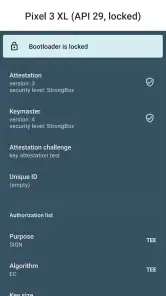
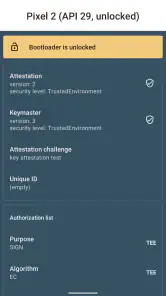
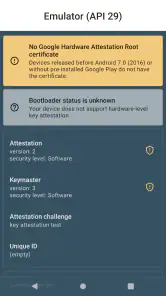
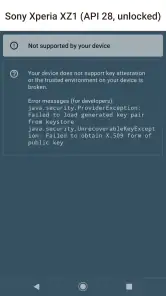
Analysis by Reviewed
I’d describe Key Attestation Demo as a specialist learning tool, not a general-purpose security app. Its appeal is that it gives curious Android users a way to explore a specific part of the system’s cryptographic security rather than asking them to take security claims on trust. I find that focus refreshing, though it also means the app makes most sense when you want to learn how attestation works, not when you’re looking for a practical privacy dashboard or a fix for a security problem.
A focused demonstration, not a security scanner
The distinction matters before you install it. Key attestation concerns whether cryptographic keys can be tied to a trusted environment on a device; a demonstration of that process is useful for understanding the idea, but it isn’t the same as scanning every app, removing malware, or warning you about unsafe browsing. I’d use this app to build a mental model of one Android security mechanism, then turn to the relevant device settings or a purpose-built security product for other concerns.
That narrow scope is also why the app fits the Libraries & Demo category. Xingchen & Rikka made an educational example for people who want to inspect a system capability, and the free price makes it easy to try without treating it as a major commitment. It has a 4.8 average from around 260 ratings and more than 100,000 installs, but I’d read that popularity in context: this is a compact technical utility with a naturally narrower audience than a mainstream phone app.
What the demonstration is useful for
The most practical way I’d use this app is as a small, repeatable teaching aid. Before discussing attestation with a teammate or class, I’d open it and walk through the process together, pausing to separate the idea of a key from the evidence associated with it. That makes an abstract platform capability easier to discuss without pretending that one screen can explain every layer of Android security.
It can also help when you’re comparing how security concepts are presented across devices. The useful question is not simply “did the check pass?” but “what claim does this check support, and what remains outside its scope?” Keeping that question in view turns the app into a prompt for careful investigation instead of a pass-or-fail badge. I would write down any unfamiliar terms as I go, then look them up in Android’s technical documentation rather than treating the demo as the final authority.
There’s a useful trade-off here: hands-on exploration is more memorable than reading a definition, but it can make a complicated process look simpler than it is. For a beginner, that simplification is a good starting point. For someone building a security-sensitive product, it should be the start of a deeper review, not evidence that an implementation is ready to ship.
What is Key Attestation Demo?
The Key Attestation Demo is a fascinating application designed to showcase how Android's key attestation feature works. In simpler terms, it helps verify the authenticity and integrity of cryptographic keys on your device. Now, I know that sounds a bit techie, but bear with me; it's actually quite cool.
More From Our News Desk

Clash of Clans Is Won Between the Battles

Android Auto Makes the Case for Quieter Car Software

MobiOffice: Transforming Mobile Productivity with Seamless Integration

EA SPORTS FC™ Mobile Soccer: Redefining Mobile Sports Gaming

How Microsoft OneDrive Became a Mobile Productivity Giant

How Google Translate Breaks Language Barriers Effortlessly
Exploring the Features
Once you launch the app, you’re greeted with a clean and intuitive interface. The app doesn’t bombard you with technical jargons right off the bat, which is a relief. It guides you step-by-step through the process of generating and verifying keys.
You can easily navigate through different sections to understand how keys are generated, stored, and validated. One feature I found particularly intriguing is how the app demonstrates the attestation process with visual aids. It’s like attending a mini-course on cybersecurity without the snooze-fest of a lecture hall.
Making a short session count
This is not an app I’d expect to open every morning, and that is not a flaw for its intended role. I’d get the most from it in a focused session: choose one concept you want to understand, follow the demonstration, and then explain the process back in your own words. If the explanation feels fuzzy, repeat the flow and note which step raises the question. That approach is more useful than clicking through quickly and remembering only that keys were involved.
A realistic everyday scenario would be a developer asked why an app treats one device as eligible for a sensitive feature and another differently. I’d use the demo to give the team a shared starting point, then check the actual requirements of the product and platform. It can help frame a conversation, but it cannot decide whether a particular service’s policy is justified or whether a device is safe for every purpose.
If you’re using it on an older supported Android device, keep the platform context in mind when drawing conclusions. A result from one phone is an example of that phone’s environment, not a universal description of every Android model. That makes the app handy for learning, but limits how confidently you should generalize from a single demonstration.
Reading the result with care
A useful way to get more from a technical demo is to treat its output as a lesson, not a verdict on your whole phone. If you’re comparing devices or learning about Android’s security model, pay attention to what the attestation process is intended to establish, then ask what that evidence does and does not cover. That habit helps prevent a common mistake: seeing a successful check and assuming every app, account, and file on the device is therefore protected.
For a developer or student, I’d keep a simple note of the concepts that are unclear and use the demonstration as a starting point for further reading or a conversation with a security-minded colleague. For a casual user, the more practical payoff may simply be understanding why some apps care about device integrity. Either way, the best result is a clearer grasp of a mechanism, rather than a new daily routine.
Where it sits among alternatives
In the broader world of Android tools, this sits closer to a technical sample than to a security suite or a general device-information app. A device-information utility may show hardware and software details at a glance, while a security product aims to monitor or respond to broader risks. This demo has a different job: make one system capability tangible. If your goal is a wide inventory of a phone, choose a diagnostic utility; if your goal is protection, choose a tool designed for threat monitoring. If your goal is to understand attestation itself, this focused example is the more relevant place to start.
That comparison also explains why its small scope can be a strength for a learner. A broad dashboard can bury one technical topic among dozens of unrelated readouts. Here, the subject stays central, so you can keep a discussion focused. The trade-off is that anyone expecting a full course, a troubleshooting guide, or a comprehensive security assessment will need other resources alongside it.
User Experience
Now, let’s talk about usability. The app is user-friendly, even for those who aren’t tech-savvy. It doesn’t require any special permissions, which is a huge plus in my book. You can explore the app’s functionalities without worrying about your personal data being at risk.
The developers have done an excellent job of ensuring that the app runs smoothly. I didn’t experience any crashes or bugs, which is always a good sign. Plus, it’s lightweight, so it doesn’t hog your device’s resources.
Small practical limits
The main friction is conceptual rather than operational: “attestation” can sound like a sweeping guarantee when it is evidence about a specific security property. I’d be cautious about repeating a result without explaining that boundary, especially in a team discussion where a simple green light could be misunderstood. The app is easier to approach than a dense technical paper, but it cannot remove the need to interpret what the mechanism is meant to prove.
It is also a specialist tool, so its value depends on what you bring to it. Someone who has never wondered about keys, device integrity, or Android’s security architecture may finish a session and still have no reason to return. That is a fair limitation, not a reason to dress it up as a daily utility. I would install it for a specific learning question, rather than expecting it to become part of my regular phone setup.
Who will get the most out of it?
I’d recommend it most to Android developers, security students, and technically curious owners who want a hands-on introduction to attestation. It can also help someone evaluating how a device handles a particular security concept, provided they understand that a demo is not a complete independent audit. The app is rated for Everyone, runs on Android 7.0 or later, and its current version is 1.5.0, so it suits people using a range of Android devices that meet that requirement.
Imagine a developer is explaining to a teammate why an app might check whether a cryptographic key is backed by a trusted part of a phone. Rather than relying only on a diagram, they can open this demo and use its flow to make the idea more concrete. That is a modest but genuinely useful classroom or desk-side scenario: it gives people a shared example to discuss, while leaving room to verify technical details against the Android documentation.
On the other hand, I’d suggest skipping it if you want an antivirus replacement, a one-tap privacy checkup, or a tool that makes security decisions for you. A broad mobile security suite is a better fit for routine threat monitoring, while Android’s built-in settings are the sensible place to review everyday protections. Compared with typical demo apps, this one is valuable because it focuses on a real platform feature; compared with consumer security apps, it is intentionally far less comprehensive.
Getting started without overreading it
If you decide to try it, I’d go in with one concrete question, such as what kind of assurance key attestation is intended to provide. Follow the demonstration slowly and distinguish the mechanics from the conclusions you might draw from them. This is a useful way to avoid treating a technical output as a personal security score, especially if you are sharing what you learned with someone who has not seen the process.
For a class or informal workshop, I’d pair the app with a short discussion rather than simply passing a phone around. Ask what the demonstration illustrates, what assumptions a relying app might make, and why those assumptions need to be checked in context. That turns a brief app session into a more useful learning exercise without claiming that the demo itself answers every implementation question.
Why Should You Try It?
If you’re curious about how Android keeps your data safe, or if you’re just a tech enthusiast like me, this app is definitely worth a try. It’s not just for developers or cybersecurity experts; anyone with a smartphone can appreciate the insights it offers.
The app provides a hands-on experience about a subject that’s often overlooked but incredibly important in today’s digital age. By understanding how key attestation works, you’re better equipped to appreciate the security features of your device.
In conclusion, the Key Attestation Demo is more than just an educational tool. It’s a window into the world of mobile security. Whether you’re a novice or a seasoned pro in the tech world, this app is a fantastic resource. So, go ahead, give it a download, and dive into the fascinating world of key attestation!
My verdict
My recommendation comes with a clear boundary: install it when you’re curious about Android key attestation, not because you expect it to secure the whole phone. That focused purpose is both its strongest point and its main limitation. If you like learning by seeing a system concept demonstrated, the free app is an approachable place to begin; if you need ongoing protection or a broad explanation of mobile security, choose a tool built for that job instead.
Key Attestation Demo Frequently Asked Questions
Who develops Key Attestation Demo, and is it free to download?
Key Attestation Demo is developed by Xingchen & Rikka and is free to download. It is a focused Android app in the Libraries & Demo category, intended to demonstrate the system’s Key Attestation feature rather than serve as a general-purpose security or device-management tool. If you are looking for an introduction to this specific Android capability, its focused purpose may make it a useful app to try.
Which Android devices can run Key Attestation Demo?
The app requires Android 7.0 or later. Whether the demonstration can make use of hardware-backed key storage depends on the Android device and its available security capabilities, so the experience may differ between devices. Check that your device meets the minimum Android requirement before downloading, and keep in mind that the app is meant to demonstrate a system feature rather than provide the same experience on every phone or tablet.
What is Key Attestation Demo and what does it do?
Key Attestation Demo is an application designed to demonstrate the key attestation feature available in modern Android devices. This feature allows applications to verify the security of cryptographic keys stored in the device's hardware-backed keystore. By using this app, developers and security enthusiasts can better understand how key attestation works and how it can be used to enhance the security of their applications.
How secure is Key Attestation Demo?
Key Attestation Demo leverages the security features of Android's hardware-backed keystore, which is designed to protect cryptographic keys from unauthorized access. The app itself does not store any sensitive information but rather demonstrates the security mechanisms available on the device. Users should always ensure their devices are updated with the latest security patches to maximize security.
Do I need any special permissions to use Key Attestation Demo?
Key Attestation Demo requires minimal permissions to operate. It primarily needs access to the device's keystore functionalities to demonstrate the key attestation process. Users do not need to worry about granting sensitive permissions like access to contacts or location, making it a low-risk application to install and use.
Pros
- Enhances app security significantly.
- Supports multiple Android versions.
- Easy integration with existing apps.
- Provides detailed attestation reports.
- Improves user trust and confidence.
Cons
- Limited to newer Android devices.
- Requires internet for full functionality.
- Complex setup for beginners.
- Limited documentation available.
- Not suitable for all app types.
- Category
- Libraries & Demo
- Version
- 1.5.0











