

Yard Mastery: Lawn Care App
- 456.00
- 4.5
- Installs
- 100.00K
- Price
- Free

Screenshots
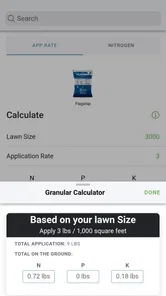
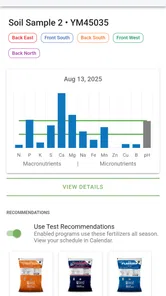
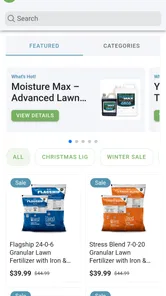
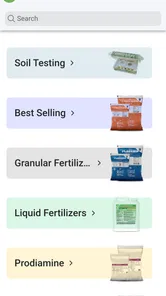
Analysis by Reviewed
I tend to be skeptical of lawn-care apps because many of them turn a simple seasonal routine into a maze of reminders, product names, and vague advice. Yard Mastery: Lawn Care App takes a more practical route. It is designed for people who want to plan their own lawn work, keep track of fertilizer, and use soil-test information instead of guessing every time the grass looks tired. After spending time with it, I see it as a useful companion for a homeowner who enjoys doing the work personally, but not as a magic solution for every type of yard problem.
The app comes from Yard Mastery, Inc. and sits in the House & Home category. It is free to use and rated for Everyone, which makes it approachable for a household where more than one person may be involved in yard maintenance. Its overall rating is a 4.5 average from around 2.3 thousand ratings, and it has passed the 100 thousand install mark. Those figures suggest that it has found a real audience among do-it-yourself lawn owners, although popularity alone does not replace understanding whether its planning style matches your yard.
How the app feels during ordinary lawn planning
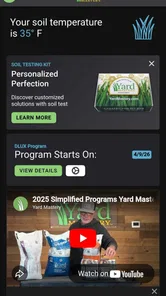
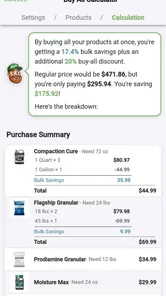
The first thing I noticed is that the app is more useful when I treat it as a planning notebook with guidance rather than as a one-tap lawn diagnosis tool. The central idea is to connect a personalized care schedule with soil testing and fertilizer tracking. That combination matters because lawn maintenance is rarely about one isolated action. A fertilizer application affects what I do next, soil information changes how I interpret weak growth, and timing can matter as much as the product itself.
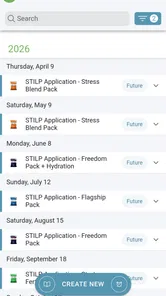
In normal use, the app should feel reasonably direct for someone who already knows the basic shape of their lawn routine. I can imagine opening it before a weekend outside, checking what needs attention, reviewing what was applied previously, and deciding whether the next task is worth doing now or waiting for better conditions. That is a much better workflow than searching through old receipts or trying to remember whether a treatment happened last month.
I would not expect every screen to feel instant on every phone, especially when moving between schedule details, test information, and tracking records. The app’s value is not based on animation or visual effects, so a brief pause would not undermine the experience in the way it might in a game. What matters more is whether the information remains organized when I return to it repeatedly. For this kind of tool, clarity over flashy speed is the performance standard I would use.
The current version is 4.00.05, and the app supports devices running Android 7.0 or later. That gives it a fairly broad reach, but an older compatible phone may not feel as responsive as a newer one. I would also avoid judging the app during a rushed moment when I am carrying tools, wearing gloves, or standing in direct sun. Lawn apps work best when I enter information deliberately, not when I try to operate them like a quick calculator between tasks.
A realistic weekend workflow
Here is where I think the app fits naturally. Imagine I notice thin patches near the driveway on Saturday morning. Instead of immediately spreading more fertilizer, I can use the app to review my recent lawn activity and consider whether a soil test is the sensible next step. If I have already logged an application, that record can prevent an accidental repeat. I can then plan the next action around the schedule rather than reacting to the appearance of the grass alone.
More From Our News Desk

 Instagram
Instagram’s Power Comes From Its Place in Your Phone
A close look at how Instagram turns Meta’s reach, recommendation systems and everyday camera habits into durable platform power—and what that costs users.

 Gmail
GmailGmail in a Busy Inbox: Who Benefits Most?
From first account to crowded workday, Gmail earns its place through dependable search and flexible sorting—but its best fit depends on how much inbox maintenance you can tolerate.

 Prime Video
Switching to Prime Video: What Changes in Your Viewing Routine
Prime Video can make a compelling second home for streaming, but switching means learning a different catalog, rental layer, and route from browsing to playback.

 Universal TV Remote Control
Universal TV Remote Control Works Best as a Reliable Backup
A phone remote earns its place through quick setup and reliable habits. Here is how to get more from Universal TV Remote Control—and where its limits show.

 Weather - By Xiaomi
Weather by Xiaomi Review: Clear at a Glance, Less Clear Up Close
Xiaomi’s weather app makes everyday forecasts quick to scan, but its calm surface can leave useful details and recovery paths harder to find than they should be.

 X
XX Under Pressure: Can It Recover When Posting Goes Wrong?
A resilience-focused review of X, examining setup, mistaken posts, interruptions, weak connections, and the gaps that matter when recovery needs to be dependable.
Latest News



That workflow is more valuable than it sounds. Homeowners often remember the broad plan but forget the exact timing, especially when weather interrupts outdoor work. A tracking tool creates a small amount of discipline. I still have to inspect the lawn, read product instructions, and make the final decision, but the app reduces the mental load of remembering what happened before.
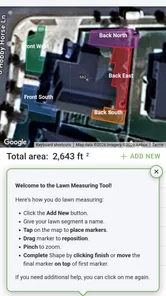
For a larger property, I would divide my attention into practical zones before entering anything. The front lawn, backyard, shaded side area, and problem patches may not behave alike. A single schedule can be misleading if I apply it blindly everywhere. The app is most helpful when I use its information as a framework and keep local differences in mind. That is one of the important trade-offs: personalization can organize a routine, but it does not eliminate the need for observation.
What happens when the app is used heavily
The demanding moments are not likely to be gaming-style bursts of activity. They are periods when I am entering several records, reviewing soil information, adjusting a schedule, and checking past applications in one sitting. A person starting mid-season may have more setup work than someone who begins with a clean, simple routine. The app’s usefulness grows with accurate history, but building that history takes patience.
I would approach the first session in stages rather than trying to document the entire yard at once. First, I would establish the lawn details and schedule. Next, I would add the most recent fertilizer information while it is still easy to verify. Only after that would I refine the routine with soil-test results. This sequence reduces the chance of entering rushed or contradictory information, and it also makes any later troubleshooting easier.
Resource demands should be modest in the context of what the app does. It is a planning and tracking utility, not a media-heavy service, so I would not expect it to place the same demand on storage, battery, or graphics hardware as a video or game app. Still, older devices can struggle with any modern application if storage is nearly full or the operating system is under pressure. Keeping the phone in reasonable condition will matter more than having a high-end model.
There is also a human version of “heavy use” to consider. If I am trying to record every detail while moving quickly around the yard, the friction comes from data entry rather than processing power. My practical tip is to make one short note after each meaningful task instead of postponing everything until the end of the season. That creates a more dependable record and avoids the common problem of confusing one treatment with another.
Reliability depends on the quality of the record
I see reliability here in two layers. The first is whether the app consistently preserves and presents my schedule and tracking information. The second is whether the advice remains useful when my inputs are incomplete or my lawn does not match a standard pattern. The first layer is what an app can handle directly; the second still depends heavily on how carefully I use it.
A schedule is only as trustworthy as its starting assumptions. If I enter the wrong lawn details, forget a previous application, or treat the front and back areas as identical when they are not, the resulting plan can give me false confidence. That is not necessarily a flaw in the software, but it is a reason to review the setup instead of following every suggestion automatically.
Soil testing is one of the app’s stronger ideas because it encourages evidence-based decisions. However, a test result is not a complete diagnosis of every lawn issue. Drainage, shade, foot traffic, mowing height, pests, and watering habits can all affect appearance. I would use the app to connect test information with a care plan, not to assume that one number explains every brown or thin patch.
Another useful habit is to treat fertilizer tracking as a safety check for my own memory. If I am unsure whether an application happened, I would rather pause and verify the record than make a duplicate decision based on a vague recollection. This is a non-obvious strength: the log is not only a history for later reference; it can also stop an impulsive response when the lawn looks worse than expected.
Recovery after interruptions and missed tasks
Outdoor routines rarely run perfectly. Rain, travel, illness, equipment problems, or a busy week can push a planned task aside. I would not try to “catch up” by compressing several treatments into a short period. Instead, I would reopen the schedule, check the last recorded action, and rebuild the next step from what actually happened. That is where a tracking app can be more useful than a paper calendar, because the history is easier to consult and adjust.
If I stop using the app for a while, the best recovery method is to enter only information I can establish confidently. I would not invent dates or fill gaps with guesses just to make the record look complete. A clean restart with a note about the current situation is more useful than a detailed but unreliable history. This approach also makes the app less intimidating for someone who discovers it after already owning a lawn-care routine.
My confidence would be higher if I used a simple backup habit outside the app, such as keeping product labels and test results together until the corresponding records are entered. That is not a criticism of this particular tool; it is sensible practice for any tracker that influences real-world maintenance. The app can organize the information, but it should not be the only place where important instructions exist.
Older phones, outdoor conditions, and practical constraints
The Android requirement of 7.0 or later means the app is not restricted to only recent devices. That is helpful for people who keep an older phone as their yard-work device. At the same time, compatibility does not guarantee a modern feel on every supported handset. A phone with limited free storage, an aging battery, or a slow connection may make ordinary navigation feel less comfortable.
I would also think about the physical environment. A phone used in the yard is exposed to glare, dirt, moisture, and hurried handling. Even a well-designed screen becomes less convenient when I am wearing gloves or trying to keep the device away from wet grass. My preferred approach would be to review the plan indoors, then use the phone outside only for short checks and quick record updates.
This is also an app where screen size can influence the experience. A compact phone is perfectly adequate for checking one task, but entering several details may feel cramped. A larger display makes it easier to compare information and avoid tapping the wrong field. People who dislike typing on a phone may prefer to make a brief paper note during the work and enter it afterward in one calm session.
Because the app is free, the barrier to trying this workflow is low. That does not mean it will suit every homeowner. Someone who hires a lawn service and never handles scheduling or fertilizer decisions may gain little from maintaining a detailed personal log. Likewise, a person with a tiny patch of grass and an uncomplicated routine may find a basic calendar sufficient.
Where it beats ordinary alternatives—and where it does not
The usual alternative is a paper calendar, a notes app, or a collection of reminders. Those options are flexible and familiar, but they often separate the schedule from the reason behind it. I might remember that I applied something without remembering why, what the soil test indicated, or when I intended to reassess the result. Yard Mastery brings those lawn-specific pieces closer together, which makes it more suitable for a continuing care routine.
A generic task manager can still be better for households managing many kinds of chores. If I want shared shopping lists, equipment maintenance, home repairs, and lawn work in one place, a general productivity app may be more convenient. The trade-off is that it will not be built around soil testing and fertilizer history. This app earns its place when lawn care is important enough to deserve its own focused system.
It also should not replace professional help when the problem is severe, spreading quickly, or difficult to identify. A schedule can help me become more consistent, but it cannot inspect roots, diagnose every disease, or account for unusual local conditions on its own. I would choose a specialist over the app when the lawn is deteriorating despite sensible care or when I am unsure whether treatment could cause harm.
One of my favorite practical uses is comparing the plan with what I see over time. Instead of judging success the day after an application, I can look at the lawn across several maintenance cycles and notice whether the same area repeatedly underperforms. That encourages better questions: Is the issue limited to shade? Does traffic explain it? Is watering uneven? The app becomes more valuable when it helps me observe patterns rather than chase instant results.
My performance verdict for DIY lawn owners
Yard Mastery: Lawn Care App is a focused House & Home tool for people who want a more deliberate lawn routine. Its strongest contribution is the connection between scheduling, soil information, and fertilizer records. I would recommend it to a homeowner who regularly handles yard work, forgets treatment timing, or wants to move away from guesswork without building a complicated spreadsheet.
From a performance perspective, I would expect a relatively light workload compared with visually intensive apps, with the main friction appearing during setup and detailed record entry rather than during everyday checks. The Android 7.0 minimum makes it accessible to many older phones, though an aging device may still make navigation less pleasant. Stability matters here because the app is meant to become a dependable reference, so I would keep my records tidy and maintain a simple backup habit for important product and test information.
The app is not the right choice for someone seeking an automatic diagnosis, a complete replacement for professional lawn advice, or a universal schedule that can be followed without looking at local conditions. It also may feel like unnecessary work for a very small or low-maintenance yard. But for a DIY owner who wants to know what was done, what should happen next, and how soil information fits into the plan, it offers a sensible structure.
My final impression is positive because the app addresses the part of lawn care that is easiest to neglect: consistency. It does not remove the need to think, inspect, and adapt, and that is actually a strength in my view. Used carefully, Yard Mastery: Lawn Care App can turn scattered lawn tasks into a record I can understand and improve over time. For a free tool from Yard Mastery, Inc., that makes it worth trying—especially if my current system is a fading memory of what I did last weekend.
Yard Mastery: Lawn Care App Frequently Asked Questions
Does Yard Mastery work on older Android devices?
Yard Mastery: Lawn Care App supports Android devices running version 7.0 or later. Before downloading, check your device’s operating system version and make sure you have enough available storage for the app. If your device meets those requirements, you can use the app to organize lawn-care tasks and explore its planning tools.
Who develops Yard Mastery: Lawn Care App, and is it suitable for the whole family?
The app is developed by Yard Mastery, Inc. and is rated for everyone, making it suitable for a broad audience interested in home and lawn care. Its focus is practical yard maintenance, so it can be useful for homeowners and DIY lawn enthusiasts. As with any lawn-care guidance, follow product instructions and supervise children around tools or treatments.
What is Yard Mastery: Lawn Care App used for?
Yard Mastery: Lawn Care App is designed to help homeowners plan and improve their lawn-care routine. It provides guidance on fertilizing, weed control, watering, mowing, and seasonal maintenance. The app is especially useful for people who want a more structured approach to lawn care instead of guessing which products to use or when to apply them.
Is Yard Mastery suitable for beginners in lawn care?
Yes, the app is suitable for beginners because it presents lawn-care tasks in a more organized and accessible way. Users can learn about common maintenance practices, product timing, and lawn improvement strategies without needing advanced horticultural knowledge. However, recommendations may still require adjustment based on grass type, local climate, soil conditions, and the specific problems affecting your yard.
Does the app provide personalized lawn-care recommendations?
Yard Mastery can offer guidance based on information such as your location, lawn conditions, grass type, and the goals you want to achieve. This makes the advice more practical than using a generic calendar. Nevertheless, the recommendations should be treated as helpful guidance rather than a guaranteed diagnosis, particularly when dealing with serious pests, diseases, drainage issues, or unusual soil conditions.
Pros
- Personalized lawn-care plans make seasonal tasks easier to organize.
- Useful reminders help prevent missed mowing
- watering
- and treatment schedules.
- Covers common grass types
- weeds
- fertilizers
- and lawn maintenance topics.
- Step-by-step guidance is helpful for beginners managing a lawn.
- Progress tracking can make long-term lawn improvements easier to monitor.
Cons
- Some advanced advice or content may require a paid subscription.
- Recommendations may be less accurate for unusual climates or grass varieties.
- The app can feel overwhelming for users seeking only basic lawn tips.
- Treatment suggestions may require identifying grass and weed types correctly.
- Regular notifications may become repetitive if your lawn needs little maintenance.







