

XME LOOPS
- 245.00
- 4.5
- Installs
- 50.00K
- Price
- Free

Screenshots
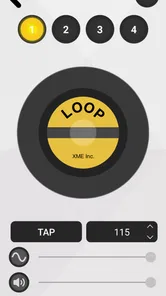
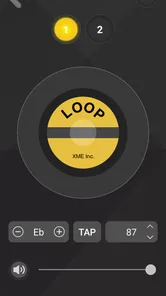
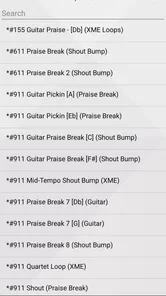
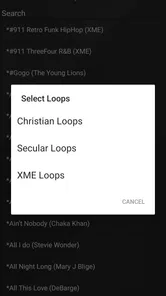

Analysis by Reviewed
I found XME LOOPS most useful as a focused source of musical building blocks rather than as a complete music-making studio. It belongs to the Music & Audio category, is made by XME Inc., and takes a simple idea seriously: give you access to loops that can help turn a blank project into something with rhythm, texture, and direction. That narrow purpose is also its biggest strength. You are not opening it to replace a full digital audio workstation; you are opening it when you need inspiration or a usable starting point.
After spending time with it, my overall view is positive, but conditional. The app makes the most sense for people who already understand what they want to do with loops, whether that means sketching a beat, finding a backing layer, experimenting with a vocal idea, or adding movement to a personal video project. Beginners can still enjoy it, although they may need another app to arrange, record, edit, and finish the result. Its value depends less on replacing your music tools and more on how well it fits into the rest of your creative workflow.
What using XME LOOPS feels like in practice
The first thing I noticed is that the app’s appeal is immediate. A loop is easier to use than an empty timeline because it gives you a pulse or a musical mood before you have made any decisions of your own. That can be especially helpful when I am trying to start a project after a long day and do not want to build every sound from scratch. Instead of searching through instruments for an hour, I can begin with a repeating idea and decide whether it deserves to become something larger.
This makes the app a practical companion for quick sketches. I can imagine using it during a commute, between classes, or during a short break when a melody arrives but I do not have time to produce a full track. The important distinction is that the app is most valuable at the beginning of a project. It helps me get past silence. The later work—arranging sections, balancing sounds, recording a finished performance, and polishing a mix—belongs elsewhere unless my wider setup provides those tools.
The subscription message is straightforward: the service is presented as costing ten dollars per month for unlimited loops, with additional loops added without an extra charge. That arrangement may suit someone who uses new material frequently, because the appeal is not buying one isolated sound and stopping there. At the same time, I would think carefully before committing if I only need a few loops for one small project. The recurring cost matters more for occasional users than for someone who opens the app every week.
There are also in-app purchases listed from $9.99 to $109.99 per item. I would not treat those figures as a reason to dismiss the app, but I would pay close attention to what is being offered before confirming a purchase. For a loop library, the practical question is not simply how much content exists. It is whether the material matches the styles, tempos, and moods I actually use. A large collection can still feel limited if its character does not fit my projects.
Why the loop-first approach works
Loops are useful because they reduce the number of decisions needed at the start. A drum pattern can suggest a tempo. A bass phrase can point toward a chord progression. A texture can tell me whether a track should feel warm, tense, bright, or spacious. That chain reaction is where I see the strongest creative benefit. XME LOOPS is not just a storage shelf; it can act as a prompt when I am stuck.
More From Our News Desk

 Gmail
GmailGmail in a Busy Inbox: Who Benefits Most?
From first account to crowded workday, Gmail earns its place through dependable search and flexible sorting—but its best fit depends on how much inbox maintenance you can tolerate.

 Prime Video
Switching to Prime Video: What Changes in Your Viewing Routine
Prime Video can make a compelling second home for streaming, but switching means learning a different catalog, rental layer, and route from browsing to playback.

 Universal TV Remote Control
Universal TV Remote Control Works Best as a Reliable Backup
A phone remote earns its place through quick setup and reliable habits. Here is how to get more from Universal TV Remote Control—and where its limits show.

 Weather - By Xiaomi
Weather by Xiaomi Review: Clear at a Glance, Less Clear Up Close
Xiaomi’s weather app makes everyday forecasts quick to scan, but its calm surface can leave useful details and recovery paths harder to find than they should be.

 X
XX Under Pressure: Can It Recover When Posting Goes Wrong?
A resilience-focused review of X, examining setup, mistaken posts, interruptions, weak connections, and the gaps that matter when recovery needs to be dependable.

 Clash of Clans
Clash of Clans Is Won Between the Battles
Its raids are quick; its community is a long-term project of coordination, teaching, rivalry, and shared responsibility—with all the friction that entails.
Latest News



One of my preferred ways to use a loop library is to choose a sound for its atmosphere before worrying about its exact genre. I might begin with something that feels too sparse or too strange for the original idea, then build around it. This approach prevents the app from becoming a place where I select the safest, most obvious option every time. The more I treat the loops as starting points rather than finished answers, the more useful the experience becomes.
Another practical technique is to keep the first selection deliberately small. I would choose one rhythmic element and one contrasting musical layer, then test whether they leave room for my own contribution. Adding too many loops at once can make a sketch feel complete before I have made any meaningful decisions. It also makes it harder to identify which part is creating the energy and which part is simply filling space.
That is a non-obvious advantage of working with a dedicated loop app: it can encourage restraint. Instead of collecting sounds endlessly, I can use the library as a limited palette. A short idea with two well-matched parts is often easier to develop than a crowded arrangement assembled from every appealing option.
A realistic everyday workflow
Imagine I have a short vocal melody recorded on my phone. I do not yet know whether it belongs in a pop sketch, a relaxed electronic track, or something more atmospheric. I could open XME LOOPS, look for a rhythm that supports the natural phrasing of the melody, and then try a second loop that gives the idea a little harmonic color. The goal would not be to finish the song inside this app. The goal would be to discover which direction makes the vocal sound most convincing.
Once I find that direction, I can move the idea into my usual recording or production app and continue there. This is where the product fits naturally: it helps me make an early creative decision, while another tool handles the detailed work. If I were producing a complete track from the first beat to the final export, I would want to confirm that my preferred workstation can accept the kind of material I plan to use and that my workflow does not become awkward when moving between apps.
For video creators, the same process could work with a short clip. I might use a loop to test whether a scene needs a calm bed, a more active pulse, or a sharper transition. The app can help me think musically even when the final project is not a song. That said, I would still expect to perform the final timing and editing in a video or audio editor designed for that job.
For a songwriter, the benefit is different. A loop can provide enough movement to reveal whether a lyric has the right emotional weight. I can sing over it, notice where the words fight the rhythm, and revise the phrasing before spending time on a polished arrangement. In this role, XME LOOPS is closer to a rehearsal partner than a finished production environment.
The details that matter before choosing it
The app is free to install, which makes it easy to test whether its approach suits me before spending money. It is rated for Everyone, so its presentation is intended for a broad audience rather than a narrowly defined professional group. The current version is 2.0.8 and it supports Android starting with version 6.0, a useful point to check before installing on an older device.
Its public reception is encouraging without being a substitute for personal testing. XME LOOPS has an average rating of 4.5 from around 994 ratings, along with around 245 written reviews, and it has passed 50 thousand installs. I read those figures as signs that the app has found a real audience, but not as proof that every user will prefer its workflow. Loop selection is subjective, and the right library for one producer may be the wrong one for another.
I would also approach the word “unlimited” carefully. Unlimited access can be valuable, but only if I can quickly identify sounds that fit my projects. If browsing becomes the main activity, the promise of more material may work against productivity. My advice is to decide on a purpose before opening the library: a drum foundation, a transition, a background texture, or a mood for a vocal. That small bit of preparation keeps the session focused.
Where the experience becomes less convincing
The main weakness is not that the app focuses on loops; it is that loops can create a false sense of progress. A repeating pattern may sound exciting for a minute, but it does not automatically provide a song structure or a personal identity. If I rely too heavily on ready-made material, my project can begin to resemble a collage of attractive fragments rather than an intentional composition.
That issue is especially important for musicians who want complete control over every note. A person who enjoys designing drum sounds, writing detailed parts, or shaping a track from an empty session may find a loop-first library restrictive. In that case, a full digital audio workstation with instruments and editing tools would be a better primary choice. XME LOOPS can still provide inspiration, but it would not replace the deeper control that those users are looking for.
The payment model may also create hesitation. A monthly plan is easier to justify when I use the app as a regular source of ideas, but less attractive when I am working on one short project. The presence of individual in-app items across a broad price range means I would want to understand the purchase path clearly and avoid buying impulsively. The free entry point helps, yet the app’s long-term value depends on how often I return to it.
There is a creative limitation too: a loop can dictate the character of a track before I have decided what I want to say. If I start with a polished-sounding pattern, I may unconsciously adapt my melody, lyrics, or arrangement to it. Sometimes that is exactly what I need. Other times it makes the music feel less personal. I get better results when I occasionally reverse the process—write a rough idea first, then use the app to support it rather than letting the library lead every decision.
I would also avoid judging the app by how quickly it produces an impressive first impression. A loop that sounds good alone may clash with a vocal, occupy too much frequency space, or become tiring after repeated playback. My practical test is to listen to the selected material under the part I actually care about. If the vocal disappears or the central melody loses its shape, the loop is not helping, no matter how attractive it sounded during browsing.
Who will get the most from it
I would recommend XME LOOPS to an aspiring producer who wants a low-friction way to begin making ideas. It can be useful when technical knowledge is still developing because the first creative step does not require building every element manually. It is also a good fit for songwriters who need accompaniment while testing melodies, and for experienced producers who want a fast source of raw material rather than another complex workstation.
It may work well for creators who make short-form content and need musical starting points for different moods. The key is to treat the loops as ingredients and then finish the timing, structure, and mix in the tool that already handles those tasks. I would particularly suggest it to someone who often says, “I have an idea, but I do not know how to start.” The app’s strongest contribution is getting a project moving.
I would be more cautious about recommending it to a person who wants a single app for recording instruments, editing detailed arrangements, mixing, and completing releases. That is not the role I would assign to this product. I would also suggest skipping it if you rarely make music or only need one very specific sound for a one-off task. In that situation, a one-time purchase or a smaller free library may be more sensible than maintaining access to a broad loop service.
There is a useful middle ground for people who already own a favorite music app. They do not need to abandon it. Instead, they can use XME LOOPS during the idea stage, audition a few contrasting directions, and then continue in their established setup. This makes the app easier to evaluate because its success can be measured by whether it improves the first fifteen minutes of a project, not by whether it performs every later production task.
My verdict after weighing the trade-offs
My final opinion is that XME LOOPS is a focused and approachable tool with a clear creative purpose. I like it most when I use it to break through a blank page, test a mood, or give a rough melody enough rhythm to reveal its potential. The free installation lowers the risk of trying it, while the unlimited-loop subscription may be worthwhile for regular users who genuinely explore new material often.
Still, I would not recommend paying simply because the library is large or because unlimited access sounds reassuring. I would first test whether the available material fits my taste and whether I can move from browsing to making quickly. I would also decide in advance whether I need a recurring source of ideas or only a small amount of content for one project. That distinction will determine whether the pricing feels practical or excessive.
For me, the clearest way to describe the app is this: it is a creative launchpad, not the whole airport. It can get a song, video, or vocal sketch into motion, but I still need another destination for detailed editing and finishing. If that division of labor matches your habits, XME LOOPS is worth exploring. If you want complete control from the first note to the final mix inside one environment, I would choose a fuller music-production alternative instead.
My recommendation is for curious beginners, active songwriters, and producers who value speed over building every sound from zero. Used with that expectation, XME LOOPS can make the early part of creating feel less intimidating and more playful. Used as a supposed replacement for a complete studio, it is likely to disappoint. That honest boundary is what makes the app easy to recommend to the right person, even though it is not the right tool for everyone.
XME LOOPS Frequently Asked Questions
Who makes XME LOOPS, and what kind of app is it?
XME LOOPS is a Music & Audio app developed by XME Inc. It is built around creating and working with musical loops, making it a practical option for people who want to explore beat-making and layered musical ideas on a mobile device. It is free to download, with a 4.5 average rating from around 994 ratings.
What is XME LOOPS and what can you do with it?
XME LOOPS is a music-focused application designed for creating, arranging, and experimenting with loop-based compositions. It is intended for users who enjoy building beats, melodies, and layered musical ideas without needing a full professional studio setup. After exploring its workflow, the app feels most suitable for quick sketches, beat-making practice, and creative experimentation on a mobile device.
Is XME LOOPS suitable for beginners without music production experience?
Yes, XME LOOPS can be approachable for beginners because loop-based creation generally allows users to start making music without understanding advanced recording or mixing techniques. You can experiment by combining available sounds and repeating sections, then gradually learn how timing, layering, and arrangement work. However, users seeking detailed tutorials or advanced production controls may need additional learning resources.
Does XME LOOPS work offline, or does it require an internet connection?
The need for an internet connection may depend on the specific feature you are using. Basic creation tools and previously downloaded content may work offline, while downloading sound packs, synchronizing projects, receiving updates, or accessing online features can require connectivity. Before relying on the app during travel or in areas with limited service, it is recommended to test the main functions offline.
Is XME LOOPS free to download, and are there in-app purchases?
XME LOOPS is free to download, but it offers in-app purchases priced from $9.99 to $109.99 per item. Its store summary describes an option costing 10 dollars per month for unlimited loops, with more loops added at no additional charge. Review the purchase choices before committing so you can decide whether the free app or a paid option suits your needs.
Pros
- Simple interface makes loop creation quick for beginners.
- Works well for building layered beats and short musical ideas.
- Loop-based workflow encourages fast experimentation.
- Useful for practicing timing
- rhythm
- and basic arrangement.
- Compact format makes it convenient for casual music making.
Cons
- Advanced producers may find the editing tools too limited.
- Loop variety may feel restricted without additional content.
- Small-screen editing can be awkward on some phones.
- Export and sharing options may not meet professional needs.
- Longer compositions can become repetitive without careful arrangement.













