

Worship Backing Tracks
- 129.00
- 4.7
- Installs
- 100.00K
- Price
- Free

Screenshots
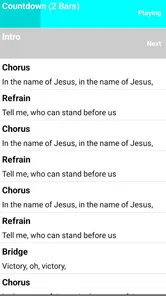
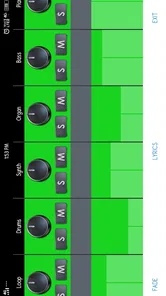
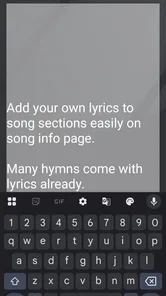

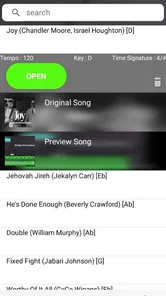
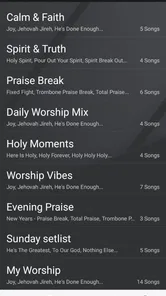
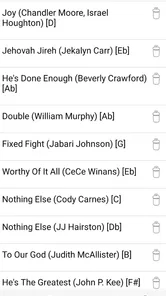
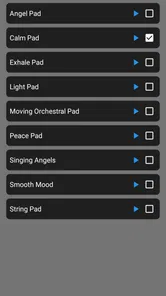
Analysis by Reviewed
I approached Worship Backing Tracks as a practical music and audio tool rather than something to browse casually. Its purpose is straightforward: it gives worship musicians access to gospel backing tracks that can support singing, rehearsal, personal devotion, or a fuller live arrangement. In my experience, that focused purpose is its biggest strength. You are not opening it for a broad streaming catalog or a social feed; you are looking for musical support that can sit behind a vocalist, band, or worship leader.
The app comes from XME Inc. and is available free of charge, which makes it easy to try before deciding whether it belongs in your regular setup. It is rated for Everyone, runs on Android starting with version 6.0, and has reached over one hundred thousand installs. Those details make it approachable for many users, including people working with older phones rather than the newest hardware.
Its average rating of 4.7 from around one and a half thousand ratings suggests that the basic idea works well for a substantial group of users. I would still treat that rating as a starting point, not a guarantee that every church, singer, or rehearsal style will find the same value. A backing-track app succeeds or fails according to the exact songs, arrangements, controls, and performance habits a person needs.
How the app feels to read and navigate
The first thing I value in a worship tool is whether I can get to the music without mental clutter. A musician preparing for a service may already be checking a set list, lyrics, instrument settings, and timing. An app that adds unnecessary searching or confusing menus quickly becomes a problem. Worship Backing Tracks benefits from having a narrow purpose, because the user journey is easier to understand than in a general music service.
The short description, “Worship Backing Tracks,” tells you exactly what kind of tool this is. The longer store summary points toward gospel multi-tracks intended to enhance worship sound. That clarity matters for people who are not comfortable experimenting with unfamiliar audio software. You can approach the app with a clear question: does it contain the kind of backing support I need?
For readability, I would use the app on a phone with the display set to a comfortable text size and brightness before a rehearsal begins. This is not a criticism of the app itself; it is a sensible habit for any music app used under stage lighting or in a dim room. Small labels, bright screens, and hurried tapping can make even simple navigation tiring, especially when someone is moving between a microphone, an instrument, and a phone.
A useful workflow is to explore the available material while sitting down, then decide what you will use before the service or practice session. I would not rely on discovering the right track for the first time while people are waiting. The app’s focused design makes preparation possible, but preparation still matters because backing music is less forgiving than casual listening.
More From Our News Desk

 Gmail
GmailGmail in a Busy Inbox: Who Benefits Most?
From first account to crowded workday, Gmail earns its place through dependable search and flexible sorting—but its best fit depends on how much inbox maintenance you can tolerate.

 Prime Video
Switching to Prime Video: What Changes in Your Viewing Routine
Prime Video can make a compelling second home for streaming, but switching means learning a different catalog, rental layer, and route from browsing to playback.

 Universal TV Remote Control
Universal TV Remote Control Works Best as a Reliable Backup
A phone remote earns its place through quick setup and reliable habits. Here is how to get more from Universal TV Remote Control—and where its limits show.

 Weather - By Xiaomi
Weather by Xiaomi Review: Clear at a Glance, Less Clear Up Close
Xiaomi’s weather app makes everyday forecasts quick to scan, but its calm surface can leave useful details and recovery paths harder to find than they should be.

 X
XX Under Pressure: Can It Recover When Posting Goes Wrong?
A resilience-focused review of X, examining setup, mistaken posts, interruptions, weak connections, and the gaps that matter when recovery needs to be dependable.

 Clash of Clans
Clash of Clans Is Won Between the Battles
Its raids are quick; its community is a long-term project of coordination, teaching, rivalry, and shared responsibility—with all the friction that entails.
Latest News



One practical advantage is that the app can suit users who prefer a dedicated worship resource over a large general-purpose music platform. A regular streaming service may be better for discovering artists, albums, or devotional listening, but it is not necessarily organized around the needs of someone who wants an accompaniment layer. Here, the narrower purpose can reduce the number of irrelevant choices.
At the same time, a focused catalog can become a limitation if your worship style depends on very specific versions, unusual keys, or a broad range of contemporary and traditional material. I would check the available selection early, especially if you are planning an entire service around it. The app is most convincing when its musical coverage matches your needs, not simply because it belongs to the right category.
Making the interface workable for different users
People interact with music apps in different ways. A confident musician may quickly recognize a track and start rehearsing, while a volunteer who only serves occasionally may need clearer orientation. I found the app’s value easier to judge when I treated it as part of a routine: select the song, confirm the arrangement, listen for the opening, and decide whether it supports the way I intend to lead.
That routine also helps users with limited attention or memory. Instead of depending on last-minute decisions, prepare a small sequence of tracks and write down the order separately if necessary. This is an important distinction: the app can provide the audio, but a church team may still need its own simple system for naming songs, assigning responsibilities, and confirming transitions.
For someone with low vision, the most comfortable experience will likely come from using the phone’s built-in display adjustments and a larger device when possible. A tablet can provide more physical space for reading labels and tapping controls, although the usefulness of that approach depends on the exact layout and the person’s setup. I would test the screen from the position where it will actually be used rather than assuming that a comfortable desk view will translate to a stage.
Users who are less familiar with English music terminology may also benefit from preparing in advance. Worship teams often use shorthand for keys, sections, and cues, but the app should not be expected to replace communication between musicians. A quick rehearsal with the vocalist and instrumentalists can prevent confusion that no interface can solve.
Motor and sensory considerations during music use
Backing tracks create a different kind of interaction from ordinary listening. You may need to start playback while holding a microphone, adjust volume with one hand, or operate the phone from a stand. That makes motor access important. In my view, the best approach is to minimize live interaction: set the phone securely, position it within easy reach, and avoid building a performance around frequent taps.
For users with limited dexterity or hand tremors, a last-minute control-heavy workflow could be frustrating. Preparing the track beforehand and using a stable surface can reduce the need for precise movements. If another team member is available, assigning one person to manage playback may be more inclusive than expecting the singer or worship leader to control everything while performing.
People who are sensitive to sudden or layered sound should listen to each track before using it publicly. Multi-track arrangements can feel fuller than a simple instrumental recording, and that density may be helpful for a large room but tiring for someone sensitive to busy audio. I would begin at a moderate volume and check how the arrangement feels after several minutes, rather than judging it only from the opening.
This is also where the app differs from a plain backing instrumental. A multi-track-oriented worship resource is intended to add depth and support, but more sound is not automatically better sound. In a small room, a dense arrangement can compete with a live keyboard, guitar, or vocal. In a larger space, the same material may help the performance feel less empty. The right choice depends on the room, the team, and the role the track is meant to play.
For singers with hearing differences, the practical question is whether the track provides enough dependable musical reference without overpowering the live voice. I would test it with the actual speaker or monitoring arrangement used at rehearsal. Phone playback can be useful for personal practice, but it may not represent how the backing will feel through a church sound system.
Users who prefer visual information should consider pairing the audio with their existing lyric sheets, chord charts, or rehearsal notes. The app’s job is to supply musical backing; it should not be treated as a complete replacement for every other cue a worship team uses. Combining tools can make the experience more accessible than expecting one app to carry the entire performance.
Everyday scenarios where it makes sense
One realistic use case is a volunteer worship leader preparing for a small midweek gathering. The team may have a vocalist and one instrument, but not enough players to reproduce a full arrangement. I would use the app during rehearsal to hear whether a backing track fills the missing parts without making the live performer feel buried. If it works, the group gains musical support without needing to recruit a complete band for that session.
Another situation is personal vocal practice. A singer can use a track to work on entrances, phrasing, confidence, and staying in time. The benefit is greater than singing along to a finished commercial recording because the backing leaves more room for the singer’s own interpretation. Still, I would not assume that practicing with one arrangement prepares you for every live version. Different keys, tempos, and transitions can change the experience considerably.
It can also help a worship team compare two approaches during planning. Play a track with only a few live elements, then ask whether the arrangement feels supportive or crowded. This turns the app into a decision-making aid rather than background noise. The non-obvious lesson is that a backing track should be judged by what it allows the live musicians to do, not by how impressive it sounds when played alone.
For remote preparation, a team member could listen at home and report whether the material fits the planned service. That can save rehearsal time, particularly for volunteers with different schedules. However, I would still perform at least one shared test before relying on it publicly, because personal headphones, a phone speaker, and a venue sound system can produce very different impressions.
Where it differs from familiar alternatives
The usual alternative is a general music-streaming app. That option is stronger for broad discovery, artist recordings, playlists, and everyday listening. It may also feel more familiar to users who already have a personal library. Worship Backing Tracks is more specialized: its appeal comes from supporting a worship performance rather than simply playing a finished song.
Another alternative is a downloaded instrumental file managed through a phone’s ordinary music player. That can be simpler if you already own the exact tracks you need and only require play and pause. The dedicated app becomes more useful when you want a resource centered on gospel worship material rather than a mixed personal library.
Live musicians are a third alternative, and they remain the better choice when a congregation values spontaneous transitions, flexible tempos, or arrangements that change in response to the room. A fixed backing track offers consistency, but consistency can become rigidity. If the worship leader regularly extends a chorus, changes the order, or pauses for prayer, the team must decide whether the track can accommodate that style without awkwardness.
This trade-off is central. The app can strengthen a small team that needs a fuller sound, but it should not pressure that team into following a recording when the service calls for flexibility. I would recommend it most for planned songs with clear structures and less for gatherings built around frequent improvisation.
Situational access: home, rehearsal, stage, and shared worship
At home, the app is easiest to evaluate. You can listen privately, repeat difficult sections, and decide whether the musical feel suits your voice. This is the best environment for users who need more time to process the arrangement or who prefer not to make decisions under social pressure.
During rehearsal, the main challenge is coordination. Everyone should know whether the track is a guide, a permanent part of the arrangement, or a temporary practice aid. I would play it at a level that leaves room for conversation, stop to discuss the balance, and note any section where the live performers need a clearer cue. This approach is especially useful for newer volunteers who may otherwise assume that the app should simply run continuously.
On stage, situational access depends on physical setup. A phone that is easy to reach at home may be inaccessible behind a keyboard, on a low stand, or in a brightly lit area. Place it where the responsible person can see and operate it without crossing cables or leaving a performance position. If the user has limited reach or mobility, the team should solve that placement issue before the service rather than expecting quick improvisation.
For people who cannot comfortably read a screen while performing, a verbal cue from another team member may be more practical than repeated visual checking. For people who cannot hear the backing clearly, a separate monitoring solution may be needed, but that becomes part of the wider audio setup rather than something I would attribute automatically to the app.
The Everyone content rating makes the app suitable for a broad age range in principle, including families and younger musicians. In practice, younger or inexperienced users may still need guidance about volume, equipment handling, and when to start or stop a track. The age rating does not remove the need for a responsible rehearsal routine.
Older Android users may appreciate that the minimum operating system is Android 6.0, since not every volunteer has a recent phone. I would still install and test it on the actual device intended for use. Compatibility on paper is helpful, but stage reliability depends on the phone’s battery, storage, speakers, notifications, and general condition.
Costs and commitment before regular use
The free entry point is a genuine advantage for teams that need to explore the idea without committing immediately. It lets a singer or worship leader decide whether the musical material fits before building a workflow around it. The app also includes in-app purchases ranging from $9.99 to $399.99 per item, so I would examine the purchase screen carefully and make sure the person responsible understands what each item provides before spending money.
That price range means the app can serve very different levels of commitment, but it also creates a reason to slow down. A casual user may only need a small addition, while a church planning a larger library may face a much bigger decision. I would begin with one clearly relevant purchase, test it in rehearsal, and only then consider expanding. This is a more sensible approach than buying broadly because a track sounds promising in isolation.
For shared use, agree on who owns the account or manages purchases and how the team will access the material. I would avoid assuming that one person’s phone automatically becomes a dependable church resource. A simple written record of the selected tracks, responsible device, and rehearsal order can prevent confusion when volunteers change.
Remaining barriers I would consider before recommending it
The main barrier is not the concept but the dependence on fit. A backing-track app is only as useful as the songs and arrangements that match your voice, congregation, and service plan. If your team needs highly specific keys or extensive control over individual parts, a more advanced music production solution may be better, even if it takes longer to learn.
Another barrier is the fixed nature of recorded support. Live players can slow down for a congregation, repeat a line, or follow an unexpected response. A track cannot naturally read the room. That does not make it unsuitable, but it means the worship leader should choose moments where structure is an advantage rather than a constraint.
There is also a social barrier. Some congregations may prefer an entirely live sound, while others may welcome electronic support. The app cannot decide that cultural question for you. I would introduce it as a way to support musicians, not as a replacement for the identity of the worship team. A thoughtful arrangement can make the backing feel integrated; an overly loud or constant track can make the service feel less personal.
Accessibility can be affected by the surrounding equipment as much as by the app. A person may be able to navigate the phone but struggle with a low stand, poor lighting, unclear handoffs, or audio that is difficult to distinguish from the live instruments. The best inclusive workflow is therefore shared: prepare the track, position the device, explain the cue, and check the sound with the person who will actually use it.
I would also skip this app if my main goal were general music listening, artist discovery, or a flexible playlist experience. A conventional streaming service would be more natural for those tasks. I would also look elsewhere if I needed detailed editing, custom looping, live tempo changes, or a full digital audio workstation. Worship Backing Tracks is more appealing when the desired result is ready-to-use worship accompaniment rather than hands-on production.
Who will get the most from it
I see the strongest match in solo worship leaders, small church teams, singers practicing gospel material, and groups that need added musical depth without assembling a large band. It can also help a musician decide whether a song works in a particular setting before asking other people to learn a full arrangement.
It is less suitable for teams that depend on spontaneous musical direction or that already have a reliable band capable of covering every part. In those cases, the app may add more coordination than value. The right question is not whether backing tracks are good in general, but whether this particular team needs consistency, extra texture, or rehearsal support.
Because the developer is XME Inc. and the current version is 1.1.22, I would keep the app updated through the normal platform process and retest important material after an update. That is a practical habit for any tool used in a public performance. A rehearsal check also gives users with different abilities a chance to confirm that the navigation, screen, sound, and physical placement still work for them.
The app’s user base is meaningful enough to show that the concept has found an audience, while its rating indicates generally positive reception. I would interpret that as encouragement to try it, not as a substitute for checking the actual catalog and workflow against your own needs.
My inclusive verdict
I recommend Worship Backing Tracks to people who want focused gospel accompaniment and are willing to prepare before using it in front of others. Its free starting point, Everyone rating, support for Android devices from version 6.0, and clear worship-centered purpose make it approachable. I especially like it for small teams that need a fuller arrangement without pretending that a fixed recording can replace every live musical decision.
From an inclusive-use perspective, its success depends on the surrounding routine. Users with visual, motor, hearing, attention, or mobility needs may benefit from larger screens, built-in device adjustments, stable placement, moderate volume, shared playback responsibility, and clear rehearsal cues. Those are not decorative extras; they determine whether the app is genuinely usable in a real worship setting.
The most important trade-off is control. You gain dependable accompaniment and a potentially richer sound, but you give up some of the flexibility that live musicians provide. I would choose it for planned songs, personal practice, and small-group support. I would be cautious when the service depends on spontaneous repetition, changing tempos, or highly customized arrangements.
Overall, I see this as a practical specialist app rather than an all-purpose music solution. If your goal is to add gospel backing support to singing or worship, it is worth exploring carefully. Start with the free experience, test the material in the room where it will be used, involve the people who will operate and hear it, and make any purchase only after the workflow proves comfortable. Used that way, Worship Backing Tracks can make worship music more accessible to smaller or differently equipped teams without forcing every musician into the same role.
Worship Backing Tracks Frequently Asked Questions
What devices can run Worship Backing Tracks?
Worship Backing Tracks is a music and audio app for Android devices running Android 6.0 or later. Before downloading, check that your device meets this requirement and has enough available storage for the app and any content you plan to use. The app is developed by XME Inc., and it is rated for Everyone.
Who develops Worship Backing Tracks, and how well is it rated?
Worship Backing Tracks is developed by XME Inc. Its average rating is 4.7, based on around 1.5 thousand ratings, with 129 written reviews. Those figures offer a useful snapshot of user feedback, though individual experiences can differ depending on a person’s device, needs, and expectations. The app’s store summary describes it as gospel multi-tracks intended to enhance the sound of worship.
What is Worship Backing Tracks and who is it designed for?
Worship Backing Tracks is an app intended to support church worship teams, singers, musicians, and ministry leaders during live services, rehearsals, or personal practice. It provides professionally arranged accompaniment tracks that can help fill out a performance when some instruments are unavailable. It may be useful for small worship groups, solo performers, and churches looking for a consistent musical foundation.
What kind of songs and musical resources are available?
The app focuses on backing tracks for contemporary Christian worship and related church music. Depending on the available catalog and subscription or purchase options, users may find tracks covering different arrangements, keys, tempos, and instrumentation. Before downloading, it is worth checking the current library, supported song versions, and whether the tracks match the setlist, vocal range, and musical style your worship team normally uses.
Can Worship Backing Tracks be used during live church services?
The app can be useful in live worship settings, but its suitability depends on your device, audio equipment, internet access, and the specific licensing terms for each track. Users should test playback before a service and connect the device to a reliable sound system or mixer. It is also important to review the app’s usage rights, since personal practice and public performance may have different requirements.
Pros
- Large catalog of worship backing tracks in multiple musical styles.
- Useful for rehearsals
- live services
- and personal worship practice.
- Tracks help singers stay on tempo and maintain consistent arrangements.
- Convenient mobile access without needing a full band or extra equipment.
- May support different keys
- making songs easier to fit individual vocal ranges.
Cons
- Some tracks or features may require a paid subscription or separate purchase.
- Audio quality and arrangement style can vary between songs.
- Requires a stable connection if tracks are not available for offline playback.
- Limited control may be available over individual instruments or track sections.
- The catalog may not include every church’s preferred worship song or version.













