Xfinity
- 83.95K
- 3.5
- Installs
- 10.00M
- Price
- Free

Screenshots
Analysis by Reviewed
I judge a home-services app by what happens when I need it, not by how many tiles it puts on a screen. Xfinity is most useful when your household already relies on Comcast services: instead of treating internet, TV and home security as unrelated chores, it aims to give you one place to manage them. That convenience has a clear condition, though: the app’s value depends on the services attached to your account and on having a working connection when you need to check or change something.
When a connection is part of the task
Many app actions here are tied to your home setup. Checking connected devices or changing network settings is most relevant while you’re trying to solve a Wi-Fi problem; checking a camera or adjusting security is more useful when you’re away. That makes the app less like a general-purpose organizer and more like a remote control for a Comcast household. I’d choose it for those account-specific jobs, not as a replacement for a dedicated streaming service or a standalone network utility.
A practical habit is to use the app while you still have access to the home network if you’re planning a change, then check the result from the room or device that was giving you trouble. For example, if a video call keeps dropping in one corner of the house, looking at connected devices and reviewing network settings can help you narrow down whether the issue seems tied to the device or the connection. The app can make that investigation more convenient, but it can’t make a weak signal disappear simply because the controls are on your phone.
Useful on the move, with limits
Remote access is a natural fit for someone leaving home and wanting to check a supported security setup or manage an account task without returning to a computer. It is also handy for households where one person usually handles the router and another needs to see what is going on. I would still treat it as a companion to the service, rather than assuming every control or screen will be equally useful to every account holder.
That distinction matters when deciding who should install it. If you use Comcast services and often help family members with home internet, having the account tools on a phone may save time. If you only need to watch shows, a streaming app focused on viewing is likely a simpler choice. And if your home internet comes from another provider, this app is unlikely to be the right hub for your everyday network tasks.
Getting Started with Xfinity
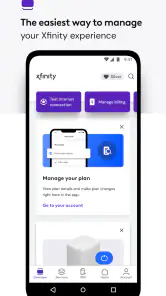
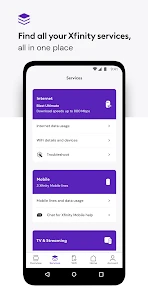
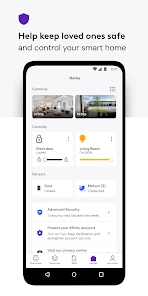
From the get-go, downloading and setting up Xfinity was a breeze. Available on both Android and iOS, the app is user-friendly and intuitive, which is a huge plus for those who might not be so tech-savvy. After logging in with your Xfinity account, the app provides a well-organized dashboard that neatly displays all available services. You can manage your TV subscriptions, internet settings, and even control your home security system, all from your phone. Talk about convenience!
Entertainment at Your Fingertips
The entertainment options on this app are truly impressive. With a plethora of TV shows and movies available for streaming, boredom is not an option. I particularly enjoyed the personalized recommendations based on my viewing habits, which made it super easy to find new favorites. Plus, the streaming quality is top-notch, ensuring a smooth viewing experience without those pesky buffering moments.
You May Like

Clash of Clans Is Won Between the Battles

Android Auto Makes the Case for Quieter Car Software

MobiOffice: Transforming Mobile Productivity with Seamless Integration

EA SPORTS FC™ Mobile Soccer: Redefining Mobile Sports Gaming

How Microsoft OneDrive Became a Mobile Productivity Giant

How Google Translate Breaks Language Barriers Effortlessly
For a relaxed evening, the entertainment side can make sense if it fits the services on your account. I’d think of it as convenient access within that broader household setup, rather than assuming it will replace a library you prefer elsewhere. Before settling in, make sure the phone or viewing device has a stable connection; a household-management app cannot compensate for unreliable Wi-Fi or mobile data. If your main priority is browsing a particular streaming catalog, compare the available choices with the dedicated service you already use.
Internet Management Made Easy
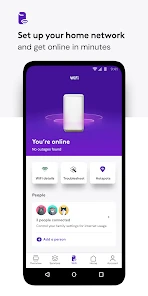
A standout feature of the Xfinity app is its internet management capabilities. Ever find yourself in a Wi-Fi dead zone at home? With this app, you can easily troubleshoot connectivity issues, view connected devices, and even set up parental controls to ensure the kids aren't surfing the web during homework time. It’s like having a tech guru in your pocket!
One useful workflow is to check which devices are connected before making a network change, especially in a busy home where a work laptop, a television and family phones may all be competing for attention. It gives you a more concrete starting point than guessing which device is causing a slowdown. For parents, network controls can be helpful when the goal is to set a household boundary, but I wouldn’t treat an app setting as a substitute for talking through expectations or checking how a particular device behaves.
Smart Home Security
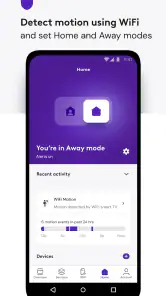
For those who value security, Xfinity doesn’t disappoint. The app allows for real-time monitoring of your home security system. You can arm or disarm your system remotely, view live camera feeds, and receive instant alerts for any unusual activity. It really gives you peace of mind, knowing you can keep an eye on things even when you’re miles away.
Remote monitoring is most useful as a quick check, not as a guarantee that you’ll always be able to respond immediately. If you’re travelling, it’s sensible to confirm your phone has a reliable connection before depending on an alert or camera view, and to decide in advance who else in the household can handle a security issue. That is a practical trade-off of managing connected equipment through an app: convenience comes with reliance on both the service and the network path to it.
What to expect when something goes wrong
If a screen is slow to load or a control doesn’t seem to take effect, I’d start by checking whether the phone itself has a usable connection, then retry the task before changing several settings at once. That small pause helps avoid making a second change while the first one is still processing. For a home Wi-Fi issue, compare the experience on another device or in another room; for an account or service issue, a network reset may not be the answer. Keeping those problems separate makes troubleshooting less frustrating.
Because the app brings different service areas together, the dashboard can be convenient but may also feel broader than necessary if you only use one part of the package. I’d focus on the section that matches the task rather than treating every feature as essential. Comcast’s app is free, rated for Everyone, and has a 3.5 average from around 312,000 ratings; that mixed reception is a useful reminder that a central hub can save steps for some households while feeling cumbersome to people who want one narrowly focused tool.
Who will get the most from it
This is a stronger fit for existing Comcast customers who regularly manage home internet, TV or compatible security services from a phone. The app has over 10 million installs and has been available since 2017, so it serves a broad audience, but reach alone does not make it a must-have for every household. Its current version is 5.64.0-2 and it requires Android 10 or later on Android; iPhone users should check compatibility on their device before installing.
Compared with keeping separate provider, streaming and security apps, a single account hub can reduce the number of places you visit for routine household tasks. The trade-off is that a dedicated app may be clearer when you only want one job done, such as streaming or managing equipment from a different internet provider. I’d skip Xfinity if you don’t use its services, or if you want a provider-neutral tool that controls a mixed setup without depending on one account.
A practical connectivity verdict
For a typical weekday, imagine a child’s schoolwork is interrupted by a patchy connection just as you’re starting a work call. I’d use the app to inspect connected devices and available internet controls, then test the laptop again from the room where it needs to work. If the problem persists, I’d avoid assuming the app can diagnose every cause; the phone can make account-level checks easier, but physical distance from the router, device issues or a wider service problem may still need attention through other steps.
So, should you install it? I would if your home already uses Comcast services and you want one phone-based place for common account, network and security tasks. I would not choose it just for entertainment or general connectivity if another provider or a dedicated service better matches your setup. The app is free, and the benefit is straightforward: fewer separate stops for supported household tasks, balanced against the need for a dependable connection and an account that actually uses the services you want to manage.
To wrap things up, the Xfinity app is a powerhouse of features designed to make life easier and more entertaining. Whether you're binge-watching the latest series, managing your home network, or ensuring your home is secure, this app has got you covered. If you’re already a customer or considering becoming one, this app is definitely worth checking out. It might just become your new favorite digital companion!
Xfinity Frequently Asked Questions
Can I install Xfinity on an older phone or tablet?
Before downloading, check that your device meets the app’s operating-system requirement. Xfinity is available for devices running Android 10 or later, so an older device that cannot run that version may not be compatible. The app is free to download, but compatibility is worth checking first to avoid installation problems and to make sure you can use the service comfortably.
Who develops the Xfinity app, and what is it for?
Xfinity is a productivity app developed by Comcast. Its brief store description is simply “Xfinity,” while its message, “Manage it all. Easy.,” reflects its role as a mobile place to manage Xfinity services. Whether it suits you depends on the services you use and the tasks you want to handle from your phone or tablet.
Do I need an Xfinity account to use the app?
The Xfinity app is intended for managing Xfinity services, so an Xfinity account is central to using its service-management tools. Once signed in, you can use the app as a place to handle your services from a mobile device. The app is free to download, but its usefulness depends on having Xfinity services associated with your account.
What is the primary function of the Xfinity app?
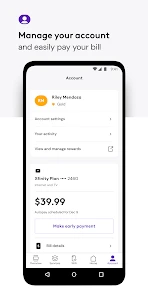
The Xfinity app is designed primarily to help users manage their Xfinity services. It allows users to pay bills, troubleshoot services, view and manage network connections, and access a wide array of entertainment options. The app acts as a comprehensive tool for monitoring and controlling your internet, TV, and voice services from your smartphone or tablet.
Is the Xfinity app available for both Android and iOS devices?
Yes, the Xfinity app is available for both Android and iOS devices. Users can download the app from the Google Play Store for Android devices and the Apple App Store for iOS devices. The app is designed to provide a seamless experience across different platforms, ensuring that users can manage their Xfinity services efficiently on any device.
Pros
- User-friendly interface
- Wide range of streaming content
- Reliable internet connection
- Customizable packages
- 24/7 customer support
Cons
- High subscription costs
- Frequent service interruptions
- Limited availability in areas
- Complex billing system
- Data caps on internet plans

- Category
- Productivity
- Version
- 5.64.0-2











