Xbox
- 136.67K
- 4.5
- Installs
- 100.00M
- Price
- Free
Screenshots
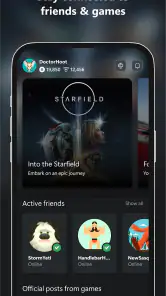
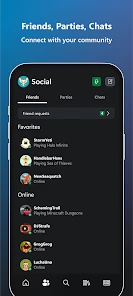
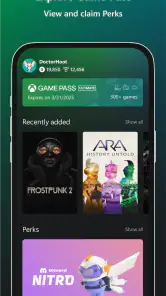
Analysis by Reviewed
I find the most useful way to think about Xbox is as a companion for staying connected to console gaming when you are away from the console itself. Its central appeal is not that it replaces every part of playing on a television; it brings social conversations and selected console tasks onto a phone. That distinction matters: I would install it for the connection and convenience, then treat mobile play as one option rather than the whole reason to use it.
Keeping a gaming community close at hand
Microsoft Corporation’s free entertainment app has a focused job: help players keep in touch with their gaming community. The scale is substantial, with over 100 million installs and an average rating of 4.5 from around 2.2 million ratings. That popularity makes sense for people who already play on Xbox, but it does not automatically make the app useful to someone with no connection to that ecosystem. It is rated Teen, and the current version is 2511.1.3.
What the companion experience changes
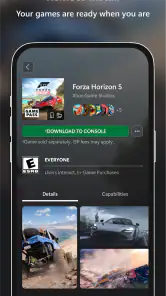
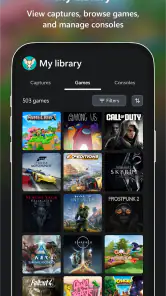
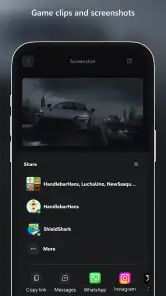
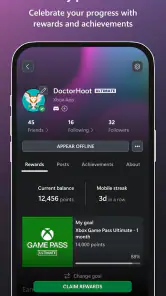
In practice, I see the app as a second screen for the social and practical edges of console gaming. You can chat with friends, join parties, share clips and screenshots, and keep an eye on game news. Those tools can save a bit of back-and-forth when friends are deciding what to play, while the console-management controls are handy when you want to prepare a game before sitting down.
A useful habit is to use the phone for coordination, not as a substitute for every console interaction. For example, if a friend sends a message while I am away from the TV, I can respond there instead of waiting until I pick up a controller. If I am planning a play session, managing an install from the app can make the time before I sit down more productive. These small handoffs are where a companion app earns its place.
How remote play fits into an ordinary day
Remote play sounds like the headline feature, but I would judge it by the situation rather than the promise. It can be appealing when the television is occupied and you still want to continue a game on your phone. It is also a reasonable option for a short session away from the usual setup, provided the controls and viewing experience suit the game you want to play. For precision-heavy play or a long session, I would still choose the console and a controller whenever possible.
One realistic routine is to check messages during a commute break, reply to a party invitation, and then use the console-management option later to queue up a game before getting home. That is more convincing than expecting a phone to recreate the full living-room experience. A touchscreen is not equally comfortable for every game, and remote play depends on a suitable connection and setup. If the picture stutters or controls feel awkward, switching back to the console is the sensible choice, not a failure of the app.
Where it sits beside other gaming options
Compared with a general messaging app, this one keeps conversations close to Xbox activity and makes sharing gaming captures feel more relevant. A console’s own menus remain the better place for detailed play and setup, while a regular group chat may be easier if your friends use several different platforms. I would not ask this app to replace either: its advantage is having community contact and selected console tasks together, not being the universal hub for every gaming group.
There is a trade-off in that focus. The app is most worthwhile when your friends and gaming life are already centered on Xbox. If you mainly play elsewhere, or only want a broad chat tool, a platform-neutral messenger is likely the simpler choice. Likewise, anyone looking for a dedicated game-streaming service should check that remote play suits their own console arrangement before making it the deciding reason to install.
Who gets the most from it
I would recommend it first to regular Xbox players who message friends around game nights, share captures, or want to handle simple console tasks from a phone. It is also useful for someone who wants to stay involved in a group when they cannot be at the console. The Android version requires OS 8.0 or later, and the app is also available on iOS, so it is worth checking device compatibility before downloading.
By contrast, a person who plays alone, rarely checks gaming messages, and prefers to manage everything directly on the console may have little reason to keep it installed. The app is free, which makes trying it a low-commitment choice, but usefulness depends on whether its community and console shortcuts fit your habits. It was released on Nov 19, 2013, and its continued appeal is clearest when you use it as a practical companion rather than expecting it to be a complete gaming platform.
Making the phone a useful handoff
The strongest routine is to decide what belongs on the phone before a session and what should wait for the console. I use mobile access for lightweight decisions: checking whether friends are around, answering a message, or getting a game ready while I am doing something else. Once I sit down, the controller and television are still the more comfortable place to browse deeply or play. Thinking of the app as a handoff rather than a miniature console keeps expectations realistic and helps avoid fiddling with a phone when a quick console action would be easier.
There is also a practical way to assess whether the app is worth keeping: notice whether it saves a step you actually repeat. If you regularly coordinate sessions or share captures, those conveniences can become part of your routine. If you open it only to browse occasional news, its place on your home screen may be harder to justify. I would give the communication and console shortcuts a fair trial during a normal week, rather than judging it by a single remote-play attempt.
Small decisions that improve the experience
Before relying on remote play, I would test it at home in the same room and on the network I expect to use. That lets me separate a control or connection problem from the novelty of playing on a smaller screen. I would also begin with a game that tolerates pauses and less precise input, rather than a fast competitive match. This is not a claim that every game behaves the same; it is a low-risk way to find out whether the phone form suits the games I already enjoy.
For captures and messages, it helps to treat the app as a companion to the console’s own activity rather than a replacement for it. A clip is most useful when I have a particular friend or conversation in mind, and party chat matters most when the group is already using Xbox. If my friends are split across platforms, I would settle on the channel everyone checks instead of expecting one app to solve that coordination problem. The convenience comes from fitting into an existing habit, not from adding another place everyone must monitor.
Questions I would settle before installing
Does it make sense without an Xbox console? In my view, its main value is tied to Xbox friends and console tasks, so someone outside that circle may find a general messenger more useful. Can it replace playing on a television? Not completely: remote play can suit a spare moment, but screen size, controls, and connection quality make it a situational option. Is it useful if I mostly play alone? Only if the console-management tools or other phone-based conveniences matter to you; the social side will naturally count for less.
Would I choose it over the console’s own menus? For detailed setup and play, no. I would use the phone when I am away from the console and switch back when I want the full experience. Is it a good fit for mixed-platform groups? It can still serve the Xbox part of the group, but a platform-neutral chat may be easier for everyone. Those answers are more useful than treating the app as an all-purpose gaming solution.
Getting Started with Xbox
First things first, downloading the app is a breeze. Available on both Android and iOS, it takes just a few moments to install. Once you’ve got it on your device, you’re greeted with a sleek and intuitive interface. The app's design is user-friendly, making navigation a smooth ride even for the not-so-tech-savvy among us.
Features That Keep You Hooked
The app is packed with features that cater to every gamer’s needs. One of the standout features has to be the remote play option. Imagine being able to play your favorite Xbox games on your phone while lounging on your couch or even while traveling. It’s a game-changer, literally!
Moreover, the app allows you to stay connected with your gaming friends. You can chat, join parties, and even share your gaming clips and screenshots. It’s like having a mini Xbox community right in your pocket. The app also keeps you updated with the latest game releases, news, and updates so you’re always in the loop.
Performance and Usability
Speaking of performance, the app runs smoothly with minimal lags. The developers have done a commendable job in ensuring that it’s optimized for various devices. Whether you’re using the latest smartphone or an older model, the app adjusts accordingly, offering a consistent experience.
One thing I particularly love is the ability to manage my console directly from the app. You can install new games, delete old ones, and even use it as a remote control. It’s super handy, especially for someone like me who often misplaces the physical remote!
Final Thoughts
All in all, the app is a must-have for any gaming enthusiast. It brings the best of console gaming right to your mobile device, ensuring you’re always connected to your gaming world. Whether you’re looking to play on the go or just want to keep tabs on your gaming community, this app has got you covered.
If you haven’t tried it yet, I’d say give it a shot. It might just become your go-to app for all things gaming. Happy gaming!
My recommendation in practice
For a household where the television is shared, the app’s role is especially easy to understand. If someone else is watching a show, I can still check in with friends, answer a game-night message, or see whether there is a small task I can handle before the screen is free. If I choose to use remote play, I can treat it as a short, flexible session rather than assuming it will be as comfortable as the main setup. That makes the app useful even when I do not actually play through the phone.
I would skip it if I have no Xbox community to keep up with and do not expect to manage a console from my phone. I would also avoid making it the only way I plan to play when I need precise controls, a large display, or a dependable long session. The app is at its best when it removes friction around console gaming; it is less convincing when asked to replace the console, a controller, or a cross-platform chat service. For the right player, that narrower purpose is a strength rather than a flaw.
My advice is to install it if your Xbox life continues between sessions: friends message you, captures are worth sharing, or preparing a game remotely would save a step. If those moments rarely happen, there is no need to keep another app out of habit. The experience is most rewarding when the phone quietly supports the way you already play, then gets out of the way when it is time to return to the console.
Xbox Frequently Asked Questions
Do I need a Microsoft account to use the Xbox app?
The Xbox app is designed to connect users with the Xbox gaming community, so signing in with a Microsoft account is a practical first step for using its community features. If you already use Microsoft services, you may be able to use that account. Consider reviewing your account and privacy settings before connecting with other players, especially if the app will be used by a teenager.
Is the Xbox app appropriate for younger children?
The Xbox app is rated Teen, so families should consider that age guidance before downloading it for a younger child. It is a community-focused entertainment app, and social interactions can be part of the experience. Parents and guardians may want to discuss safe communication and review account and privacy settings together, rather than relying on the age rating alone to decide whether the app is suitable.
Can I use the Xbox app without an internet connection?
The Xbox app is intended to keep you connected to the Xbox gaming community, so its connected features rely on internet access. If you are offline, you should not expect community interactions to work as they normally do. This app is best suited to users who can connect their mobile device to the internet when they want to engage with Xbox and other players.
Will the Xbox app work on my phone or tablet?
The Xbox app is available for mobile devices that meet its minimum operating-system requirement. Before downloading, check your device’s system version and make sure there is enough storage space for installation. The app is free, but compatibility still depends on the device and operating system you are using. It is an entertainment companion for the Xbox community, not a console in itself.
Does installing the Xbox app let me play every Xbox game on my phone?
Installing the Xbox app does not mean that every Xbox game can be played directly on a phone. The app’s stated purpose is to keep you connected to the gaming community, while game access depends on the compatible devices and services you use. If playing games is your main goal, check that the particular Xbox feature or service you want is available for your device before relying on the app.
Pros
- Seamless integration with Xbox consoles.
- Access to a vast game library.
- High-quality graphics and performance.
- Robust online multiplayer features.
- Frequent updates and new features.
Cons
- Requires subscription for full access.
- Large storage space needed.
- Some games require additional purchases.
- Occasional connectivity issues.
- Limited backward compatibility.
- Category
- Entertainment
- Version
- 2511.1.3